Azure
7746 TopicsHealthcare Agent Orchestrator: Multi-agent Framework for Domain-Specific Decision Support
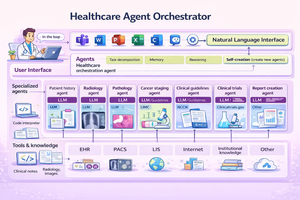
At Microsoft Build, we introduced the Healthcare Agent Orchestrator, now available in Azure AI Foundry Agent Catalog . In this blog, we unpack the science: how we structured the architecture, curated real tumor board data, and built robust agent coordination that brings AI into real healthcare workflows. Healthcare Agent Orchestrator assisting a simulated tumor board meeting. Introduction Healthcare is inherently collaborative. Critical decisions often require input from multiple specialists—radiologists, pathologists, oncologists, and geneticists—working together to deliver the best outcomes for patients. Yet most AI systems today are designed around narrow tasks or single-agent architectures, failing to reflect the real-world teamwork that defines healthcare practice. That’s why we developed the Healthcare Agent Orchestrator: an orchestrator and code sample built around Microsoft’s industry-leading healthcare AI models, designed to support reasoning and multidisciplinary collaboration -- enabling modular, interpretable AI workflows that mirror how healthcare teams actually work. The orchestrator brings together Microsoft healthcare AI models—such as MedImageParse for image recognition, CXRReportGen for automated radiology reporting, and MedImageInsight for retrieval and similarity analysis—into a unified, task-aware system that enables developers to build an agent that reflects real-word healthcare decision making pattern. This work was led by Yu (Aiden) Gu, Principal Applied Scientist at Microsoft Research, who conceived the study, defined the research direction, and led the design and development of the Healthcare Agent Orchestrator proof-of-concept. Healthcare Is Naturally Multi-Agent Healthcare decision-making often requires synthesizing diverse data types—radiologic images, pathology slides, genetic markers, and unstructured clinical narratives—while reconciling differing expert perspectives. In a molecular tumor board, for instance, a radiologist might highlight a suspicious lesion on CT imaging, a pathologist may flag discordant biopsy findings, and a geneticist could identify a mutation pointing toward an alternate treatment path. Effective collaboration in these settings hinges not on isolated analysis, but on structured dialogue—where evidence is surfaced, assumptions are challenged, and hypotheses are iteratively refined. To support the development of healthcare agent orchestrator, we partnered with a leading healthcare provider organization, who independently curated and de-identified a proprietary dataset comprising longitudinal patient records and real tumor board transcripts—capturing the complexity of multidisciplinary discussions. We provided guidance on data types most relevant for evaluating agent coordination, reasoning handoffs, and task alignment in collaborative settings. We then applied LLM-based structuring techniques to convert de-identified free-form transcripts into interpretable units, followed by expert review to ensure domain fidelity and relevance. This dataset provides a critical foundation for assessing agent coordination, reasoning handoffs, and task alignment in simulated collaborative settings. Why General-Purpose LLMs Fall Short for Healthcare Collaboration While general-purpose large language models have delivered remarkable results in many domains, they face key limitations in high-stakes healthcare environments: Precision is critical: Even small hallucinations or inconsistencies can compromise safety and decision quality Multi-modal integration is required: Many healthcare decisions involve interpreting and correlating diverse data types—images, reports, structured records—much of which is not available in public training sets Transparency and traceability matter: Users must understand how conclusions are formed and be able to audit intermediate steps The Healthcare Agent Orchestrator addresses these challenges by pairing general reasoning capabilities with specialized agents that operate over imaging, genomics, and structured EHRs—ensuring grounded, explainable results aligned with clinical expectations. Each agent contributes domain-specific expertise, while the orchestrator ensures coherence, oversight, and explainability—resulting in outputs that are both grounded and verifiable. Architecture: Coordinating Specialists Through Orchestration Healthcare Agent Orchestrator. Healthcare Agent Orchestrator’s multi-agent framework is built on modular AI infrastructure, designed for secure, scalable collaboration: Semantic Kernel: A lightweight, open-source development kit for building AI agents and integrating the latest AI models into C#, Python, or Java codebases. It acts as efficient middleware for rapidly delivering enterprise-grade solutions—modular, extensible, and designed to support responsible AI at scale. Model Context Protocol (MCP): an open standard that enables developers to build secure, two-way connections between their data sources and AI-powered tools. Magentic-One: Microsoft’s generalist multi-agent system for solving open-ended web and file-based tasks across domains—built on Microsoft AutoGen, our popular open-source framework for developing multi-agent applications. Each agent is orchestrated within the system and integrated via Semantic Kernel’s group chat infrastructure, with support for communication and modular deployment via Azure. This orchestration ensures that each model—whether interpreting a lung nodule, analyzing a biopsy image, or summarizing a genomic variant—is applied precisely where its expertise is most relevant, without overloading a single system with every task. The modularity of the framework also future-proofs: as new health AI models and tools emerge, they can be seamlessly incorporated into the ecosystem without disrupting existing workflows—enabling continuous innovation while maintaining clinical stability. Microsoft’s healthcare AI models at the Core Healthcare agent orchestrator also enables developers to explore the capabilities of Microsoft’s latest healthcare AI models: CXRReportGen: Integrates multimodal inputs—including current and prior X-ray images and report context—to generate grounded, interpretable radiology reports. The model has shown improved accuracy and transparency in automated chest X-ray interpretation, evaluated on both public and private data. MedImageParse 3 : A biomedical foundation model for imaging parsing that can jointly conduct segmentation, detection, and recognition across 9 imaging modalities. MedImageInsight 4 : Facilitates fast retrieval of clinically similar cases, supports disease classification across broad range of medical image modalities, accelerating second opinion generation and diagnostic review workflows. Each model has the ability to act as a specialized agent within the system, contributing focused expertise while allowing flexible, context-aware collaboration orchestrated at the system level. CXRReportGen is included in the initial release and supports the development and testing of grounded radiology report generation. Other Microsoft healthcare models such as MedImageParse and MedImageInsight are being explored in internal prototypes to expand the orchestrator’s capabilities across segmentation, detection, and image retrieval tasks. Seamless Integration with Microsoft Teams Rather than creating new silos, Healthcare Agent Orchestrator integrates directly into the tools clinicians already use—specifically Microsoft Teams. Developers are investigating how clinicians can engage with agents through natural conversation, asking questions, requesting second opinions, or cross-validating findings—all without leaving their primary collaboration environment. This approach minimizes friction, improves user experience, and brings cutting-edge AI into real-world care settings. Building Toward Robust, Trustworthy Multi-Agent Collaboration Think of the orchestrator as managing a secure, structured group chat. Each participant is a specialized AI agent—such as a ‘Radiology’ agent, ‘PatientHistory’ agent, or 'ClinicalTrials‘ agent. At the center is the ‘Orchestrator’ agent, which moderates the interaction: assigning tasks, maintaining shared context, and resolving conflicting outputs. Agents can also communicate directly with one another, exchanging intermediate results or clarifying inputs. Meanwhile, the user can engage either with the orchestrator or with specific agents as needed. Each agent is configured with instructions (the system prompt that guides its reasoning), and a description (used by both the UI and the orchestrator to determine when the agent should be activated). For example, the Radiology agent is paired with the cxr_report_gen tool, which wraps Microsoft’s CXRReportGen model for generating findings from chest X-ray images. Tools like this are declared under the agent’s tools field and allow it to call foundation models or other capabilities on demand—such as the clinical_trials tool 5 for querying ClinicalTrials.gov. Only one agent is marked as facilitator, designating it as the moderator of the conversation; in this scenario, the Orchestrator agent fills that role. Early observations highlight that multi-agent orchestration introduces new complexities—even as it improves specialization and task alignment. To address these emergent challenges, we are actively evolving the framework across several dimensions: Mitigating Error Propagation Across Agents: Ensuring that early-stage errors by one agent do not cascade unchecked through subsequent reasoning steps. This includes introducing critical checkpoints where outputs from key agents are verified before being consumed by others. Optimizing Agent Selection and Specialization: Recognizing that more agents are not always better. Adding unnecessary or redundant agents can introduce noise and confusion. We’ve implemented a systematic framework that emphasizes a few highly suited agents per task —dynamically selected based on case complexity and domain needs—while continuously tracking performance gains and catching regressions early. Improving Transparency and Hand-off Clarity: Structuring agent interactions to make intermediate outputs and rationales visible, enabling developers (and the system itself) to trace how conclusions were reached, catch inconsistencies early, and intervene when necessary. Adapting General Frameworks for Healthcare Complexity Generic orchestration frameworks like Semantic Kernel provide a strong foundation—but healthcare demands more. The stakes are higher, the data more nuanced, and the workflows require precision, traceability, and regulatory compliance. Here’s how we’ve extended and adapted these systems to help address healthcare demands: Precision and Safety: We introduced domain-aware verification checkpoints and task-specific agent constraints to reduce inappropriate tool usage—supporting more reliable reasoning. To help uphold the high standards required in healthcare, we defined two complementary metric systems (Check Healthcare Agent Orchestrator Evaluation for more details): Core Metrics: monitor health agents selection accuracy, intent resolution, contextual relevance, and information aggregation RoughMetric: a composite score based on ROUGE that helps quantify the precision of generated outputs and conversation reliability. TBFact: A modified version of RadFact 2 that measures factuality of claims in agents' messages and helps identifying omissions and hallucination Domain-Specific Tool Planning: Healthcare agents must reason across multimodal inputs—such as chest X-rays, CT slices, pathology images, and structured EHRs. We’ve customized Semantic Kernel’s tool invocation and planning modules to reflect clinical workflows, not generic task chains. These infrastructure-level adaptations are designed to complement Microsoft Healthcare AI models—such as CXRReportGen, MedImageParse, and MedImageInsight—working together to enable coordinated, domain-aware reasoning across complex healthcare tasks. Enabling Collaborative, Trustworthy AI in Healthcare Healthcare demands AI systems that are as collaborative, adaptive, and trustworthy as the clinical teams they aim to support. The Healthcare Agent Orchestrator is a concrete step toward that vision—pairing specialized health AI models with a flexible, multi-agent coordination framework, purpose-built to reflect the complexity of real clinical decision-making. By aligning with existing healthcare workflows and enabling transparent, role-specific collaboration, this system shows promise to empower clinicians to work more effectively—with AI as a partner, not a replacement. Healthcare Multi-Agent Orchestrator and the Microsoft healthcare AI models are intended for research and development use. Healthcare Multi-Agent Orchestrator and the healthcare AI models not designed or intended to be deployed in clinical settings as-is nor is it intended for use in the diagnosis or treatment of any health or medical condition, and its performance for such purposes has not been established. You bear sole responsibility and liability for any use of Healthcare Multi-Agent Orchestrator or the healthcare AI models, including verification of outputs and incorporation into any product or service intended for a medical purpose or to inform clinical decision-making, compliance with applicable healthcare laws and regulations, and obtaining any necessary clearances or approvals. 1 arXiv, Universal Abstraction: Harnessing Frontier Models to Structure Real-World Data at Scale, February 2, 2025 2 arXiv, MAIRA-2: Grounded Radiology Report Generation, June 6, 2024 3 Nature Method, A foundation model for joint segmentation, detection and recognition of biomedical objects across nine modalities, Nov 18, 2024 4 arXiv, Medimageinsight: An open-source embedding model for general domain medical imaging, Oct 9, 2024 5 Machine Learning for Healthcare Conference, Scaling Clinical Trial Matching Using Large Language Models: A Case Study in Oncology, August 4, 20236.6KViews2likes0CommentsAnatomy of an Outage: How Microsoft focuses on Transparency during and post incident
Outages happen—no matter the hyperscale provider, no matter the architecture. What separates resilient organizations from the rest is how quickly they detect issues, how effectively they communicate, and how well they learn from the inevitable. Rick Claus had the opportunity to co-present a session on the topic of how Microsoft communicates during outages and what YOU can do to be more proactive on how your Azure based infra is weathering the storm. He and Tajinder Pal Singh Ahluwalia pull back the curtain on how Microsoft handles major incidents—from the first customer impact signal to the deep‑dive retrospectives that follow.36Views0likes0CommentsPartner Blog | Azure updates for partners: December 2025
At Microsoft Ignite 2025, we explored what it means for organizations to move into the era of Frontier transformation. This shift is focused on embedding AI across every part of the business to improve decision-making, increase speed, and create new value. Organizations leading in AI make it foundational. They rethink processes and integrate new technologies from the start to improve efficiency. For partners, this move toward Frontier represents a significant opportunity to lead customers into this new era. By building AI-powered solutions, connecting data for intelligent insights, and deploying Microsoft Azure’s cloud-ready platforms, partners can deliver value faster and scale confidently through the Microsoft ecosystem. Microsoft Ignite came with a significant number of announcements, so I’ve gathered the Azure updates that matter most for partners. These are the capabilities that can strengthen your ability to deliver intelligent solutions, drive operational efficiency, and differentiate your product or service in the market. You can also explore how partners are turning momentum into action, access highlights, and grab practical guidance from my Microsoft Ignite session. Continue reading here30Views0likes0Comments
Entra Risky Users Custom Role
My customer implemented unified RBAC (Defender Portal) and removed the Entra Security Operator role. They lost the ability to manage Risky Users in Entra. Two options explored by the customer - Protected Identity Administrator role (licensing unclear) or create a custom role with microsoft.directory/identityProtection/riskyUsers/update, which they couldn't find under custom role. Do you know if there are other options to manage Risky Users without using the Security Operator role?27Views0likes1Comment
Announcing the General Availability (GA) of the Premium v2 tier of Azure API Management
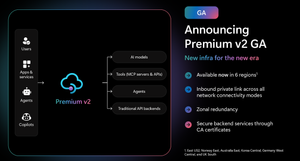
Superior capacity, highest entity limits, unlimited included calls, and the most comprehensive set of features set the Premium v2 tier apart from other API Management tiers. Customers rely on the Premium v2 tier for running enterprise-wide API programs at scale, with high availability, and performance. The Premium v2 tier has a new architecture that eliminates management traffic from the customer VNet, making private networking much more secure and easier to setup. During the creation of a Premium v2 instance, you can choose between VNet injection or VNet integration (introduced in the Standard v2 tier) options. In addition, today we are also adding three new features to Premium v2: Inbound Private Link: You can now enable private endpoint connectivity to restrict inbound access to your Premium v2 instance. It can be enabled along with VNet injection or VNet integration or without a VNet. Availability zone support: Premium v2 now supports availability zones (zone redundancy) to enhance the reliability and resilience of your API gateway. Custom CA certificates: Azure API management v2 gateway can now validate TLS connections with the backend service using custom CA certificates. New and improved VNet injection Using VNet injection in Premium v2 no longer requires configuring routes or service endpoints. Customers can secure their API workloads without impacting API Management dependencies, while Microsoft can secure the infrastructure without interfering with customer API workloads. In short, the new VNet injection implementation enables both parties to manage network security and configuration settings independently and without affecting each other. You can now configure your APIs with complete networking flexibility: force tunnel all outbound traffic to on-premises, send all outbound traffic through an NVA, or add a WAF device to monitor all inbound traffic to your API Management Premium v2—all without constraints. Inbound Private Link Customers can now configure an inbound private endpoint for their API Management Premium v2 instance to allow your API consumers securely access the API Management gateway over Azure Private Link. The private endpoint uses an IP address from an Azure virtual network in which it's hosted. Network traffic between a client on your private network and API Management traverses over the virtual network and a Private Link on the Microsoft backbone network, eliminating exposure from the public internet. Further, you can configure custom DNS settings or an Azure DNS private zone to map the API Management hostname to the endpoint's private IP address. With a private endpoint and Private Link, you can: Create multiple Private Link connections to an API Management instance. Use the private endpoint to send inbound traffic on a secure connection. Apply different API Management policies based on whether traffic comes from the private endpoint. Limit incoming traffic only to private endpoints, preventing data exfiltration. Combine with inbound virtual network injection or outbound virtual network integration to provide end-to-end network isolation of your API Management clients and backend services. More details can be found here Today, only the API Management instance’s Gateway endpoint supports inbound private link connections. Each API management instance can support at most 100 Private Link connections. Availability zones Azure API Management Premium v2 now supports Availability Zones (AZ) redundancy to enhance the reliability and resilience of your API gateway. When deploying an API Management instance in an AZ-enabled region, users can choose to enable zone redundancy. This distributes the service's units, including Gateway, management plane, and developer portal, across multiple, physically separate AZs within that region. Learn how to enable AZs here. CA certificates If the API Management Gateway needs to connect to the backends secured with TLS certificates issued by private certificate authorities (CA), you need to configure custom CA certificates in the API Management instance. Custom CA certificates can be added and managed as Authorization Credentials in the Backend entities. The Backend entity has been extended with new properties allowing customers to specify a list of certificate thumbprints or subject name + issuer thumbprint pairs that Gateway should trust when establishing TLS connection with associated backend endpoint. More details can be found here. Region availability The Premium v2 tier is now generally available in six public regions (Australia East, East US2, Germany West Central, Korea Central, Norway East and UK South) with additional regions coming soon. For pricing information and regional availability, please visit the API Management pricing page. Learn more API Management v2 tiers FAQ API Management v2 tiers documentation API Management overview documentationGuide for Architecting Azure-Databricks: Design to Deployment
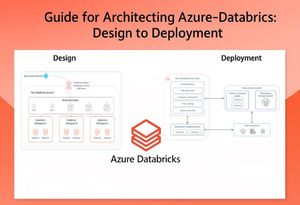
Author's: Chris Walk cwalk, Dan Johnson danjohn1234, Eduardo dos Santos eduardomdossantos, Ted Kim tekim, Eric Kwashie ekwashie, Chris Haynes Chris_Haynes, Tayo Akigbogun takigbogun and Rafia Aqil Rafia_Aqil Peer Reviewed: Mohamed Sharaf mohamedsharaf Note: This article does not cover the Serverless Workspace option, which is currently in Public Preview. We plan to update this article once Serverless Workspaces are Generally Available. Also, while Terraform is the recommended method for production deployments due to its automation and repeatability, for simplicity in this article we will demonstrate deployment through the Azure portal. DESIGN: Architecting a Secure Azure Databricks Environment Step 1: Plan Workspace, Subscription Organization, Analytics Architecture and Compute Planning your Azure Databricks environment can follow various arrangements depending on your organization’s structure, governance model, and workload requirements. The following guidance outlines key considerations to help you design a well-architected foundation. 1.1 Align Workspaces with Business Units A recommended best practice is to align each Azure Databricks workspace with a specific business unit. This approach—often referred to as the “Business Unit Subscription” design pattern—offers several operational and governance advantages. Streamlined Access Control: Each unit manages its own workspace, simplifying permissions and reducing cross-team access risks. For example, Sales can securely access only their data and notebooks. Cost Transparency: Mapping workspaces to business units enables accurate cost attribution and supports internal chargeback models. Each workspace can be tagged to a cost center for visibility and accountability. Even within the same workspace, costs can be controlled using system tables that provide detailed usage metrics and resource consumption insights. Challenges to keep-in-mind: While per-BU workspaces have high impact, be mindful of workspace sprawl. If every small team spins up its own workspace, you might end up with dozens or hundreds of workspaces, which introduces management overhead. Databricks recommends a reasonable upper limit (on Azure, roughly 20–50 workspaces per account/subscription) because managing “collaboration, access, and security across hundreds of workspaces can become extremely difficult, even with good automation” [1]. Each workspace will need governance (user provisioning, monitoring, compliance checks), so there is a balance to strike. 1.2 Workspace Alignment and Shared Metastore Strategy As you align workspaces with business units, it's essential to understand how Unity Catalog and the metastore fit into your architecture. Unity Catalog is Databricks’ unified governance layer that centralizes access control, auditing, and data lineage across workspaces. Each Unity Catalog is backed by a metastore, which acts as the central metadata repository for tables, views, volumes, and other data assets. In Azure Databricks, you can have one metastore per region, and all workspaces within that region share it. This enables consistent governance and simplifies data sharing across teams. If your organization spans multiple regions, you’ll need to plan for cross-region sharing, which Unity Catalog supports through Delta Sharing. By aligning workspaces with business units and connecting them to a shared metastore, you ensure that governance policies are enforced uniformly, while still allowing each team to manage its own data assets securely and independently. 1.3 Distribute Workspaces Across Subscriptions When scaling Azure Databricks, consider not just the number of workspaces, but also how to distribute them across Azure subscriptions. Using multiple Azure subscriptions can serve both organizational needs and technical requirements: Environment Segmentation (Dev/Test/Prod): A common pattern is to put production workspaces in a separate Azure subscription from development or test workspaces. This provides an extra layer of isolation. Microsoft highly recommends separating workspaces into prod and dev, in separate subscriptions. This way, you can apply stricter Azure policies or network rules to the prod subscription and keep the dev subscription a bit more open for experimentation without risking prod resources. Honor Azure Resource Limits: Azure subscriptions come with certain capacity limits and Azure Databricks workspaces have their own limits (since it’s a multi-tenant PaaS). If you put all workspaces in one subscription, or all teams in one workspace, you might hit those limits. Most enterprises naturally end up with multiple subscriptions as they grow – planning this early avoids later migration headaches. If you currently have everything in one subscription, evaluate usage and consider splitting off heavy workloads or prod workloads into a new one to adhere to best practices. 1.4 Consider Completing Azure Landing Zone Assessment When evaluating and planning your next deployment, it’s essential to ensure that your current landing zone aligns with Microsoft best practices. This helps establish a robust Databricks architecture and minimizes the risk of avoidable issues. Additionally, customers who are early in their cloud journey can benefit from Cloud Assessments—such as an Azure Landing Zone Review and a review of the “Prepare for Cloud Adoption” documentation—to build a strong foundation. 1.5 Planning Your Azure Databricks Workspace Architecture Your workspace architecture should reflect the operational model of your organization and support the workloads you intend to run, from exploratory notebooks to production-grade ETL pipelines. To support your planning, Microsoft provides several reference architectures that illustrate well-architected patterns for Databricks deployments. These solution ideas can serve as starting points for designing maintainable environments: Simplified Architecture: Modern Data Platform Architecture, ETL-Intensive Workload Reference Architecture: Building ETL Intensive Architecture, End-to-End Analytics Architecture: Create a Modern Analytics Architecture. 1.6 Planning for that “Right” Compute Choosing the right compute setup in Azure Databricks is crucial for optimizing performance and controlling costs, as billing is based on Databricks Units (DBUs) using a per-second pricing model. Classic Compute: You can fine-tune your own compute by enabling auto-termination and autoscaling, using Photon acceleration, leveraging spot instances, selecting the right VM type and node count for your workload, and choosing SSDs for performance or HDDs for archival storage. Preferred by mature internal teams and developers who need advanced control over clusters—such as custom VM selection, tuning, and specialized configurations. Serverless Compute: Alternatively, managed services can simplify operations with built-in optimizations. Removes infrastructure management and offers instant scaling without cluster warm-up, making it ideal for agility and simplicity. Step 2: Plan the “Right” CIDR Range (Classic Compute) Note: You can skip this step if you plan to use serverless compute for all your resources, as CIDR range planning is not required in serverless deployments. When planning CIDR ranges for your Azure Databricks workspace, it's important to ensure your virtual network has enough IP address capacity to support cluster scaling. Why this matters: If you choose a small VNet address space and your analytics workloads grow, you might hit a ceiling where you simply cannot launch more clusters or scale-out because there are no free IPs in the subnet. The subnet sizes—and by extension, the VNet CIDR—determine how many nodes you can. Databricks recommends using a CIDR block between /16 and /24 for the VNet, and up to /26 for the two required subnets: the container subnet and the host subnet. Here’s a reference Microsoft provides. If your current workspace’s VNet lacks sufficient IP space for active cluster nodes, you can request a CIDR range update through your Azure Databricks account team as noted in the Microsoft documentation. 2.1 Considerations for CIDR Range Workload Type & Concurrency: Consider what kinds of workloads will run (ETL Pipelines, Machine Learning Notebooks, BI Dashboards, etc.) and how many jobs or clusters may need to run in parallel. High concurrency (e.g. multiple ETL jobs or many interactive clusters) means more nodes running at the same time, requiring a larger pool of IP addresses. Data Volume (Historical vs. Incremental): Are you doing a one-time historical data load or only processing new incremental data? A large backfill of terabytes of data may require spinning up a very large cluster (hundreds of nodes) to process in a reasonable time. Ongoing smaller loads might get by with fewer nodes. Estimate how much data needs processing. Transformation Complexity: The complexity of data transformations or machine learning workloads matters. Heavy transformations (joins, aggregations on big data) or complex model training can benefit more workers. If your use cases include these, you may need larger clusters (more nodes) to meet performance SLAs, which in turn demands more IP addresses available in the subnet. Data Sources and Integration: Consider how your Databricks environment will connect to data. If you have multiple data sources or sinks (e.g. ingest from many event hubs, databases, or IoT streams), you might design multiple dedicated clusters or workflows, potentially all active at once. Also, if using separate job clusters per job (Databricks Jobs), multiple clusters might launch concurrently. All these scenarios increase concurrent node count. 2.2 Configuring a Dedicated Network (VNet) per Workspace with Egress Control By default, Azure Databricks deploys its classic compute resources into a Microsoft-managed virtual network (VNet) within your Azure subscription. While this simplifies setup, it limits control over network configuration. For enhanced security and flexibility, it's recommended to use VNet Injection, which allows you to deploy the compute plane into your own customer-managed VNet. This approach enables secure integration with other Azure services using service endpoints or private endpoints, supports user-defined routes for accessing on-premises data sources, allows traffic inspection via network virtual appliances or firewalls, and provides the ability to configure custom DNS and enforce egress restrictions through network security group (NSG) rules. Within this VNet (which must reside in the same region and subscription as the Azure Databricks workspace), two subnets are required for Azure Databricks: a container subnet (referred to as private subnet) and a host subnet (referred to as public subnet). To implement front-end Private Link, back-end Private Link, or both, your workspace VNet needs a third subnet that will contain the private endpoint (PrivateLink subnet). It is recommended to also deploy an Azure Firewall for egress control. Step 3: Plan Network Architecture for Securing Azure-Databricks 3.1 Secure Cluster Connectivity Secure Cluster Connectivity, also known as No Public IP (NPIP), is a foundational security feature for Azure Databricks deployments. When enabled, it ensures that compute resources within the customer-managed virtual network (VNet) do not have public IP addresses, and no inbound ports are exposed. Instead, each cluster initiates a secure outbound connection to the Databricks control plane using port 443 (HTTPS), through a dedicated relay. This tunnel is used exclusively for administrative tasks, separate from the web application and REST API traffic, significantly reducing the attack surface. For the most secure deployment, Microsoft and Databricks strongly recommend enabling Secure Cluster Connectivity, especially in environments with strict compliance or regulatory requirements. When Secure Cluster Connectivity is enabled, both workspace subnets become private, as cluster nodes don’t have public IP addresses. 3.2 Egress with VNet Injection (NVA) For Databricks traffic, you’ll need to assign a UDR to the Databricks-managed VNet with a next hop type of Network Virtual Appliance (NVA)—this could be an Azure Firewall, NAT Gateway, or another routing device. For control plane traffic, Databricks recommends using Azure service tags, which are logical groupings of IP addresses for Azure services and should be routed with the next hop type of internet. This is important because Azure IP ranges can change frequently as new resources are provisioned, and manually maintaining IP lists is not practical. Using service tags ensures that your routing rules automatically stay up to date. 3.3 Front-End Connectivity with Azure Private Link (Standard Deployment) To further enhance security, Azure Databricks supports Private Link for front-end connections. In a standard deployment, Private Link enables users to access the Databricks web application, REST API, and JDBC/ODBC endpoints over a private VNet interface, bypassing the public internet. For organizations with no public internet access from user networks, a browser authentication private endpoint is required. This endpoint supports SSO login callbacks from Microsoft Entra ID and is shared across all workspaces in a region using the same private DNS zone. It is typically hosted in a transit VNet that bridges on-premises networks and Azure. Note: There are two deployment types: standard and simplified. To compare these deployment types, see Choose standard or simplified deployment. 3.4 Serverless Compute Networking Azure Databricks offers serverless compute options that simplify infrastructure management and accelerate workload execution. These resources run in a Databricks-managed serverless compute plane, isolated from the public internet and connected to the control plane via the Microsoft backbone network. To secure outbound traffic from serverless workloads, administrators can configure Serverless Egress Control using network policies that restrict connections by location, FQDN, or Azure resource type. Additionally, Network Connectivity Configurations (NCCs) allow centralized management of private endpoints and firewall rules. NCCs can be attached to multiple workspaces and are essential for enabling secure access to Azure services like Data Lake Storage from serverless SQL warehouses. DEPLOYMENT: Step-to-Step Implementation using Azure Portal Step 1: Create an Azure Resource Group For each new workspace, create a dedicated Resource Group (to contain the Databricks workspace resource and associated resources). Ensure that all resources are deployed in the same Region and Resource Group (i.e. workspace, subnets...) to optimize data movement performance and enhance security. Step 2: Deploy Workspace Specific Virtual Network (VNET) From your Resource Group, create a Virtual Network. Under the Security section, enable Azure Firewall. Deploying an Azure Firewall is recommended for egress control, ensuring that outbound traffic from your Databricks environment is securely managed. Define address spaces for your Virtual Network (Review Step 2 from Design). As documented, you could create a VNet with these values: IP range: First remove the default IP range, and then add IP range 10.28.0.0/23. Create subnet public-subnet with range 10.28.0.0/25. Create subnet private-subnet with range 10.28.0.128/25. Create subnet private-link with range 10.28.1.0/27. Please note: your IP values can be different depending on your IPAM and available scopes. Review + Create your Virtual Network. Step 3: Deploy Azure-Databricks Workspace: Now that networking is in place, create the Databricks workspace. Below are detailed steps your organization should review while creating workspace creation: In Azure Portal, search for Azure Databricks and click Create. Choose the Subscription, RG, Region, select Premium, enter in “Managed Resource Group name” and click Next. Managed Resource Group- will be created after your Databrick workspace is deployed and contains infrastructure resources for the workspace i.e. VNets, DBFS. Required: Enable “Secure Cluster Connectivity” (No Public IP for clusters), to ensure that Databricks clusters are deployed without public IP addresses (Review Section 3.1). Required: Enable the option to deploy into your Virtual Network (VNet Injection), also known as “Bring Your Own VNet” (Review Section 3.2). Select the Virtual Network created in Step 2. Enter Private, Public Subnet Names. Enable or Disable “Deploying Nat Gateway”, according to your workspace requirement. Disable “Allow Public Network Access”. Select “No Azure Databricks Rules” for Required NSG Rules. Select “Click on add to create a private endpoint”, this will open a panel for private endpoint setup. Click “Add” to enter your Private Link details created in Step 2. Also, ensure that Private DNS zone integration is set to “Yes” and that a new Private DNS Zone is created, indicated by (New)privatelink.azuredatabricks.net. Unless an existing DNS zone for this purpose already exists. (Optional) Under Encryption Tab, Enable Infrastructure Encryption, if you have requirement for FIPS 140-2. It comes at a cost, it takes time to encrypt and decrypt. By default your data is already encrypted. If you have a standard regulatory requirement (ex. HIPAA). (Optional) Compliance security profile- for HIPAA. (Optional) Automatic cluster updates, First Sunday of every Month. Review + Create the workspace and wait for it to deploy. Step 4: Create a private endpoint to support SSO for web browser access: Note: This step is required when front-end Private Link is enabled, and client networks cannot access the public internet. After creating your Azure Databricks workspace, if you try to launch it without the proper Private Link configuration, you will see an error like the image below: This happens because the workspace is configured to block public network access, and the necessary Private Endpoints (including the browser_authentication endpoint for SSO) are not yet in place. Create Web-Auth Workspace Note: Deploy a “dummy”: WEB_AUTH_DO_NOT_DELETE_<region> workspace in the same region as your production workspace. Purpose: Host the browser_authentication private endpoint (one required per region). Lock the workspace (Delete lock) to prevent accidental removal. Follow step 2 to create Virtual Network (Vnet) Follow step 3 and create a VNet injected “dummy” workspace. Create Browser Authentication Private Endpoint In Azure Portal, Databricks workspace (dummy), Networking, Private endpoint connections, + Private endpoint. Resource step: Target sub-resource: browser_authentication Virtual Network step: VNet: Transit/Hub VNet (central network for Private Link) Subnet: Private Endpoint subnet in that VNet (not Databricks host subnets) DNS step: Integrate with Private DNS zone: Yes Zone: privatelink.azuredatabricks.net Ensure DNS zone is linked to the Transit VNet After creation: A-records for *.pl-auth.azuredatabricks.net are auto-created in the DNS zone. Workspace Connectivity Testing If you have VPN or ExpressRoute, Bastion is not required. However, for the purposes of this article we will be testing our workpace connectivity through Bastion. If you don’t have private connectivity and need to test from inside the VNet, Azure Bastion is a convenient option. Step 5: Create Storage Account From your Resource Group, click Create and select Storage account. On the configuration page: Select Preferred Storage type as: Azure Blob Storage or Azure Data Lake Storage Gen 2. Choose Performance and Redundancy options based on your business requirements. Click Next to proceed. Under the Advanced tab: Enable Hierarchical namespace under Data Lake Storage Gen2. This is critical for: Directory and file-level operations, Access Control Lists (ACLs). Under the Networking tab: Set Public Network Access to Disabled. Complete the creation process and then create container(s) inside the storage account. Step 6: Create Private Endpoints for Workspace Storage Account Pre-requisite: You need to create two private endpoints from the VNet used for VNet injection to your workspace storage account for the following Target sub-resources: dfs and blob. Navigate to your Storage Account. Go to Networking, Private Endpoints tab and click on to + Create Private Endpoint. In the Create Private Endpoint wizard: Resource tab: Select your Storage Account. Set Target sub-resource to dfs for the first endpoint. Virtual Network tab: Choose the VNet you used for VNet injection. Select the appropriate subnet. Complete the creation process. The private endpoint will be auto approved and visible under Private Endpoints. Repeat the process for the second private endpoint: This time set Target sub-resource to blob. Step 7: Link Storage and Databricks Workspace: Create Access Connector In your Resource Group, create an Access Connector for Azure Databricks. No additional configuration is required during creation. Assign Role to Access Connector Navigate to your Storage Account, Access Control (IAM), Add role assignment. Select: Role: Storage Blob Data Contributor Assign access to: Managed Identity Under Members: Click Select members. Find and select your newly created Access Connector for Azure Databricks. Save the role assignment. Copy Resource ID Go to the Access Connector Overview page. Copy the Resource ID for later use in Databricks configuration. Step 8: Link Storage and Databricks Workspace: Navigate to Unity Catalog In your Databricks Workspace, go to Unity Catalog, External Data and select “Create external Location” button. Configure External Location Select ADLS as the storage type. Enter the ADLS storage URL in the following format: abfss://<container_name>@<storage_account_name>.dfs.core.windows.net/ Update these two parameters: <container_name> and <storage_name> Provide Access Connector Select “Create new storage credential” from Storage credential field. Paste the Resource ID of the Access Connector for Azure Databricks (from Step 10) into the Access Connector ID field. Validate Connection Click Submit. You should see a “Successful” message confirming the connection. Click submit and you should receive a “Successful” message, indicating your connection has succeeded. You can now create Catalogs and link your secure storage. Step 9: Configuring Serverless Compute Networking: If your organization plans to use Serverless SQL Warehouses or Serverless Jobs Compute, you must configure Serverless Networking. Add Network Connectivity Configuration (NCC) Go to the Databricks Account Console: https://accounts.azuredatabricks.net/ Navigate to Cloud resources, click Add Network Connectivity Configuration. Fill in the required fields and create a new NCC. Associate NCC with Workspace In the Account Console, go to Workspaces. Select your workspace, click Update Workspace. From the Network Connectivity Configuration dropdown, select the NCC you just created. Add Private Endpoint Rule In Cloud resources, select your NCC, select Private Endpoint Rules and click Add Private Endpoint Rule. Provide: Resource ID: Enter your Storage Account Resource ID. Note: this can be found from your storage account, click on “JSON View” top right. Azure Subresource type: dfs & blob. Approve Pending Connection Go to your Storage Account, Networking, Private Endpoints. You will see a Pending connection from Databricks. Approve the connection and you will see the Connection status in your Account Console as ESTABLISHED. Step 10: Test Your Workspace: Launch a small test cluster and verify the following: It can start (which means it can talk to the control plane). It can read/write from the storage, following the following code to confirm read/write to storage: Set Spark properties to configure Azure credentials to access Azure storage. Check Private DNS Record has been created. (Optional) If on-prem data is needed: try connecting to an on-prem database (using the ExpressRoute path): Connect your Azure Databricks workspace to your on-premises network - Azure Databricks | Microsoft Learn. Step 11: Account Console, Planning Workspace Access Controls and Getting Started: Once your Azure Databricks workspace is deployed, it's essential to configure access controls and begin onboarding users with the right permissions. From your account console: https://accounts.azuredatabricks.net/, you can centrally manage your environment: add users and groups, enable preview features, and view or configure all your workspaces. Azure Databricks supports fine-grained access management through Unity Catalog, cluster policies, and workspace-level roles. Start by defining who needs access to what—whether it's notebooks, tables, jobs, or clusters—and apply least-privilege principles to minimize risk. DBFS Limitation: DBFS is automatically created upon Databricks Workspace creation. DBFS can be found in your Managed Resource Group. Databricks cannot secure DBFS (see reference image below). If there is a business need to avoid DBFS then you can disable DBFS access following instructions here: Disable access to DBFS root and mounts in your existing Azure Databricks workspace. Use Unity Catalog to manage data access across catalogs, schemas, and tables, and consider implementing cluster policies to standardize compute configurations across teams. To help your teams get started, Microsoft provides a range of tutorials and best practice guides: Best practice articles - Azure Databricks | Microsoft Learn. Step 12: Planning Data Migration: As you prepare to move data into your Azure Databricks environment, it's important to assess your migration strategy early. This includes identifying source systems, estimating data volumes, and determining the appropriate ingestion methods—whether batch, streaming, or hybrid. For organizations with complex migration needs or legacy systems, Microsoft offers specialized support through its internal Azure Cloud Accelerated Factory program. Reach out to your Microsoft account team to explore nomination for Azure Cloud Accelerated Factory, which provides hands-on guidance, tooling, and best practices to accelerate and streamline your data migration journey. Summary Regular maintenance and governance are as important as the initial design. Continuously review the environment and update configurations as needed to address evolving requirements and threats. For example, tag all resources (workspaces, VNets, clusters, etc.) with clear identifiers (workspace name, environment, department) to track costs and ownership effectively. Additionally, enforce least privilege across the platform: ensure that only necessary users are given admin privileges, and use cluster-level access control to restrict who can create or start clusters. By following the above steps, an organization will have an Azure Databricks architecture that is securely isolated, well-governed, and scalable. References: [1] 5 Best Practices for Databricks Workspaces AzureDatabricksBestPractices/toc.md at master · Azure ... - GitHub Deploy a workspace using the Azure Portal Additional Links: Quick Introduction to Databricks: what is databricks | introduction - databricks for dummies Connect Purview with Azure Databricks: Integrating Microsoft Purview with Azure Databricks Secure Databricks Delta Share between Workspaces: Secure Databricks Delta Share for Serverless Compute Azure-Databricks Cost Optimization Guide: Databricks Cost Optimization: A Practical Guide Integrate Azure Databricks with Microsoft Fabric: Integrating Azure Databricks with Microsoft Fabric Databricks Solution Accelerators for Data & AI Azure updates Appendix 3.5 Understanding Data Transfer (Express Route vs. Public Internet) For data transfers, your organization must decide to use ExpressRoute or Internet Egress. There are several considerations that can help you determine your choice: 3.5.1. Connectivity Model • ExpressRoute: Provides a private, dedicated connection between your on-premises infrastructure and Microsoft Azure. It bypasses the public internet entirely and connects through a network service provider. • Internet Egress: Refers to outbound data traffic from Azure to the public internet. This is the default path for most Azure services unless configured otherwise. 3.6 Planning for User-Defined Routes (UDRs) When working with Databricks deployments—especially in VNet-injected workspaces—setting up User Defined Routes (UDRs) is a smart move. It’s a best practice that helps manage and secure network traffic more effectively. By using UDRs, teams can steer traffic between Databricks components and external services in a controlled way, which not only boosts security but also supports compliance efforts. 3.6.1 UDRs and Hub and Spoke Topology If your Databricks workspace is deployed into your own virtual network (VNet), you’ll need to configure standard user-defined routes (UDRs) to manage traffic flow. In a typical hub-and-spoke architecture, UDRs are used to route all traffic from the spoke VNets to the hub VNet. 3.6.2 Hub and Spoke with VWANHUB If your Databricks workspace is deployed into your own virtual network (VNet) and is peered to a Virtual WAN (VWAN) hub as the primary connectivity hub into Azure, a user-defined route (UDR) is not required—provided that a private traffic routing policy or internet traffic routing policy is configured in the VWAN hub. 3.6.3 Use of NVAs and Service Tags For Databricks traffic, you’ll need to assign a UDR to the Databricks-managed VNet with a next hop type of Network Virtual Appliance (NVA)—this could be an Azure Firewall, NAT Gateway, or another routing device. For control plane traffic, Databricks recommends using Azure service tags, which are logical groupings of IP addresses for Azure services and should be routed with the next hop type of internet. This is important because Azure IP ranges can change frequently as new resources are provisioned, and manually maintaining IP lists is not practical. Using service tags ensures that your routing rules automatically stay up to date. 3.6.4 Default Outbound Access Retirement (Non-Serverless Compute) Microsoft is retiring default outbound internet access for new deployments starting September 30,2025. Going forward, outbound connectivity will require an explicit configuration using an NVA, NAT Gateway, Load Balancer, or Public IP address. Also, note that using a Public IP Address in the deployment is discouraged for Security purposes, and it is recommended to deploy the workspace in a ‘Secure Cluster Connectivity ration.” Configure connectivity will require an explicit configuration using an NVA, NAT Gateway, Load Balancer, or Public IP address. Also, note that using a Public IP Address in the deployment is discouraged for Security purposes, and it is recommended to deploy the workspace in a ‘Secure Cluster Connectivity ration.”1.3KViews1like0Comments
How AI Is Helping Patients Access Life-Saving Treatments Faster
Every day counts when patients are waiting for critical medications. For NSF, audits of new drugs are essential to ensure safety and compliance—but these processes can take weeks, slowing time-to-market for therapies that could change lives. NSF partnered with the Cloud Accelerate Factory to build an Azure AI-powered solution that automates document review, compliance checks, and summary generation. The result? Audit times cut by 50%, freeing experts to focus on strategy and enabling treatments to reach patients sooner. With near-perfect accuracy and scalable design, this AI tool is transforming how NSF works—reducing inefficiencies, minimizing human error, and unlocking capacity for global impact. This isn’t just about technology—it’s about accelerating hope. By embracing AI, NSF is proving how nonprofits can leverage innovation to amplify their mission and improve lives worldwide. To learn more about how NSF, an independent, science-based organization, is using AI and to join the conversation, please read their full story on Microsoft for Nonprofits LinkedIn: https://www.linkedin.com/feed/update/urn:li:activity:740636312889416089632Views0likes0CommentsSecure, Seamless Access using Managed Identities with Azure Files SMB
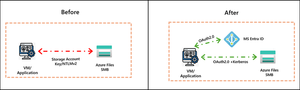
As organizations evolve their application and storage environments, whether on‑premises, hybrid, or cloud, secure access is top of mind. Organizations are vigilant about protecting sensitive data while enabling agile application access across distributed environments. SMB shares are commonly used for persistent storage in applications like AKS for container workloads, web applications, and App Services. Traditional models that rely on credentials like storage account keys do not meet the demands of a Zero Trust architecture, where every access request must be verified explicitly, granted with least privilege, and designed to assume malicious access from bad actors. We are excited to announce the Public Preview of Managed Identities support with Azure Files SMB. This capability provides a secure, identity-driven approach for customer applications that eliminates credentials-based access and integrates seamlessly with MS Entra ID. Azure virtual machines, containers, and applications running in Azure can now authenticate to Azure Files using their own managed identity, and mount shares using short lived OAuth tokens over Kerberos. This unlocks secure file share access for both first party and customer applications, including Azure Kubernetes Service (AKS), Azure Functions, App Services, and other cloud native services By leveraging Managed Identities, customers gain: Zero Trust Alignment–Identity tied to a specific resource, token refreshes every hour, and no passwords or keys to manage or rotate with Azure handling end-to-end identity management Role Based Access Control – Built-in RBAC for least-privilege enforcement Compliance Mandate Resolution – Compliant with FIPS, removing need for NTLMv2 Multi-Client Support – Works with Windows and Linux clients over SMB This capability brings a secure, simple, and scalable access model that helps organizations meet industry standard security requirements while inheriting Microsoft Entra ID’s enterprise grade identity, governance, and security capabilities for file shares. Securing Real World Applications To illustrate how Managed Identities strengthen security, the following example workloads highlight where customers will benefit from this capability. Eliminate Secret Sprawl for Continuous Integration, Continuous Deployment (CI/CD) workloads Azure Files SMB provides a centralized location for storing software development artifacts generated during CI/CD pipelines. CI/CD workloads span far beyond application code, covering infrastructure updates, data engineering workflows, ML pipelines, and compliance automation, making them foundational to modern DevOps practices. Build agents in Azure DevOps or other CI/CD systems often run on both Linux and Windows, requiring a common storage backend for binaries and configuration files. Historically, these agents authenticated to Azure Files using storage account keys. With Managed Identities, build agents can now authenticate using their own identity from Microsoft Entra ID, with authorization governed through Azure RBAC. This enhances security, removes static credentials, and simplifies compliance. “Managed Identities support with SMB shares will enable us to remove dependencies on storage account keys to run our CI/CD pipelines, enabling stronger security and alignment with Zero-Trust principles." Alex Garcia, Staff Dev Ops Engineer, Unity Technologies. Secure Persistent Files Storage with Azure Kubernetes Service (AKS) Stateful AKS workloads rely on persistent volumes for configuration, logs, and application data. Previously, mounting Azure Files required storing account keys or secrets in Kubernetes. Organizations requested exceptions from their security organizations to continue using shared keys until a secure managed identities-based solution was available. With this feature, AKS clusters can authenticate directly to Azure Files SMB without storage account keys. This enables secure, token‑based access for persistent volume mounts, improving security posture and eliminating the need for exceptions to use access tied to storage account keys. Learn more in the Azure Files AKS CSI documentation. Get Started with Managed Identities with SMB Azure Files Start using Managed Identities with Azure Files today at no additional cost. This feature is supported on HDD and SSD SMB shares across all billing models. Refer to our documentation for complete set-up guidance. Whether provisioning new storage or enhancing existing deployments, this capability provides secure, enterprise‑grade access with a streamlined configuration experience. Secure your workloads today! For any questions, reach out to the team at azurefiles@microsoft.com119Views0likes0CommentsAzure passowrd protection
We have a hybrid Azure infrastructure with an AD Connector installed on-prem and configured for PTA. We installed the password protection server and registered it with the Azure tenant, then deployed the DC agent on all domain controllers. Both the proxy and agents are operational. We published a few banned words to block in case anyone uses them. For testing, I changed my password to include one of the banned words. To my surprise, I was able to change the password. I checked the corresponding logon server, and the DC event viewer showed that the password was validated, but the banned word was in the password list that Azure set to enforce. Why is it not blocking the change?23Views0likes1Comment
I passed the GH‑900: GitHub Foundations exam!
Hi everyone, I’m excited to share that I cleared the GH‑900 (GitHub Foundations) exam with a good score! This certification validates my understanding of Git, repository collaboration, pull requests, and GitHub’s core features. Preparation Approach: I studied using Microsoft Learn resources and the GH‑900 study guide. For extra practice and exam-style questions, I used dumps-4-azure — it really gave me the extra edge for exam readiness. I also practiced hands-on with real GitHub workflows (branches, pull requests, projects) to reinforce my understanding. Key Takeaways: The exam tests foundational Git + GitHub collaboration skills — not just theory. Practical experience combined with mock questions made a big difference. Consistency in daily preparation is the key. Next Steps: After GH‑900, I’m planning to go for GH‑100 (GitHub Administration) to deepen my GitHub skills at the organizational level.70Views1like1Comment