azure stack hci
126 Topics
Issue with Hyper-V VM on Tagged VLAN – Traffic Reaches Local Hosts but Not External Networks
Hi everyone, I’m having an issue getting a Hyper-V VM to work correctly when using a tagged VLAN interface. I have a test VM configured with a trunk port and a tagged VLAN. Here is the configuration I’m using: Set-VMNetworkAdapterVlan -VMName "testvlan" -Trunk -NativeVlanId 2 -AllowedVlanIdList "4" The strange part is this: When the VM is on VLAN 4 (tagged), it can reach other resources on the same VLAN as long as those resources are running on the same Hyper-V host. But if the target resource is outside the Hyper-V host, the VM cannot reach it at all. The hardware vendor has already ruled out any issue with the top-of-rack switches interconnecting the hosts. If I reconfigure the VM’s network adapter in access mode on the same VLAN, then all traffic works normally and the VM can reach resources outside the host without any problem. So it seems that traffic leaves the host correctly only when the adapter is in access mode, not when using a trunk with VLAN tagging. Has anyone seen this behavior before or has suggestions on what to check next?87Views0likes1Comment
Azure Stack HCI 23h2 upgrade & Azure local Resource
Good evening, After upgrading from 22H2 to 23H2, we encountered an issue where the Azure Local resource in the Azure portal appears as "not connected recently." Additionally, we are not seeing the "Your cluster can be upgraded to the latest version" option, likely due to this connection issue. Despite successful connectivity tests and extensive troubleshooting, the resource remains unsynchronised with Azure. As a result, we tried deleting the Azure Local resource and re-registering the nodes. Now, while both nodes are successfully registered and connected to Azure and passing the Invoke-AzStackHciUpgradeValidation , we are unable to find a way to re-register the Azure Local resource to proceed with the "Install the solution upgrade via Azure portal" step. The only option I see is going through the "Deploy Azure Local" process in Azure Arc. However, I believe this would overwrite existing settings and VMs, causing significant disruption—especially since this is a production cluster upgraded from 22H2. Is there a way to re-register the cluster and restore the Azure Local resource using existing settings, so we can proceed with deploying the rest of the solution upgrade via the Azure portal? Any guidance would be greatly appreciated571Views0likes3CommentsAzure Stack HCI version 23H2 is generally available
Today we’re announcing the general availability of Azure Stack HCI version 23H2, and the Azure Arc infrastructure needed to provision virtual machines and Kubernetes clusters, and Azure Virtual Desktop for Azure Stack HCI. Together, these capabilities enable an adaptive cloud approach, empowering customers to deploy and operate everything from hardware to applications using Azure Resource Manager and core Azure management services. 40KViews10likes53Comments
AVD on Azure Local: Increase memory of Sessionhosts after Hostpool deployment
Hi there, Is there a best practice for increasing the RAM of the session hosts in an Azure Virtual Desktop host pool? We are using the autoscaler to start and stop VMs on demand. Since this is an automated process, all the settings changed via HyperV-Manager get overwritten, presumably by the host pool template. Can someone confirm that I am on the right track and maybe give me a hint or a how-to on how to change the RAM for my session hosts? Hostpool Type: Pooled Uses Session Host Config: No Thanks in Advance, Maik284Views0likes2Comments
Error Depoloying Azure Stack?
I keep getting this message when I try to deploy azure stack Any idea would be appreciated thanks Exception Type 'SetAzureStackHostsPreConfiguration' of Role 'HostNetwork' raised an exception: Stopping execution after intent provisioning failed with [ ProvisioningFailed ] for intent "compute_management" on host "NODE1". Configuration Status: Failed Compute: True Management: True Storage: False at TestNetworkAtcIntentStatus, C:\NugetStore\Microsoft.AS.Network.Deploy.HostNetwork.1.2411.1.8\content\Powershell\Roles\HostNetwork\HostNetwork.psm1: line 1714 at ConfigureHostAdaptersWithNetworkAtcForHosts, C:\NugetStore\Microsoft.AS.Network.Deploy.HostNetwork.1.2411.1.8\content\Powershell\Roles\HostNetwork\HostNetwork.psm1: line 2183 at Set-HostAdaptersWithNetworkAtc, C:\NugetStore\Microsoft.AS.Network.Deploy.HostNetwork.1.2411.1.8\content\Powershell\Roles\HostNetwork\HostNetwork.psm1: line 2315 at Invoke-ConfigureHostAdaptersWithNetworkAtc<Process>, C:\NugetStore\Microsoft.AS.Network.Deploy.HostNetwork.1.2411.1.8\content\Powershell\Roles\HostNetwork\HostNetwork.psm1: line 2586 at Invoke-ConfigureAzureStackHostNetworkingWithATC, C:\NugetStore\Microsoft.AS.Network.Deploy.HostNetwork.1.2411.1.8\content\Powershell\Roles\HostNetwork\HostNetwork.psm1: line 3781 at Invoke-SetAzureStackHostsPreConfiguration, C:\NugetStore\Microsoft.AS.Network.Deploy.HostNetwork.1.2411.1.8\content\Powershell\Roles\HostNetwork\HostNetwork.psm1: line 3916 at SetAzureStackHostsPreConfiguration, C:\NugetStore\Microsoft.AS.Network.Deploy.HostNetwork.1.2411.1.8\content\Powershell\Classes\HostNetwork\HostNetwork.psm1: line 66 at <ScriptBlock>, C:\CloudDeployment\ECEngine\InvokeInterfaceInternal.psm1: line 139 at Invoke-EceInterfaceInternal, C:\CloudDeployment\ECEngine\InvokeInterfaceInternal.psm1: line 134 at <ScriptBlock>, <No file>: line 33284Views0likes1CommentAzure Stack HCI Cluster network name changes from "ClusterNetwork1" to "Unused:ClusterNetwork1"
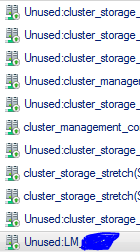
I have configured Azure Stack HCI Stretched Cluster with Network ATC. Strange behaviour i am noticing is with naming of Cluster Network(screenshot 1). e.g. current name is "Cluster Network1", gets changed to "Unused: Cluster Network1". Also Live Migration settings(screenshot 2) keep selecting multiple adaptors by itself even i uncheck all and only keep "LM" on top an checked. Any suggestions or fix to this.1.1KViews0likes6Comments
Issues with Azure stack HCI 23H2 and and NVMe Drives 5520 Series
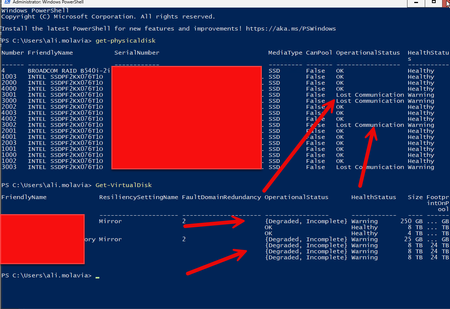
We recently purchased a Lenovo MX630 V3 Integrated System for Azure Stack HCI 23H2 deployment with 16 x 5520 series NVMe drives (Lenovo NVMe part number is 4XB7A13943/SSDPF2KX076T1O and the server model is 7D6U). We are using version 10.2408.0.29 25398.1085 of Azure Stack HCI. In the past few days, we have encountered some weird issues. The storage cluster degraded because the physical disks keep going to "Lost Communication," causing the storage volume to go into detached mode. We are using firmware version Lenovo NVMe 9CV10450, which is approved by Lenovo. I see that the newer driver is 9CV10490, and I was wondering if anyone had a similar experience with these drives and if the August update fixed it. The reason I ask is that using Solidigm driver/firmware is not supported by Lenovo. So far, we have replaced one disk, but when I observed the last problem, it seemed to fix itself.546Views0likes3CommentsPublic Preview of Azure Migrate from VMware to Azure Stack HCI
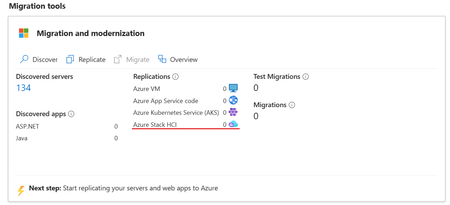
We are excited to announce the public preview of Azure Migrate's latest functionality: seamless migration from VMware to Azure Stack HCI. This significant enhancement extends the power of cloud migration to the edge, offering cutting-edge performance and security while keeping your data securely on-premises. With Azure Migrate’s agent-less replication, minimal downtime, and network traffic optimized data transfer, this new capability ensures an efficient, smooth transition for your virtualized workloads. Explore the Azure Migrate today and experience the next evolution of virtualization and cloud integration.12KViews15likes17Comments