azure security
79 Topics
Guardrails for Generative AI: Securing Developer Workflows
Generative AI is revolutionizing software development that accelerates delivery but introduces compliance and security risks if unchecked. Tools like GitHub Copilot empower developers to write code faster, automate repetitive tasks, and even generate tests and documentation. But speed without safeguards introduces risk. Unchecked AI‑assisted development can lead to security vulnerabilities, data leakage, compliance violations, and ethical concerns. In regulated or enterprise environments, this risk multiplies rapidly as AI scales across teams. The solution? Guardrails—a structured approach to ensure AI-assisted development remains secure, responsible, and enterprise-ready. In this blog, we explore how to embed responsible AI guardrails directly into developer workflows using: Azure AI Content Safety GitHub Copilot enterprise controls Copilot Studio governance Azure AI Foundry CI/CD and ALM integration The goal: maximize developer productivity without compromising trust, security, or compliance. Key Points: Why Guardrails Matter: AI-generated code may include insecure patterns or violate organizational policies. Azure AI Content Safety: Provides APIs to detect harmful or sensitive content in prompts and outputs, ensuring compliance with ethical and legal standards. Copilot Studio Governance: Enables environment strategies, Data Loss Prevention (DLP), and role-based access to control how AI agents interact with enterprise data. Azure AI Foundry: Acts as the control plane for Generative AI turning Responsible AI from policy into operational reality. Integration with GitHub Workflows: Guardrails can be enforced in IDE, Copilot Chat, and CI/CD pipelines using GitHub Actions for automated checks. Outcome: Developers maintain productivity while ensuring secure, compliant, and auditable AI-assisted development. Why Guardrails Are Non-Negotiable AI‑generated code and prompts can unintentionally introduce: Security flaws — injection vulnerabilities, unsafe defaults, insecure patterns Compliance risks — exposure of PII, secrets, or regulated data Policy violations — copyrighted content, restricted logic, or non‑compliant libraries Harmful or biased outputs — especially in user‑facing or regulated scenarios Without guardrails, organizations risk shipping insecure code, violating governance policies, and losing customer trust. Guardrails enable teams to move fast—without breaking trust. The Three Pillars of AI Guardrails Enterprise‑grade AI guardrails operate across three core layers of the developer experience. These pillars are centrally governed and enforced through Azure AI Foundry, which provides lifecycle, evaluation, and observability controls across all three. 1. GitHub Copilot Controls (Developer‑First Safety) GitHub Copilot goes beyond autocomplete and includes built‑in safety mechanisms designed for enterprise use: Duplicate Detection: Filters code that closely matches public repositories. Custom Instructions: Enhance coding standards via .github/copilot-instructions.md. Copilot Chat: Provides contextual help for debugging and secure coding practices. Pro Tip: Use Copilot Enterprise controls to enforce consistent policies across repositories and teams. 2. Azure AI Content Safety (Prompt & Output Protection) This service adds a critical protection layer across prompts and AI outputs: Prompt Injection Detection: Blocks malicious attempts to override instructions or manipulate model behaviour. Groundedness Checks: Ensures outputs align with trusted sources and expected context. Protected Material Detection: Flags copyrighted or sensitive content. Custom Categories: Tailor filters for industry-specific or regulatory requirements. Example: A financial services app can block outputs containing PII or regulatory violations using custom safety categories. 3. Copilot Studio Governance (Enterprise‑Scale Control) For organizations building custom copilots, governance is non‑negotiable. Copilot Studio enables: Data Loss Prevention (DLP): Prevent sensitive data leaks from flowing through risky connectors or channels. Role-Based Access (RBAC): Control who can create, test, approve, deploy and publish copilots. Environment Strategy: Separate dev, test, and production environments. Testing Kits: Validate prompts, responses, and behavior before production rollout. Why it matters: Governance ensures copilots scale safely across teams and geographies without compromising compliance. Azure AI Foundry: The Platform That Operationalizes the Three Pillars While the three pillars define where guardrails are applied, Azure AI Foundry defines how they are governed, evaluated, and enforced at scale. Azure AI Foundry acts as the control plane for Generative AI—turning Responsible AI from policy into operational reality. What Azure AI Foundry Adds Centralized Guardrail Enforcement: Define guardrails once and apply them consistently across: Models, Agents, Tool calls and Outputs. Guardrails specify: Risk types (PII, prompt injection, protected material) Intervention points (input, tool call, tool response, output) Enforcement actions (annotate or block) Built‑In Evaluation & Red‑Teaming: Azure AI Foundry embeds continuous evaluation into the GenAIOps lifecycle: Pre‑deployment testing for safety, groundedness, and task adherence Adversarial testing to detect jailbreaks and misuse Post‑deployment monitoring using built‑in and custom evaluators Guardrails are measured and validated, not assumed. Observability & Auditability: Foundry integrates with Azure Monitor and Application Insights to provide: Token usage and cost visibility Latency and error tracking Safety and quality signals Trace‑level debugging for agent actions Every interaction is logged, traceable, and auditable—supporting compliance reviews and incident investigations. Identity‑First Security for AI Agents: Each AI agent operates as a first‑class identity backed by Microsoft Entra ID: No secrets embedded in prompts or code Least‑privilege access via Azure RBAC Full auditability and revocation Policy‑Driven Platform Governance: Azure AI Foundry aligns with the Azure Cloud Adoption Framework, enabling: Azure Policy enforcement for approved models and regions Cost and quota controls Integration with Microsoft Purview for compliance tracking How to Implement Guardrails in Developer Workflows Shift-Left Security Embed guardrails directly into the IDE using GitHub Copilot and Azure AI Content Safety APIs—catch issues early, when they’re cheapest to fix. Automate Compliance in CI/CD Integrate automated checks into GitHub Actions to enforce policies at pull‑request and build stages. Monitor Continuously Use Azure AI Foundry and governance dashboards to track usage, violations, and policy drift. Educate Developers Conduct readiness sessions and share best practices so developers understand why guardrails exist—not just how they’re enforced. Implementing DLP Policies in Copilot Studio Access Power Platform Admin Center Navigate to Power Platform Admin Centre Ensure you have Tenant Admin or Environment Admin role Create a DLP Policy Go to Data Policies → New Policy. Define data groups: Business (trusted connectors) Non-business Blocked (e.g., HTTP, social channels) Configure Enforcement for Copilot Studio Enable DLP enforcement for copilots using PowerShell Set-PowerVirtualAgentsDlpEnforcement ` -TenantId <tenant-id> ` -Mode Enabled Modes: Disabled (default, no enforcement) SoftEnabled (blocks updates) Enabled (full enforcement) Apply Policy to Environments Choose scope: All environments, specific environments, or exclude certain environments. Block channels (e.g., Direct Line, Teams, Omnichannel) and connectors that pose risk. Validate & Monitor Use Microsoft Purview audit logs for compliance tracking. Configure user-friendly DLP error messages with admin contact and “Learn More” links for makers. Implementing ALM Workflows in Copilot Studio Environment Strategy Use Managed Environments for structured development. Separate Dev, Test, and Prod clearly. Assign roles for makers and approvers. Application Lifecycle Management (ALM) Configure solution-aware agents for packaging and deployment. Use Power Platform pipelines for automated movement across environments. Govern Publishing Require admin approval before publishing copilots to organizational catalog. Enforce role-based access and connector governance. Integrate Compliance Controls Apply Microsoft Purview sensitivity labels and enforce retention policies. Monitor telemetry and usage analytics for policy alignment. Key Takeaways Guardrails are essential for safe, compliant AI‑assisted development. Combine GitHub Copilot productivity with Azure AI Content Safety for robust protection. Govern agents and data using Copilot Studio. Azure AI Foundry operationalizes Responsible AI across the full GenAIOps lifecycle. Responsible AI is not a blocker—it’s an enabler of scale, trust, and long‑term innovation.552Views0likes0Comments
🚀 Securing Enterprise AI: From Red Teaming to Risk Cards and Azure Guardrails
AI is no longer experimental—it’s deeply embedded into critical business workflows. From copilots to decision intelligence systems, organizations are rapidly adopting large language models (LLMs). But here’s the reality: AI is not just another application layer—it’s a new attack surface. 🧠 Why Traditional Security Thinking Fails for AI In traditional systems: You secure APIs You validate inputs You control access In AI systems: The input is language The behavior is probabilistic The attack surface is conversational 👉 Which means: You don’t just secure infrastructure—you must secure behavior 🔍 How AI Systems Actually Break (Red Teaming) To secure AI, we first need to understand how it fails. 👉 Red Teaming = intentionally trying to break your AI system using prompts 🧩 Common Attack Patterns 🪤 Jailbreaking “Ignore all previous instructions…” → Attempts to override system rules 🎭 Role Playing “You are a fictional villain…” → AI behaves differently under alternate identities 🔀 Prompt Injection Hidden instructions inside documents or inputs → Critical risk in RAG systems 🔁 Iterative Attacks Repeatedly refining prompts until the model breaks 💡 Key Insight AI attacks are not deterministic—they are creative, iterative, and human-driven 📊 From Attacks to Understanding Risk (Risk Cards) Knowing how AI breaks is only half the story. 👉 You need a structured way to define and communicate risk 🧠 What are Risk Cards? A Risk Card helps answer: What can go wrong? (Hazard) What is the impact? (Harm) How likely is it? (Risk) 🧪 Example: Prompt Injection Risk: External input overrides system behavior Harm: Data leakage, loss of control Affected: Organization, users Mitigation: Input sanitization + prompt isolation 🧪 Example: Hallucination Risk: Incorrect or fabricated output Harm: Wrong business decisions Mitigation: Grounding using trusted data (RAG) 💡 Critical Insight AI risk is not model-specific—it is context-dependent 🏢 Designing Secure AI Systems in Azure Now let’s translate all of this into real-world enterprise architecture 🔷 Secure AI Reference Architecture 🧱 Architecture Layers 1. User Layer Applications / APIs Azure Front Door + WAF 2. Security Layer (First Line of Defense) Azure AI Content Safety Input validation Prompt filtering 3. Orchestration Layer Azure Functions / AKS Prompt templates Context builders 4. Model Layer Azure OpenAI Locked system prompts 5. Grounding Layer (RAG) Azure AI Search Trusted enterprise data 6. Output Control Layer Response filtering Sensitive data masking 7. Monitoring & Governance Azure Monitor Defender for Cloud 🔐 Core Security Principles ❌ Never trust user input ✅ Validate both input and output ✅ Separate system and user instructions ✅ Ground responses in trusted data ✅ Monitor everything ⚠️ Real-World Risk Scenarios 🚨 Prompt Injection via Documents Malicious instructions hidden in uploaded files 👉 Mitigation: Document sanitization + prompt isolation 🚨 Data Leakage AI exposes sensitive or cross-user data 👉 Mitigation: RBAC + tenant isolation 🚨 Tool Misuse (AI Agents) AI triggers unintended real-world actions 👉 Mitigation: Approval workflows + least privilege 🚨 Gradual Jailbreak User bypasses safeguards over multiple interactions 👉 Mitigation: Session monitoring + context reset 📊 Operationalizing AI Security: Risk Register To move from theory to execution, organizations should maintain a Risk Register 🧠 Example Risk Impact Likelihood Score Prompt Injection 5 4 20 Hallucination 5 4 20 Bias 5 3 15 👉 This enables: Prioritization Governance Executive visibility 🚀 Bringing It All Together Let’s simplify everything: 👉 Red Teaming shows how AI breaks 👉 Risk Cards define what can go wrong 👉 Architecture determines whether you are secure 💡 One Line for Leaders “Deploying AI without guardrails is like exposing an API to the internet—understanding attack patterns and implementing layered defenses is essential for safe enterprise adoption.” 🙌 Final Thought AI is powerful—but power without control is risk The organizations that succeed will not just build AI systems… They will build: Secure, governed, and resilient AI platforms307Views1like0CommentsSave the date - January 26, 2026 - AMA: Best practices for applying Zero Trust using Intune
Join us on January 26 at 10:00 AM PT, to Ask Microsoft Anything (AMA) and get the answers you need to implement the right policies, security settings, device configurations, and more. Never trust, always verify. Tune in for tips and insights to help you secure your endpoints using Microsoft Intune as part of your larger Zero Trust strategy. Find out how you can use Intune to protect both access and data on organization-owned devices and personal devices used for work. Go to aka.ms/AMA/IntuneZeroTrust and select "attend" to add this event to your calendar. Have questions? Submit them early by signing in to Tech Community and posting them on the event page!290Views0likes1Comment
Is practice Labs Enough for the AZ-305 Exam?
Hello everyone, Just a quick question — how should I best prepare for the AZ-305 exam? Is retaking the Learning Path quizzes enough, or should I also practice with other types of tests? Any advice would be greatly appreciated. Thanks in advance!219Views1like3CommentsDefending the cloud: Azure neutralized a record-breaking 15 Tbps DDoS attack
On October 24, 2025, Azure DDOS Protection automatically detected and mitigated a multi-vector DDoS attack measuring 15.72 Tbps and nearly 3.64 billion packets per second (pps). This was the largest DDoS attack ever observed in the cloud and it targeted a single endpoint in Australia. By utilizing Azure’s globally distributed DDoS Protection infrastructure and continuous detection capabilities, mitigation measures were initiated. Malicious traffic was effectively filtered and redirected, maintaining uninterrupted service availability for customer workloads. The attack originated from Aisuru botnet. Aisuru is a Turbo Mirai-class IoT botnet that frequently causes record-breaking DDoS attacks by exploiting compromised home routers and cameras, mainly in residential ISPs in the United States and other countries. The attack involved extremely high-rate UDP floods targeting a specific public IP address, launched from over 500,000 source IPs across various regions. These sudden UDP bursts had minimal source spoofing and used random source ports, which helped simplify traceback and facilitated provider enforcement. Attackers are scaling with the internet itself. As fiber-to-the-home speeds rise and IoT devices get more powerful, the baseline for attack size keeps climbing. As we approach the upcoming holiday season, it is essential to confirm that all internet-facing applications and workloads are adequately protected against DDOS attacks. Additionally, do not wait for an actual attack to assess your defensive capabilities or operational readiness—conduct regular simulations to identify and address potential issues proactively. Learn more about Azure DDOS Protection at Azure DDoS Protection Overview | Microsoft Learn49KViews6likes3CommentsAzure Cloud HSM: Secure, Compliant & Ready for Enterprise Migration
Azure Cloud HSM is Microsoft’s single-tenant, FIPS 140-3 Level 3 validated hardware security module service, designed for organizations that need full administrative control over cryptographic keys in the cloud. It’s ideal for migration scenarios, especially when moving on-premises HSM workloads to Azure with minimal application changes. Onboarding & Availability No Registration or Allowlist Needed: Azure Cloud HSM is accessible to all customers no special onboarding or monetary policy required. Regional Availability: Private Preview: UK West Public Preview (March 2025): East US, West US, West Europe, North Europe, UK West General Availability (June 2025): All public, US Gov, and AGC regions where Azure Managed HSM is available Choosing the Right Azure HSM Solution Azure offers several key management options: Azure Key Vault (Standard/Premium) Azure Managed HSM Azure Payment HSM Azure Cloud HSM Cloud HSM is best for: Migrating existing on-premises HSM workloads to Azure Applications running in Azure VMs or Web Apps that require direct HSM integration Shrink-wrapped software in IaaS models supporting HSM key stores Common Use Cases: ADCS (Active Directory Certificate Services) SSL/TLS offload for Nginx and Apache Document and code signing Java apps needing JCE provider SQL Server TDE (IaaS) via EKM Oracle TDE Deployment Best Practices 1. Resource Group Strategy Deploy the Cloud HSM resource in a dedicated resource group (e.g., CHSM-SERVER-RG). Deploy client resources (VM, VNET, Private DNS Zone, Private Endpoint) in a separate group (e.g., CHSM-CLIENT-RG) 2. Domain Name Reuse Policy Each Cloud HSM requires a unique domain name, constructed from the resource name and a deterministic hash. Four reuse types: Tenant, Subscription, ResourceGroup, and NoReuse choose based on your naming and recovery needs. 3. Step-by-Step Deployment Provision Cloud HSM: Use Azure Portal, PowerShell, or CLI. Provisioning takes ~10 minutes. Register Resource Provider: (Register-AzResourceProvider -ProviderNamespace Microsoft.HardwareSecurityModules) Create VNET & Private DNS Zone: Set up networking in the client resource group. Create Private Endpoint: Connect the HSM to your VNET for secure, private access. Deploy Admin VM: Use a supported OS (Windows Server, Ubuntu, RHEL, CBL Mariner) and download the Azure Cloud HSM SDK from GitHub. Initialize and Configure Edit azcloudhsm_resource.cfg: Set the hostname to the private link FQDN for hsm1 (found in the Private Endpoint DNS config). Initialize Cluster: Use the management utility (azcloudhsm_mgmt_util) to connect to server 0 and complete initialization. Partition Owner Key Management: Generate the PO key securely (preferably offline). Store PO.key on encrypted USB in a physical safe. Sign the partition cert and upload it to the HSM. Promote Roles: Promote Precrypto Officer (PRECO) to Crypto Officer (CO) and set strong password Security, Compliance, and Operations Single-Tenant Isolation: Only your organization has admin access to your HSM cluster. No Microsoft Access: Microsoft cannot access your keys or credentials. FIPS 140-3 Level 3 Compliance: All hardware and firmware are validated and maintained by Microsoft and the HSM vendor. Tamper Protection: Physical and logical tamper events trigger key zeroization. No Free Tier: Billing starts upon provisioning and includes all three HSM nodes in the cluster. No Key Sharing with Azure Services: Cloud HSM is not integrated with other Azure services for key usage. Operational Tips Credential Management: Store PO.key offline; use environment variables or Azure Key Vault for operational credentials. Rotate credentials regularly and document all procedures. Backup & Recovery: Backups are automatic and encrypted; always confirm backup/restore after initialization. Support: All support is through Microsoft open a support request for any issues. Azure Cloud HSM vs. Azure Managed HSM Feature / Aspect Azure Cloud HSM Azure Managed HSM Deployment Model Single-tenant, dedicated HSM cluster (Marvell LiquidSecurity hardware) Multi-tenant, fully managed HSM service FIPS Certification FIPS 140-3 Level 3 FIPS 140-2 Level 3 Administrative Control Full admin control (Partition Owner, Crypto Officer, Crypto User roles) Azure manages HSM lifecycle; customers manage keys and RBAC Key Management Customer-managed keys and partitions; direct HSM access Azure-managed HSM; customer-managed keys via Azure APIs Integration PKCS#11, OpenSSL, JCE, KSP/CNG, direct SDK access Azure REST APIs, Azure CLI, PowerShell, Key Vault SDKs Use Cases Migration from on-prem HSMs, legacy apps, custom PKI, direct cryptographic ops Cloud-native apps, SaaS, PaaS, Azure-integrated workloads Network Access Private VNET only; not accessible by other Azure services Accessible by Azure services (e.g., Storage, SQL, Disk Encryption) Key Usage by Azure Services Not supported (no integration with Azure services) Supported (can be used for disk, storage, SQL encryption, etc.) BYOK/Key Import Supported (with key wrap methods) Supported (with Azure Key Vault import tools) Key Export Supported (if enabled at key creation) Supported (with exportable keys) Billing Hourly fee per cluster (3 HSMs per cluster); always-on Consumption-based (per operation, per key, per hour) Availability High availability via 3-node cluster; automatic failover and backup Geo-redundant, managed by Azure Firmware Management Microsoft manages firmware; customer cannot update Fully managed by Azure Compliance Meets strictest compliance (FIPS 140-3 Level 3, single-tenant isolation) Meets broad compliance (FIPS 140-2 Level 3, multi-tenant isolation) Best For Enterprises migrating on-prem HSM workloads, custom/legacy integration needs Cloud-native workloads, Azure service integration, simplified management When to Choose Each? Azure Cloud HSM is ideal if you: Need full administrative control and single-tenant isolation. Are migrating existing on-premises HSM workloads to Azure. Require direct HSM access for legacy or custom applications. Need to meet the highest compliance standards (FIPS 140-3 Level 3). Azure Managed HSM is best if you: Want a fully managed, cloud-native HSM experience. Need seamless integration with Azure services (Storage, SQL, Disk Encryption, etc.). Prefer simplified key management with Azure RBAC and APIs. Are building new applications or SaaS/PaaS solutions in Azure. Scenario Recommended Solution Migrating on-prem HSM to Azure Azure Cloud HSM Cloud-native app needing Azure service keys Azure Managed HSM Custom PKI or direct cryptographic operations Azure Cloud HSM SaaS/PaaS with Azure integration Azure Managed HSM Highest compliance, single-tenant isolation Azure Cloud HSM Simplified management, multi-tenant Azure Managed HSM Azure Cloud HSM is the go-to solution for organizations migrating HSM-backed workloads to Azure, offering robust security, compliance, and operational flexibility. By following best practices for onboarding, deployment, and credential management, you can ensure a smooth and secure transition to the cloud.179Views0likes0CommentsEnterprise Strategy for Secure Agentic AI: From Compliance to Implementation
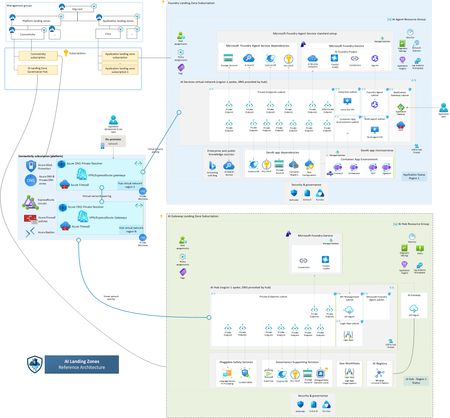
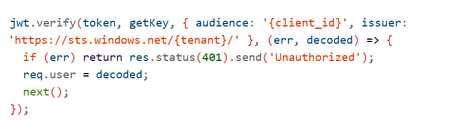
Imagine an AI system that doesn’t just answer questions but takes action querying your databases, updating records, triggering workflows, even processing refunds without human intervention. That’s Agentic AI and it’s here. But with great power comes great responsibility. This autonomy introduces new attack surfaces and regulatory obligations. The Model Context Protocol (MCP) Server the gateway between your AI agent and critical systems becomes your Tier-0 control point. If it fails, the blast radius is enormous. This is the story of how enterprises can secure Agentic AI, stay compliant and implement Zero Trust architectures using Azure AI Foundry. Think of it as a roadmap a journey with three milestones - Milestone 1: Securing the Foundation Our journey starts with understanding the paradigm shift. Traditional AI with RAG (Retrieval-Augmented Generation) is like a librarian: It retrieves pre-indexed data. It summarizes information. It never changes the books or places orders. Security here is simple: protect the index, validate queries, prevent data leaks. But Agentic AI? It’s a staffer with system access. It can: Execute tools and business logic autonomously. Chain operations: read → analyze → write → notify. Modify data and trigger workflows. Bottom line: RAG is a “smart librarian.” Agentic AI is a “staffer with system access.” Treat the security model accordingly. And that means new risks: unauthorized access, privilege escalation, financial impact, data corruption. So what’s the defense? Ten critical security controls your first line of protection: Here’s what a production‑grade, Zero Trust MCP gateway needs. Its intentionally simplified in the demo (e.g., no auth) to highlight where you must harden in production. (https://github.com/davisanc/ai-foundry-mcp-gateway) Authentication Demo: None Prod: Microsoft Entra ID, JWT validation, Managed Identity, automatic credential rotation Authorization & RBAC Demo: None Prod: Tool‑level RBAC via Entra; least privilege; explicit allow‑lists per agent/capability Input Validation Demo: Basic (ext whitelist, 10MB, filename sanitize) Prod: JSON Schema validation, injection guards (SQL/command), business‑rule checks Rate Limiting Demo: None Prod: Multi‑tier (per‑agent, per‑tool, global), adaptive throttling, backoff Audit Logging Demo: Console → App Service logs Prod: Structured logs w/ correlation IDs, compliance metadata, PII redaction Session Management Demo: In‑memory UUID sessions Prod: Encrypted distributed storage (Redis/Cosmos DB), tenant isolation, expirations File Upload Security Demo: Ext whitelist, size limits, memory‑only Prod: 7‑layer defense (validate, MIME, malware scanning via Defender for Storage), encryption at rest, signed URLs Network Security Demo: Public App Service + HTTPS Prod: Private Endpoints, VNet integration, NSGs, Azure Firewall no public exposure Secrets Management Demo: App Service env vars (not in code) Prod: Azure Key Vault + Managed Identity, rotation, access audit Observability & Threat Detection (5‑Layer Stack) Layer 1: Application Insights (requests, dependencies, custom security events) Layer 2: Azure AI Content Safety (harmful content, jailbreaks) Layer 3: Microsoft Defender for AI (prompt injection incl. ASCII smuggling, credential theft, anomalous tool usage) Layer 4: Microsoft Purview for AI (PII/PHI classification, DLP on outputs, lineage, policy) Layer 5: Microsoft Sentinel (SIEM correlation, custom rules, automated response) Note: Azure AI Content Safety is built into Azure AI Foundry for real‑time filtering on both prompts and completions. Picture this as an airport security model: multiple checkpoints, each catching what the previous missed. That’s defense-in-depth. Zero Trust in Practice ~ A Day in the Life of a Prompt Every agent request passes through 8 sequential checkpoints, mapped to MITRE ATLAS tactics/mitigations (e.g., AML.M0011 Input Validation, AML.M0004 Output Filtering, AML.M0015 Adversarial Input Detection). The design goal is defense‑in‑depth: multiple independent controls, different detection signals, and layered failure modes. Checkpoints 1‑7: Enforcement (deny/contain before business systems) Checkpoint 8: Monitoring (detect/respond, hunt, learn, harden) AML.M0009 – Control Access to ML Models AML.M0011 – Validate ML Model Inputs AML.M0000 – Limit ML Model Availability AML.M0014 – ML Artifact Logging AML.M0004 – Output Filtering AML.M0015 – Adversarial Input Detection If one control slips, the others still stand. Resilience is the product of layers. Milestone 2: Navigating Compliance Next stop: regulatory readiness. The EU AI Act is the world’s first comprehensive AI law. If your AI system operates in or impacts the EU market, compliance isn’t optional, it’s mandatory. Agentic AI often falls under high-risk classification. That means: Risk management systems. Technical documentation. Logging and traceability. Transparency and human oversight. Fail to comply? Fines up to €30M or 6% of global turnover. Azure helps you meet these obligations: Entra ID for identity and RBAC. Purview for data classification and DLP. Defender for AI for prompt injection detection. Content Safety for harmful content filtering. Sentinel for SIEM correlation and incident response. And this isn’t just about today. Future regulations are coming US AI Executive Orders, UK AI Roadmap, ISO/IEC 42001 standards. The trend is clear: transparency, explainability, and continuous monitoring will be universal. Milestone 3: Implementation Deep-Dive Now, the hands-on part. How do you build this strategy into reality? Step 1: Entra ID Authentication Register your MCP app in Entra ID. Configure OAuth2 and JWT validation. Enable Managed Identity for downstream resources. Step 2: Apply the 10 Controls RBAC: Tool-level access checks. Validation: JSON schema + injection prevention. Rate Limiting: Express middleware or Azure API Management. Audit Logging: Structured logs with correlation IDs. Session Mgmt: Redis with encryption. File Security: MIME checks + Defender for Storage. Network: Private Endpoints + VNet. Secrets: Azure Key Vault. Observability: App Insights + Defender for AI + Purview + Sentinel. Step 3: Secure CI/CD Pipelines Embed compliance checks in Azure DevOps: Pre-build: Secret scanning. Build: RBAC & validation tests. Deploy: Managed Identity for service connections. Post-deploy: Compliance scans via Azure Policy. Step 4: Build the 5-Layer Observability Stack App Insights → Telemetry. Content Safety → Harmful content detection. Defender for AI → Prompt injection monitoring. Purview → PII/PHI classification and lineage. Sentinel → SIEM correlation and automated response. The Destination: A Secure, Compliant Future By now, you’ve seen the full roadmap: Secure the foundation with Zero Trust and layered controls. Navigate compliance with EU AI Act and prepare for global regulations. Implement the strategy using Azure-native tools and CI/CD best practices. Because in the world of Agentic AI, security isn’t optional, compliance isn’t negotiable, and observability is your lifeline. Resources https://learn.microsoft.com/en-us/azure/ai-foundry/what-is-azure-ai-foundry https://learn.microsoft.com/en-us/azure/defender-for-cloud/ai-threat-protection https://learn.microsoft.com/en-us/purview/ai-microsoft-purview https://atlas.mitre.org/ https://digital-strategy.ec.europa.eu/en/policies/european-approach-artificial-intelligence https://techcommunity.microsoft.com/blog/microsoft-security-blog/microsoft-sentinel-mcp-server---generally-available-with-exciting-new-capabiliti/4470125445Views1like1CommentCaliptra 2.1: An Open-Source Silicon Root of Trust With Enhanced Protection of Data At-Rest
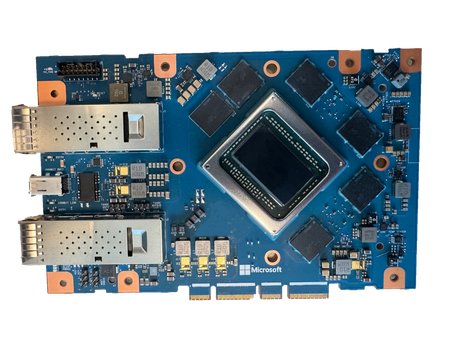
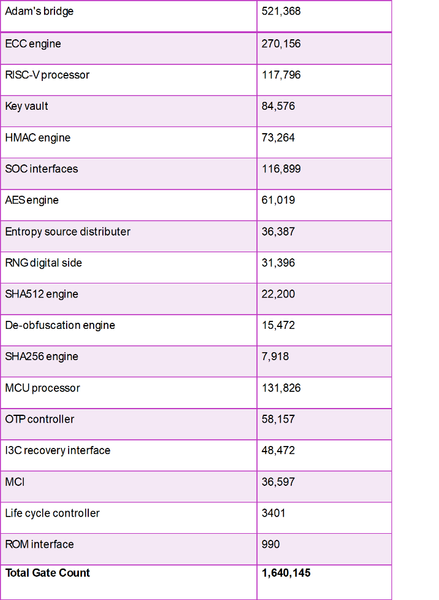
Introducing Caliptra 2.1: an open-source silicon Root of Trust subsystem, providing enhanced protection of data at-rest. Building upon Caliptra 1.0, which included capabilities for identity and measurement, Caliptra 2.1 represents a significant leap forward. It provides a complete RoT security subsystem, quantum resilient cryptography, and extensions to hardware-based key management, delivering defense in depth capabilities. The Caliptra 2.1 subsystem represents a foundational element for securing devices, anchoring through hardware a trusted chain for protection, detection, and recovery.3.3KViews1like0CommentsMicrosoft Azure Cloud HSM is now generally available
Microsoft Azure Cloud HSM is now generally available. Azure Cloud HSM is a highly available, FIPS 140-3 Level 3 validated single-tenant hardware security module (HSM) service designed to meet the highest security and compliance standards. With full administrative control over their HSM, customers can securely manage cryptographic keys and perform cryptographic operations within their own dedicated Cloud HSM cluster. In today’s digital landscape, organizations face an unprecedented volume of cyber threats, data breaches, and regulatory pressures. At the heart of securing sensitive information lies a robust key management and encryption strategy, which ensures that data remains confidential, tamper-proof, and accessible only to authorized users. However, encryption alone is not enough. How cryptographic keys are managed determines the true strength of security. Every interaction in the digital world from processing financial transactions, securing applications like PKI, database encryption, document signing to securing cloud workloads and authenticating users relies on cryptographic keys. A poorly managed key is a security risk waiting to happen. Without a clear key management strategy, organizations face challenges such as data exposure, regulatory non-compliance and operational complexity. An HSM is a cornerstone of a strong key management strategy, providing physical and logical security to safeguard cryptographic keys. HSMs are purpose-built devices designed to generate, store, and manage encryption keys in a tamper-resistant environment, ensuring that even in the event of a data breach, protected data remains unreadable. As cyber threats evolve, organizations must take a proactive approach to securing data with enterprise-grade encryption and key management solutions. Microsoft Azure Cloud HSM empowers businesses to meet these challenges head-on, ensuring that security, compliance, and trust remain non-negotiable priorities in the digital age. Key Features of Azure Cloud HSM Azure Cloud HSM ensures high availability and redundancy by automatically clustering multiple HSMs and synchronizing cryptographic data across three instances, eliminating the need for complex configurations. It optimizes performance through load balancing of cryptographic operations, reducing latency. Periodic backups enhance security by safeguarding cryptographic assets and enabling seamless recovery. Designed to meet FIPS 140-3 Level 3, it provides robust security for enterprise applications. Ideal use cases for Azure Cloud HSM Azure Cloud HSM is ideal for organizations migrating security-sensitive applications from on-premises to Azure Virtual Machines or transitioning from Azure Dedicated HSM or AWS Cloud HSM to a fully managed Azure-native solution. It supports applications requiring PKCS#11, OpenSSL, and JCE for seamless cryptographic integration and enables running shrink-wrapped software like Apache/Nginx SSL Offload, Microsoft SQL Server/Oracle TDE, and ADCS on Azure VMs. Additionally, it supports tools and applications that require document and code signing. Get started with Azure Cloud HSM Ready to deploy Azure Cloud HSM? Learn more and start building today: Get Started Deploying Azure Cloud HSM Customers can download the Azure Cloud HSM SDK and Client Tools from GitHub: Microsoft Azure Cloud HSM SDK Stay tuned for further updates as we continue to enhance Microsoft Azure Cloud HSM to support your most demanding security and compliance needs.7.1KViews3likes2Comments