azure purview
17 Topics
Workaround Enabling Purview Data Quality & Profiling for Cross-Tenant Microsoft Fabric Assets
The Challenge: Cross-Tenant Data Quality Blockers Like many of you, I have been managing a complex architecture where Microsoft Purview sits in Tenant A and Microsoft Fabric resides in Tenant B. While we can achieve basic metadata scanning (with some configuration), I hit a hard wall when trying to enable Data Quality (DQ) scanning. Purview's native Data Quality scan for Fabric currently faces limitations in cross-tenant scenarios, preventing us from running Profiling or applying DQ Rules directly on the remote Delta tables. The Experiment: "Governance Staging" Architecture rather than waiting for a native API fix, I conducted an experiment to bridge this gap using a "Data Staging" approach. The goal was to bring the data's "physicality" into the same tenant as Purview to unlock the full DQ engine. The Solution Steps: Data Movement (Tenant B to Tenant A): Inside the Fabric Workspace (Tenant B), I created a Fabric Data Pipeline. I used this to export the critical Delta Tables as Parquet files to an ADLS Gen2 account located in Tenant A (the same tenant as Purview). Note: You can schedule this to run daily to keep the "Governance Copy" fresh. Native Scanning (Tenant A): I registered this ADLS Gen2 account as a source in Purview. Because both Purview and the ADLS account are in the same tenant, the scan was seamless, instantaneous, and required no complex authentication hurdles. Activating Data Quality: Once the Parquet files were scanned, I attached these assets to a Data Product in the Purview Data Governance portal. The Results: The results were immediate and successful. Because the data now resides on a fully supported, same-tenant ADLS Gen2 surface: ✅ Data Profiling: I could instantly see column statistics, null distributions, and value patterns. ✅ DQ Rules: I was able to apply custom logic and business rules to the data. ✅ Scans: The DQ scan ran successfully, generating a Data Quality Score for our Fabric data. Conclusion: While we await native cross-tenant "Live View" support for DQ in Fabric, this workaround works today. It allows you to leverage the full power of Microsoft Purview's Data Quality engine immediately. If you are blocked by tenant boundaries, I highly recommend setting up a lightweight "Governance Staging" container in your primary tenant. Has anyone else experimented with similar staging patterns for Governance? Let's discuss below.Solved125Views1like2CommentsCross-Tenant Purview Scan of Fabric Lakehouse fails to ingest Sub-items (Delta Tables)
Environment: Tenant 1 (Consumer): Azure Purview (Microsoft Purview Data Map). Tenant 2 (Provider): Microsoft Fabric (Capacity + Workspaces). Architecture: Purview in Tenant 1 is scanning Fabric in Tenant 2 via the "Fabric" Data Source using Azure Auto-Resolve Integration Runtime. The Issue: I can successfully scan and see Item-level metadata (e.g., Workspace Name, Lakehouse Name). However, I am getting Zero sub-item visibility. No Delta Tables, no Columns, and no sub-item lineage are being ingested into Purview. Configuration Verified: Service Principal (SPN): Created an App Registration in Tenant 2 (Fabric Tenant). Permissions: The SPN is a Member (and I tested Admin) of the target Fabric Workspace. Fabric Admin Settings (Tenant 2): Allow service principals to use read-only admin APIs: Enabled for the SPN's Security Group. Enhance admin APIs responses with detailed metadata: Enabled. Enhance admin APIs responses with DAX and mashup expressions: Enabled. My Specific Questions for the Product Team / MVPs/Members: Authentication Flow: For sub-item ingestion (Delta Tables) to work cross-tenant, is it sufficient for the SPN to be a standard App Registration in Tenant 2 (Provider), or does Fabric require the "Cross-Tenant Access" (Guest User) flow where a shadow SPN is created via the specific trusted external tenants configuration? API Limitation: Is the "Enhanced Metadata" API payload (metadata/subartifacts) restricted to Same-Tenant calls only during the current Preview? I suspect the API is returning a standard payload instead of the enhanced one due to the cross-tenant boundary. Workaround: Has anyone successfully forced ingestion of Delta Tables cross-tenant by using the Apache Atlas REST API to manually inject the schema entities, or is there a specific hidden toggle in the Fabric Admin Portal (perhaps specifically for "External Principals") that I am missing?93Views1like1Comment
eDiscovery for email attachment with encrypted sensitivity labels
We are currently testing encrypted sensitivity labels in conjunction with eDiscovery. We applied an encrypted label to a document, and eDiscovery was able to successfully search for the content in both OneDrive and SharePoint. However, the same functionality does not appear to work for email attachments—the content of encrypted attachments is not searchable. Are there any specific settings or configurations that need to be enabled to support encrypted email attachments in eDiscovery? Thanks122Views0likes2CommentsPurview - DLP license question
Hi all, I’m a little confused about the difference in features between M365 E3 and M365 E5. If I’m on E3, and I’m looking to monitor and stop PII date such as credit card information or bank account numbers from being sent out via email, will this data need to be manually labelled? Or can i add those sensitive data types as a conditional filter in my DLP policy? e.g. my DLP conditions will be to check for credit card data and block the action. Will this work with E3? Does DLP scan for PII during transit or is that an E5 feature. Secondly, my encrypted emails ask me to download the information protection viewer. Is that all E3 feature? I’m looking to get the encryption which lets user authenticate via One time code. Is that e5? thanks!614Views0likes2Comments
Azure Purview Self-Service Access policy not working.
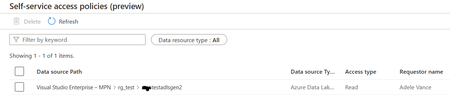
Using this https://learn.microsoft.com/en-us/purview/how-to-policies-self-service-storage we created a Workflow for self-service data access policy. When a consumer submits a request for a Read access to a data asset, it successfully sends the request to the data owner of the asset. Data Owner approves the request, and after approval, a policy gets successfully auto generated. But the consumer still does not have Read access to the data asset via Azure Portal or Azure Storage Explorer. According to following official documentations and a video from Purview teams, the consumer should have a Read access to the data asset. Question: What we may have been missing and how the issue can be resolved? Remarks: We have verified all the prerequisites described in the above link, as follows: Ran the short PowerShell script: # Install the Az module Install-Module -Name Az -Scope CurrentUser -Repository PSGallery -Force # Login into the subscription Connect-AzAccount -Subscription <SubscriptionID> # Register the feature Register-AzProviderFeature -FeatureName AllowPurviewPolicyEnforcement -ProviderNamespace Microsoft.Storage Data Asset: ADLSGen2 Storage Account [This was created after the above script run] Purview Collection: Collection1 (subcollection of root collection) Data Owner roles on the storage account: IAM Owner, Storage Blob Data Contributor Data Owner roles on Collection1: Data Curator, Data Reader Consumer role on Collection1: Reader A screenshot of the policy auto-generated after an approval from data owner: Ref: https://learn.microsoft.com/en-us/purview/concept-self-service-data-access-policy https://learn.microsoft.com/en-us/purview/how-to-workflow-self-service-data-access-hybrid https://learn.microsoft.com/en-us/purview/how-to-enable-data-policy-enforcement https://www.youtube.com/watch?v=CFE8ltT19Ss643Views1like1Comment
Custom Attributes in Term Templates
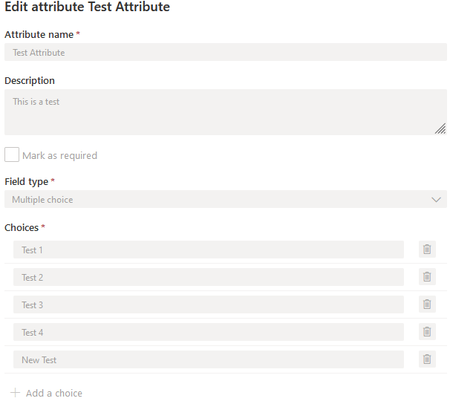
We are running into what appears to be an issue with custom attributes in Purview. Once they have been saved and the template updated it doesn't appear to be possible to modify the selections that have been added for a multiple choice field type. We are able to add new choices but not able to delete existing choices or modify the text in them. Is this a limitation of the software or an access level issue? I've attached a screen shot of what it looks like normally. Description is greyed out as well because I expired the attribute.585Views0likes0Comments
Auto label based on content matching by Information protection scanner
I have on premises repository in TBs. I have already configured information protection scanner and added repository where files are placed and my scanner is scanning the files also. I want to auto label them based on content matching. for example: Auto label files as "Confidential" when there is a match of world "budget" Auto label files as "Internal use only" when there is a match of word "leave request form" I know auto labeling is available for M365 for example exchange, ondrive and sharepoint. but How can I achieve above using information protection scanner. Please help. Thanks2.9KViews0likes12Comments
Purview give user restricted access
Hi, A user wants to know who downloaded / opened files within a specific SHarePoint site. Is it possible to give a user restricted access to Purview so they can access reports from only a singe site so they cannot access reports from any other area?871Views0likes2Comments