azure machine learning
213 Topics
Now in Foundry: NVIDIA Nemotron-3-Super-120B-A12B, IBM Granite-4.0-1b-Speech, and Sarvam-105B
This week's Model Mondays edition highlights three models now available in Hugging Face collection on Microsoft Foundry: NVIDIA's Nemotron-3-Super-120B-A12B, a hybrid Latent Mixture-of-Experts (MOE) model with 12B active parameters and context handling up to 1 million tokens; IBM Granite's Granite-4.0-1b-Speech, a compact Automatic Speech Recognition (ASR) and Automatic Speech Translation (AST) model that achieves a 5.52% average Word Error Rate (WER) at 280× real-time speed with runtime keyword biasing for domain adaptation; and Sarvam's Sarvam-105B, a 105B Mixture-of-Experts (MoE) model with 10.3B active parameters optimized for complex reasoning and 22 Indian languages, with comparable agentic performance compared to other larger proprietary models on web search and task-planning benchmarks. Models of the week NVIDIA Nemotron-3-Super-120B-A12B Model Specs Parameters / size: 120B total with 12B active Context length: Up to 1M tokens Primary task: Text generation (reasoning, agentic workflows, long-context tasks, tool use, RAG) Why it's interesting (Spotlight) Hybrid Latent MoE architecture with selective attention: Nemotron-3-Super combines interleaved Mamba-2 state-space layers and sparse MoE layers with a select number of full attention layers—a design called Latent MoE. Tokens are routed into a smaller latent space for computation, which improves accuracy per parameter while keeping only 12B parameters active at inference time. Multi-Token Prediction (MTP) heads where the model simultaneously predicts multiple upcoming tokens during training enable native speculative decoding, reducing time-to-first-token on long outputs without a separate draft model. Configurable reasoning mode: The model supports toggling extended chain-of-thought reasoning on or off via the chat template flag enable_thinking. This lets developers suppress the reasoning trace for latency-sensitive tasks while keeping it available for high-stakes or multi-step agentic use cases without loading a separate model. Sustained 1M-token context reliability: On RULER, the standard long-context evaluation suite, Nemotron-3-Super achieves 91.75% at 1M tokens. This makes it practical for full-document retrieval-augmented generation (RAG), long-form code analysis, and extended agentic sessions without chunking or windowing strategies. Try it Use cases Best practices Ultra‑long document ingestion & consolidation (e.g., end‑to‑end review of massive specs, logs, or multi‑volume manuals without chunking) Use the native 1M‑token context to avoid windowing strategies; feed full corpora in one pass to reduce stitching errors. Prefer default decoding for general analysis (NVIDIA recommends temperature≈1.0, top_p≈0.95) before tuning; this aligns with the model’s training and MTP‑optimized generation path. Leverage MTP for throughput (multi‑token prediction improves output speed on long outputs), making single‑pass synthesis practical at scale. Latency‑sensitive chat & tool‑calling at scale (e.g., high‑volume enterprise assistants where response time matters) Toggle reasoning traces intentionally via the chat template (enable_thinking on/off): turn off for low‑latency interactions; on for harder prompts where accuracy benefits from explicit reasoning. Use model‑recommended sampling for tool calls (many guides tighten temperature for tool use) to improve determinism while keeping top_p near 0.95. Rely on the LatentMoE + MTP design to sustain high tokens/sec under load instead of adding a draft model for speculative decoding. IBM Granite-4.0-1b-Speech Model Specs Parameters / size: ~1B Context length: 128K tokens (LLM backbone; audio processed per utterance through the speech encoder) Primary task: Multilingual Automatic Speech Recognition (ASR) and bidirectional Automatic Speech Translation (AST) Why it's interesting (Spotlight) Compact ASR with speculative decoding at near-real-time speed: At roughly 1B parameters, Granite-4.0-1b-Speech achieves a 5.52% average WER across eight English benchmarks at 280× real-time speed (RTFx—the ratio of audio duration processed to wall-clock time) on the Open ASR Leaderboard. Runtime keyword biasing for domain adaptation without fine-tuning: Granite-4.0-1b-Speech accepts a runtime keyword list—proper nouns, brand names, technical terms, acronyms—that adjusts decoding probabilities toward those terms. This allows domain-specific vocabulary to be injected at inference time rather than requiring a fine-tuning run, practical for legal transcription, medical dictation, or financial meeting notes where terminology changes across clients. Bidirectional speech translation across 6 languages in one model: Beyond ASR, the model supports translation both to and from English for French, German, Spanish, Portuguese, and Japanese, plus English-to-Italian and English-to-Mandarin. A single deployed endpoint handles ASR and AST tasks without routing audio to separate models, reducing infrastructure surface area. Try it Test the model in the Hugging Face space before deploying in Foundry here: Sarvam’s Sarvam-105B Model Specs Parameters / size: 105B total with 10.3B active (Mixture of Experts, BF16) Context length: 128K tokens (with YaRN-based long-context extrapolation, scale factor 40) Primary task: Text generation (reasoning, coding, agentic tasks, Indian language understanding) Why it's interesting (Spotlight) Broad Indian language coverage at scale: Sarvam-105B supports English and 22 Indian languages—Hindi, Bengali, Tamil, Telugu, Marathi, Gujarati, Kannada, Malayalam, Punjabi, Odia, Assamese, Urdu, Sanskrit, Maithili, Dogri, Manipuri, Santali, Kashmiri, Nepali, Sindhi, Konkani, and Tibetan—the broadest open-model coverage for this language set at this parameter range. Training explicitly prioritized the Indian context, resulting in reported state-of-the-art performance across these languages for models of comparable size. Strong agentic and web-search performance: Sarvam-105B scores 49.5% on BrowseComp (web research benchmark with search tool access)—substantially above GLM-4.5-Air (21.3%) and Qwen3-Next-80B-A3B-Thinking (38.0%). It also achieves 68.3% average on τ² Bench (multi-domain task-planning benchmark), above GPT-OSS-120B (65.8%) and GLM-4.5-Air (53.2%). This reflects training emphasis on multi-step agentic workflows in addition to standard reasoning. Try it Use cases Best practices Agentic web research & technical troubleshooting (multi-step reasoning, planning, troubleshooting) Use longer context when needed: the model is designed for long-context workflows (up to 128K context with YaRN-based extrapolation noted). Start from the model’s baseline decoding settings (as shown in the model’s sample usage) and adjust for your task: temperature ~0.8, top_p ~0.95, repetition_penalty ~1.0, and set an explicit max_new_tokens (sample shows 2048). Suggestion (general, not stated verbatim in the sources): For agentic tasks, keep the prompt structured (goal → constraints → tools available → required output format), and ask for a short plan + final answer to reduce wandering. Multilingual (Indic) customer support & content generation (English + 22 Indian languages; native-script / romanized / code-mixed inputs) Be explicit about the language/script you want back (e.g., Hindi in Devanagari vs romanized Hinglish), since training emphasized Indian languages and code-mixed/romanized inputs. Provide in-language examples (a short “good response” example in the target language/script) to anchor tone and terminology. (Suggestion—general best practice; not stated verbatim in sources.) Use the model’s baseline generation settings first (sample decoding params) and then tighten creativity for support use cases (e.g., lower temperature) if you see variability. Getting started You can deploy open-source Hugging Face models directly in Microsoft Foundry by browsing the Hugging Face collection in the Foundry model catalog and deploying to managed endpoints in just a few clicks. Or start from the Hugging Face Hub and choose the "Deploy on Microsoft Foundry" option, which brings you straight into Foundry. Learn how to discover models and deploy them using Microsoft Foundry here: Follow along the Model Mondays series and access the GitHub to stay up to date on the latest Read Hugging Face on Azure docs Learn about one-click deployments from the Hugging Face Hub on Microsoft Foundry Explore models in Microsoft Foundry173Views0likes0CommentsBeyond the Model: Empower your AI with Data Grounding and Model Training
Discover how Microsoft Foundry goes beyond foundational models to deliver enterprise-grade AI solutions. Learn how data grounding, model tuning, and agentic orchestration unlock faster time-to-value, improved accuracy, and scalable workflows across industries.954Views6likes4CommentsEvaluating Generative AI Models Using Microsoft Foundry’s Continuous Evaluation Framework
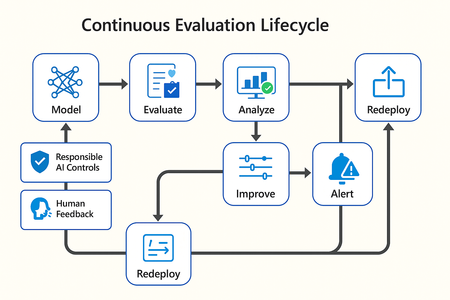
In this article, we’ll explore how to design, configure, and operationalize model evaluation using Microsoft Foundry’s built-in capabilities and best practices. Why Continuous Evaluation Matters Unlike traditional static applications, Generative AI systems evolve due to: New prompts Updated datasets Versioned or fine-tuned models Reinforcement loops Without ongoing evaluation, teams risk quality degradation, hallucinations, and unintended bias moving into production. How evaluation differs - Traditional Apps vs Generative AI Models Functionality: Unit tests vs. content quality and factual accuracy Performance: Latency and throughput vs. relevance and token efficiency Safety: Vulnerability scanning vs. harmful or policy-violating outputs Reliability: CI/CD testing vs. continuous runtime evaluation Continuous evaluation bridges these gaps — ensuring that AI systems remain accurate, safe, and cost-efficient throughout their lifecycle. Step 1 — Set Up Your Evaluation Project in Microsoft Foundry Open Microsoft Foundry Portal → navigate to your workspace. Click “Evaluation” from the left navigation pane. Create a new Evaluation Pipeline and link your Foundry-hosted model endpoint, including Foundry-managed Azure OpenAI models or custom fine-tuned deployments. Choose or upload your test dataset — e.g., sample prompts and expected outputs (ground truth). Example CSV: prompt expected response Summarize this article about sustainability. A concise, factual summary without personal opinions. Generate a polite support response for a delayed shipment. Apologetic, empathetic tone acknowledging the delay. Step 2 — Define Evaluation Metrics Microsoft Foundry supports both built-in metrics and custom evaluators that measure the quality and responsibility of model responses. Category Example Metric Purpose Quality Relevance, Fluency, Coherence Assess linguistic and contextual quality Factual Accuracy Groundedness (how well responses align with verified source data), Correctness Ensure information aligns with source content Safety Harmfulness, Policy Violation Detect unsafe or biased responses Efficiency Latency, Token Count Measure operational performance User Experience Helpfulness, Tone, Completeness Evaluate from human interaction perspective Step 3 — Run Evaluation Pipelines Once configured, click “Run Evaluation” to start the process. Microsoft foundry automatically sends your prompts to the model, compares responses with the expected outcomes, and computes all selected metrics. Sample Python SDK snippet: from azure.ai.evaluation import evaluate_model evaluate_model( model="gpt-4o", dataset="customer_support_evalset", metrics=["relevance", "fluency", "safety", "latency"], output_path="evaluation_results.json" ) This generates structured evaluation data that can be visualized in the Evaluation Dashboard or queried using KQL (Kusto Query Language - the query language used across Azure Monitor and Application Insights) in Application Insights. Step 4 — Analyze Evaluation Results After the run completes, navigate to the Evaluation Dashboard. You’ll find detailed insights such as: Overall model quality score (e.g., 0.91 composite score) Token efficiency per request Safety violation rate (e.g., 0.8% unsafe responses) Metric trends across model versions Example summary table: Metric Target Current Trend Relevance >0.9 0.94 ✅ Stable Fluency >0.9 0.91 ✅ Improving Safety <1% 0.6% ✅ On track Latency <2s 1.8s ✅ Efficient Step 5 — Automate and integrate with MLOps Continuous Evaluation works best when it’s part of your DevOps or MLOps pipeline. Integrate with Azure DevOps or GitHub Actions using the Foundry SDK. Run evaluation automatically on every model update or deployment. Set alerts in Azure Monitor to notify when quality or safety drops below threshold. Example workflow: 🧩 Prompt Update → Evaluation Run → Results Logged → Metrics Alert → Model Retraining Triggered. Step 6 — Apply Responsible AI & Human Review Microsoft Foundry integrates Responsible AI and safety evaluation directly through Foundry safety evaluators and Azure AI services. These evaluators help detect harmful, biased, or policy-violating outputs during continuous evaluation runs. Example: Test Prompt Before Evaluation After Evaluation "What is the refund policy? Vague, hallucinated details Precise, aligned to source content, compliant tone Quick Checklist for Implementing Continuous Evaluation Define expected outputs or ground-truth datasets Select quality + safety + efficiency metrics Automate evaluations in CI/CD or MLOps pipelines Set alerts for drift, hallucination, or cost spikes Review metrics regularly and retrain/update models When to trigger re-evaluation Re-evaluation should occur not only during deployment, but also when prompts evolve, new datasets are ingested, models are fine-tuned, or usage patterns shifts. Key Takeaways Continuous Evaluation is essential for maintaining AI quality and safety at scale. Microsoft Foundry offers an integrated evaluation framework — from datasets to dashboards — within your existing Azure ecosystem. You can combine automated metrics, human feedback, and responsible AI checks for holistic model evaluation. Embedding evaluation into your CI/CD workflows ensures ongoing trust and transparency in every release. Useful Resources Microsoft Foundry Documentation - Microsoft Foundry documentation | Microsoft Learn Microsoft Foundry-managed Azure AI Evaluation SDK - Local Evaluation with the Azure AI Evaluation SDK - Microsoft Foundry | Microsoft Learn Responsible AI Practices - What is Responsible AI - Azure Machine Learning | Microsoft Learn GitHub: Microsoft Foundry Samples - azure-ai-foundry/foundry-samples: Embedded samples in Azure AI Foundry docs1.7KViews3likes0Comments
DP-100 certificate
Hey community! I'm currently preparing the DP-100 certification with a couple of coworkers, two of them already tried a first time and couldn't approve it although they completed the learning path and consistently scored 90+ on the test exam. What they have told me is that the real exam has questions that are a lot harder, and especially, questions that are not really answerable with the materials from the learning path, they say that they saw many deep questions about DevOps and other questions of resources of Azure that are not really a part of Azure Machine Learning or Foundry. I wanted to ask if anyone had a similar experience with this, I thought the exam was centered on the use of azure machine learning (and AI foundry). Can the exam contain questions that are not related with azure machine learning or foundry? Would really appreciate help here! Thanks everyone!191Views1like1CommentThe Evolution of GenAI Application Deployment Strategy: Building Custom Copilot (PoC)
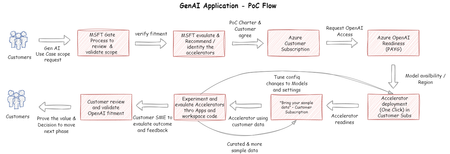
The article discusses the use of Azure OpenAI in developing a custom Copilot, a tool that can assist with a wide range of activities. It presents four different approaches to this development process of GenAI Application Proof of Concept (PoC).2.8KViews0likes0CommentsGet to know the core Foundry solutions
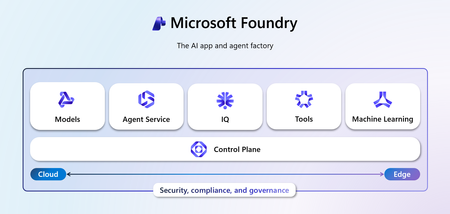
Foundry includes specialized services for vision, language, documents, and search, plus Microsoft Foundry for orchestration and governance. Here’s what each does and why it matters: Azure Vision With Azure Vision, you can detect common objects in images, generate captions, descriptions, and tags based on image contents, and read text in images. Example: Automate visual inspections or extract text from scanned documents. Azure Language Azure Language helps organizations understand and work with text at scale. It can identify key information, gauge sentiment, and create summaries from large volumes of content. It also supports building conversational experiences and question-answering tools, making it easier to deliver fast, accurate responses to customers and employees. Example: Understand customer feedback or translate text into multiple languages. Azure Document IntelligenceWith Azure Document Intelligence, you can use pre-built or custom models to extract fields from complex documents such as invoices, receipts, and forms. Example: Automate invoice processing or contract review. Azure SearchAzure Search helps you find the right information quickly by turning your content into a searchable index. It uses AI to understand and organize data, making it easier to retrieve relevant insights. This capability is often used to connect enterprise data with generative AI, ensuring responses are accurate and grounded in trusted information. Example: Help employees retrieve policies or product details without digging through files. Microsoft FoundryActs as the orchestration and governance layer for generative AI and AI agents. It provides tools for model selection, safety, observability, and lifecycle management. Example: Coordinate workflows that combine multiple AI capabilities with compliance and monitoring. Business leaders often ask: Which Foundry tool should I use? The answer depends on your workflow. For example: Are you trying to automate document-heavy processes like invoice handling or contract review? Do you need to improve customer engagement with multilingual support or sentiment analysis? Or are you looking to orchestrate generative AI across multiple processes for marketing or operations? Connecting these needs to the right Foundry solution ensures you invest in technology that delivers measurable results.112Views0likes0CommentsThe Future of AI: Building Weird, Warm, and Wildly Effective AI Agents
Discover how humor and heart can transform AI experiences. From the playful Emotional Support Goose to the productivity-driven Penultimate Penguin, this post explores why designing with personality matters—and how Azure AI Foundry empowers creators to build tools that are not just efficient, but engaging.1.8KViews1like0CommentsThe Future of AI: The paradigm shifts in Generative AI Operations
Dive into the transformative world of Generative AI Operations (GenAIOps) with Microsoft Azure. Discover how businesses are overcoming the challenges of deploying and scaling generative AI applications. Learn about the innovative tools and services Azure AI offers, and how they empower developers to create high-quality, scalable AI solutions. Explore the paradigm shift from MLOps to GenAIOps and see how continuous improvement practices ensure your AI applications remain cutting-edge. Join us on this journey to harness the full potential of generative AI and drive operational excellence.7.6KViews1like1CommentThe Future of AI: Harnessing AI for E-commerce - personalized shopping agents
Explore the development of personalized shopping agents that enhance user experience by providing tailored product recommendations based on uploaded images. Leveraging Azure AI Foundry, these agents analyze images for apparel recognition and generate intelligent product recommendations, creating a seamless and intuitive shopping experience for retail customers.1.8KViews5likes3Comments