Azure Files
61 TopicsGeneral Availability: Azure Active Directory Kerberos with Azure Files for hybrid identities
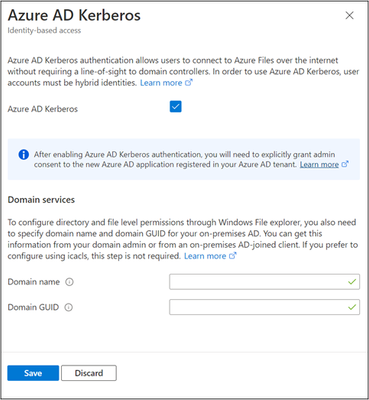
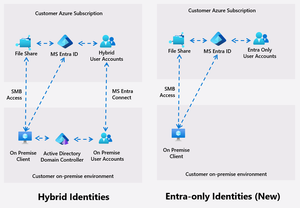
We are excited to announce General Availability of Azure Files integration with Azure Active Directory (Azure AD) Kerberos for hybrid identities. With this release, identities in Azure AD can mount and access Azure file shares without the need for line-of-sight to an Active Directory domain controller.39KViews11likes36CommentsCloud Native Identity with Azure Files: Entra-only Secure Access for the Modern Enterprise
Azure Files introduces Entra only identities authentication for SMB shares, enabling cloud-only identity management without reliance on on-premises Active Directory. This advancement supports secure, seamless access to file shares from anywhere, streamlining cloud migration and modernization, and reducing operational complexity and costs.10KViews8likes14CommentsSimplifying file share management and control for Azure Files
Azure Files makes it easy to run your file shares in the cloud without the overhead of on-premises file servers or NAS devices. Until now, managing file shares in Azure has also meant managing storage accounts, an extra layer of management that brings along capacity planning, shared settings, and scaling challenges. To simplify this experience, we're excited to announce the preview of a new file share-centric management model for Azure Files. This shift means you can focus on just the part you care about - creating and using file shares with your applications, without the overhead of storage account management. With the new management model, you can now: Deploy files shares using easy automation as a top-level resource. Configure granular secure access by share. Monitor and scale per share with added flexibility. Leverage simplified transparent pricing with provisioned v2. Let's look at how this works. A new way to manage file shares With the Microsoft.FileShares management model, file shares are now top-level Azure resources, just like virtual machines, disks, or virtual networks. This allows file shares to seamlessly integrate with Azure's ecosystem of tools, including templates, policies, tags, and cost management. By having file shares as top-level Azure resources, you no longer need to puzzle over which storage account settings actually apply. Each file share comes with only the settings that matter, so you can manage it directly without extra layers of complexity. The result is a simpler, more intuitive experience where you stay focused on your workload, not the infrastructure underneath. Per share settings unlock a new level of granular control: each file share can now have its own networking and security rules, tailored to the workload it supports. The result is isolation and flexibility: security without compromise. Provisioning and billing are also simplified in this mode, as you no longer need to capacity plan files against the storage, IOPS, and throughput limits of the storage accounts hosting them. Each file share now scales independently up to Azure Files' limits, so growth in one file share doesn't impact any others. And because Azure billing always works on a per resource basis, every file share stands on its own as a separate billable item. That makes costs easy to track, allocate, or charge back to the right project, department, or customer. Combined with the provisioned v2 billing model for Azure Files, the result is transparent pricing: you provision exactly what you need for each share and can attribute the cost with precision. In this first release, you'll be able to create and manage NFS file shares on SSD, with support for SMB file shares planned in the future. Built to scale Azure Files supports a diverse customer base, ranging from small businesses managing a few shares to large enterprises deploying thousands. It accommodates both traditional file share workloads with long-lived persistent data and dynamic container workloads that provision and decommission file shares frequently. No matter the scenario, our goal is the same: Azure Files should adapt to your workload, not the other way around. These principles are baked directly into the new model, ensuring that users do not need to create additional subscriptions due to management limitations, and that sufficient scalability and performance are provided to meet demanding workloads. In preview, you can create up to 1,000 file shares per subscription per region. But raw resource counts don't mean much if the management service can't keep pace - just as important, the new model significantly raises the management service limits compared to the storage account model. For most customers, this makes management throttling much less likely, even at scale (see Azure Files scale targets for information on both Microsoft.FileShares and Microsoft.Storage request limits). As we work toward general availability, we plan to further increase both resource and request limits to help customers operate at scale without running into throttling or needing to shard file shares across multiple subscriptions. Speed matters just as much as scale, and in preview, provisioning a file share has typically been faster than provisioning through a storage account. In our in-house testing, we observed file shares deployed using the new model were about ~2x faster than classic file shares, and we intend to continue to improve those numbers as we work towards general availability. Get started today You can start creating file share resources today in preview, which is open to everyone. Just go to the Azure portal, search for "file shares" and click "+ Create": A few important notes about what's not yet available in preview: The new management model is only supported on NFS and not SMB shares (on either SSD or HDD) for now. NFS file shares using customer managed keys (CMK), file share soft-delete, and AKS integration via the CSI driver are not yet available, but are planned for general availability. The initial preview is available in a limited set of regions, however we will expand this list as we work towards general availability. See regional availability for a complete list. To learn more, please see: Planning for an Azure Files deployment How to create a file share (Microsoft.FileShares) Azure Files scale targets2.7KViews8likes8CommentsMigrate the critical file data you need to power your applications
When you migrate applications to Azure, you cannot leave file data behind. The Azure File Migration program can help you migrate data from NFS, SMB, and S3 sources to Azure Storage Services in less time, less risk, and no headache! Learn how to take advantage of this program and about the fundamentals of file migration in this post.17KViews6likes8CommentsLower costs and boost flexibility with Azure Files provisioned v2
For enterprise IT professionals or startup developers alike, cost efficiency for file storage is top of mind. Whether you're running mission-critical databases, production scale applications like SAP, or cloud native applications using file storage on AKS, your storage infrastructure should adapt to your workload - not the other way around. To bring this flexibility to your hands, we introduced the provisioned v2 model for the HDD (standard) media tier in 2024. Today, we are excited to announce that we're extending the provisioned v2 model to the SSD (premium) media tier. Provisioned v2 is designed to give you more control, better performance alignment, and significant cost savings across a wide range of customer scenarios - by decoupling performance from capacity, lowering the minimum share size to 32 GiB, and increasing the maximum share size to 256 TiB. With provisioned v2 you can dynamically scale up or down your file share capacity or performance as needed without any downtime based on your workload pattern. Right-sized performance for every workload Whether you are running general purpose file shares, DevOps tooling, AI workflows or databases, you can benefit from leveraging the provisioned v2 model. Here are some examples: Database workloads such as SQL Server, Oracle®, MongoDB, and enterprise platforms like SAP and EPIC require high IOPS and throughput but minimal storage. With provisioned v2, you can secure needed performance without excess storage, resulting in substantial cost savings. Containerized workloads, like Azure Kubernetes Service (AKS), often use very small file shares to achieve shared storage between volumes. With provisioned v2, we've decreased the minimum share size from 100 GiB to 32 GiB and have enabled you to provision just the minimum IOPS and throughput that's included for free. This means that the minimum file share cost in Azure Files is going from $16 / month to just $3.20 / month - an 80% cost savings! Workloads that require fast fetch of infrequently used data, like media files, where the storage workload requires IOPS/throughput occasionally but requires the low latency upon retrieval that you can only get on SSD storage media. With provisioned v2, we've increased the maximum share size from 100 TiB to 256 TiB, enabling larger than ever file shares on Azure Files. And the flexible provisioning afforded by provisioned v2 enables you to dramatically decrease bundled IOPS/throughput to match the archive's requirements. Let's take a deeper look at these savings with some sample workloads: Workload scenario Provisioned v1 Provisioned v2 Cost savings Workload using defaults for IOPS and throughput 10 TiB storage, ~13K IOPS, ~1.1 GiB / sec throughput $1,638.40 / month $1,341.09 / month 18% Relational database workload 4 TiB storage, 20K IOPS, 1.5 GiB / sec throughput $2,720 / month $925.42 / month 66% Hot archive for multimedia 100 TiB storage, 15K IOPS, 2 GiB / sec throughput $16,384.00 / month $10,641.93 / month 35% To learn more about how to compare your costs between the provisioned v2 and provisioned v1 models, see understanding the costs of the provisioned v2 model. All pricing comparisons are shown using the West US 2 prices for locally redundant storage (LRS). Top reasons to give provisioned v2 a try If you haven't looked at Azure Files before, now is the best time to get started. Here's why you should look at making the move to Azure Files with provisioned v2 SSD: Affordable, with low entry costs starting at just $3.20/month. Flexible and customizable to fit a wide range of requirements. Easy to understand and predictable pricing. Support for high IOPS and low latency performance, ideal for performance-critical applications that require sustained throughput and rapid data access. Support for unpredictable or burst-heavy usage patterns, ensuring smooth performance under variable demand. Scalable sizing options, with SSD file shares ranging from 32 GiB to 256 TiB - well-suited for workloads with smaller footprints. How it works With the provisioned v2 model, IOPS and throughput are recommended to you based on the amount of provisioned storage you select, however this recommendation is completely overridable by you. If your workload needs more IOPS or throughput than the default recommendations, you can provision more without having to provision a bunch of extra storage. And if your workload needs less than the default recommendation, you can decrease the provisioned IOPS and throughput all the way down to the minimums for a file share. The best part of this is that you don't have to get this right on file share creation: if you don't know what your performance requirements are or your workload's patterns change over time, you can dynamically scale up or down your file share's provisioning as needed, without any downtime. The provisioned v2 file share also gives you all of the telemetry needed to monitor your workload's used IOPS and throughput usage, enabling you to continuously tune your file share to your workload. Getting started is easy Provisioned v2 for SSD is available right now, in all public cloud regions (see provisioned v2 availability for details). Simply select "Azure Files" for primary service, "Premium" for performance, and "Provisioned v2" for billing when creating your storage account in the Azure Portal. To learn more about how to get started, see: Azure Files pricing page Understanding the provisioned v2 model | Microsoft Learn How to create an Azure file share | Microsoft Learn836Views4likes0Comments
Secure Linux workloads using Azure Files with Encryption in Transit
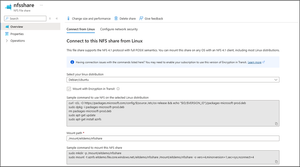
Encryption in Transit (EiT) overview As organizations increasingly move to cloud environments, safeguarding data security both at rest and during transit is essential for protecting sensitive information from emerging threats and for maintaining regulatory compliance. Azure Files already offers encryption at rest using Microsoft-managed or customer-managed keys for NFS file shares. Today, we're excited to announce the General Availability of Encryption in Transit (EiT) for NFS file shares. By default, Azure encrypts data moving across regions. In addition, all clients accessing Azure Files NFS shares are required to be within the scope of a trusted virtual network (VNet) to ensure secure access to applications. However, data transferred within resources in a VNet remains unencrypted. Enabling EiT ensures that all read & writes to the NFS file shares within the VNET are encrypted providing an additional layer of security. With EiT, enterprises running production scale applications with Azure Files NFS shares can now meet their end-to-end compliance requirements. Feedback from the NFS community and Azure customers emphasized the need for an encryption approach that is easy to deploy, portable, and scalable. TLS enables a streamlined deployment model for NFS with EiT while minimizing configuration complexity, maintaining protocol transparency, and avoiding operational overhead. The result is a more secure, performant, and standards-compliant solution that integrates seamlessly into existing NFS workflows. With EiT, customers can now encrypt all NFS traffic using the latest and most secure version of TLS, TLS 1.3, achieving enterprise-grade security effortlessly. TLS provides three core security guarantees: Confidentiality: Data is encrypted, preventing eavesdropping. Authentication: Client verifies the server via certificates during handshake to establish trust. Integrity: TLS ensures that information arrives safely and unchanged, thus adding protection against data corruption or bitflips in transit. TLS encryption for Azure Files is delivered via stunnel, a trusted, open-source proxy designed to add TLS encryption to existing client-server communications without modifying the applications themselves. It has been widely used for its robust security and transparent, in-transit encryption for many use cases across industries for many years. AZNFS Mount Helper for Seamless Setup EiT client setup and mount for NFS volumes may seem like a daunting task, but we have made it easier using the AZNFS mount helper tool. Simplicity and Resiliency: AZNFS is a simple, open-source tool, maintained and supported by Microsoft, that automates stunnel setup and NFS volume mounting over a secure TLS tunnel. AZNFS’s in-built watchdog's auto-reconnect logic protects the TLS mounts, ensuring high availability during unexpected connectivity interruptions. Sample AZNFS mount commands, customized to your NFS volume, are available in the Azure portal (screenshot below). Fig 1. Azure portal view to configure AZNFS for Azure clients using EiT Standardized and flexible: Mounting with AZNFS incorporates the Microsoft recommended performance, security and reliability mount options by default while providing flexibility to adjust these settings to fit your workload. For example, while TLS is the default selection, you can override it to non-TLS connections for scenarios like testing or debugging. Broad Linux compatibility: AZNFS is available through Microsoft’s package repository for major Linux distributions, including Ubuntu, RedHat, SUSE, Alma Linux, Oracle Linux and more. Seamless upgrades: AZNFS package updates automatically in the background without affecting the active mount connections. You will not need any maintenance windows or downtime to perform upgrades. The illustration below shows how EiT helps transmit data securely between clients and NFS volumes over trusted networks. Fig 2. EiT set up flow and secure data transfer for NFS shares Enterprise Workloads and Platform Support EiT is compatible with applications running on a wide range of platforms, including Linux VMs in Azure, on-premises Linux servers, VM scale sets, and Azure Batch, ensuring compatibility with major Linux distributions for cloud, hybrid, and on-premises deployments. Azure Kubernetes Service (AKS): The preview of NFS EiT in AKS will be available shortly. In the meantime, the upstream Azure Files CSI Driver includes AZNFS integration, which can be manually configured to enable EiT for NFS volumes with stateful container workloads. SAP: SAP systems are central to many business operations and handle sensitive data like financial information, customer details, and proprietary data. Securing this confidential data within the SAP environment, including its central services, is a critical concern. NFS volumes, used in central services are single points of failure, making their security and availability crucial. This blog post on SAP deployments on Azure provides guidance on using EiT enabled NFS volumes for SAP deployment scenarios to make them even more secure. SAP tested EiT for their SAP RISE deployments and shared positive feedback: “The NFS Encryption in Transit preview has been a key enabler for running RISE customers mission critical workloads on Azure Files, helping us meet high data in transit encryption requirements without compromising performance or reliability. It has been critical in supporting alignment with strict security architectures and control frameworks—especially for regulated industries like financial services and healthcare. We’re excited to see this capability go GA and look forward to leveraging it at scale.” Ventsislav Ivanov, IT Architecture Chief Expert, SAP Compliance-centric verticals: As part of our preview, customers in industry verticals including financial services, insurance, retail leveraged EiT to address their data confidentiality and compliance needs. One such customer, Standard Chartered, a major global financial institution, highlighted its benefits. “The NFS Encryption in Transit preview has been a key enabler for migrating one of our on-premises applications to Azure. It allowed us to easily run tests in our development and staging environments while maintaining strict compliance and security for our web application assets. Installation of the required aznfs package was seamless, and integration into our bootstrap script for virtual machine scale set automation went smoothly. Additionally, once we no longer needed to disable the HTTPS requirement on our storage account, no further changes were necessary to our internal Terraform modules—making the experience nearly plug-and-play. We’re excited to see this capability reach general availability” Mohd Najib, Azure Cloud Engineer, Standard Chartered Regional availability and pricing Encryption in Transit GA with TLS 1.3 is rolling out globally and is now available in most regions. EiT can be enabled on both new and existing storage accounts and Azure Files NFS shares. There is no additional cost for enabling EiT. Next Steps to Secure Your Workloads Explore More: How to encrypt data in transit for NFS shares| Microsoft Learn Mandate Security: Enable “Secure Transfer Required” on all your Storage Accounts with NFS volumes to mandate EiT for additional layer of protection. Enforce at Scale: Enable Azure Policy for enforcing EiT across your subscription. Please reach out to the team at AzureFiles@microsoft.com for any questions and feedback.776Views4likes0CommentsIntroducing Cross Resource Metrics and Alerts Support for Azure Storage
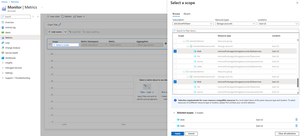
Aggregate and analyze storage metrics from multiple storage accounts in a single chart. We’re thrilled to announce a highly requested feature: Cross Resource Metrics and Alerts support for Azure Storage! With this new capability, you can now monitor and visualize metrics across multiple storage accounts in a single chart and configure alerts across multiple accounts — within the same subscription and region. This makes managing large fleets of storage accounts significantly easier and more powerful. What’s New Cross Resource Metrics Support Visualize aggregated metric data across multiple storage accounts. Break down metrics by individual resources in a sorted and ordered way. Cross Resource Alerting Support Create a single alert rule that monitors a metric across many storage accounts and triggers an action when thresholds are crossed on any resource. Full Metric Namespace Support Works across Blob, File, Table, and Queue metric namespaces. All existing storage metrics are supported for cross resource visualization and alerting. Why This Matters Centralized Monitoring for Large Environments Manage and monitor dozens (or hundreds) of storage accounts at once with a unified view. Fleet-wide Alerting Set up a single alert that covers your whole storage fleet, ensuring you are quickly notified if any account experiences performance degradation or other issues. Operational Efficiency Helps operations teams scale monitoring efforts without needing to configure and manage separate dashboards and alerts for each account individually. How To Get Started Step 1: Create a Cross Resource Metrics Chart Go to Azure Monitor -> Metrics. Scope Selection: Under Select a scope, select the same Metric Namespace (blob/file/queue/table) for multiple Storage Accounts from the same Subscription and Region. Click Apply. In the below example, two storage accounts have been selected for metrics in the blob metric namespace. Configure Metric Chart: Select a Metric (e.g., Blob Capacity, Transactions, Ingress) Aggregation: By default, a Split by clause on ResourceId is applied to view individual account breakdowns. Or view aggregated data across all selected accounts by removing the Split by clause. Example As another example, lets monitor total transactions across storage accounts on the Hot tier to view aggregate or per-account breakdown in a single graph. From the same view, select the Transactions metric instead. Select 5 storage accounts by using the Add Filter clause and filtering by the ResourceId property. Add another filter and select a specific tier, say Hot. This will show aggregated transactions on data in the Hot tier per minute across all selected storage accounts. Select Apply Splitting and select ResourceId to view an ordered breakdown of transactions per minute for all the Storage accounts in scope. In this specific example, only 4 storage accounts are shown since 1 storage account is excluded based on the Tier filter. Step 2: Set Up Cross Resource Alert Rules Click on New alert rule from the chart view shown above in order to create an alert that spans the 5 storage accounts above and get alerted when any account breaches a certain transactions limit over a 5 minute period. Configure required values for the Threshold, Unit and Value is fields. This defines when the alert should fire (e.g., Transactions > 5000) Under the Split by dimensions section, ensure that the Microsoft.ResourceId dimension is not included. Under Actions, attach an Action Group (Email, Webhook, Logic App, etc.). Review and Create. Final Thoughts Cross Resource Metrics and Alerts for Azure Storage makes monitoring and management at scale much more intuitive and efficient. Whether you're overseeing 5 storage accounts or 500, you can now visualize performance and respond to issues faster than ever. And you can do it for metrics across multiple storage services including blobs, queues, files and tables! We can't wait to hear how you use this feature! Let us know your feedback by commenting below or visiting Azure Feedback.348Views3likes0CommentsHybrid File Tiering Addresses Top CIO Priorities of Risk Control and Cost Optimization
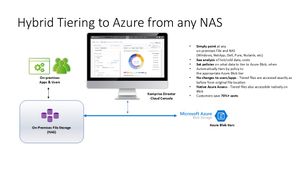
Hybrid File Tiering addresses top CIO priorities of risk control and cost optimization This article describes how you can leverage Komprise Intelligent Tiering for Azure with any on-premises file storage platform and Azure Blob Storage to reduce your cost by 70% and shrink your ransomware attack surface. Note: This article has been co-authored by Komprise and Microsoft. Unstructured data plays a big role in today's IT budgets and risk factors Unstructured data, which is any data that does not fit neatly into a database or tabular format, has been growing exponentially and is now projected by analysts to be over 80% of business information. Unstructured data is commonly referred to as file data, which is the terminology used for the rest of this article. File data has caught some IT leaders by surprise because it is now consuming a significant portion of IT budgets with no sign of slowing down. File data is expensive to manage and retain because it is typically stored and protected by replication to an identical storage platform which can be very expensive at scale. We will now review how you can easily identify hot and cold data and transparently tier cold files to Azure to cut costs and shrink ransomware exposure with Komprise. Why file data is factoring into CIO priorities CIOs are prioritizing cost optimization, risk management and revenue improvement as key priorities for their data. 56% chose cost optimization as their top priority according to the 2024 Komprise State of Unstructured Data Management survey. This is because file data is often retained for decades, its growth rate is in double-digits, and it can easily be petabytes of data. Keeping a primary copy, a backup copy and a DR copy means three or more copies of the large volume of file data which becomes prohibitively expensive. On the other hand, file data has largely been untapped in terms of value, but businesses are now realizing the importance of file data to train and fine tune AI models. Smart solutions are required to balance these competing requirements. Why file data is vulnerable to ransomware attacks File data is arguably the most difficult data to protect against ransomware attacks because it is open to many different users, groups and applications. This increases risk because a single user's or group's mistake can lead to a ransomware infection. If the file is shared and accessed again, the infection can quickly spread across the network undetected. As ransomware lurks, the risk increases. For these reasons, you cannot ignore file data when creating a ransomware defense strategy. How to leverage Azure to cut the cost and inherent risk of file data retention You can cut costs and shrink the ransomware attack surface of file data using Azure even when you still require on-premises access to your files. The key is reducing the amount of file data that is actively accessed and thus exposed to ransomware attacks. Since 80% of file data is typically cold and has not been accessed in months (see Demand for cold data storage heats up | TechTarget), transparently offloading these files to immutable storage through hybrid tiering cuts both costs and risks. Hybrid tiering offloads entire files from the data storage, snapshot, backup and DR footprints while your users continue to see and access the tiered files without any change to your application processes or user behavior. Unlike storage tiering which is typically offered by the storage vendor and causes blocks of files to be controlled by the storage filesystem to be placed in Azure, hybrid tiering operates at the file level and transparently offloads the entire file to Azure while leaving behind a link that looks and behaves like the file itself. Hybrid tiering offloads cold files to Azure to cut costs and shrink the ransomware attack surface: Cut 70%+ costs: By offloading cold files and not blocks, hybrid tiering can shrink the amount of data you are storing and backing up by 80%, which cuts costs proportionately. As shown in the example below, you can cut 70% of file storage and backup costs by using hybrid tiering. Assumptions Amount of Data on NAS (TB) 1024 % Cold Data 80% Annual Data Growth Rate 30% On-Prem NAS Cost/GB/Mo $0.07 Backup Cost/GB/Mo $0.04 Azure Blob Cool Cost/GB/Mo $0.01 Komprise Intelligent Tiering for Azure/GB/Mo $0.008 On-Prem NAS On-prem NAS + Azure Intelligent Tiering Data in On-Premises NAS 1024 205 Snapshots 30% 30% Cost of On-Prem NAS Primary Site $1,064,960 $212,992 Cost of On-Prem NAS DR Site $1,064,960 $212,992 Backup Cost $460,800 $42,598 Data on Azure Blob Cool $0 819 Cost of Azure Blob Cool $0 $201,327 Cost of Komprise $100,000 Total Cost for 1PB per Year $2,590,720 $769,909 SAVINGS/PB/Yr $1,820,811 70% Shrink ransomware attack surface by 80%: Offloading cold files to immutable Azure Blob removes cold files from the active attack surface thus eliminating 80% of the storage, DR and backup costs while also providing a potential recovery path if the cold files get infected. By having Komprise tier to immutable Azure Blob with versioning, even if someone tried to infect a cold file, it would be saved as a new version – enabling recovery using an older version. Learn more about Azure Immutable Blob storage here. In addition to cost savings and improved ransomware defense, the benefits of Hybrid Cloud Tiering using Komprise and Azure are: Leverage Existing Storage Investment: You can continue to use your existing NAS storage and Komprise to tier cold files to Azure. Users and applications continue to see and access the files as if they were still on-premises. Leverage Azure Data Services: Komprise maintains file-object duality with its patented Transparent Move Technology (TMT), which means the tiered files can be viewed and accessed in Azure as objects, allowing you to use Azure Data Services natively. This enables you to leverage the full power of Azure with your enterprise file data. Works Across Heterogeneous Vendor Storage: Komprise works across all your file and object storage to analyze and transparently tier data to Azure file and object tiers. Ongoing Lifecycle Management in Azure: Komprise continues to manage data lifecycle in Azure, so as data gets colder, it can move from Azure Blob Cool to Cold to Archive tier based on policies you control. Azure and Komprise customers are already using hybrid tiering to improve their ransomware posture while reducing costs – a great example is Katten. Global law firm saves $900,000 per year and achieves resilient ransomware defense with Komprise and Azure Katten Muchin Rosenman LLP (Katten) is a full-service law firm delivering legal services across more than a dozen practice areas and sectors, including Aviation, Construction, Energy, Education, Entertainment, Healthcare and Real Estate. Like many other large law firms, Katten has been seeing an average 20% annual growth in storage for file related data, resulting in the need to add on-premises storage capacity every 12-18 months. With a focus on managing data storage costs in an environment where data is growing exponentially annually but cannot be deleted, Katten needed a solution that could provide deep data insights and the ability to move file data as it ages to immutable object storage in the cloud for greater cost savings and ransomware protection. Katten Law implemented hybrid tiering using Komprise Intelligent Tiering to Azure and leveraged Immutable Blob storage to not only save $900,000 annually but also improved their ransomware defense posture. Read how Katten Law does hybrid tiering to Azure using Komprise. Summary: Hybrid Tiering helps CIOs to optimize file costs and cut ransomware risks Cost optimization and Risk management are top CIO priorities. File data is a major contributor to both costs and ransomware risks. Organizations are leveraging Komprise to tier cold files to Azure while continuing to use their on-premises file storage NAS. This provides a low risk approach with no disruption to users and apps while cutting 70% costs and shrinking the ransomware attack surface by 80%. Next steps To learn more and get a customized assessment of your savings, visit the Azure Marketplace listing or contact azure@komprise.com.752Views3likes1Comment