Azure Cosmos DB
60 TopicsEvaluating Generative AI Models Using Microsoft Foundry’s Continuous Evaluation Framework
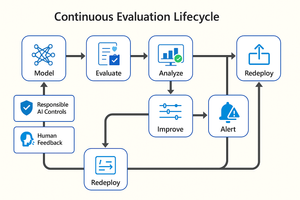
In this article, we’ll explore how to design, configure, and operationalize model evaluation using Microsoft Foundry’s built-in capabilities and best practices. Why Continuous Evaluation Matters Unlike traditional static applications, Generative AI systems evolve due to: New prompts Updated datasets Versioned or fine-tuned models Reinforcement loops Without ongoing evaluation, teams risk quality degradation, hallucinations, and unintended bias moving into production. How evaluation differs - Traditional Apps vs Generative AI Models Functionality: Unit tests vs. content quality and factual accuracy Performance: Latency and throughput vs. relevance and token efficiency Safety: Vulnerability scanning vs. harmful or policy-violating outputs Reliability: CI/CD testing vs. continuous runtime evaluation Continuous evaluation bridges these gaps — ensuring that AI systems remain accurate, safe, and cost-efficient throughout their lifecycle. Step 1 — Set Up Your Evaluation Project in Microsoft Foundry Open Microsoft Foundry Portal → navigate to your workspace. Click “Evaluation” from the left navigation pane. Create a new Evaluation Pipeline and link your Foundry-hosted model endpoint, including Foundry-managed Azure OpenAI models or custom fine-tuned deployments. Choose or upload your test dataset — e.g., sample prompts and expected outputs (ground truth). Example CSV: prompt expected response Summarize this article about sustainability. A concise, factual summary without personal opinions. Generate a polite support response for a delayed shipment. Apologetic, empathetic tone acknowledging the delay. Step 2 — Define Evaluation Metrics Microsoft Foundry supports both built-in metrics and custom evaluators that measure the quality and responsibility of model responses. Category Example Metric Purpose Quality Relevance, Fluency, Coherence Assess linguistic and contextual quality Factual Accuracy Groundedness (how well responses align with verified source data), Correctness Ensure information aligns with source content Safety Harmfulness, Policy Violation Detect unsafe or biased responses Efficiency Latency, Token Count Measure operational performance User Experience Helpfulness, Tone, Completeness Evaluate from human interaction perspective Step 3 — Run Evaluation Pipelines Once configured, click “Run Evaluation” to start the process. Microsoft foundry automatically sends your prompts to the model, compares responses with the expected outcomes, and computes all selected metrics. Sample Python SDK snippet: from azure.ai.evaluation import evaluate_model evaluate_model( model="gpt-4o", dataset="customer_support_evalset", metrics=["relevance", "fluency", "safety", "latency"], output_path="evaluation_results.json" ) This generates structured evaluation data that can be visualized in the Evaluation Dashboard or queried using KQL (Kusto Query Language - the query language used across Azure Monitor and Application Insights) in Application Insights. Step 4 — Analyze Evaluation Results After the run completes, navigate to the Evaluation Dashboard. You’ll find detailed insights such as: Overall model quality score (e.g., 0.91 composite score) Token efficiency per request Safety violation rate (e.g., 0.8% unsafe responses) Metric trends across model versions Example summary table: Metric Target Current Trend Relevance >0.9 0.94 ✅ Stable Fluency >0.9 0.91 ✅ Improving Safety <1% 0.6% ✅ On track Latency <2s 1.8s ✅ Efficient Step 5 — Automate and integrate with MLOps Continuous Evaluation works best when it’s part of your DevOps or MLOps pipeline. Integrate with Azure DevOps or GitHub Actions using the Foundry SDK. Run evaluation automatically on every model update or deployment. Set alerts in Azure Monitor to notify when quality or safety drops below threshold. Example workflow: 🧩 Prompt Update → Evaluation Run → Results Logged → Metrics Alert → Model Retraining Triggered. Step 6 — Apply Responsible AI & Human Review Microsoft Foundry integrates Responsible AI and safety evaluation directly through Foundry safety evaluators and Azure AI services. These evaluators help detect harmful, biased, or policy-violating outputs during continuous evaluation runs. Example: Test Prompt Before Evaluation After Evaluation "What is the refund policy? Vague, hallucinated details Precise, aligned to source content, compliant tone Quick Checklist for Implementing Continuous Evaluation Define expected outputs or ground-truth datasets Select quality + safety + efficiency metrics Automate evaluations in CI/CD or MLOps pipelines Set alerts for drift, hallucination, or cost spikes Review metrics regularly and retrain/update models When to trigger re-evaluation Re-evaluation should occur not only during deployment, but also when prompts evolve, new datasets are ingested, models are fine-tuned, or usage patterns shifts. Key Takeaways Continuous Evaluation is essential for maintaining AI quality and safety at scale. Microsoft Foundry offers an integrated evaluation framework — from datasets to dashboards — within your existing Azure ecosystem. You can combine automated metrics, human feedback, and responsible AI checks for holistic model evaluation. Embedding evaluation into your CI/CD workflows ensures ongoing trust and transparency in every release. Useful Resources Microsoft Foundry Documentation - Microsoft Foundry documentation | Microsoft Learn Microsoft Foundry-managed Azure AI Evaluation SDK - Local Evaluation with the Azure AI Evaluation SDK - Microsoft Foundry | Microsoft Learn Responsible AI Practices - What is Responsible AI - Azure Machine Learning | Microsoft Learn GitHub: Microsoft Foundry Samples - azure-ai-foundry/foundry-samples: Embedded samples in Azure AI Foundry docs259Views0likes0CommentsAzure monthly newsletters are now on the Partner News blog!
Go to our Partner news blog and click the tag "Azure News" to catch up on all our past monthly Azure newsletters. You can click the follow button in the top right corner to receive notifications of when the next newsletter is released. This ensures you will never miss out on updates again! Come on in and join the conversation! -jill32Views0likes0CommentsThis Azure Cosmos DB discussion board will be migrating into the Azure partners board on December 12, 2025.
Hello Partners!! Please note this discussion board will be merged into our Azure Partners discussion board on Friday, December 12th, 2025. Please follow this new board and subscribe to the Azure Cosmos DB tag to get notified of new posts of this topic!😃37Views0likes0Comments
CosmosDb multi-region writes and creating globally unique value
Hi! I am trying to understand how to deal with conflicts when using multi-region writes. Imagine I am trying to create a Twitter clone and I have to ensure that when a user creates an account, it also select an unique user handle (a unique key like username ). In a single region I would just have a container with no indexing and then create that value as a partition key, if I succeed it means that there was not another handle with that value and from this point nobody else will be able to add it. But when thinking in multi-region writes, two persons in different regions could indeed add the same handle. Then the conflict resolution strategy would need to deal with it. But the only conflict resolution possible here is to delete one of them. But this is happening asynchronously after both persons successfully created their accounts, so one of them would get a bad surprise the next time they log in. As far as I understood, https://learn.microsoft.com/en-us/azure/cosmos-db/consistency-levels#strong-consistency-and-multiple-write-regions After thinking for a while about this problem I think there is no solution possible using multiple write regions. The only solution would be to have this container in an account with a single write region, and although the client could do a "tentative query" to another read-only region to see if a given handle is already taken, in the final step to actually take it I must force the client to do the final write operation in that particular region. Consistency levels here only help to define how close to reality is the "tentative query", but that is all. Does this reasoning make sense? Many thanks.170Views0likes1CommentAzure AI Search for offloading cross partition queries in Cosmos Db?
HI Azure Cosmos Db team, We were testing on a design to use Azure AI Search indexing on Cosmos Db and use AI Search for cross partition queries that was coming to cosmos db.AI Search will return the unique Id that can be used for point read in Cosmos Db. Apart from having eventual consistency always when incorporating this design which is a disadvantage can we guarantee accuracy with Azure AI Search equality and greater than filters for transactional workloads? We can ensure cosmos db will give the correct response ( accurate) when requested with a query for transactional workloads? We are not utilizing synapse link because of concurrency and API Centric application architecture. With Regards, Nitin Rahim349Views0likes1CommentCosmos Db JAVA SDK Retry Policy
Hi Azure Cosmos Db Team, We haven't explicitly set retry policy in the event of throttling. Uses the default throttling retry policy. Below as seen from diagnostics. throttlingRetryOptions=RetryOptions{maxRetryAttemptsOnThrottledRequests=9, maxRetryWaitTime=PT30S} However when we encountered actual throttling ("statusCode\":429,\"subStatusCode\":3200) we see in the diagnostics values increasing in multiples of 4 \"retryAfterInMs\":4.0 x-ms-retry-after-ms=4, \"retryAfterInMs\":8.0 x-ms-retry-after-ms=8 and resulting in Request rate is large. More Request Units may be needed, so no changes were made. Please retry this request later. Can you please let me know the difference in behavior here(maxRetryWaitTime as shown in throttlingRetryOptions and retryAfterInMs in the diagnostics as seen above in the event pf throttling) ? I was expecting in the event of throttling the request will be retried after 30 seconds only based on throttlingRetryOptions setting? This is having a compounding effect in case of concurrent requests which affects overall throughput. We need to customize based on our requirement the retry no of times and interval in the event of throttling. Which parameter should we use for that? With Regards, Nitin Rahim995Views0likes6CommentsNumber fields rounding off in Cosmos Db from Azure Portal
Hi Azure Cosmos Db Team, We are seeing an issue from Portal in Cosmos Db. When we enter a numeric field in cosmos db from portal for eg "digittest": 123456789123456789 it is rounding of to "digittest": 123456789123456780 Saw this behavior after 16 characters. Thought the issue is with portal ( related to java script).So tried using the sdk. When using JAVA SDK we saw we were able to retrieve the same value we created with sdk. However when we update another attribute in document in the portal and then retrieve the same document from sdk we are seeing the portal saved value for the number even though we didn't update the LONG number field . Can you please confirm for LONG fields and INT fields we can save and see the same way in portal and from sdk irrespective of length? This can be very misleading. With Regards, Nitin Rahim494Views0likes2CommentsNOT IS_DEFINED in Comsos Db
Hi Azure Cosmos Db team, We need to use NOT IS_DEFINED to evaluate a property below NOT IS_DEFINED(c.TestLocation['South Central US'] per the results analyzed NOT IS_DEFINED is not utilizing Index and is doing a full scan. There was an update from Cosmos Db Team that NOT IS_DEFINED can utilize index now. Below is the blog pertaining the same. https://devblogs.microsoft.com/cosmosdb/april-query-improvements/ Can you please provide an alternative available if we cannot use NOT IS_DEFINED to evaluate the same property and to utilize index without a data model update? With Regards, Nitin Rahim786Views0likes3CommentsAzure Cosmos Db Materialized View general availability
Hi Azure Cosmos DB Team, Can you please confirm if materialized view for Cosmos Db is general available now and can be recommended for production workloads? Also lag for materialized view to catchup is dependent on SKU allocation and provisioned RU in source and destination container only? Does consistency have any impact when querying the materialized view query or for the materialized view catcup in case of heavy writes and updates in source container? If the account is set up with bounded staleness consistency materialized view querying will also have bounded staleness consistency associated with them when using cosmos JAVA sdk for querying? We are using SQL API. With Regards, Nitin Rahim619Views0likes5CommentsPagination in Cosmos Db (Maxitemcount or pagesize)
Hi Azure Cosmos Db Team, Is there an equivalent in Cosmos Db for MaxItemCount parameter( present in dotnet sdk) in JAVA SDK? We wanted to test with MaxItemCount to -1 in JAVA SDK? Where is this exposed? In feed options or Cosmos queryrequestoptions? I see a pagesize parameter in JAVA SDK but we cannot set the same to -1 it seems so that the SDK can optimize the same? We are using SQL API. We are currently using pagesize ==100 for cross partition queries.We are seeing high latency for queries exceeding 2000 results from SDK even though from the portal the RU and latency seems to be less. https://learn.microsoft.com/en-us/dotnet/api/microsoft.azure.documents.client.feedoptions.maxitemcount?view=azure-dotnet With Regards, Nitin Rahim971Views0likes5Comments