azure app service
494 Topics
Proactive Cloud Ops with SRE Agent: Scheduled Checks for Cloud Optimization
The Cloud Optimization Challenge Your cloud environment is always changing: New features ship weekly Traffic patterns shift seasonally Costs creep up quietly Security best practices evolve Teams spin up resources and forget them It's Monday morning. You open the Azure portal. Everything looks... fine. But "fine" isn't great. That VM has been at 8% CPU for weeks. A Key Vault secret expires in 12 days. Nothing's broken. But security is drifting, costs are creeping, and capacity gaps are growing silently. The question isn't "is something broken?" it's "could this be better?" Four Pillars of Cloud Optimization Pillar What Teams Want The Challenge Security Stay compliant, reduce risk Config drift, legacy settings, expiring creds Cost Spend efficiently, justify budget Hard to spot waste across 100s of resources Performance Meet SLOs, handle growth Know when to scale before demand hits Availability Maximize uptime, build resilience Hidden dependencies, single points of failure Most teams check these sometimes. SRE Agent checks them continuously. Enter SRE Agent + Scheduled tasks SRE Agent can pull data from Azure Monitor, resource configurations, metrics, logs, traces, errors, cost data and analyze it on a schedule. If you use tools outside Azure (Datadog, PagerDuty, Splunk), you can connect those via MCP servers so the agent sees your full observability stack. My setup uses Azure-native sources. Here's how I wired it up. How I Set It Up: Step by Step Step 1: Create SRE Agent with Subscription Access I created an SRE Agent without attaching it to any specific resource group. Instead, I gave it Reader access at the subscription level. This lets the agent scan across all my resource groups for optimization opportunities. No resource group configuration needed. The agent builds a knowledge graph of everything VMs, storage accounts, Key Vaults, NSGs, web apps across the subscription. Step 2: Create and Upload My Organization Practices I created an org-practices.md file that defines what "good" looks like for my team: I uploaded this to SRE Agent's knowledge base. Now the agent knows our bar, not just Azure defaults. 👉 See my full org-practices.md Source repos for this demo: security-demoapp - App with intentional security misconfigurations costoptimizationapp - App with cost optimization opportunities Step 3: Connect to Teams Channel I connected SRE Agent to my team's Teams channel so findings land where we already work. Critical findings get immediate notifications. Warnings go into a daily digest. No more logging into separate dashboards. The insights come to us. Step 4: Connect Resource Groups to GitHub Repos Add the two resource groups to the SRE Agent and link the apps to their corresponding GitHub repos: Resource Group GitHub Repository rg-security-opt-demo security-demoapp rg-cost-opt-sreademo costoptimizationapp This enables the agent to create GitHub issues for findings linking violations directly to the repo responsible for that infrastructure. Step 5: Test with Prompts Before setting up automation, I tested the agent with manual prompts to make sure it was finding the right issues. The agent ran the checks, compared against my org-practices.md, and identified the issues. Security Check: Scan resource group "rg-security-opt-demo" for any violations of our security practices defined in org-practices.md in your knowledge base. list violations with severity and remediation steps. Make sure to check against all critical requirements and send message in teams channel with your findings and create an issue in the github repo https://github.com/dm-chelupati/security-demoapp.git Cost Check: Scan resource group "rg-cost-opt-sreademo" for any violations of our costpractices defined in org-practices.md in your knowledge base. list violations with severity and remediation steps. Make sure to check against all critical requirements and send message in teams channel with your findings and create an issue in the github repo https://github.com/dm-chelupati/costoptimizationapp.git Step 6: Check Output via GitHub Issues After running prompts, I checked GitHub. The agent had created issues. Each issue has the root cause, impact, and fix ready for the team to action or for Coding Agent to pick up and create a PR. 👉 See the actual issues created: Security findings issue Cost findings issue Step 7: Set Up Scheduled Triggers This is where it gets powerful. I configured recurring schedules: Weekly Security Check (Wednesdays 8 AM): Create a scheduled trigger that performs security practices checks against the org practices in knowledge base org-practices.md, creates github issue and send teams message on a weekly basis Wednesdays at 8 am UTC Weekly Cost Review (Mondays 8 AM): Create a scheduled trigger that performs cost practices checks against the org practices in knowledge base org-practices.md, creates github issue and send teams message on a weekly basis on Mondays at 8 am UTC Now optimization runs automatically. Every week, fresh findings land in GitHub Issues and Teams. Why Context Makes the SRE Agent Powerful Think about hiring a new SRE. They're excellent at their craft—they know Kubernetes, networking, Azure inside out. But on day one, they can't solve problems in your environment yet. Why? They don't have context: What are your SLOs? What's "acceptable" latency for your app? When do you rotate secrets? Monthly? Quarterly? Before each release? Which resources are production-critical vs. dev experiments? What's your tagging policy? Who owns what? How do you deploy? GitOps? Pipelines? Manual approvals? A great engineer becomes your great engineer once they learn how your team operates. SRE Agent works the same way. Out of the box, it knows Azure resource types, networking, best practices. But it doesn't know your bar. Is 20% CPU utilization acceptable or wasteful? Should secrets expire in 30 days or 90? Are public endpoints ever okay, or never? The more context you give the agent, your SLOs, your runbooks, your policies, the more it reasons like a team member who understands your environment, not just Azure in general. That's why Step 2 matters so much. When I uploaded our standards, the agent stopped checking generic Azure best practices and started checking our best practices. Bring your existing knowledge: You don't have to start from scratch. If your team's documentation already lives in Atlassian Confluence, SharePoint, or other tools, you can connect those via MCP servers. The agent pulls context from where your team already works, no need to duplicate content. Why This Matters Before this setup, optimization was a quarterly thing. Now it happens automatically: Before After Check security when audit requests it Daily automated posture check Find waste when finance complains Weekly savings report in Teams Discover capacity issues during incidents Scheduled headroom analysis Expire credentials and debug at 2 AM 30-day warning with exact secret names Optimization isn't a project anymore. It's a practice. Try It Yourself Create an SRE Agent with access to your subscription Upload your team's standards (security policies, cost thresholds, tagging rules) Set up a scheduled trigger, start with a daily security check Watch the first report land in Teams See what you've been missing while everything looked "fine." Learn More Azure SRE Agent documentation Azure SRE Agent blogs Azure SRE Agent community Azure SRE Agent home page Azure SRE Agent pricing Azure SRE Agent is currently in preview. Get Started4Views0likes0CommentsAnnouncing the Public Preview of the New App Service Quota Self-Service Experience
Update 10/30/2025: The App Service Quota Self-Service experience is back online after a short period where we were incorporating your feedback and making needed updates. As this is public preview, availability and features are subject to change as we receive and incorporate feedback. What’s New? The updated experience introduces a dedicated App Service Quota blade in the Azure portal, offering a streamlined and intuitive interface to: View current usage and limits across the various SKUs Set custom quotas tailored to your App Service plan needs This new experience empowers developers and IT admins to proactively manage resources, avoid service disruptions, and optimize performance. Quick Reference - Start here! If your deployment requires quota for ten or more subscriptions, then file a support ticket with problem type Quota following the instructions at the bottom of this post. If any subscription included in your request requires zone redundancy (note that most Isolated v2 deployments require ZR), then file a support ticket with problem type Quota following the instructions at the bottom of this post. Otherwise, leverage the new self-service experience to increase your quota automatically. Self-service Quota Requests For non-zone-redundant needs, quota alone is sufficient to enable App Service deployment or scale-out. Follow the provided steps to place your request. 1. Navigate to the Quotas resource provider in the Azure portal 2. Select App Service (Pubic Preview) Navigating the primary interface: Each App Service VM size is represented as a separate SKU. If the intention is to be able to scale up or down within a specific offering (e.g., Premium v3), then equivalent number of VMs need to be requested for each applicable size of that offering (e.g., request 5 instances for both P1v3 and P3v3). As with other quotas, you can filter by region, subscription, provider, or usage. Note that your portal will now show "App Service (Public Preview)" for the Provider name. You can also group the results by usage, quota (App Service VM type), or location (region). Current usage is represented as App Service VMs. This allows you to quickly identify which SKUs are nearing their quota limits. Adjustments can be made inline: no need to visit another page. This is covered in detail in the next section. Total Regional VMs: There is a SKU in each region called Total Regional VMs. This SKU summarizes your usage and available quota across all individual SKUs in that region. There are three key points about using Total Regional VMs. You should never request Total Regional VMs quota directly - it will automatically increase in response to your request for individual SKU quota. If you are unable to deploy a given SKU, then you must request more quota for that SKU to unblock deployment. For your deployment to succeed, you must have sufficient quota in the individual SKU as well as Total Regional VMs. If either usage is at its respective limit, then you will be unable to deploy and must request more of that individual SKU's quota to proceed. In some regions, Total Regional VMs appears as "0 of 0" usage and limit and no individual SKU quotas are shown. This is an indication that you should not interact with the portal to resolve any quota-related issues in this region. Instead, you should try the deployment and observe any error messages that arise. If any error messages indicate more quota is needed, then this must be requested by filing a support ticket with problem type Quota following the instructions at the bottom of this post so that App Service can identify and fix any potential quota issues. In most cases, this will not be necessary, and your deployment will work without requesting quota wherever "0 of 0" is shown for Total Regional VMs and no individual SKU quotas are visible. See the example below: 3. Request quota adjustments Clicking the pen icon opens a flyout window to capture the quota request: The quota type (App Service SKU) is already populated, along with current usage. Note that your request is not incremental: you must specify the new limit that you wish to see reflected in the portal. For example, to request two additional instances of P1v2 VMs, you would file the request like this: Click submit to send the request for automatic processing. How quota approvals work: Immediately upon submitting a quota request, you will see a processing dialog like the one shown: If the quota request can be automatically fulfilled, then no support request is needed. You should receive this confirmation within a few minutes of submission: If the request cannot be automatically fulfilled, then you will be given the option to file a support request with the same information. In the example below, the requested new limit exceeds what can be automatically granted for the region: 4. If applicable, create support ticket When creating a support ticket, you will need to repopulate the Region and App Service plan details; the new limit has already been populated for you. If you forget the region or SKU that was requested, you can reference them in your notifications pane: If you choose to create a support ticket, then you will interact with the capacity management team for that region. This is a 24x7 service, so requests may be created at any time. Once you have filed the support request, you can track its status via the Help + support dashboard. Known issues The self-service quota request experience for App Service is in public preview. Here are some caveats worth mentioning while the team finalizes the release for general availability: Closing the quota request flyout window will stop meaningful notifications for that request. You can still view the outcome of your quota requests by checking actual quota, but if you want to rely on notifications for alerts, then we recommend leaving the quota request window open for the few minutes that it is processing. Some SKUs are not yet represented in the quota dashboard. These will be added later in the public preview. The Activity Log does not currently provide a meaningful summary of previous quota requests and their outcomes. This will also be addressed during the public preview. As noted in the walkthrough, the new experience does not enable zone-redundant deployments. Quota is an inherently regional construct, and zone-redundant enablement requires a separate step that can only be taken in response to a support ticket being filed. Quota API documentation is being drafted to enable bulk non-zone redundant quota requests without requiring you to file a support ticket. Filing a Support Ticket If your deployment requires zone redundancy or contains many subscriptions, then we recommend filing a support ticket with issue type "Technical" and problem type "Quota": We want your feedback! If you notice any aspect of the experience that does not work as expected, or you have feedback on how to make it better, please use the comments below to share your thoughts!5.2KViews3likes21CommentsAI Transcription & Text Analytics for Health
Industry Challenge Healthcare organizations depend on qualitative research, patient interviews, and clinical documentation to improve care delivery. Traditional transcription services often create bottlenecks: Manual Processes: Require manual uploads and lack automation. Delayed Turnaround: Transcripts can take days, slowing research and decision-making. Limited Integration: Minimal interoperability with EMR systems or analytics platforms. Cost Inefficiencies: Pricing models that scale poorly for large volumes. The need for real-time, HIPAA-compliant transcription and integrated analytics has never been greater. Azure AI Solution Overview Azure provides a comprehensive, cloud-native transcription and analytics pipeline that addresses these challenges head-on. By leveraging Azure AI Services, organizations can: Transcribe audio/video recordings in real time. Process PDFs and text documents for structured data extraction. Apply Text Analytics for Health to identify medical entities and structure data into FHIR format. Generate summaries and insights using cutting edge LLMs including Azure OpenAI. This approach accelerates workflows, improves compliance, and reduces costs compared to traditional transcription vendors. Azure Speech Service Options Azure Speech Service offers multiple transcription modes to fit different scenarios: Real-Time Transcription: Converts live audio streams into text instantly for telehealth sessions and interviews. Batch Transcription: Processes large volumes of pre-recorded audio asynchronously for research studies. Fast Transcription: Optimized for quick turnaround on short recordings for rapid documentation needs. Azure Text Analytics for Health One of the most powerful components of this solution is Azure AI Language – Text Analytics for Health, which transforms raw text into structured clinical insights. Key capabilities include: Named Entity Recognition (NER): Automatically identifies clinical entities such as symptoms, diagnoses, medications, procedures, and anatomy from transcripts and documents. Relation Extraction: Detects relationships between entities (e.g., linking a medication to its dosage or a condition to its treatment), enabling richer context for clinical decision-making. Entity Linking to UMLS Codes: Maps recognized entities to Unified Medical Language System (UMLS) concepts, ensuring interoperability and standardization across healthcare systems. Assertion Detection: Determines the status of an entity (e.g., present, absent, conditional, or hypothetical), which is critical for accurate interpretation of patient data. These features allow healthcare organizations to move beyond simple transcription and unlock structured, actionable insights that can feed downstream analytics and reporting. Other Azure Resources Azure AI Document Intelligence – Extracts structured data from PDFs and scanned documents. Azure OpenAI Service – Summarizes transcripts and generates clinical insights. Azure Storage & Functions – Securely stores raw and processed data; orchestrates workflows for transcription and analytics. Integration with Microsoft Fabric OneLake Once FHIR JSON output is generated from Text Analytics for Health, it can be stored in Microsoft Fabric OneLake. This unlocks powerful downstream capabilities: Unified Data Lake: Centralized storage for structured healthcare data. Analytics & Reporting: Use Fabric’s Lakehouse and Power BI to build dashboards for clinical research trends, patient outcomes, and operational metrics. AI-Driven Insights: Combine transcription data with other datasets for predictive modeling and advanced analytics. This integration ensures that transcription and clinical insights are not siloed—they become part of a broader data ecosystem for research and decision-making. Why Azure Stands Out Compared to other transcription solutions in the market, Azure offers: Real-Time Processing: Immediate access to transcripts versus multi-day turnaround. Integrated Analytics: Built-in medical entity recognition and AI summarization. Compliance & Security: HIPAA-ready architecture with enterprise-grade governance. Cost Efficiency: Pay-as-you-go pricing with elastic scaling for large datasets. End-to-End Data Flow: From transcription to Fabric OneLake for analytics. Step-by-Step Deployment Guide As part of the Azure Field team working in the Healthcare and Life Sciences industry, this challenge has emerged as a common theme among organizations seeking to modernize transcription and analytics workflows. To assist organizations exploring Azure AI solutions to address these challenges, the following demo application was developed by Solution Engineer Samuel Tauil and Cloud & AI Platform Specialist Hannah Abbott. This application is intended to allow organizations to quickly stand up and test these Azure services for their needs and is not intended as a production-ready solution. This Azure-powered web application demonstrates how organizations can modernize transcription and clinical insights using cloud-native AI services. Users can upload audio files in multiple formats, which are stored in Azure Storage and trigger an Azure Function to perform speech-to-text transcription with speaker diarization. The transcript is then enriched through Azure Text Analytics for Health, applying advanced capabilities like named entity recognition, relation extraction, UMLS-based entity linking, and assertion detection to deliver structured clinical insights. Finally, Azure OpenAI generates a concise summary and a downloadable clinical report, while FHIR-compliant JSON output seamlessly integrates with Microsoft Fabric OneLake for downstream analytics and reporting—unlocking a complete, scalable, and secure solution for healthcare data workflows. The following video clip uses AI-generated dialog for a fictitious scenario to demonstrate the capabilities of the sample application. Sample application developed by Samuel Tauil Microsoft Solution Engineer (25) Samuel Tauil | LinkedIn Prerequisites Azure Subscription GitHub account Azure CLI installed locally (optional, for manual deployment) 1. Fork the Repository GitHub - samueltauil/transcription-services-demo: Azure Healthcare Transcription Services Demo - Speech-to-text with Text Analytics for Health for HIPAA-compliant medical transcription 2. Create Azure Service Principal for GitHub Actions Copy the JSON output. 3. Add GitHub Secrets (Settings → Secrets and variables → Actions): AZURE_CREDENTIALS: Paste the service principal JSON from step 2 4. Run the deployment workflow: Go to Actions tab → "0. Deploy All (Complete)" Click "Run workflow" Enter your resource group name and Azure region Click "Run workflow" 5. After infrastructure deploys, add these additional secrets: AZURE_FUNCTIONAPP_NAME: The function app name (shown in workflow output) AZURE_STATIC_WEB_APPS_API_TOKEN: Get from Azure Portal → Static Web App → Manage deployment token Benefits Accelerated Research: Reduce transcription time from days to minutes. Enhanced Accuracy: AI-driven entity recognition for clinical terms. Scalable & Secure: Built on Azure’s compliance-ready infrastructure. Analytics-Ready: Seamless integration with Fabric for reporting and insights. Reference Links: Transcription Service: Speech to text overview - Speech service - Foundry Tools | Microsoft Learn Batch transcription overview - Speech service - Foundry Tools | Microsoft Learn Speech to text quickstart - Foundry Tools | Microsoft Learn Real-time diarization quickstart - Speech service - Foundry Tools | Microsoft Learn Text Analytics: Watch this: Embedded Video | Microsoft Learn What is the Text Analytics for health in Azure Language in Foundry Tools? - Foundry Tools | Microso… Fast Healthcare Interoperability Resources (FHIR) structuring in Text Analytics for health - Foundr… azure-ai-docs/articles/ai-services/language-service/text-analytics-for-health/quickstart.md at main… AI Foundry: Model catalog - Azure AI Foundry234Views0likes0CommentsApp Service Easy MCP: Add AI Agent Capabilities to Your Existing Apps with Zero Code Changes
The age of AI agents is here. Tools like GitHub Copilot, Claude, and other AI assistants are no longer just answering questions—they're taking actions, calling APIs, and automating complex workflows. But how do you make your existing applications and APIs accessible to these intelligent agents? At Microsoft Ignite, I teamed up to present session BRK116: Apps, agents, and MCP is the AI innovation recipe, where I demonstrated how you can add agentic capabilities to your existing applications with little to no code changes. Today, I'm excited to share a concrete example of that vision: Easy MCP—a way to expose any REST API to AI agents with absolutely zero code changes to your existing apps. The Challenge: Bridging REST APIs and AI Agents Most organizations have invested years building REST APIs that power their applications. These APIs represent critical business logic, data access patterns, and integrations. But AI agents speak a different language—they use protocols like Model Context Protocol (MCP) to discover and invoke tools. The traditional approach would require you to: Learn the MCP SDK Write new MCP server code Manually map each API endpoint to an MCP tool Deploy and maintain additional infrastructure What if you could skip all of that? Introducing Easy MCP (a proof of concept not associated with the App Service platform) Easy MCP is an OpenAPI-to-MCP translation layer that automatically generates MCP tools from your existing REST APIs. If your API has an OpenAPI (Swagger) specification—which most modern APIs do—you can make it accessible to AI agents in minutes. This means that if you have existing apps with OpenAPI specifications already running on App Service, or really any hosting platform, this tool makes enabling MCP seamless. How It Works Point the gateway at your API's base URL Detect your OpenAPI specification automatically Connect and the gateway generates MCP tools for every endpoint Use the MCP endpoint URL with any MCP-compatible AI client That's it. No code changes. No SDK integration. No manual tool definitions. See It in Action Let's say you have a Todo API running on Azure App Service at `https://my-todo-app.azurewebsites.net`. In just a few clicks: Open the Easy MCP web UI Enter your API URL Click "Detect" to find your OpenAPI spec Click "Connect" Now configure your AI client (like VS Code with GitHub Copilot) to use the gateway's MCP endpoint: { "servers": { "my-api": { "type": "http", "url": "https://my-gateway.azurewebsites.net/mcp" } } } Instantly, your AI assistant can: "What's on my todo list?" "Add 'Review PR #123' to my todos with high priority" "Mark all tasks as complete" All powered by your existing REST API, with zero modifications. The Bigger Picture: Modernization Without Rewrites This approach aligns perfectly with a broader modernization strategy we're enabling on Azure App Service. App Service Managed Instance: Move and Modernize Legacy Apps For organizations with legacy applications—whether they're running on older Windows frameworks, custom configurations, or traditional hosting environments—Azure App Service Managed Instance provides a path to the cloud with minimal friction. You can migrate these applications to a fully managed platform without rewriting code. Easy MCP: Add AI Capabilities Post-Migration Once your legacy applications are running on App Service, Easy MCP becomes the next step in your modernization journey. That 10-year-old internal API? It can now be accessed by AI agents. That legacy inventory system? AI assistants can query and update it. No code changes needed. The modernization path: Migrate legacy apps to App Service with Managed Instance (no code changes) Expose APIs to AI agents with Easy MCP Gateway (no code changes) Empower your organization with AI-assisted workflows Deploy It Yourself Easy MCP is open source and ready to deploy. If you already have an existing API to use with this tool, go for it. If you need an app to test with, check out this sample. Make sure you complete the "Add OpenAPI functionality to your web app" step. You don't need to go beyond that. GitHub Repository: seligj95/app-service-easy-mcp Deploy to Azure in minutes with Azure Developer CLI: azd auth login azd init azd up Or run it locally for testing: npm install npm run dev # Open http://localhost:3000 What's Next: Native App Service Integration Here's where it gets really exciting. We're exploring ways to build this capability directly into the Azure App Service platform so you won't have to deploy a second app or additional resources to get this capability. Azure API Management recently released a feature with functionality to expose a REST API, including an API on App Service, as an MCP server, which I highly recommend that you check out if you're familiar with Azure API Management. But in this case, imagine a future where adding AI agent capabilities to your App Service apps is as simple as flipping a switch in the Azure Portal—no gateway or API Management deployment required, no additional infrastructure or services to manage, and built-in security, monitoring, scaling, etc.—all of the features you're already using and are familiar with on App Service. Stay tuned for updates as we continue to make Azure App Service the best platform for AI-powered applications. And please share your feedback on Easy MCP—we want to hear how you're using it and what features you'd like to see next as we consider this feature for native integration.371Views1like0CommentsSecure Unique Default Hostnames Now GA for Functions and Logic Apps
We are pleased to announce that Secure Unique Default Hostnames are now generally available (GA) for Azure Functions and Logic Apps (Standard). This expands the security model previously available for Web Apps to the entire App Service ecosystem and provides customers with stronger, more secure, and standardized hostname behavior across all workloads. Why This Feature Matters Historically, App Service resources have used default hostname format such as: <SiteName>.azurewebsites.net While straightforward, this pattern introduced potential security risks, particularly in scenarios where DNS records were left behind after deleting a resource. In those situations, a different user could create a new resource with the same name and unintentionally receive traffic or bindings associated with the old DNS configuration, creating opportunities for issues such as subdomain takeover. Secure Unique Default Hostnames address this by assigning a unique, randomized, region‑scoped hostname to each resource, for example: <SiteName>-<Hash>.<Region>.azurewebsites.net This change ensures that: No other customer can recreate the same default hostname. Apps inherently avoid risks associated with dangling DNS entries. Customers gain a more secure, reliable baseline behavior across App Service. Adopting this model now helps organizations prepare for the long‑term direction of the platform while improving security posture today. What’s New: GA Support for Functions and Logic Apps With this release, both Azure Functions and Logic Apps (Standard) fully support the Secure Unique Default Hostname capability. This brings these services in line with Web Apps and ensures customers across all App Service workloads benefit from the same secure and consistent default hostname model. Azure CLI Support The Azure CLI for Web Apps and Function Apps now includes support for the “--domain-name-scope” parameter. This allows customers to explicitly specify the scope used when generating a unique default hostname during resource creation. Examples: az webapp create --domain-name-scope {NoReuse, ResourceGroupReuse, SubscriptionReuse, TenantReuse} az functionapp create --domain-name-scope {NoReuse, ResourceGroupReuse, SubscriptionReuse, TenantReuse} Including this parameter ensures that deployments consistently use the intended hostname scope and helps teams prepare their automation and provisioning workflows for the secure unique default hostname model. Why Customers Should Adopt This Now While existing resources will continue to function normally, customers are strongly encouraged to adopt Secure Unique Default Hostnames for all new deployments. Early adoption provides several important benefits: A significantly stronger security posture. Protection against dangling DNS and subdomain takeover scenarios. Consistent default hostname behavior as the platform evolves. Alignment with recommended deployment practices and modern DNS hygiene. This feature represents the current best practice for hostname management on App Service and adopting it now helps ensure that new deployments follow the most secure and consistent model available. Recommended Next Steps Enable Secure Unique Default Hostnames for all new Web Apps, Function Apps, and Logic Apps. Update automation and CLI scripts to include the --domain-name-scope parameter when creating new resources. Begin updating internal documentation and operational processes to reflect the new hostname pattern. Additional Resources For readers who want to explore the technical background and earlier announcements in more detail, the following articles offer deeper coverage of unique default hostnames: Public Preview: Creating Web App with a Unique Default Hostname This article introduces the foundational concepts behind unique default hostnames. It explains why the feature was created, how the hostname format works, and provides examples and guidance for enabling the feature when creating new resources. Secure Unique Default Hostnames: GA on App Service Web Apps and Public Preview on Functions This article provides the initial GA announcement for Web Apps and early preview details for Functions. It covers the security benefits, recommended usage patterns, and guidance on how to handle existing resources that were created without unique default hostnames. Conclusion Secure Unique Default Hostnames now provide a more secure and consistent default hostname model across Web Apps, Function Apps, and Logic Apps. This enhancement reduces DNS‑related risks and strengthens application security, and organizations are encouraged to adopt this feature as the standard for new deployments.259Views0likes0CommentsAnnouncing the Public Preview of the New Hybrid Connection Manager (HCM)
Update May 28, 2025: The new Hybrid Connection Manager is now Generally Available. The download links shared in this post will give you the latest Generally Available version. Learn more Key Features and Improvements The new version of HCM introduces several enhancements aimed at improving usability, performance, and security: Cross-Platform Compatibility: The new HCM is now supported on both Windows and Linux clients, allowing for seamless management of hybrid connections across different platforms, providing users with greater flexibility and control. Enhanced User Interface: We have redesigned the GUI to offer a more intuitive and efficient user experience. In addition to a new and more accessible GUI, we have also introduced a CLI that includes all the functionality needed to manage connections, especially for our Linux customers who may solely use a CLI to manage their workloads. Improved Visibility: The new version offers enhanced logging and connection testing, which provides greater insight into connections and simplifies debugging. Getting Started To get started with the new Hybrid Connection Manager, follow these steps: Requirements: Windows clients must have ports 4999-5001 available Linux clients must have port 5001 available Download and Install: The new HCM can be downloaded from the following links. Ensure you download the version that corresponds to your client. If you are new to the HCM, check out the existing documentation to learn more about the product and how to get started. If you are an existing Windows user, installing the new Windows version will automatically upgrade your existing version to the new version, and all your existing connections will be automatically ported over. There is no automated migration path from the Windows to the Linux version at this time. Windows download Download the MSI package and follow the installation instructions Linux download From your terminal running as administrator, follow these steps: sudo apt update sudo apt install tar gzip build-essential sudo wget "https://download.microsoft.com/download/HybridConnectionManager-Linux.tar.gz" sudo tar -xf HybridConnectionManager-Linux.tar.gz cd HybridConnectionManager/ sudo chmod 755 setup.sh sudo ./setup.sh Once that is finished, your HCM is ready to be used Run `hcm help` to see the available commands For interactive mode, you will need to install and login to the Azure CLI. Authentication from the HCM to Azure is done using this credential. Install the Azure CLI with: `install azure cli: curl -sL https://aka.ms/InstallAzureCLIDeb | sudo bash` Run `az login` and follow the prompts Add your first connection by running `hcm add` Configure Your Connections: Use the GUI or the CLI to add hybrid connections to your local machine. Manage Your Connections: Use the GUI or the CLI with the `hcm list` and `hcm remove` commands to manage your hybrid connections efficiently. Detailed help texts are available for each command to assist you. Join the Preview We invite you to join the public preview and provide your valuable feedback. Your insights will help us refine and improve the Hybrid Connections Manager to better meet your needs. Feedback and Support If you encounter any issues or have suggestions, please reach out to hcmsupport@service.microsoft.com or leave a comment on this post. We are committed to ensuring a smooth and productive experience with the new HCM. Detailed documentation and guidance will be available in the coming weeks as we get closer to General Availability (GA). Thank you for your continued support and collaboration. We look forward to hearing your thoughts and feedback on this exciting new release.2.2KViews2likes16CommentsFind the Alerts You Didn't Know You Were Missing with Azure SRE Agent
I had 6 alert rules. CPU. Memory. Pod restarts. Container errors. OOMKilled. Job failures. I thought I was covered. Then my app went down. I kept refreshing the Azure portal, waiting for an alert. Nothing. That's when it hit me: my alerts were working perfectly. They just weren't designed for this failure mode. Sound familiar? The Problem Every Developer Knows If you're a developer or DevOps engineer, you've been here: a customer reports an issue, you scramble to check your monitoring, and then you realize you don't have the right alerts set up. By the time you find out, it's already too late. You set up what seems like reasonable alerting and assume you're covered. But real-world failures are sneaky. They slip through the cracks of your carefully planned thresholds. My Setup: AKS with Redis I love to vibe code apps using GitHub Copilot Agent mode with Claude Opus 4.5. It's fast, it understands context, and it lets me focus on building rather than boilerplate. For this project, I built a simple journal entry app: AKS cluster hosting the web API Azure Cache for Redis storing journal data Azure Monitor alerts for CPU, memory, pod restarts, container errors, OOMKilled, and job failures Seemed solid. What could go wrong? The Scenario: Redis Password Rotation Here's something that happens constantly in enterprise environments: the security team rotates passwords. It's best practice. It's in the compliance checklist. And it breaks things when apps don't pick up the new credentials. I simulated exactly this. The pods came back up. But they couldn't connect to Redis (as expected). The readiness probes started failing. The LoadBalancer had no healthy backends. The endpoint timed out. And not a single alert fired. Using SRE Agent to Find the Alert Gaps Instead of manually auditing every alert rule and trying to figure out what I missed, I turned to Azure SRE Agent. I asked it a simple question: "My endpoint is timing out. What alerts do I have, and why didn't any of them fire?" Within minutes, it had diagnosed the problem. Here's what it found: My Existing Alerts Why They Didn't Fire High CPU/Memory No resource pressure,just auth failures Pod Restarts Pods weren't restarting, just unhealthy Container Errors App logs weren't being written OOMKilled No memory issues Job Failures No K8s jobs involved The gaps SRE Agent identified: ❌ No synthetic URL availability test ❌ No readiness/liveness probe failure alerts ❌ No "pods not ready" alerts scoped to my namespace ❌ No Redis connection error detection ❌ No ingress 5xx/timeout spike alerts ❌ No per-pod resource alerts (only node-level) SRE Agent didn't just tell me what was wrong, it created a GitHub issue with : KQL queries to detect each failure type Bicep code snippets for new alert rules Remediation suggestions for the app code Exact file paths in my repo to update Check it out: GitHub Issue How I Built It: Step by Step Let me walk you through exactly how I set this up inside SRE Agent. Step 1: Create an SRE Agent I created a new SRE Agent in the Azure portal. Since this workflow analyzes alerts across my subscription (not just one resource group), I didn't configure any specific resource groups. Instead, I gave the agent's managed identity Reader permissions on my entire subscription. This lets it discover resources, list alert rules, and query Log Analytics across all my resource groups. Step 2: Connect GitHub to SRE Agent via MCP I added a GitHub MCP server to give the agent access to my source code repository.MCP (Model Context Protocol) lets you bring any API into the agent. If your tool has an API, you can connect it. I use GitHub for both source code and tracking dev tickets, but you can connect to wherever your code lives (GitLab, Azure DevOps) or your ticketing system (Jira, ServiceNow, PagerDuty). Step 3: Create a Subagent inside SRE Agent for managing Azure Monitor Alerts I created a focused subagent with a specific job and only the tools it needs: Azure Monitor Alerts Expert Prompt: " You are expert in managing operations related to azure monitor alerts on azure resources including discovering alert rules configured on azure resources, creating new alert rules (with user approval and authorization only), processing the alerts fired on azure resources and identifying gaps in the alert rules. You can get the resource details from azure monitor alert if triggered via alert. If not, you need to ask user for the specific resource to perform analysis on. You can use az cli tool to diagnose logs, check the app health metrics. You must use the app code and infra code (bicep files) files you have access to in the github repo <insert your repo> to further understand the possible diagnoses and suggest remediations. Once analysis is done, you must create a github issue with details of analysis and suggested remediation to the source code files in the same repo." Tools enabled: az cli – List resources, alert rules, action groups Log Analytics workspace querying – Run KQL queries for diagnostics GitHub MCP – Search repositories, read file contents, create issues Step 4: Ask the Subagent About Alert Gaps I gave the agent context and asked a simple question: "@AzureAlertExpert: My API endpoint http://132.196.167.102/api/journals/john is timing out. What alerts do I have configured in rg-aks-journal, and why didn't any of them fire? The agent did the analysis autonomously and summarized findings with suggestions to add new alert rules in a GitHub issue. Here's the agentic workflow to perform azure monitor alert operations Why This Matters Faster response times. Issues get diagnosed in minutes, not hours of manual investigation. Consistent analysis. No more "I thought we had an alert for that" moments. The agent systematically checks what's covered and what's not. Proactive coverage. You don't have to wait for an incident to find gaps. Ask the agent to review your alerts before something breaks. The Bottom Line Your alerts have gaps. You just don't know it until something slips through. I had 6 alert rules and still missed a basic failure. My pods weren't restarting, they were just unhealthy. My CPU wasn't spiking, the app was just returning errors. None of my alerts were designed for this. You don't need to audit every alert rule manually. Give SRE Agent your environment, describe the failure, and let it tell you what's missing. Stop discovering alert gaps from customer complaints. Start finding them before they matter. A Few Tips Give the agent Reader access at subscription level so it can discover all resources Use a focused subagent prompt, don't try to do everything in one agent Test your MCP connections before running workflows What Alert Gaps Have Burned You? What's the alert you wish you had set up before an incident? Credential rotation? Certificate expiry? DNS failures? Let us know in the comments.246Views0likes0CommentsFrom Vibe Coding to Working App: How SRE Agent Completes the Developer Loop
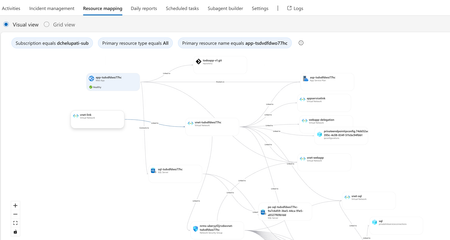
The Most Common Challenge in Modern Cloud Apps There's a category of bugs that drive engineers crazy: multi-layer infrastructure issues. Your app deploys successfully. Every Azure resource shows "Succeeded." But the app fails at runtime with a vague error like Login failed for user ''. Where do you even start? You're checking the Web App, the SQL Server, the VNet, the private endpoint, the DNS zone, the identity configuration... and each one looks fine in isolation. The problem is how they connect and that's invisible in the portal. Networking issues are especially brutal. The error says "Login failed" but the actual causes could be DNS, firewall, identity, or all three. The symptom and the root causes are in completely different resources. Without deep Azure networking knowledge, you're just clicking around hoping something jumps out. Now imagine you vibe coded the infrastructure. You used AI to generate the Bicep, deployed it, and moved on. When it breaks, you're debugging code you didn't write, configuring resources you don't fully understand. This is where I wanted AI to help not just to build, but to debug. Enter SRE Agent + Coding Agent Here's what I used: Layer Tool Purpose Build VS Code Copilot Agent Mode + Claude Opus Generate code, Bicep, deploy Debug Azure SRE Agent Diagnose infrastructure issues and create developer issue with suggested fixes in source code (app code and IaC) Fix GitHub Coding Agent Create PRs with code and IaC fix from Github issue created by SRE Agent Copilot builds. SRE Agent debugs. Coding Agent fixes. What I Built I used VS Code Copilot in Agent Mode with Claude Opus to create a .NET 8 Web App connected to Azure SQL via private endpoint: Private networking (no public exposure) Entra-only authentication Managed identity (no secrets) Deployed with azd up. All green. Then I tested the health endpoint: $ curl https://app-tsdvdfdwo77hc.azurewebsites.net/health/sql {"status":"unhealthy","error":"Login failed for user ''.","errorType":"SqlException"} Deployment succeeded. App failed. One error. How I Fixed It: Step by Step Step 1: Create SRE Agent with Azure Access I created an SRE Agent with read access to my Azure subscription. You can scope it to specific resource groups. The agent builds a knowledge graph of your resources and their dependencies visible in the Resource Mapping view below. Step 2: Connect GitHub to SRE Agent using GitHub MCP server I connected the GitHub MCP server so the agent could read my repository and create issues. Step 3: Create Sub Agent to analyze source code I created a sub-agent for analyzing source code using GitHub mcp tools. this lets SRE Agent understand not just Azure resources, but also the Bicep and source code files that created them. "you are expert in analyzing source code (bicep and app code) from github repos" Step 4: Invoke Sub-Agent to Analyze the Error In the SRE Agent chat, I invoked the sub-agent to diagnose the error I received from my app end point. It correlated the runtime error with the infrastructure configuration Step 5: Watch the SRE Agent Think and Reason SRE Agent analyzed the error by tracing code in Program.cs, Bicep configurations, and Azure resource relationships Web App, SQL Server, VNet, private endpoint, DNS zone, and managed identity. Its reasoning process worked through each layer, eliminating possibilities one by one until it identified the root causes. Step 6: Agent Creates GitHub Issue Based on its analysis, SRE Agent summarized the root causes and suggested fixes in a GitHub issue: Root Causes: Private DNS Zone missing VNet link Managed identity not created as SQL user Suggested Fixes: Add virtualNetworkLinks resource to Bicep Add SQL setup script to create user with db_datareader and db_datawriter roles Step 7: Merge the PR from Coding Agent Assign the Github issue to Coding Agent which then creates a PR with the fixes. I just reviewed the fix. It made sense and I merged it. Redeployed with azd up, ran the SQL script: curl -s https://app-tsdvdfdwo77hc.azurewebsites.net/health/sql | jq . { "status": "healthy", "database": "tododb", "server": "tcp:sql-tsdvdfdwo77hc.database.windows.net,1433", "message": "Successfully connected to SQL Server" } 🎉 From error to fix in minutes without manually debugging a single Azure resource. Why This Matters If you're a developer building and deploying apps to Azure, SRE Agent changes how you work: You don't need to be a networking expert. SRE Agent understands the relationships between Azure resources private endpoints, DNS zones, VNet links, managed identities. It connects dots you didn't know existed. You don't need to guess. Instead of clicking through the portal hoping something looks wrong, the agent systematically eliminates possibilities like a senior engineer would. You don't break your workflow. SRE Agent suggests fixes in your Bicep and source code not portal changes. Everything stays version controlled. Deployed through pipelines. No hot fixes at 2 AM. You close the loop. AI helps you build fast. Now AI helps you debug fast too. Try It Yourself Do you vibe code your app, your infrastructure, or both? How do you debug when things break? Here's a challenge: Vibe code a todo app with a Web App, VNet, private endpoint, and SQL database. "Forget" to link the DNS zone to the VNet. Deploy it. Watch it fail. Then point SRE Agent at it and see how it identifies the root cause, creates a GitHub issue with the fix, and hands it off to Coding Agent for a PR. Share your experience. I'd love to hear how it goes. Learn More Azure SRE Agent documentation Azure SRE Agent blogs Azure SRE Agent community Azure SRE Agent home page Azure SRE Agent pricing579Views3likes0CommentsExtend SRE Agent with MCP: Build an Agentic Workflow to Triage Customer Issues
Your inbox is full. GitHub issues piling up. "App not working." "How do I configure alerts?" "Please add dark mode." You open each one, figure out what it is, ask for more info, add labels, route to the right team. An hour later, you're still sorting issues. Sound familiar? The Triage Tax Every L1 support engineer, PM, and on-call developer who's handled customer issues knows this pain. When tickets come in, you're not solving problems, you're sorting them. Read the issue. Is it a bug or a question? Check the docs. Does this feature exist? Ask for more info. Wait two days. Re-triage. Add labels. Route to engineering. It's tedious. It requires judgment, you need to understand the product, know what info is needed, check documentation. And honestly? It's work that nobody volunteers for but someone has to do. In large organizations, it gets even more complex. The issue doesn't just need to be triaged, it needs to be routed to the right engineering team. Is this an auth issue? Frontend? Backend? Infrastructure? A wrong routing decision means delays, re-assignments, and frustrated customers. What if an AI agent could do this for you? Enter Azure SRE Agent + MCP Here's what I built: I gave SRE Agent access to my GitHub and PagerDuty accounts via MCP, uploaded my triage rubric as a markdown file, and set it to run twice a day. No more reading every ticket manually. No more asking the same "please provide more info" questions. No more morning triage sessions. What My Setup Looks Like My app's customer issues come in through GitHub. My team uses PagerDuty to track bugs and incidents. So I connected both via MCP to the SRE Agent. I also uploaded my triage logic as a .md file on how to classify issues, what info is required for each category, which labels to use, which team handles what. And since I didn't want to run this workflow manually, I set up a scheduled task to trigger it twice a day. Now it just runs. I verify its work if I want to. What the Agent Does Fetches all open, unlabeled GitHub issues Reads each issue and classifies it (bug, doc question, feature request) Checks if required info is present Posts a comment asking for details if needed, or acknowledges the issue Adds appropriate labels Creates a PagerDuty incident for bugs ready for engineering Moves to the next issue How I Built It: Step by Step Let me walk you through exactly how I set this up inside SRE Agent. Step 1: Create an SRE Agent I created a new SRE Agent in the Azure portal. Since this workflow triages GitHub issues and not Azure resources, I didn't need to configure any Azure resource groups or subscriptions. Just an agent. Step 2: Connect MCP Servers I added two MCP servers to give the agent access to my tools: GitHub MCP– Fetch issues, post comments, add labels PagerDuty MCP – Create incidents for bugs that need dev team's attention MCP (Model Context Protocol) lets you bring any API into the agent. If your tool has an API, you can connect it. Step 3: Create Subagents I created two focused subagents, each with a specific job and only the tools it needs: GitHub Issue Triager "You are expert in triaging GitHub issues, classifying them into categories such as user needs to supply additional information, bug, documentation question, or feature request. Use the knowledge base to search for the right document that helps you with performing this triaging. Perform all actions autonomously without waiting for user input. Hand off to Incident Creator for the issues you classified as bugs." Tools: GitHub MCP (issues, labels, comments) Incident Creator Here "You are expert in managing incidents in PagerDuty, listing services, incidents, creating incidents with all details. Once done, hand off back to GitHub Issue Triager." Tools: PagerDuty MCP (services, incidents) The handoff between them creates a workflow. They collaborate without human involvement. Step 4: Add Your Knowledge I uploaded my triage logic as a .md file to the agent's knowledge base. This is my rubric - my mental model for how to triage issues: How do I classify bugs vs. doc questions vs. feature requests? What info is required for each category? What labels do I use? When should an incident be created? Which team handles which type of issue? I wrote it down the way I'd explain it to a new teammate. The agent searches and follows it. Step 5: Add a Scheduled Task I didn't want to trigger this workflow manually every time. SRE Agent supports scheduled tasks, workflows that run automatically on a cadence. I set up a trigger to run twice a day: morning and evening. Now the workflow is fully automated. Here is the end to end automated agentic workflow to triage customer tickets. Why MCP Matters Every team uses different tools. Maybe your customer issues live in Zendesk, incidents go to ServiceNow and you use Jira or Azure DevOps. SRE Agent doesn't lock you in. With MCP, you connect to whatever tools you already use. The agent orchestrates across them. That's the extensibility model: your tools, your workflow, orchestrated by the agent. The Result Before: 2 hours every morning sorting tickets. After: By the time anyone logs in, issues are labeled, missing-info requests are posted, urgent bugs have incidents, and feature requests are acknowledged. Your team can finally focus on the complex stuff not sorting tickets. Why This Matters Faster response times. Issues get acknowledged in minutes, not days. Consistent classification. No "this should have been a P1" moments. No tickets bouncing between teams. Happier customers. They get a response immediately even if it's just "we're looking into it." Focus on what matters. Your team should be solving problems, not sorting them. The Bottom Line Triage isn't the job, it's the tax on the job. It quietly eats the hours your team could spend building, debugging, and shipping. You don't need to build a custom triage bot. You don't need to wire up webhooks and write glue code. You give the SRE agent your tools, your logic, and a schedule and it handles the sorting. Use GitHub? Connect GitHub. Use Zendesk? Connect Zendesk. PagerDuty, ServiceNow, Jira - whatever your team runs on, the agent meets you there. Stop sorting tickets. Start shipping. A Few Tips Test MCP endpoints before configuring them in the SRE agent Give each subagent only the tools it needs, don't enable everything Start read-only until you trust the classification, then enable comments Do You Still Want to Triage Issues Manually? What tools does your team use to track customer-reported issues and incidents? Let us know in the comments, we'd love to hear how you'd use this workflow with your stack. Is triage your most toilsome workflow or is there something even worse eating your team's time? Let us know in the comments.458Views1like0Comments
Fix It Before They Feel It: Higher Reliability with Proactive Mitigation
What if your infrastructure could detect performance issues and fix them automatically—before your users even notice? This blog brings that vision to life using Azure SRE Agent, an AI-powered autonomous agent that monitors, detects, and remediates production issues in real-time. 💡 The magic: Zero human intervention required. The agent handles detection, diagnosis, remediation, and reporting—all autonomously. 📺 Watch the Demo This content was presented at .NET Day 2025. Watch the full session to see Azure SRE Agent in action: 🎬 Fix it before they feel it - .NET Day 2025 🎯 What You'll See in This Demo Watch as we intentionally deploy "bad" code to production and observe how the SRE Agent: Detects the degradation — Compares live response times against learned baselines Takes autonomous action — Executes a slot swap to roll back to healthy code Communicates the incident — Posts to Teams and creates a GitHub issue Generates reports — Summarizes deployment metrics for stakeholders 🚀 Key Capabilities Capability What It Shows Proactive Baseline Learning Agent learns normal response times and stores them in a knowledge base Real-time Anomaly Detection Instant comparison of current vs. baseline metrics Autonomous Remediation Agent executes Azure CLI commands to swap slots without human approval Cross-platform Communication Automatic Teams posts and GitHub issue creation Incident Reporting End-of-day email summaries with deployment health metrics Architecture Overview The solution uses Azure SRE Agent with three specialized sub-agents working together: Components Application Layer: .NET 9 Web API running on Azure App Service Application Insights for telemetry collection Azure Monitor Alerts for incident triggers Azure SRE Agent: AvgResponseTime Sub-Agent: Captures baseline metrics every 15 minutes, stores in Knowledge Store DeploymentHealthCheck Sub-Agent: Triggered by deployment alerts, compares metrics to baseline, auto-remediates DeploymentReporter Sub-Agent: Generates daily summary emails from Teams activity External Integrations: GitHub (issue creation, semantic code search, Copilot assignment) Microsoft Teams (deployment summaries) Outlook (summary reports) What the SRE Agent Does When a deployment occurs, the SRE Agent autonomously performs the following actions: 1. Health Check (DeploymentHealthCheck Sub-Agent) When a slot swap alert fires, the agent: Queries App Insights for current response times Retrieves the baseline from the Knowledge Store Compares current performance against baseline If degradation > 20%: Executes rollback and creates GitHub issue If healthy: Posts confirmation to Teams Healthy Deployment - No Action Needed (Teams Post): The agent confirms the deployment is healthy — response time (22ms) is 80% faster than baseline (116ms). Degraded Deployment - Automatic Rollback (Teams Post): The agent detects +332% latency regression (212ms vs 116ms baseline), executes a slot swap to rollback, and creates GitHub Issue. 2. Daily Summary (DeploymentReporter Sub-Agent) Every 24 hours, the reporter agent: Reads all Teams deployment posts from the last 24 hours Aggregates deployment metrics Sends an executive summary email Daily Summary (Outlook Email): The daily report shows 9 deployments, 6 healthy, 3 rollbacks, and 3 GitHub issues created — complete with response time details and issue links. Demo Flow View Step-by-Step Instructions → Step Action Step 1 Deploy Infrastructure + Applications Step 2 Create Sub-Agents, Triggers & Schedules Step 3 Swap bad code, watch agent remediate Setting Up the Demo Prerequisites Azure subscription with Contributor access Azure CLI installed and logged in (az login) .NET 9.0 SDK PowerShell 7.0+ Step 1: Deploy Infrastructure cd scripts .\1-setup-demo.ps1 -ResourceGroupName "sre-demo-rg" -AppServiceName "sre-demo-app-12345" This script will: Prompt for Azure subscription selection Deploy Azure infrastructure (App Service, App Insights, Alerts) Build and deploy healthy code to production Build and deploy problematic code to staging Full Setup Instructions → Step 2: Configure Azure SRE Agent Navigate to Azure SRE Agents Portal Sub Agent builder tab and create three sub-agents: Sub-Agent Purpose Tools Used AvgResponseTime Captures baseline response time metrics QueryAppInsightsByAppId, UploadKnowledgeDocument DeploymentHealthCheck Detects degradation and executes remediation SearchMemory, QueryAppInsights, PostTeamsMessage, CreateGithubIssue, Az CLI commands DeploymentReporter Generates deployment summary reports GetTeamsMessages, SendOutlookEmail Creating Each Sub-Agent In the Github links below you can find gif images that capture the creation flow AvgResponseTime + Baseline Task: Detailed Instructions → DeploymentHealthCheck + Swap Alert: Detailed Instructions → DeploymentReporter + Reporter Task: Detailed Instructions → Step 3: Run the Demo .\2-run-demo.ps1 This triggers the following flow: Slot Swap Occurs (demo script) ▼ Activity Log Alert Fires ▼ Incident Trigger Activated ▼ DeploymentHealthCheck Agent Runs ─ Queries current response time from App Insights ─ Retrieves baseline from knowledge store ─ Compares (if >20% degradation) ─ Executes: az webapp deployment slot swap ─ Creates GitHub issue (if degraded) ─ Posts to Teams channel Full Demo Instructions → Demo Timeline Time Event 0:00 Run 2-run-demo.ps1 0:30 Swap staging → production (bad code deployed) 1:00 Production now slow (~1500ms vs ~50ms baseline) ~5:00 Slot Swap Alert fires ~5:04 Agent executes slot swap (rollback) ~5:30 Production restored to healthy state ~6:00 Agent posts to Teams, creates GitHub issue How the Performance Toggle Works The app has a compile-time toggle in ProductsController.cs: private const bool EnableSlowEndpoints = false; // false = fast, true = slow The setup script creates two versions: Production: EnableSlowEndpoints = false → ~50ms responses Staging: EnableSlowEndpoints = true → ~1500ms responses (artificial delay) Get Started 🔗 Full source code and instructions: github.com/microsoft/sre-agent/samples/proactive-reliability 🔗 Azure SRE Agent documentation: https://learn.microsoft.com/en-us/azure/sre-agent/ Technology Stack Framework: ASP.NET Core 9.0 Infrastructure: Azure Bicep Monitoring: Application Insights + Log Analytics Automation: Azure SRE Agent Scripts: PowerShell 7.0+ Tags: Azure, SRE Agent, DevOps, Reliability, .NET, App Service, Application Insights, Autonomous Remediation342Views0likes1Comment