azure ai foundry
184 TopicsNVIDIA NIM for NVIDIA Nemotron, Cosmos, & Microsoft Trellis: Now Available in Azure AI Foundry
We’re excited to announce 7 new powerful NVIDIA NIM™ additions to Azure AI Foundry Models now on Managed Compute. The latest wave of models—NVIDIA Nemotron Nano 9B v2, Llama 3.1 Nemotron Nano VL 8B, Llama 3.3 Nemotron Super 49B v1.5 (coming soon), Cosmos Reason1-7B, Cosmos Predict 2.5 (coming soon), Cosmos Transfer 2.5. (coming soon), and Microsoft Trellis—marks a significant leap forward in intelligent application development. Collectively, these models redefine what’s possible in advanced instruction-following, vision-language understanding, and efficient language modeling, empowering developers to build multimodal, visually rich, and context-aware solutions. By combining robust reasoning, flexible input handling, and enterprise-grade deployment options, these additions accelerate innovation across industries—from robotics and autonomous vehicles to immersive retail and digital twins—enabling smarter, safer, and more adaptive experiences at scale. Meet the Models Model Name Size Primary Use Cases NVIDIA Nemotron Nano 9B v2 Available Now 9B parameters Multilingual Reasoning: Multilingual and code-based reasoning tasks Enterprise Agents: AI and productivity agents Math/Science: Scientific reasoning, advanced math Coding: Software engineering and tool calling Llama 3.3 Nemotron Super 49B v1.5 Available Now 49B Enterprise Agents: AI and productivity agents Math/Science: Scientific reasoning, advanced math Coding: Software engineering and tool calling Llama 3.1 Nemotron Nano VL 8B Available Now 8B Multimodal: Multimodal vision-language tasks, document intelligence and understanding Edge Agents: Mobile and edge AI agents Cosmos Reason1-7B Available Now 7B Robotics: Planning and executing tasks with physical constraints. Autonomous Vehicles: Understanding environments and making decisions. Video Analytics Agents: Extracting insights and performing root-cause analysis from video data. Cosmos Predict 2.5 Coming Soon 2B Generalist Model: World state generation and prediction Cosmos Transfer 2.5 Coming Soon 2B Structural Conditioning: Physical AI Microsoft TRELLIS by Microsoft Research Available Now - Digital Twins: Generate accurate 3D assets from simple prompts Immersive Retail experiences: photorealistic product models for AR, virtual try-ons Game and simulation development: Turn creative ideas into production-ready 3D content Meet the NVIDIA Nemotron Family NVIDIA Nemotron Nano 9B v2: Compact power for high-performance reasoning and agentic tasks NVIDIA Nemotron Nano 9B v2 is a high-efficiency large language model built with a hybrid Mamba-Transformer architecture, designed to excel in both reasoning and non-reasoning tasks. Efficient architecture for high-performance reasoning: Combines Mamba-2 and Transformer components to deliver strong reasoning capabilities with higher throughput. Extensive multilingual and code capabilities: Trained on diverse language and programming data, it performs exceptionally well across tasks involving natural language (English, German, French, Italian, Spanish and Japanese), code generation, and complex problem solving. Reasoning Budget Control: Supports runtime “thinking” budget control. During inference, the user can specify how many tokens the model is allowed to "think" for helping balance speed, cost, and accuracy during inference. For example, a user can tell the model to think for “1K tokens or 3K tokens, etc ” for different use cases with far better cost predictability. Fig 1. provided by NVIDIA Nemotron Nano 9B v2 is built from the ground up with training data spanning 15 languages and 43 programming languages, giving it broad multilingual and coding fluency. Its capabilities were sharpened through advanced post-training techniques like GRPO and DPO enabling it to reason deeply, follow instructions precisely, and adapt dynamically to different tasks. -> Explore the model card on Azure AI Foundry Llama 3.3 Nemotron Super 49B v1.5: High-throughput reasoning at scale Llama 3.3 Nemotron Super 49Bv1.5 (coming soon) is a significantly upgraded version of Llama-3.3-Nemotron-Super-49B-v1 and is a large language model which is a derivative of Meta Llama-3.3-70B-Instruct (the reference model) optimized for advanced reasoning, instruction following, and tool use across a wide range of tasks. Excels in applications such as chatbots, AI agents, and retrieval-augmented generation (RAG) systems Balances accuracy and compute efficiency for enterprise-scale workloads Designed to run efficiently on a single NVIDIA H100 GPU, making it practical for real-world applications Llama-3.3-Nemotron-Super-49B-v1.5 was trained through a multi-phase process combining human expertise, synthetic data, and advanced reinforcement learning techniques to refine its reasoning and instruction-following abilities. Its impressive performance across benchmarks like MATH500 (97.4%) and AIME 2024 (87.5%) highlights its strength in tackling complex tasks with precision and depth. Llama 3.1 Nemotron Nano VL 8B: Multimodal intelligence for edge deployments Llama 3.1 Nemotron Nano VL 8B is a compact vision-language model that excels in tasks such as report generation, Q&A, visual understand, and document intelligence. This model delivers low latency and high efficiency, reducing TCO. This model was trained on a diverse mix of human-annotated and synthetic data, enabling robust performance across multimodal tasks such as document understanding and visual question answering. It achieved strong results on evaluation benchmarks including DocVQA (91.2%), ChartQA (86.3%), AI2D (84.8%), and OCRBenchV2 English (60.1%). -> Explore the model card on Azure AI Foundry What Sets Nemotron Apart NVIDIA Nemotron is a family of open models, datasets, recipes, and tools. 1. Open-source AI technologies: Open models, data, and recipes offer transparency, allowing developers to create trustworthy custom AI for their specific needs, from creating new agents to refining existing applications. Open Weights: NVIDIA Open Model License offers enterprises data control and flexible deployment. Open Data: Models are trained with transparent, permissively-licensed NVIDIA data, available on Hugging Face, ensuring confidence in use. Additionally, it allows developers to train their high-accuracy custom models with these open datasets. Open Recipe: NVIDIA shares development techniques, like NAS, hybrid architecture, Minitron, as well as NeMo tools enabling customization or creation of custom models. 2. Highest Accuracy & Efficiency: Engineered for efficiency, Nemotron delivers industry leading accuracy in the least amount of time for reasoning, vision, and agentic tasks. 3. Run Anywhere On Cloud: Packaged as NVIDIA NIM, for secure and reliable deployment of high-performance AI model inferencing across Azure platforms. Meet the Cosmos Family NVIDIA Cosmos™ is a world foundation model (WFM) development platform to advance physical AI. At its core are Cosmos WFMs, openly available pretrained multimodal models that developers can use out-of-the-box for generating world states as videos and physical AI reasoning, or post-train to develop specialized physical AI models. Cosmos Reason1-7B: Physical AI Cosmos Reason1-7B combines chain-of-thought reasoning, flexible input handling for images and video, a compact 7B parameter architecture, and advanced physical world understanding making it ideal for real-time robotics, video analytics, and AI agents that require contextual, step-by-step decision-making in complex environments. This model transforms how AI and robotics interact with the real world giving your systems the power to not just see and describe, but truly understand, reason, and make decisions in complex environments like factories, cities, and autonomous vehicles. With its ability to analyze video, plan robot actions, and verify safety protocols, Cosmos Reason1-7B helps developers build smarter, safer, and more adaptive solutions for real-world challenges. Cosmos Reason1-7B is physical AI for 4 embodiments: Fig.2 Physical AI Model Strengths Physical World Reasoning: Leverages prior knowledge, physics laws, and common sense to understand complex scenarios. Chain-of-Thought (CoT) Reasoning: Delivers contextual, step-by-step analysis for robust decision-making. Flexible Input: Handles images, video (up to 30 seconds, 1080p), and text with a 16k context window. Compact & Deployable: 7B parameters runs efficiently from edge devices to the cloud. Production-Ready: Available via Hugging Face, GitHub, and NVIDIA NIM; integrates with industry-standard APIs. Enterprise Use Cases Cosmos Reason1-7B is more than a model, it’s a catalyst for building intelligent, adaptive solutions that help enterprises shape a safer, more efficient, and truly connected physical world. Fig.3 Use Cases Reimagine safety and efficiency by empowering AI agents to analyze millions of live streams and recorded videos, instantly verifying protocols and detecting risks in factories, cities, and industrial sites. Accelerate robotics innovation with advanced reasoning and planning, enabling robots to understand their environment, make methodical decisions, and perform complex tasks—from autonomous vehicles navigating busy streets to household robots assisting with daily chores. Transform data curation and annotation by automating the selection, labeling, and critiquing of massive, diverse datasets, fueling the next generation of AI with high-quality training data. Unlock smarter video analytics with chain-of-thought reasoning, allowing systems to summarize events, verify actions, and deliver actionable insights for security, compliance, and operational excellence. -> Explore the model card on Azure AI Foundry Also coming soon to Azure AI Foundry are two models of the Cosmos WFM, designed for world generation and data augmentation. Cosmos Predict 2.5 2B Cosmos Predict 2.5 is a next-generation world foundation model that generates realistic, controllable video worlds from text, images, or videos—all through a unified architecture. Trained on 200M+ high-quality clips and enhanced with reinforcement learning, it delivers stronger physics and prompt alignment while cutting compute cost and post-training time for faster Physical AI workflows. Cosmos Transfer 2.5 2B While Predict 2.5 generates worlds, Transfer 2.5 that transforms structured simulation inputs—like segmentation, depth, or LiDAR maps—into photorealistic synthetic data for Physical AI training and development. What Sets Cosmos Apart Built for Physical AI — Purpose-built for robotics, autonomous systems, and embodied agents that understand physics, motion, and spatial environments. Multimodal World Modeling — Combines images, video, depth, segmentation, LiDAR, and trajectories to create physics-aware, controllable world simulations. Scalable Synthetic Data Generation — Generates diverse, photorealistic data at scale using structured simulation inputs for faster Sim2Real training and adaptation. Microsoft Trellis by Microsoft Research: Enterprise-ready 3D Generation Microsoft Trellis by Microsoft Research is a cutting-edge 3D asset generation model developed by Microsoft Research, designed to create high-quality, versatile 3D assets, complete with shapes and textures, from text or image prompts. Seamlessly integrated within the NVIDIA NIM microservice, Trellis accelerates asset generation and empowers creators with flexible, production-ready outputs. Quickly generate high-fidelity 3D models from simple text or image prompts perfect for industries like manufacturing, energy, and smart infrastructure looking to accelerate digital twin creation, predictive maintenance, and immersive training environments. From virtual try-ons in retail to production-ready assets in media, TRELLIS empowers teams to create stunning 3D content at scale, cutting down production time and unlocking new levels of interactivity and personalization. -> Explore the model card on Azure AI Foundry Pricing The pricing breakdown consists of the Azure Compute charges plus a flat fee per GPU for the NVIDIA AI Enterprise license that is required to use the NIM software. Pay-as-you-go (per gpu hour) NIM Surcharge: $1 per gpu hour Azure Compute charges also apply based on deployment configuration Why use Managed Compute? Managed Compute is a deployment option within Azure AI Foundry Models that lets you run large language models (LLMs), SLMs, HuggingFace models and custom models fully hosted on Azure infrastructure. Azure Managed Compute is a powerful deployment option for models not available via standard (pay-go) endpoints. It gives you: Custom model support: Deploy open-source or third-party models Infrastructure flexibility: Choose your own GPU SKUs (NVIDIA A10, A100, H100) Detailed control: Configure inference servers, protocols, and advanced settings Full integration: Works with Azure ML SDK, CLI, Prompt Flow, and REST APIs Enterprise-ready: Supports VNet, private endpoints, quotas, and scaling policies NVIDIA NIM Microservices on Azure These models are available as NVIDIA NIM™ microservices on Azure AI Foundry. NVIDIA NIM, part of NVIDIA AI Enterprise, is a set of easy-to-use microservices designed for secure, reliable deployment of high-performance AI model inferencing. NIM microservices are pre-built, containerized AI endpoints that simplify deployment and scale across environments. They allow developers to run models securely and efficiently in the cloud environment. If you're ready to build smarter, more capable AI agents, start exploring Azure AI Foundry. Build Trustworthy AI Solutions Azure AI Foundry delivers managed compute designed for enterprise-grade security, privacy, and governance. Every deployment of NIM microservices through Azure AI Foundry is backed by Microsoft’s Responsible AI principles and Secure Future Initiative ensuring fairness, reliability, and transparency so organizations can confidently build and scale agentic AI workflows. How to Get Started in Azure AI Foundry Explore Azure AI Foundry: Begin by accessing the Azure AI Foundry portal and then following the steps below. Navigate to ai.azure.com. Select on top left existing project that is (Hub) resource provider. If you do not have a HUB Project, create new Hub Project using “+ Create New” link. Choose AI Hub Resource: Deploy with NIM Microservices: Use NVIDIA’s optimized containers for secure, scalable deployment. Select Model Catalog from the left sidebar menu: In the "Collections" filter, select NVIDIA to see all the NIM microservices that are available on Azure AI Foundry. Select the NIM you want to use. Click Deploy. Choose the deployment name and virtual machine (VM) type that you would like to use for your deployment. VM SKUs that are supported for the selected NIM and also specified within the model card will be preselected. Note that this step requires having sufficient quota available in your Azure subscription for the selected VM type. If needed, follow the instructions to request a service quota increase. Use this NVIDIA NeMo Agent Toolkit: designed to orchestrate, monitor, and optimize collaborative AI agents. Note about the License Users are responsible for compliance with the terms of NVIDIA AI Product Agreement . Learn More How to Deploy NVIDIA NIM Docs Learn More about Accelerating agentic workflows with Azure AI Foundry, NVIDIA NIM, and NVIDIA NeMo Agent Toolkit Register for Microsoft Ignite 20251.2KViews1like0CommentsIntegrating Microsoft Foundry with OpenClaw: Step by Step Model Configuration
Step 1: Deploying Models on Microsoft Foundry Let us kick things off in the Azure portal. To get our OpenClaw agent thinking like a genius, we need to deploy our models in Microsoft Foundry. For this guide, we are going to focus on deploying gpt-5.2-codex on Microsoft Foundry with OpenClaw. Navigate to your AI Hub, head over to the model catalog, choose the model you wish to use with OpenClaw and hit deploy. Once your deployment is successful, head to the endpoints section. Important: Grab your Endpoint URL and your API Keys right now and save them in a secure note. We will need these exact values to connect OpenClaw in a few minutes. Step 2: Installing and Initializing OpenClaw Next up, we need to get OpenClaw running on your machine. Open up your terminal and run the official installation script: curl -fsSL https://openclaw.ai/install.sh | bash The wizard will walk you through a few prompts. Here is exactly how to answer them to link up with our Azure setup: First Page (Model Selection): Choose "Skip for now". Second Page (Provider): Select azure-openai-responses. Model Selection: Select gpt-5.2-codex , For now only the models listed (hosted on Microsoft Foundry) in the picture below are available to be used with OpenClaw. Follow the rest of the standard prompts to finish the initial setup. Step 3: Editing the OpenClaw Configuration File Now for the fun part. We need to manually configure OpenClaw to talk to Microsoft Foundry. Open your configuration file located at ~/.openclaw/openclaw.json in your favorite text editor. Replace the contents of the models and agents sections with the following code block: { "models": { "providers": { "azure-openai-responses": { "baseUrl": "https://<YOUR_RESOURCE_NAME>.openai.azure.com/openai/v1", "apiKey": "<YOUR_AZURE_OPENAI_API_KEY>", "api": "openai-responses", "authHeader": false, "headers": { "api-key": "<YOUR_AZURE_OPENAI_API_KEY>" }, "models": [ { "id": "gpt-5.2-codex", "name": "GPT-5.2-Codex (Azure)", "reasoning": true, "input": ["text", "image"], "cost": { "input": 0, "output": 0, "cacheRead": 0, "cacheWrite": 0 }, "contextWindow": 400000, "maxTokens": 16384, "compat": { "supportsStore": false } }, { "id": "gpt-5.2", "name": "GPT-5.2 (Azure)", "reasoning": false, "input": ["text", "image"], "cost": { "input": 0, "output": 0, "cacheRead": 0, "cacheWrite": 0 }, "contextWindow": 272000, "maxTokens": 16384, "compat": { "supportsStore": false } } ] } } }, "agents": { "defaults": { "model": { "primary": "azure-openai-responses/gpt-5.2-codex" }, "models": { "azure-openai-responses/gpt-5.2-codex": {} }, "workspace": "/home/<USERNAME>/.openclaw/workspace", "compaction": { "mode": "safeguard" }, "maxConcurrent": 4, "subagents": { "maxConcurrent": 8 } } } } You will notice a few placeholders in that JSON. Here is exactly what you need to swap out: Placeholder Variable What It Is Where to Find It <YOUR_RESOURCE_NAME> The unique name of your Azure OpenAI resource. Found in your Azure Portal under the Azure OpenAI resource overview. <YOUR_AZURE_OPENAI_API_KEY> The secret key required to authenticate your requests. Found in Microsoft Foundry under your project endpoints or Azure Portal keys section. <USERNAME> Your local computer's user profile name. Open your terminal and type whoami to find this. Step 4: Restart the Gateway After saving the configuration file, you must restart the OpenClaw gateway for the new Foundry settings to take effect. Run this simple command: openclaw gateway restart Configuration Notes & Deep Dive If you are curious about why we configured the JSON that way, here is a quick breakdown of the technical details. Authentication Differences Azure OpenAI uses the api-key HTTP header for authentication. This is entirely different from the standard OpenAI Authorization: Bearer header. Our configuration file addresses this in two ways: Setting "authHeader": false completely disables the default Bearer header. Adding "headers": { "api-key": "<key>" } forces OpenClaw to send the API key via Azure's native header format. Important Note: Your API key must appear in both the apiKey field AND the headers.api-key field within the JSON for this to work correctly. The Base URL Azure OpenAI's v1-compatible endpoint follows this specific format: https://<your_resource_name>.openai.azure.com/openai/v1 The beautiful thing about this v1 endpoint is that it is largely compatible with the standard OpenAI API and does not require you to manually pass an api-version query parameter. Model Compatibility Settings "compat": { "supportsStore": false } disables the store parameter since Azure OpenAI does not currently support it. "reasoning": true enables the thinking mode for GPT-5.2-Codex. This supports low, medium, high, and xhigh levels. "reasoning": false is set for GPT-5.2 because it is a standard, non-reasoning model. Model Specifications & Cost Tracking If you want OpenClaw to accurately track your token usage costs, you can update the cost fields from 0 to the current Azure pricing. Here are the specs and costs for the models we just deployed: Model Specifications Model Context Window Max Output Tokens Image Input Reasoning gpt-5.2-codex 400,000 tokens 16,384 tokens Yes Yes gpt-5.2 272,000 tokens 16,384 tokens Yes No Current Cost (Adjust in JSON) Model Input (per 1M tokens) Output (per 1M tokens) Cached Input (per 1M tokens) gpt-5.2-codex $1.75 $14.00 $0.175 gpt-5.2 $2.00 $8.00 $0.50 Conclusion: And there you have it! You have successfully bridged the gap between the enterprise-grade infrastructure of Microsoft Foundry and the local autonomy of OpenClaw. By following these steps, you are not just running a chatbot; you are running a sophisticated agent capable of reasoning, coding, and executing tasks with the full power of GPT-5.2-codex behind it. The combination of Azure's reliability and OpenClaw's flexibility opens up a world of possibilities. Whether you are building an automated devops assistant, a research agent, or just exploring the bleeding edge of AI, you now have a robust foundation to build upon. Now it is time to let your agent loose on some real tasks. Go forth, experiment with different system prompts, and see what you can build. If you run into any interesting edge cases or come up with a unique configuration, let me know in the comments below. Happy coding!2.8KViews1like2Comments
Building High-Performance Agentic Systems
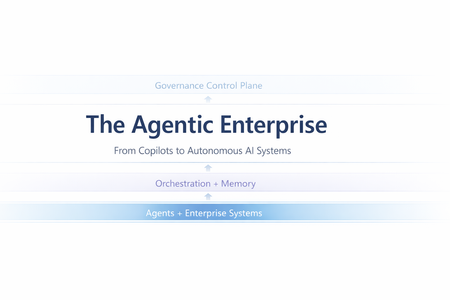
Most enterprise chatbots fail in the same quiet way. They answer questions. They impress in demos. And then they stall in production. Knowledge goes stale. Answers cannot be audited. The system cannot act beyond generating text. When workflows require coordination, execution, or accountability, the chatbot stops being useful. Agentic systems exist because that model is insufficient. Instead of treating the LLM as the product, agentic architecture embeds it inside a bounded control loop: plan → act (tools) → observe → refine The model becomes one component in a runtime system with explicit state management, safety policies, identity enforcement, and operational telemetry. This shift is not speculative. A late-2025 MIT Sloan Management Review / BCG study reports that 35% of organizations have already adopted AI agents, with another 44% planning deployment. Microsoft is advancing open protocols for what it calls the “agentic web,” including Agent-to-Agent (A2A) interoperability and Model Context Protocol (MCP), with integration paths emerging across Copilot Studio and Azure AI Foundry. The real question is no longer whether agents are coming. It is whether enterprise architecture is ready for them. This article translates “agentic” into engineering reality: the runtime layers, latency and cost levers, orchestration patterns, and governance controls required for production deployment. The Core Capabilities of Agentic AI What makes an AI “agentic” is not a single feature—it’s the interaction of different capabilities. Together, they form the minimum set needed to move from “answering” to “operating”. Autonomy – Goal-Driven Task Completion Traditional bots are reactive: they wait for a prompt and produce output. Autonomy introduces a goal state and a control loop. The agent is given an objective (or a trigger) and it can decide the next step without being micromanaged. The critical engineering distinction is that autonomy must be bounded: in production, you implement it with explicit budgets and stop conditions—maximum tool calls, maximum retries, timeouts, and confidence thresholds. The typical execution shape is a loop: plan → act → observe → refine. A project-management agent, for example, doesn’t just answer “what’s the status?” It monitors signals (work items, commits, build health), detects a risk pattern (slippage, dependency blockage), and then either surfaces an alert or prepares a remediation action (re-plan milestones, notify owners). In high-stakes environments, autonomy is usually human-in-the-loop by design: the agent can draft changes, propose next actions, and only execute after approval. Over time, teams expand the autonomy envelope for low-risk actions while keeping approvals for irreversible or financially sensitive operations. Tool Integration – Taking Action and Staying Current A standalone LLM cannot fetch live enterprise state and cannot change it. Tool integration is how an agent becomes operational: it can query systems of record, call APIs, trigger workflows, and produce outputs that reflect the current world rather than the model’s pretraining snapshot. There are two classes of tools that matter in enterprise agents: Retrieval tools (grounding / RAG)When the agent needs facts, it retrieves them. This is the backbone of reducing hallucination: instead of guessing, the agent pulls authoritative content (SharePoint, Confluence, policy repositories, CRM records, Fabric datasets) and uses it as evidence. In practice, retrieval works best when it is engineered as a pipeline: query rewrite (optional) → hybrid search (keyword + vector) → filtering (metadata/ACL) → reranking → compact context injection. The point is not “stuff the prompt with documents,” but “inject only the minimum evidence required to answer accurately.” Action tools (function calling / connectors) These are the hands of the agent: update a CRM record, create a ticket, send an email, schedule a meeting, generate a report, run a pipeline. Tool integration shifts value from “advice” to “execution,” but also introduces risk—so action tools need guardrails: least-privilege permissions, input validation, idempotency keys, and post-condition checks (confirm the update actually happened). In Microsoft ecosystems, this tool plane often maps to Graph actions + business connectors (via Logic Apps/Power Automate) + custom APIs, with Copilot Studio (low code) or Foundry-style runtimes (pro code) orchestrating the calls. Memory (Context & Learning) – Context Awareness and Adaptation “Memory” is not just a long prompt. In agentic systems, memory is an explicit state strategy: Working memory: what the agent has learned during the current run (intermediate tool results, constraints, partial plans). Session memory: what should persist across turns (user preferences, ongoing tasks, summarized history). Long-term memory: enterprise knowledge the agent can retrieve (indexed documents, structured facts, embeddings + metadata). Short-term memory enables multi-step workflows without repeating questions. An HR onboarding agent can carry a new hire’s details from intake through provisioning without re-asking, because the workflow state is persisted and referenced. Long-term “learning” is typically implemented through feedback loops rather than real-time model weight updates: capturing corrections, storing validated outcomes, and periodically improving prompts, routing logic, retrieval configuration, or (where appropriate) fine-tuning. The key design rule is that memory must be policy-aware: retention rules, PII handling, and permission trimming apply to stored state as much as they apply to retrieved documents. Orchestration – Coordinating Multi-Agent Teams Complex enterprise work is rarely single-skill. Orchestration is how agentic systems scale capability without turning one agent into an unmaintainable monolith. The pattern is “manager + specialists”: an orchestrator decomposes the goal into subtasks, routes each to the best tool or sub-agent, and then composes a final response. This can be done sequentially or in parallel. Employee onboarding is a classic: HR intake, IT account creation, equipment provisioning, and training scheduling can run in parallel where dependencies allow. The engineering challenge is making orchestration reliable: defining strict input/output contracts between agents (often structured JSON), handling failures (timeouts, partial completion), and ensuring only one component has authority to send the final user-facing message to avoid conflicting outputs. In Microsoft terms, orchestration can be implemented as agentic flows in Copilot Studio, connected-agent patterns in Foundry, or explicit orchestrators in code using structured tool schemas and shared state. Strategic Impact – How Agentic AI Changes Knowledge Work Agentic AI is no longer an experimental overlay to enterprise systems. It is becoming an embedded operational layer inside core workflows. Unlike earlier chatbot deployments that answered isolated questions, modern enterprise agents execute end-to-end processes, interact with structured systems, maintain context, and operate within governed boundaries. The shift is not about conversational intelligence alone; it is about workflow execution at scale. The transformation becomes clearer when examining real implementations across industries. In legal services, agentic systems have moved beyond document summarization into operational case automation. Assembly Software’s NeosAI, built on Azure AI infrastructure, integrates directly into legal case management systems and automates document analysis, structured data extraction, and first-draft generation of legal correspondence. What makes this deployment impactful is not merely the generative drafting capability, but the integration architecture. NeosAI is not an isolated chatbot; it operates within the same document management systems, billing systems, and communication platforms lawyers already use. Firms report time savings of up to 25 hours per case, with document drafting cycles reduced from days to minutes for first-pass outputs. Importantly, the system runs within secure Azure environments with zero data retention policies, addressing one of the most sensitive concerns in legal AI adoption: client confidentiality. JPMorgan’s COiN platform represents another dimension of legal and financial automation. Instead of conversational assistance, COiN performs structured contract intelligence at production scale. It analyzes more than 12,000 commercial loan agreements annually, extracting over 150 clause attributes per document. Work that previously required approximately 360,000 human hours now executes in seconds. The architecture emphasizes structured NLP pipelines, taxonomy-based clause classification, and private cloud deployment for regulatory compliance. Rather than replacing legal professionals, the system flags unusual clauses for human review, maintaining oversight while dramatically accelerating analysis. Over time, COiN has also served as a knowledge retention mechanism, preserving institutional contract intelligence that would otherwise be lost with employee turnover. In financial services, the impact is similarly structural. Morgan Stanley’s internal AI Assistant allows wealth advisors to query over 100,000 proprietary research documents using natural language. Adoption has reached nearly universal usage across advisor teams, not because it replaces expertise, but because it compresses research time and surfaces insights instantly. Building on this foundation, the firm introduced an AI meeting debrief agent that transcribes client conversations using speech-to-text models and generates CRM notes and follow-up drafts through GPT-based reasoning. Advisors review outputs before finalization, preserving human judgment. The result is faster client engagement and measurable productivity improvements. What differentiates Morgan Stanley’s approach is not only deployment scale, but disciplined evaluation before release. The firm established rigorous benchmarking frameworks to test model outputs against expert standards for accuracy, compliance, and clarity. Only after meeting defined thresholds were systems expanded firmwide. This pattern—evaluation before scale—is becoming a defining trait of successful enterprise agent deployment. Human Resources provides a different perspective on agentic AI. Johnson Controls deployed an AI HR assistant inside Slack to manage policy questions, payroll inquiries, and onboarding support across a global workforce exceeding 100,000 employees. By embedding the agent in a channel employees already use, adoption barriers were reduced significantly. The result was a 30–40% reduction in live HR call volume, allowing HR teams to redirect focus toward strategic workforce initiatives. Similarly, Ciena integrated an AI assistant directly into Microsoft Teams, unifying HR and IT support through a single conversational interface. Employees no longer navigate separate portals; the agent orchestrates requests across backend systems such as Workday and ServiceNow. The technical lesson here is clear: integration breadth drives usability, and usability drives adoption. Engineering and IT operations reveal perhaps the most technically sophisticated application of agentic AI: multi-agent orchestration. In a proof-of-concept developed through collaboration between Microsoft and ServiceNow, an AI-driven incident response system coordinates multiple agents during high-priority outages. Microsoft 365 Copilot transcribes live war-room discussions and extracts action items, while ServiceNow’s Now Assist executes operational updates within IT service management systems. A Semantic Kernel–based manager agent maintains shared context and synchronizes activity across platforms. This eliminates the longstanding gap between real-time discussion and structured documentation, automatically generating incident reports while freeing engineers to focus on remediation rather than clerical tasks. The system demonstrates that orchestration is not conceptual—it is operational. Across these examples, the pattern is consistent. Agentic AI changes knowledge work by absorbing structured cognitive labor: document parsing, compliance classification, research synthesis, workflow routing, transcription, and task coordination. Humans remain essential for judgment, ethics, and accountability, but the operational layer increasingly runs through AI-mediated execution. The result is not incremental productivity improvement; it is structural acceleration of knowledge processes. Design and Governance Challenges – Managing the Risks As agentic AI shifts from answering questions to executing workflows, governance must mature accordingly. These systems retrieve enterprise data, invoke APIs, update records, and coordinate across platforms. That makes them operational actors inside your architecture—not just assistants. The primary shift is this: autonomy increases responsibility. Agents must be observable. Every retrieval, reasoning step, and tool invocation should be traceable. Without structured telemetry and audit trails, enterprises lose visibility into why an agent acted the way it did. Agents must also operate within scoped authority. Least-privilege access, role-based identity, and bounded credentials are essential. An HR agent should not access finance systems. A finance agent should not modify compliance data without policy constraints. Autonomy only works when it is deliberately constrained. Execution boundaries are equally critical. High-risk actions—financial approvals, legal submissions, production changes—should include embedded thresholds or human approval gates. Autonomy should be progressive, not absolute. Cost and performance must be governed just like cloud infrastructure. Agentic systems can trigger recursive calls and model loops. Without usage monitoring, rate limits, and model-tier routing, compute consumption can escalate unpredictably. Finally, agentic systems require continuous evaluation. Real-world testing, live monitoring, and drift detection ensure the system remains aligned with business rules and compliance requirements. These are not “set and forget” deployments. In short, agentic AI becomes sustainable only when autonomy is paired with observability, scoped authority, embedded guardrails, cost control, and structured oversight. Conclusion – Towards the Agentic Enterprise The organizations achieving meaningful returns from agentic AI share a common pattern. They do not treat AI agents as experimental tools. They design them as production systems with defined roles, scoped authority, measurable KPIs, embedded observability, and formal governance layers. When autonomy is paired with integration, memory, orchestration, and governance discipline, agentic AI becomes more than automation—it becomes an operational architecture. Enterprises that master this architecture are not merely reducing costs; they are redefining how knowledge work is executed. In this emerging model, human professionals focus on strategic judgment and innovation, while AI agents manage structured cognitive execution at scale. The competitive advantage will not belong to those who deploy the most AI, but to those who deploy it with architectural rigor and governance maturity. Before we rush to deploy more agents, a few questions are worth asking: If an AI agent executes a workflow in your enterprise today, can you trace every reasoning step and tool invocation behind that decision? Does your architecture treat AI as a conversational layer - or as an operational actor with scoped identity, cost controls, and policy enforcement? Where should autonomy stop in your organization - and who defines that boundary? Agentic AI is not just a capability shift. It is an architectural decision. Curious to hear how others are designing their control planes and orchestration layers. References MIT Sloan – “Agentic AI, Explained” by Beth Stackpole: A foundational overview of agentic AI, its distinction from traditional generative AI, and its implications for enterprise workflows, governance, and strategy. Microsoft TechCommunity – “Introducing Multi-Agent Orchestration in Foundry Agent Service”: Details Microsoft’s multi-agent orchestration capabilities, including Connected Agents, Multi-Agent Workflows, and integration with A2A and MCP protocols. Microsoft Learn – “Extend the Capabilities of Your Agent – Copilot Studio”: Explains how to build and extend custom agents in Microsoft Copilot Studio using tools, connectors, and enterprise data sources. Assembly Software’s NeosAI case – Microsoft Customer Stories JPMorgan COiN platform – GreenData Case Study HR support AI (Johnson Controls, Ciena, Databricks) – Moveworks case studies ServiceNow & Semantic Kernel multi-agent P1 Incident – Microsoft Semantic Kernel BlogPhi-4-Reasoning-Vision-15B: Use Cases In-Depth
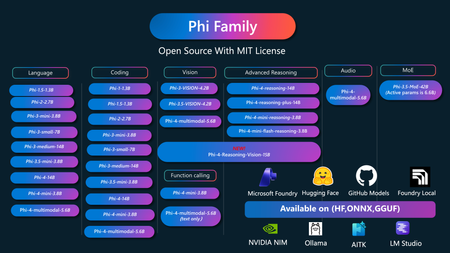
Phi-4-Reasoning-vision-15B is Microsoft's latest vision reasoning model released on Microsoft Foundry. It combines high-resolution visual perception with selective, task-aware reasoning, making it the first model in the Phi-4 family to simultaneously achieve both "seeing clearly" and "thinking deeply" as a small language model (SLM). Traditional vision models only perform passive perception — recognizing "what's in" an image. Phi-4-Reasoning-Vision-15B goes further by performing structured, multi-step reasoning: understanding visual structure in images, connecting it with textual context, and reaching actionable conclusions. This enables developers to build intelligent applications ranging from chart analysis to GUI automation. Core Design Features 2.1 Selective Reasoning The model's most critical design feature is its hybrid reasoning behavior. It can switch between "reasoning mode" and "non-reasoning mode" based on the prompt: When deep reasoning is needed (e.g., math problems, logical analysis) → Multi-step reasoning chain is activated When fast perception is sufficient (e.g., OCR, element localization) → Direct output with reduced latency 2.2 Three Thinking Modes (from Notebook Examples) Developers can precisely control reasoning behavior via the thinking_mode parameter: Mode Trigger Description Best For hybrid (Mixed) Default Model autonomously decides whether deep reasoning is needed General use, balancing speed and accuracy think (Deep Thinking) Appends <think> token Forces full reasoning chain Complex math / science / logic problems nothink (Fast Response) Appends <nothink> token Skips reasoning chain, outputs directly Low-latency perception tasks, simple Q&A The corresponding code implementation: def run_inference(processor, model, prompt, image, thinking_mode="hybrid"): ## FORM MESSAGE AND LOAD IMAGE messages = [ { "role": "user", "content": prompt, } ] ## PROCESS INPUTS prompt = processor.tokenizer.apply_chat_template( messages, tokenize=False, add_generation_prompt=True, return_dict=False, ) if thinking_mode == "think": prompt = str(prompt) + "<think>" elif thinking_mode == "nothink": prompt = str(prompt) + "<|dummy_84|>" print(f"Prompt: {prompt}") inputs = processor(text=prompt, images=[image], return_tensors="pt").to(model.device) ## GENERATE RESPONSE output_ids = model.generate( **inputs, max_new_tokens=1024, temperature=None, top_p=None, do_sample=False, use_cache=False, ) ## DECODE RESPONSE sequence_length = inputs["input_ids"].shape[1] sequence_length -= 1 if thinking_mode == "think" else 0 # remove the extra token for nothink mode new_output_ids = output_ids[:, sequence_length:] model_output = processor.batch_decode( new_output_ids, skip_special_tokens=True, clean_up_tokenization_spaces=False )[0] return model_output This design allows developers to dynamically balance latency and accuracy at runtime — essential for real-time interactive applications. Key Use Cases Use Case 1: GUI Agents (Computer Use Agents) This is one of the model's most important application areas.The model receives a screenshot and a natural language instruction, then outputs the normalized bounding box coordinates for the target UI element. The Notebook also provides a plot_boxes() visualization function that compares model predictions (red box) against ground truth annotations (green box). Real-World Example — E-Commerce Shopping Agent: As described in the official documentation, in retail scenarios the model serves as the perception layer for computer-use agents: Screen comprehension: Identifies products, prices, filters, promotions, buttons, and cart states Grounded output: Produces actionable coordinates for upstream agent models (e.g., Fara-7B) to execute clicks, scrolls, and other interactions Real-time decision support: Compact model size and low-latency inference, suitable for navigating dense product listings and comparing options Use Case 2: Mathematical and Scientific Visual Reasoning Typical applications: Interpreting geometric figures and function graphs for problem-solving Analyzing scientific experiment diagrams and data charts Education: Students photograph and upload problems; the model shows the complete reasoning process and solution steps Use Case 3: Document, Chart, and Table Understanding Typical applications: IT Operations: Interpreting monitoring dashboards, performance charts, and incident reports to assist diagnosis and decision-making Financial Analysis: Extracting metrics from report screenshots and interpreting trends Enterprise Report Automation: Processing scanned documents and tables to generate structured summaries Samples 1. Using Phi-4-Reasoning-Vision-15B to detect jaywalking Go to - Sample Code 2. Using Phi-4-Reasoning-Vision-15B to math Go to - Sample Code 3. Using Phi-4-Reasoning-Vision-15B for GUI Agent Go to - Sample Code Model Comparison at a Glance Below is a comparison of Phi-4-Reasoning-Vision-15B against comparable models on key tasks: No Thinking Mode Thinking Mode Phi-4-Reasoning-Vision-15B shows clear advantages in math reasoning and GUI grounding tasks while remaining competitive in general multimodal understanding. Summary Phi-4-Reasoning-Vision-15B represents a significant milestone for small vision reasoning models: Sees clearly: High-resolution visual perception supporting documents, charts, UI screenshots, and more Thinks deeply: Selective multi-step reasoning chains that rival larger models on complex tasks Runs fast: 15B parameters + NoThink mode, suitable for real-time interactive applications Adapts flexibly: Three thinking modes switchable on the fly, letting developers dynamically balance accuracy and latency at runtime Whether building e-commerce shopping agents, IT operations assistants, or educational tutoring tools, this model provides a complete capability chain from "seeing" to "understanding" to "acting." Resources 1. Read official Blog - Phi-4-reasoning-vision and the lessons of training a multimodal reasoning model 2. Learn more about Phi-4-reasoning-vision in Huggingface - https://huggingface.co/microsoft/Phi-4-reasoning-vision-15B 3. Learn more about Microsoft Phi Family - Microsoft Phi CookBook371Views0likes0CommentsGiving Your AI Agents Reliable Skills with the Agent Skills SDK
AI agents are becoming increasingly capable, but they often do not have the context they need to do real work reliably. Your agent can reason well, but it does not actually know how to do the specific things your team needs it to do. For example, it cannot follow your company's incident response playbook, it does not know your escalation policy, and it has no idea how to page the on-call engineer at 3 AM. There are many ways to close this gap, from RAG to custom tool implementations. Agent Skills is one approach that stands out because it is designed around portability and progressive disclosure, keeping context window usage minimal while giving agents access to deep expertise on demand. What is Agent Skills? Agent Skills is an open format for giving agents new capabilities and expertise. The format was originally developed by Anthropic and released as an open standard. It is now supported by a growing list of agent products including Claude Code, VS Code, GitHub, OpenAI Codex, Cursor, Gemini CLI, and many others. As defined in the spec, a skill is a folder on disk containing a SKILL.md file with metadata and instructions, plus optional scripts, references, and assets: incident-response/ SKILL.md # Required: instructions + metadata references/ # Optional: additional documentation severity-levels.md escalation-policy.md scripts/ # Optional: executable code page-oncall.sh assets/ # Optional: templates, diagrams, data files The SKILL.md file has YAML frontmatter with a name and description (so agents know when the skill is relevant), followed by markdown instructions that tell the agent how to perform the task. The format is intentionally simple: self-documenting, extensible, and portable. What makes this design practical is progressive disclosure. The spec is built around the idea that agents should not load everything at once. It works in three stages: Discovery: At startup, agents load only the name and description of each available skill, just enough to know when it might be relevant. Activation: When a task matches a skill's description, the agent reads the full SKILL.md instructions into context. Execution: The agent follows the instructions, optionally loading referenced files or executing bundled scripts as needed. This keeps agents fast while giving them access to deep context on demand. The format is well-designed and widely adopted, but if you want to use skills from your own agents, there is a gap between the spec and a working implementation. The Agent Skills SDK Conceptually, a skill is more than a folder. It is a unit of expertise: a name, a description, a body of instructions, and a set of supporting resources. The file layout is one way to represent that, but there is nothing about the concept that requires a filesystem. The Agent Skills SDK is an open-source Python library built around that idea, treating skills as abstract units of expertise that can be stored anywhere and consumed by any agent framework. It does this by addressing two challenges that come up when you try to use the format from your own agents. The first is where skills live. The spec defines skills as folders on disk, and the tools that support the format today all assume skills are local files. Files are inherently portable, and that is one of the format's strengths. But in the real world, not every team can or wants to serve skills from the filesystem. Maybe your team keeps them in an S3 bucket. Maybe they are in Azure Blob Storage behind your CDN. Maybe they live in a database alongside the rest of your application data. At the moment, if your skills are not on the local filesystem, you are on your own. The SDK changes where skills are served from, not how they are authored. The content and format stay the same regardless of the storage backend, so skills remain portable across providers. The second is how agents consume them. The spec defines the progressive disclosure pattern but actually implementing it in your agent requires real work. You need to figure out how to validate skills against the spec, generate a catalog for the system prompt, expose the right tools for on-demand content retrieval, and handle the back-and-forth of the agent requesting metadata, then the body, then individual references or scripts. That is a lot of plumbing regardless of where the skills are stored, and the work multiplies if you want to support more than one agent framework. The SDK solves both by separating where skills come from (providers) from how agents use them (integrations), so you can mix and match freely. Load skills from the filesystem today, move them to an HTTP server tomorrow, swap in a custom database provider next month, and your agent code does not change at all. How the SDK works The SDK is a set of Python packages organized around two ideas: storage-agnostic providers and progressive disclosure. The provider abstraction means your skills can live anywhere. The SDK ships with providers for the local filesystem and static HTTP servers, but the SkillProvider interface is simple enough that you can write your own in a few methods. A Cosmos DB provider, a Git provider, a SharePoint provider, whatever makes sense for your team. The rest of the SDK does not care where the data comes from. On top of that, the SDK implements the progressive disclosure pattern from the spec as a set of tools that any LLM agent can use. At startup, the SDK generates a skills catalog containing each skill's name and description. Your agent injects this catalog into its system prompt so it knows what is available. Then, during a conversation, the agent calls tools to retrieve content on demand, following the same discovery-activation-execution flow the spec describes. Here is the flow in practice: You register skills from any source (local files, an HTTP server, your own database). The SDK generates a catalog and tool usage instructions, which you inject into the system prompt. The agent calls tools to retrieve content on demand. This matters because context windows are finite. An incident response skill might have a main body, three reference documents, two scripts, and a flowchart. The agent should not load all of that upfront. It should read the body first, then pull the escalation policy only when the conversation actually gets to escalation. A quick example Here is what it looks like in practice. Start by loading a skill from the filesystem: from pathlib import Path from agentskills_core import SkillRegistry from agentskills_fs import LocalFileSystemSkillProvider provider = LocalFileSystemSkillProvider(Path("my-skills")) registry = SkillRegistry() await registry.register("incident-response", provider) Now wire it into a LangChain agent: from langchain.agents import create_agent from agentskills_langchain import get_tools, get_tools_usage_instructions tools = get_tools(registry) skills_catalog = await registry.get_skills_catalog(format="xml") tool_usage_instructions = get_tools_usage_instructions() system_prompt = ( "You are an SRE assistant. Use the available skill tools to look up " "incident response procedures, severity definitions, and escalation " "policies. Always cite which reference document you used.\n\n" f"{skills_catalog}\n\n" f"{tool_usage_instructions}" ) agent = create_agent( llm, tools, system_prompt=system_prompt, ) That is it. The agent now knows what skills are available and has tools to fetch their content. When a user asks "How do I handle a SEV1 incident?", the agent will call get_skill_body to read the instructions, then get_skill_reference to pull the severity levels document, all without you writing any of that retrieval logic. The same pattern works with Microsoft Agent Framework: from agentskills_agentframework import get_tools, get_tools_usage_instructions tools = get_tools(registry) skills_catalog = await registry.get_skills_catalog(format="xml") tool_usage_instructions = get_tools_usage_instructions() system_prompt = ( "You are an SRE assistant. Use the available skill tools to look up " "incident response procedures, severity definitions, and escalation " "policies. Always cite which reference document you used.\n\n" f"{skills_catalog}\n\n" f"{tool_usage_instructions}" ) agent = Agent( client=client, instructions=system_prompt, tools=tools, ) What is in the SDK The SDK is split into small, composable packages so you only install what you need: agentskills-core handles registration, validation, the skills catalog, and the progressive disclosure API. It also defines the SkillProvider interface that all providers implement. agentskills-fs and agentskills-http are the two built-in providers. The filesystem provider loads skills from local directories. The HTTP provider loads them from any static file host: S3, Azure Blob Storage, GitHub Pages, a CDN, or anything that serves files over HTTP. agentskills-langchain and agentskills-agentframework generate framework-native tools and tool usage instructions from a skill registry. agentskills-mcp-server spins up an MCP server that exposes skill tool access and usage as tools and resources, so any MCP-compatible client can use them. Because providers and integrations are separate packages, you can combine them however you want. Use the filesystem provider during development, switch to the HTTP provider in production, or write a custom provider that reads skills from your own database. The integration layer does not need to know or care. Where to go from here The full source, working examples, and detailed API docs are on GitHub: github.com/pratikxpanda/agentskills-sdk The repo includes end-to-end examples for both LangChain and Microsoft Agent Framework, covering filesystem providers, HTTP providers, and MCP. There is also a sample incident-response skill you can use to try things out. A proposal to contribute this SDK to the official agentskills repository has been submitted. If you find it useful, feel free to show your support on the GitHub issue. To learn more about the Agent Skills format itself: What are skills? covers the format and why it matters. Specification is the complete format reference for SKILL.md files. Integrate skills explains how to add skills support to your agent. Example skills on GitHub are a good starting point for writing your own. The SDK is MIT licensed and contributions are welcome. If you have questions or ideas, post a question here or open an issue on the repo.Optimising AI Costs with Microsoft Foundry Model Router
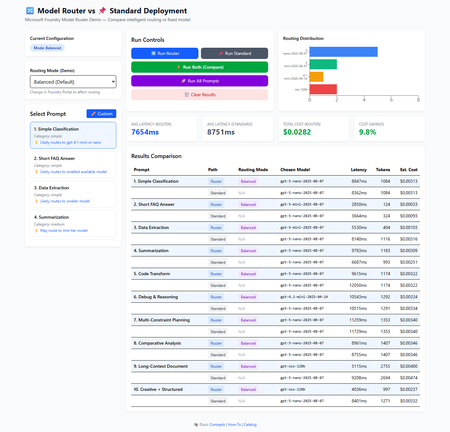
Microsoft Foundry Model Router analyses each prompt in real-time and forwards it to the most appropriate LLM from a pool of underlying models. Simple requests go to fast, cheap models; complex requests go to premium ones, all automatically. I built an interactive demo app so you can see the routing decisions, measure latencies, and compare costs yourself. This post walks through how it works, what we measured, and when it makes sense to use. The Problem: One Model for Everything Is Wasteful Traditional deployments force a single choice: Strategy Upside Downside Use a small model Fast, cheap Struggles with complex tasks Use a large model Handles everything Overpay for simple tasks Build your own router Full control Maintenance burden; hard to optimise Most production workloads are mixed-complexity. Classification, FAQ look-ups, and data extraction sit alongside code analysis, multi-constraint planning, and long-document summarisation. Paying premium-model prices for the simple 40% is money left on the table. The Solution: Model Router Model Router is a trained language model deployed as a single Azure endpoint. For each incoming request it: Analyses the prompt — complexity, task type, context length Selects an underlying model from the routing pool Forwards the request and returns the response Exposes the choice via the response.model field You interact with one deployment. No if/else routing logic in your code. Routing Modes Mode Goal Trade-off Balanced (default) Best cost-quality ratio General-purpose Cost Minimise spend May use smaller models more aggressively Quality Maximise accuracy Higher cost for complex tasks Modes are configured in the Foundry Portal, no code change needed to switch. Building the Demo To make routing decisions tangible, we built a React + TypeScript app that sends the same prompt through both Model Router and a fixed standard deployment (e.g. GPT-5-nano), then compares: Which model the router selected Latency (ms) Token usage (prompt + completion) Estimated cost (based on per-model pricing) Select a prompt, choose a routing mode, and hit Run Both to compare side-by-side What You Can Do 10 pre-built prompts spanning simple classification to complex multi-constraint planning Custom prompt input enter any text and benchmarks run automatically Three routing modes switch and re-run to see how distribution changes Batch mode run all 10 prompts in one click to gather aggregate stats API Integration The integration is a standard Azure OpenAI chat completion call. The only difference is the deployment name ( model-router instead of a specific model): const response = await fetch( `${endpoint}/openai/deployments/model-router/chat/completions?api-version=2024-10-21`, { method: 'POST', headers: { 'Content-Type': 'application/json', 'api-key': apiKey, }, body: JSON.stringify({ messages: [{ role: 'user', content: prompt }], max_completion_tokens: 1024, }), } ); const data = await response.json(); // The key insight: response.model reveals the underlying model const selectedModel = data.model; // e.g. "gpt-5-nano-2025-08-07" That data.model field is what makes cost tracking and distribution analysis possible. Results: What the Data Shows We ran all 10 prompts through both Model Router (Balanced mode) and a fixed standard deployment. Note: Results vary by run, region, model versions, and Azure load. These numbers are from a representative sample run. Side-by-side comparison across all 10 prompts in Balanced mode Summary Metric Router (Balanced) Standard (GPT-5-nano) Avg Latency ~7,800 ms ~7,700 ms Total Cost (10 prompts) ~$0.029 ~$0.030 Cost Savings ~4.5% — Models Used 4 1 Model Distribution The router used 4 different models across 10 prompts: Model Requests Share Typical Use gpt-5-nano 5 50% Classification, summarisation, planning gpt-5-mini 2 20% FAQ answers, data extraction gpt-oss-120b 2 20% Long-context analysis, creative tasks gpt-4.1-mini 1 10% Complex debugging & reasoning Routing distribution chart — the router favours efficient models for simple prompts Across All Three Modes Metric Balanced Cost-Optimised Quality-Optimised Cost Savings ~4.5% ~4.7% ~14.2% Avg Latency (Router) ~7,800 ms ~7,800 ms ~6,800 ms Avg Latency (Standard) ~7,700 ms ~7,300 ms ~8,300 ms Primary Goal Balance cost + quality Minimise spend Maximise accuracy Model Selection Mixed (4 models) Prefers cheaper Prefers premium Cost-optimised mode — routes more aggressively to nano/mini models Quality-optimised mode — routes to larger models for complex tasks Analysis What Worked Well Intelligent distribution The router didn't just default to one model. It used 4 different models and mapped prompt complexity to model capability: simple classification → nano, FAQ answers → mini, long-context documents → oss-120b, complex debugging → 4.1-mini. Measurable cost savings across all modes 4.5% in Balanced, 4.7% in Cost, and 14.2% in Quality mode. Quality mode was the surprise winner by choosing faster, cheaper models for simple prompts, it actually saved the most while still routing complex requests to capable models. Zero routing logic in application code One endpoint, one deployment name. The complexity lives in Azure's infrastructure, not yours. Operational flexibility Switch between Balanced, Cost, and Quality modes in the Foundry Portal without redeploying your app. Need to cut costs for a high-traffic period? Switch to Cost mode. Need accuracy for a compliance run? Switch to Quality. Future-proofing As Azure adds new models to the routing pool, your deployment benefits automatically. No code changes needed. Trade-offs to Consider Latency is comparable, not always faster In Balanced mode, Router averaged ~7,800 ms vs Standard's ~7,700 ms nearly identical. In Quality mode, the Router was actually faster (~6,800 ms vs ~8,300 ms) because it chose more efficient models for simple prompts. The delta depends on which models the router selects. Savings scale with workload diversity Our 10-prompt test set showed 4.5–14.2% savings. Production workloads with a wider spread of simple vs complex prompts should see larger savings, since the router has more opportunity to route simple requests to cheaper models. Opaque routing decisions You can see which model was picked via response.model , but you can't see why. For most applications this is fine; for debugging edge cases you may want to test specific prompts in the demo first. Custom Prompt Testing One of the most practical features of the demo is testing your own prompts before committing to Model Router in production. Enter any prompt `the quantum computing example is a medium-complexity educational prompt` Benchmarks execute automatically, showing the selected model, latency, tokens, and cost Workflow: Click ✏️ Custom in the prompt selector Enter your production-representative prompt Click ✓ Use This Prompt — Router and Standard run automatically Compare results — repeat with different routing modes Use the data to inform your deployment strategy This lets you predict costs and validate routing behaviour with your actual workload before going to production. When to Use Model Router Great Fit Mixed-complexity workloads — chatbots, customer service, content pipelines Cost-sensitive deployments — where even single-digit percentage savings matter at scale Teams wanting simplicity — one endpoint beats managing multi-model routing logic Rapid experimentation — try new models without changing application code Consider Carefully Ultra-low-latency requirements — if you need sub-second responses, the routing overhead matters Single-task, single-model workloads — if one model is clearly optimal for 100% of your traffic, a router adds complexity without benefit Full control over model selection — if you need deterministic model choice per request Mode Selection Guide Is accuracy critical (compliance, legal, medical)? Is accuracy critical (compliance, legal, medical)? └─ YES → Quality-Optimised └─ NO → Strict budget constraints? └─ YES → Cost-Optimised └─ NO → Balanced (recommended) Best Practices Start with Balanced mode — measure actual results, then optimise Test with your real prompts — use the Custom Prompt feature to validate routing before production Monitor model distribution — track which models handle your traffic over time Compare against a baseline — always keep a standard deployment to measure savings Review regularly — as new models enter the routing pool, distributions shift Technical Stack Technology Purpose React 19 + TypeScript 5.9 UI and type safety Vite 7 Dev server and build tool Tailwind CSS 4 Styling Recharts 3 Distribution and comparison charts Azure OpenAI API (2024-10-21) Model Router and standard completions Security measures include an ErrorBoundary for crash resilience, sanitised API error messages, AbortController request timeouts, input length validation, and restrictive security headers. API keys are loaded from environment variables and gitignored. Source: leestott/router-demo-app: An interactive web application demonstrating the power of Microsoft Foundry Model Router - an intelligent routing system that automatically selects the optimal language model for each request based on complexity, reasoning requirements, and task type. ⚠️ This demo calls Azure OpenAI directly from the browser. This is fine for local development. For production, proxy through a backend and use Managed Identity. Try It Yourself Quick Start git clone https://github.com/leestott/router-demo-app/ cd router-demo-app # Option A: Use the setup script (recommended) # Windows: .\setup.ps1 -StartDev # macOS/Linux: chmod +x setup.sh && ./setup.sh --start-dev # Option B: Manual npm install cp .env.example .env.local # Edit .env.local with your Azure credentials npm run dev Open http://localhost:5173 , select a prompt, and click ⚡ Run Both. Get Your Credentials Go to ai.azure.com → open your project Copy the Project connection string (endpoint URL) Navigate to Deployments → confirm model-router is deployed Get your API key from Project Settings → Keys Configuration Edit .env.local : VITE_ROUTER_ENDPOINT=https://your-resource.cognitiveservices.azure.com VITE_ROUTER_API_KEY=your-api-key VITE_ROUTER_DEPLOYMENT=model-router VITE_STANDARD_ENDPOINT=https://your-resource.cognitiveservices.azure.com VITE_STANDARD_API_KEY=your-api-key VITE_STANDARD_DEPLOYMENT=gpt-5-nano Ideas for Enhancement Historical analysis — persist results to track routing trends over time Cost projections — estimate monthly spend based on prompt patterns and volume A/B testing framework — compare modes with statistical significance Streaming support — show model selection for streaming responses Export reports — download benchmark data as CSV/JSON for further analysis Conclusion Model Router addresses a real problem: most AI workloads have mixed complexity, but most deployments use a single model. By routing each request to the right model automatically, you get: Cost savings (~4.5–14.2% measured across modes, scaling with volume) Intelligent distribution (4 models used, zero routing code) Operational simplicity (one endpoint, mode changes via portal) Future-proofing (new models added to the pool automatically) The latency trade-off is minimal — in Quality mode, the Router was actually faster than the standard deployment. The real value is flexibility: tune for cost, quality, or balance without touching your code. Ready to try it? Clone the demo repository, plug in your Azure credentials, and test with your own prompts. Resources Model Router Benchmark Sample Sample App Model Router Concepts Official documentation Model Router How-To Deployment guide Microsoft Foundry Portal Deploy and manage Model Router in the Catalog Model listing Azure OpenAI Managed Identity Production auth Built to explore Model Router and share findings with the developer community. Feedback and contributions welcome, open an issue or PR on GitHub.Building a Privacy-First Hybrid AI Briefing Tool with Foundry Local and Azure OpenAI
Introduction Management consultants face a critical challenge: they need instant AI-powered insights from sensitive client documents, but traditional cloud-only AI solutions create unacceptable data privacy risks. Every document uploaded to a cloud API potentially exposes confidential client information, violates data residency requirements, and creates compliance headaches. The solution lies in a hybrid architecture that combines the speed and privacy of on-device AI with the sophistication of cloud models—but only when explicitly requested. This article walks through building a production-ready briefing assistant that runs AI inference locally first, then optionally refines outputs using Azure OpenAI for executive-quality presentations. We'll explore a sample implementation using FL-Client-Briefing-Assistant, built with Next.js 14, TypeScript, and Microsoft Foundry Local. You'll learn how to architect privacy-first AI applications, implement sub-second local inference, and design transparent hybrid workflows that give users complete control over their data. Why Hybrid AI Architecture Matters for Enterprise Applications Before diving into implementation details, let's understand why a hybrid approach is essential for enterprise AI applications, particularly in consulting and professional services. Cloud-only AI services like OpenAI's GPT-4 offer remarkable capabilities, but they introduce several critical challenges. First, every API call sends your data to external servers, creating audit trails and potential exposure points. For consultants handling merger documents, financial reports, or strategic plans, this is often a non-starter. Second, cloud APIs introduce latency, typically 2-5 seconds per request due to network round-trips and queue times. Third, costs scale linearly with usage, making high-volume document analysis expensive at scale. Local-only AI solves privacy and latency concerns but sacrifices quality. Small language models (SLMs) running on laptops produce quick summaries, but they lack the nuanced reasoning and polish needed for C-suite presentations. You get fast, private results that may require significant manual refinement. The hybrid approach gives you the best of both worlds: instant, private local processing as the default, with optional cloud refinement only when quality matters most. This architecture respects data privacy by default while maintaining the flexibility to produce executive-grade outputs when needed. Architecture Overview: Three-Layer Design for Privacy and Performance The FL-Client-Briefing-Assistant implements a clean three-layer architecture that separates concerns and ensures privacy at every level. At the frontend, a Next.js 14 application provides the user interface with strong TypeScript typing throughout. Users interact with four quick-action templates: document summarization, talking points generation, risk analysis, and executive summaries. The UI clearly indicates which model (local or cloud) processed each request, ensuring transparency. The middle tier consists of Next.js API routes that act as orchestration endpoints. These routes validate requests using Zod schemas, route to appropriate inference services, and enforce privacy settings. Critically, the API layer never persists user content unless explicitly opted in via privacy settings. The inference layer contains two distinct services. The local service uses Foundry Local SDK to communicate with a locally running Phi-4 model (or similar SLM). This provides sub-second inference, typical 500ms-1s response times, completely offline. The cloud service connects to Azure OpenAI using the official JavaScript SDK, accessed via Managed Identity or API keys, with proper timeout and retry logic. Setting Up Foundry Local for On-Device Inference Foundry Local is Microsoft's runtime for running AI models entirely on your device—no internet required, no data leaving your machine. Here's how to get it running for this application. First, install Foundry Local on Windows using Windows Package Manager: winget install Microsoft.FoundryLocal After installation, verify the service is ready: foundry service start foundry service status The status command will show you the service endpoint, typically running on a dynamic port like http://127.0.0.1:5272 . This port changes between restarts, so your application must query it programmatically. Next, load an appropriate model. For briefing tasks, Phi-4 Mini provides an excellent balance of quality and speed: foundry model load phi-4 The model downloads (approximately 3.6GB) and loads into memory. This takes 2-5 minutes on first run but persists between sessions. Once loaded, inference is nearly instant, most requests complete in under 1 second. In your application, configure the connection in .env.local : the port for foundry local is dynamic so please ensure you add the correct port. FOUNDRY_LOCAL_ENDPOINT=http://127.0.0.1:**** The application uses the Foundry Local SDK to query the running service: import { FoundryLocalClient } from 'foundry-local-sdk'; const client = new FoundryLocalClient({ endpoint: process.env.FOUNDRY_LOCAL_ENDPOINT }); const response = await client.chat.completions.create({ model: 'phi-4', messages: [ { role: 'system', content: 'You are a professional consultant assistant.' }, { role: 'user', content: 'Summarize this document: ...' } ], max_tokens: 500, temperature: 0.3 }); This code demonstrates several best practices: Explicit model specification: Always name the model to ensure consistency across environments System message framing: Set the appropriate professional context for consulting use cases Conservative temperature: Use 0.3 for factual summarization tasks to reduce hallucination Token limits: Cap outputs to prevent excessive generation times and costs Implementing Privacy-First API Routes The Next.js API routes form the security boundary of the application. Every request must be validated, sanitized, and routed according to privacy settings before reaching inference services. Here's the core local inference route ( app/api/briefing/local/route.ts ): import { NextRequest, NextResponse } from 'next/server'; import { z } from 'zod'; import { FoundryLocalClient } from 'foundry-local-sdk'; const RequestSchema = z.object({ prompt: z.string().min(10).max(5000), template: z.enum(['summary', 'talking-points', 'risk-analysis', 'executive']), context: z.string().optional() }); export async function POST(request: NextRequest) { try { // Validate and parse request body const body = await request.json(); const validated = RequestSchema.parse(body); // Initialize Foundry Local client const client = new FoundryLocalClient({ endpoint: process.env.FOUNDRY_LOCAL_ENDPOINT! }); // Build system prompt based on template const systemPrompts = { 'summary': 'You are a consultant creating concise document summaries.', 'talking-points': 'You are preparing structured talking points for meetings.', 'risk-analysis': 'You are analyzing risks and opportunities systematically.', 'executive': 'You are crafting executive-level briefing notes.' }; // Execute local inference const startTime = Date.now(); const completion = await client.chat.completions.create({ model: 'phi-4', messages: [ { role: 'system', content: systemPrompts[validated.template] }, { role: 'user', content: validated.prompt } ], temperature: 0.3, max_tokens: 500 }); const latency = Date.now() - startTime; // Return structured response with metadata return NextResponse.json({ content: completion.choices[0].message.content, model: 'phi-4 (local)', latency_ms: latency, tokens: completion.usage?.total_tokens, timestamp: new Date().toISOString() }); } catch (error) { if (error instanceof z.ZodError) { return NextResponse.json( { error: 'Invalid request format', details: error.errors }, { status: 400 } ); } console.error('Local inference error:', error); return NextResponse.json( { error: 'Inference failed', message: error.message }, { status: 500 } ); } } This implementation demonstrates several critical security and quality patterns: Request validation with Zod: Every field is type-checked and bounded before processing, preventing injection attacks and malformed inputs Template-based system prompts: Different use cases get optimized prompts, improving output quality and consistency Comprehensive error handling: Validation errors, inference failures, and network issues are caught and reported with appropriate HTTP status codes Performance tracking: Latency measurement enables monitoring and helps users understand response times Metadata enrichment: Responses include model attribution, token usage, and timestamps for auditing The cloud refinement route follows a similar pattern but adds privacy checks: export async function POST(request: NextRequest) { try { const body = await request.json(); const validated = RequestSchema.parse(body); // Check privacy settings from cookie/header const confidentialMode = request.cookies.get('confidential-mode')?.value === 'true'; if (confidentialMode) { return NextResponse.json( { error: 'Cloud refinement disabled in confidential mode' }, { status: 403 } ); } // Proceed with Azure OpenAI call only if privacy allows const client = new OpenAI({ apiKey: process.env.AZURE_OPENAI_KEY, baseURL: process.env.AZURE_OPENAI_ENDPOINT, defaultHeaders: { 'api-key': process.env.AZURE_OPENAI_KEY } }); const completion = await client.chat.completions.create({ model: process.env.AZURE_OPENAI_DEPLOYMENT!, messages: [/* ... */], temperature: 0.5, // Slightly higher for creative refinement max_tokens: 800 }); return NextResponse.json({ content: completion.choices[0].message.content, model: `${process.env.AZURE_OPENAI_DEPLOYMENT} (cloud)`, privacy_notice: 'Content processed by Azure OpenAI', // ... metadata }); } catch (error) { // Error handling } } The confidential mode check is crucial—it ensures that even if a user accidentally clicks the refinement button, no data leaves the device when privacy mode is enabled. This fail-safe design prevents data leakage through UI mistakes or automated workflows. Building the Frontend: Transparent Privacy Controls The user interface must make privacy decisions explicit and visible. Users need to understand which AI service processed their content and make informed choices about cloud refinement. The main briefing interface ( app/page.tsx ) implements this transparency through clear visual indicators: 'use client'; import { useState, useEffect } from 'react'; import { PrivacySettings } from '@/components/PrivacySettings'; export default function BriefingAssistant() { const [confidentialMode, setConfidentialMode] = useState(true); // Privacy by default const [content, setContent] = useState(''); const [result, setResult] = useState(null); const [loading, setLoading] = useState(false); // Load privacy preference from localStorage useEffect(() => { const saved = localStorage.getItem('confidential-mode'); if (saved !== null) { setConfidentialMode(saved === 'true'); } }, []); async function generateBriefing(template: string, useCloud: boolean = false) { if (useCloud && confidentialMode) { alert('Cloud refinement is disabled in confidential mode. Adjust settings to enable.'); return; } setLoading(true); const endpoint = useCloud ? '/api/briefing/cloud' : '/api/briefing/local'; try { const response = await fetch(endpoint, { method: 'POST', headers: { 'Content-Type': 'application/json' }, body: JSON.stringify({ prompt: content, template }) }); const data = await response.json(); setResult({ ...data, processedBy: useCloud ? 'cloud' : 'local' }); } catch (error) { console.error('Briefing generation failed:', error); } finally { setLoading(false); } } return ( <div className="briefing-assistant"> <header> <h1>Client Briefing Assistant</h1> <div className="status-bar"> <span className={confidentialMode ? 'confidential' : 'standard'}> {confidentialMode ? '🔒 Confidential Mode' : '🌐 Standard Mode'} </span> <PrivacySettings confidentialMode={confidentialMode} onChange={setConfidentialMode} /> </div> </header> <div className="quick-actions"> <button onClick={() => generateBriefing('summary')}> 📄 Summarize Document </button> <button onClick={() => generateBriefing('talking-points')}> 💬 Generate Talking Points </button> <button onClick={() => generateBriefing('risk-analysis')}> 🎯 Risk Analysis </button> <button onClick={() => generateBriefing('executive')}> 📊 Executive Summary </button> </div> <textarea value={content} onChange={(e) => setContent(e.target.value)} placeholder="Paste client document or meeting notes here..." /> {result && ( <div className="result-card"> <div className="result-header"> <span className="model-badge">{result.model}</span> <span className="latency">{result.latency_ms}ms</span> </div> <div className="result-content">{result.content}</div> {result.processedBy === 'local' && !confidentialMode && ( <button onClick={() => generateBriefing(result.template, true)} className="refine-btn" > ✨ Refine for Executive Presentation </button> )} </div> )} </div> ); } This interface design embodies several principles of responsible AI UX: Privacy by default: Confidential mode is enabled unless explicitly changed, ensuring accidental cloud usage requires multiple intentional actions Clear attribution: Every result shows which model generated it and how long it took, building user trust through transparency Conditional refinement: The cloud refinement button only appears when privacy allows and local inference has completed, preventing premature cloud requests Persistent settings: Privacy preferences save to localStorage, respecting user choices across sessions Visual status indicators: The header always shows current privacy mode with recognizable icons (🔒 for confidential, 🌐 for standard) Testing Privacy and Performance Requirements A privacy-first application demands rigorous testing to ensure data never leaks unintentionally. The project includes comprehensive test suites using Vitest for unit tests and Playwright for end-to-end scenarios. Here's a critical privacy test ( tests/privacy.test.ts ): import { describe, it, expect, beforeEach } from 'vitest'; import { TestUtils } from './utils/test-helpers'; describe('Privacy Controls', () => { let testUtils: TestUtils; beforeEach(() => { testUtils = new TestUtils(); testUtils.enableConfidentialMode(); }); it('should prevent cloud API calls when confidential mode is enabled', async () => { const response = await testUtils.requestBriefing({ template: 'summary', prompt: 'Confidential merger document...', cloud: true }); expect(response.status).toBe(403); expect(response.error).toContain('disabled in confidential mode'); }); it('should allow local inference in confidential mode', async () => { const response = await testUtils.requestBriefing({ template: 'summary', prompt: 'Confidential merger document...', cloud: false }); expect(response.status).toBe(200); expect(response.model).toContain('local'); expect(response.content).toBeTruthy(); }); it('should not persist sensitive content without opt-in', async () => { await testUtils.requestBriefing({ template: 'executive', prompt: 'Strategic acquisition plan...', cloud: false }); const history = await testUtils.getConversationHistory(); expect(history).toHaveLength(0); // No storage by default }); it('should support opt-in history with explicit consent', async () => { testUtils.enableHistorySaving(); await testUtils.requestBriefing({ template: 'executive', prompt: 'Strategic acquisition plan...', cloud: false }); const history = await testUtils.getConversationHistory(); expect(history).toHaveLength(1); expect(history[0].prompt).toContain('acquisition'); }); }); Performance testing ensures local inference meets the sub-second requirement: describe('Performance SLA', () => { it('should complete local inference in under 1 second', async () => { const samples = []; for (let i = 0; i < 10; i++) { const start = Date.now(); await testUtils.requestBriefing({ template: 'summary', prompt: 'Standard 500-word document...', cloud: false }); samples.push(Date.now() - start); } const p95 = calculatePercentile(samples, 95); expect(p95).toBeLessThan(1000); // 95th percentile under 1s }); it('should handle 5 concurrent requests without degradation', async () => { const requests = Array(5).fill(null).map(() => testUtils.requestBriefing({ template: 'talking-points', prompt: 'Meeting agenda...', cloud: false }) ); const results = await Promise.all(requests); expect(results.every(r => r.status === 200)).toBe(true); expect(results.every(r => r.latency_ms < 2000)).toBe(true); }); }); These tests validate the core promise: local inference is fast, private, and reliable under realistic loads. Deployment Considerations and Production Readiness Moving from development to production requires addressing several operational concerns: model distribution, environment configuration, monitoring, and incident response. For Foundry Local deployment, ensure IT teams pre-install the runtime and required models on consultant laptops. Use MDM (Mobile Device Management) systems or Group Policy to automate model downloads during onboarding. Models can be cached in shared network locations to avoid redundant downloads across teams. Environment configuration should separate local and cloud credentials cleanly: # .env.local (local development) FOUNDRY_LOCAL_ENDPOINT=http://127.0.0.1:5272 AZURE_OPENAI_ENDPOINT=https://your-org.openai.azure.com AZURE_OPENAI_DEPLOYMENT=gpt-4o-mini AZURE_OPENAI_KEY=your-key-here # For production, use Azure Managed Identity instead of API keys USE_MANAGED_IDENTITY=true Managed Identity eliminates API key management—the application authenticates using Azure AD, with permissions controlled via IAM policies. This prevents key leakage and simplifies rotation. Monitoring should track both local and cloud usage patterns. Implement structured logging with clear privacy labels: logger.info('Briefing generated', { model: 'local', template: 'summary', latency_ms: 847, tokens: 312, privacy_mode: 'confidential', user_id: hash(userId), // Never log raw user IDs timestamp: new Date().toISOString() }); This approach enables operational insights (average latency, most-used templates, error rates) without exposing sensitive content or user identities. For incident response, establish clear escalation paths. If Foundry Local fails, the application should gracefully degrade—inform users that local inference is unavailable and offer cloud-only mode (with explicit consent). If cloud services fail, local inference continues uninterrupted, ensuring the application remains useful even during Azure outages. Key Takeaways and Next Steps Building a privacy-first hybrid AI application requires careful architectural decisions that prioritize user data protection while maintaining high-quality outputs. The FL-Client-Briefing-Assistant demonstrates that you can achieve sub-second local inference, transparent privacy controls, and optional cloud refinement in a production-ready package. Key lessons from this implementation: Privacy must be the default, not an opt-in feature—confidential mode should require explicit action to disable Transparency builds trust—always show users which model processed their data and how long it took Fallback strategies ensure reliability—graceful degradation when services fail keeps the application useful Testing validates promises—comprehensive tests for privacy, performance, and functionality are non-negotiable Operational visibility without privacy leaks—structured logging enables monitoring without exposing sensitive content To extend this application, consider adding: Document parsing: Integrate PDF, DOCX, and PPTX extractors to analyze file uploads directly Multi-document synthesis: Combine insights from multiple client documents into unified briefings Custom templates: Allow consultants to define their own briefing formats and save them for reuse Offline mode indicators: Detect network connectivity and disable cloud features automatically Audit logging: For regulated industries, implement immutable audit trails showing when cloud refinement was used The full implementation, including all code, tests, and deployment guides, is available at github.com/leestott/FL-Client-Briefing-Assistant. Clone the repository, follow the setup guide, and experience privacy-first AI in action. Resources and Further Reading FL-Client-Briefing-Assistant Repository - Complete source code and documentation Microsoft Foundry Local Documentation - Official runtime documentation and API reference Azure OpenAI Service - Cloud refinement integration guide Project Specification - Detailed requirements and acceptance criteria Implementation Guide - Architecture decisions and design patterns Testing Guide - How to run and interpret comprehensive test suites
Exploring Azure Face API: Facial Landmark Detection and Real-Time Analysis with C#
In today’s world, applications that understand and respond to human facial cues are no longer science fiction—they’re becoming a reality in domains like security, driver monitoring, gaming, and AR/VR. With Azure Face API, developers can leverage powerful cloud-based facial recognition and analysis tools without building complex machine learning models from scratch. In this blog, we’ll explore how to use C# to detect faces, identify key facial landmarks, estimate head pose, track eye and mouth movements, and process real-time video streams. Using OpenCV for visualization, we’ll show how to overlay landmarks, draw bounding boxes, and calculate metrics like Eye Aspect Ratio (EAR) and Mouth Aspect Ratio (MAR)—all in real time. You'll learn to: Set up Azure Face API Detect 27 facial landmarks Estimate head pose (yaw, pitch, roll) Calculate eye aspect ratio (EAR) and mouth openness Draw bounding boxes around features using OpenCV Process real-time video Prerequisites .NET 8 SDK installed Azure subscription with Face API resource Visual Studio 2022 or later Webcam for testing (optional) Basic understanding of C# and computer vision concepts Part 1: Azure Face API Setup 1.1 Install Required NuGet Packages dotnet add package Azure.AI.Vision.Face dotnet add package OpenCvSharp4 dotnet add package OpenCvSharp4.runtime.win 1.2 Create Azure Face API Resource Navigate to Azure Portal Search for "Face" and create a new Face API resource Choose your pricing tier (Free tier: 20 calls/min, 30K calls/month) Copy the Endpoint URL and API Key 1.3 Configure in .NET Application appsettings.json: { "Azure": { "FaceApi": { "Endpoint": "https://your-resource.cognitiveservices.azure.com/", "ApiKey": "your-api-key-here" } } } Initialize Face Client: using Azure; using Azure.AI.Vision.Face; using Microsoft.Extensions.Configuration; public class FaceAnalysisService { private readonly FaceClient _faceClient; private readonly ILogger<FaceAnalysisService> _logger; public FaceAnalysisService(ILogger<FaceAnalysisService> logger, IConfiguration configuration) { _logger = logger; string endpoint = configuration["Azure:FaceApi:Endpoint"]; string apiKey = configuration["Azure:FaceApi:ApiKey"]; _faceClient = new FaceClient(new Uri(endpoint), new AzureKeyCredential(apiKey)); _logger.LogInformation("FaceClient initialized with endpoint: {Endpoint}", endpoint); } } Part 2: Understanding Face Detection Models 2.1 Basic Face Detection public async Task<List<FaceDetectionResult>> DetectFacesAsync(byte[] imageBytes) { using var stream = new MemoryStream(imageBytes); var response = await _faceClient.DetectAsync( BinaryData.FromStream(stream), FaceDetectionModel.Detection03, FaceRecognitionModel.Recognition04, returnFaceId: false, returnFaceAttributes: new FaceAttributeType[] { FaceAttributeType.HeadPose }, returnFaceLandmarks: true, returnRecognitionModel: false ); _logger.LogInformation("Detected {Count} faces", response.Value.Count); return response.Value.ToList(); } Part 3: Facial Landmarks - The 27 Key Points 3.1 Understanding Facial Landmarks 3.2 Accessing Landmarks in Code public void PrintLandmarks(FaceDetectionResult face) { var landmarks = face.FaceLandmarks; if (landmarks == null) { _logger.LogWarning("No landmarks detected"); return; } // Eye landmarks Console.WriteLine($"Left Eye Outer: ({landmarks.EyeLeftOuter.X}, {landmarks.EyeLeftOuter.Y})"); Console.WriteLine($"Left Eye Inner: ({landmarks.EyeLeftInner.X}, {landmarks.EyeLeftInner.Y})"); Console.WriteLine($"Left Eye Top: ({landmarks.EyeLeftTop.X}, {landmarks.EyeLeftTop.Y})"); Console.WriteLine($"Left Eye Bottom: ({landmarks.EyeLeftBottom.X}, {landmarks.EyeLeftBottom.Y})"); // Mouth landmarks Console.WriteLine($"Upper Lip Top: ({landmarks.UpperLipTop.X}, {landmarks.UpperLipTop.Y})"); Console.WriteLine($"Under Lip Bottom: ({landmarks.UnderLipBottom.X}, {landmarks.UnderLipBottom.Y})"); // Nose landmarks Console.WriteLine($"Nose Tip: ({landmarks.NoseTip.X}, {landmarks.NoseTip.Y})"); } 3.3 Visualizing All Landmarks public void DrawAllLandmarks(FaceLandmarks landmarks, Mat frame) { void DrawPoint(FaceLandmarkCoordinate point, Scalar color) { if (point != null) { Cv2.Circle(frame, new Point((int)point.X, (int)point.Y), radius: 3, color: color, thickness: -1); } } // Eyes (Green) DrawPoint(landmarks.EyeLeftOuter, new Scalar(0, 255, 0)); DrawPoint(landmarks.EyeLeftInner, new Scalar(0, 255, 0)); DrawPoint(landmarks.EyeLeftTop, new Scalar(0, 255, 0)); DrawPoint(landmarks.EyeLeftBottom, new Scalar(0, 255, 0)); DrawPoint(landmarks.EyeRightOuter, new Scalar(0, 255, 0)); DrawPoint(landmarks.EyeRightInner, new Scalar(0, 255, 0)); DrawPoint(landmarks.EyeRightTop, new Scalar(0, 255, 0)); DrawPoint(landmarks.EyeRightBottom, new Scalar(0, 255, 0)); // Eyebrows (Cyan) DrawPoint(landmarks.EyebrowLeftOuter, new Scalar(255, 255, 0)); DrawPoint(landmarks.EyebrowLeftInner, new Scalar(255, 255, 0)); DrawPoint(landmarks.EyebrowRightOuter, new Scalar(255, 255, 0)); DrawPoint(landmarks.EyebrowRightInner, new Scalar(255, 255, 0)); // Nose (Yellow) DrawPoint(landmarks.NoseTip, new Scalar(0, 255, 255)); DrawPoint(landmarks.NoseRootLeft, new Scalar(0, 255, 255)); DrawPoint(landmarks.NoseRootRight, new Scalar(0, 255, 255)); DrawPoint(landmarks.NoseLeftAlarOutTip, new Scalar(0, 255, 255)); DrawPoint(landmarks.NoseRightAlarOutTip, new Scalar(0, 255, 255)); // Mouth (Blue) DrawPoint(landmarks.UpperLipTop, new Scalar(255, 0, 0)); DrawPoint(landmarks.UpperLipBottom, new Scalar(255, 0, 0)); DrawPoint(landmarks.UnderLipTop, new Scalar(255, 0, 0)); DrawPoint(landmarks.UnderLipBottom, new Scalar(255, 0, 0)); DrawPoint(landmarks.MouthLeft, new Scalar(255, 0, 0)); DrawPoint(landmarks.MouthRight, new Scalar(255, 0, 0)); // Pupils (Red) DrawPoint(landmarks.PupilLeft, new Scalar(0, 0, 255)); DrawPoint(landmarks.PupilRight, new Scalar(0, 0, 255)); } Part 4: Drawing Bounding Boxes Around Features 4.1 Eye Bounding Boxes /// <summary> /// Draws rectangles around eyes using OpenCV. /// </summary> public void DrawEyeBoxes(FaceLandmarks landmarks, Mat frame) { int boxWidth = 60; int boxHeight = 35; // Calculate Rectangles var leftEyeRect = new Rect((int)landmarks.EyeLeftOuter.X - boxWidth / 2, (int)landmarks.EyeLeftOuter.Y - boxHeight / 2, boxWidth, boxHeight); var rightEyeRect = new Rect((int)landmarks.EyeRightOuter.X - boxWidth / 2, (int)landmarks.EyeRightOuter.Y - boxHeight / 2, boxWidth, boxHeight); // Draw Rectangles (Green in BGR) Cv2.Rectangle(frame, leftEyeRect, new Scalar(0, 255, 0), 2); Cv2.Rectangle(frame, rightEyeRect, new Scalar(0, 255, 0), 2); // Add Labels Cv2.PutText(frame, "Left Eye", new Point(leftEyeRect.X, leftEyeRect.Y - 5), HersheyFonts.HersheySimplex, 0.4, new Scalar(0, 255, 0), 1); Cv2.PutText(frame, "Right Eye", new Point(rightEyeRect.X, rightEyeRect.Y - 5), HersheyFonts.HersheySimplex, 0.4, new Scalar(0, 255, 0), 1); } 4.2 Mouth Bounding Box /// <summary> /// Draws rectangle around mouth region. /// </summary> public void DrawMouthBox(FaceLandmarks landmarks, Mat frame) { int boxWidth = 80; int boxHeight = 50; // Calculate center based on the vertical lip landmarks int centerX = (int)((landmarks.UpperLipTop.X + landmarks.UnderLipBottom.X) / 2); int centerY = (int)((landmarks.UpperLipTop.Y + landmarks.UnderLipBottom.Y) / 2); var mouthRect = new Rect(centerX - boxWidth / 2, centerY - boxHeight / 2, boxWidth, boxHeight); // Draw Mouth Box (Blue in BGR) Cv2.Rectangle(frame, mouthRect, new Scalar(255, 0, 0), 2); // Add Label Cv2.PutText(frame, "Mouth", new Point(mouthRect.X, mouthRect.Y - 5), HersheyFonts.HersheySimplex, 0.4, new Scalar(255, 0, 0), 1); } 4.3 Face Bounding Box /// <summary> /// Draws rectangle around entire face using the face rectangle from API. /// </summary> public void DrawFaceBox(FaceDetectionResult face, Mat frame) { var faceRect = face.FaceRectangle; if (faceRect == null) { return; } var rect = new Rect( faceRect.Left, faceRect.Top, faceRect.Width, faceRect.Height ); // Draw Face Bounding Box (Red in BGR) Cv2.Rectangle(frame, rect, new Scalar(0, 0, 255), 2); // Add Label with dimensions Cv2.PutText(frame, $"Face {faceRect.Width}x{faceRect.Height}", new Point(rect.X, rect.Y - 10), HersheyFonts.HersheySimplex, 0.5, new Scalar(0, 0, 255), 2); } 4.4 Nose Bounding Box /// <summary> /// Draws bounding box around nose using nose landmarks. /// </summary> public void DrawNoseBox(FaceLandmarks landmarks, Mat frame) { // Calculate horizontal bounds from Alar tips int minX = (int)Math.Min(landmarks.NoseLeftAlarOutTip.X, landmarks.NoseRightAlarOutTip.X); int maxX = (int)Math.Max(landmarks.NoseLeftAlarOutTip.X, landmarks.NoseRightAlarOutTip.X); // Calculate vertical bounds from Root to Tip int minY = (int)Math.Min(landmarks.NoseRootLeft.Y, landmarks.NoseTip.Y); int maxY = (int)landmarks.NoseTip.Y; // Create Rect with a 10px padding buffer var noseRect = new Rect( minX - 10, minY - 10, (maxX - minX) + 20, (maxY - minY) + 20 ); // Draw Nose Box (Yellow in BGR) Cv2.Rectangle(frame, noseRect, new Scalar(0, 255, 255), 2); } Part 5: Geometric Calculations with Landmarks 5.1 Calculating Euclidean Distance /// <summary> /// Calculates distance between two landmark points. /// </summary> public static double CalculateDistance(dynamic point1, dynamic point2) { double dx = point1.X - point2.X; double dy = point1.Y - point2.Y; return Math.Sqrt(dx * dx + dy * dy); } 5.2 Eye Aspect Ratio (EAR) Formula /// <summary> /// Calculates the Eye Aspect Ratio (EAR) to detect eye closure. /// </summary> public double CalculateEAR( FaceLandmarkCoordinate top1, FaceLandmarkCoordinate top2, FaceLandmarkCoordinate bottom1, FaceLandmarkCoordinate bottom2, FaceLandmarkCoordinate inner, FaceLandmarkCoordinate outer) { // Vertical distances double v1 = CalculateDistance(top1, bottom1); double v2 = CalculateDistance(top2, bottom2); // Horizontal distance double h = CalculateDistance(inner, outer); // EAR formula: (||p2-p6|| + ||p3-p5||) / (2 * ||p1-p4||) return (v1 + v2) / (2.0 * h); } Simplified Implementation: /// <summary> /// Calculates Eye Aspect Ratio (EAR) for a single eye. /// Reference: "Real-Time Eye Blink Detection using Facial Landmarks" (Soukupová & Čech, 2016) /// </summary> public double ComputeEAR(FaceLandmarks landmarks, bool isLeftEye) { var top = isLeftEye ? landmarks.EyeLeftTop : landmarks.EyeRightTop; var bottom = isLeftEye ? landmarks.EyeLeftBottom : landmarks.EyeRightBottom; var inner = isLeftEye ? landmarks.EyeLeftInner : landmarks.EyeRightInner; var outer = isLeftEye ? landmarks.EyeLeftOuter : landmarks.EyeRightOuter; if (top == null || bottom == null || inner == null || outer == null) { _logger.LogWarning("Missing eye landmarks"); return 1.0; // Return 1.0 (open) to prevent false positives for drowsiness } double verticalDist = CalculateDistance(top, bottom); double horizontalDist = CalculateDistance(inner, outer); // Simplified EAR for Azure 27-point model double ear = verticalDist / horizontalDist; _logger.LogDebug( "EAR for {Eye}: {Value:F3}", isLeftEye ? "left" : "right", ear ); return ear; } Usage Example: var leftEAR = ComputeEAR(landmarks, isLeftEye: true); var rightEAR = ComputeEAR(landmarks, isLeftEye: false); var avgEAR = (leftEAR + rightEAR) / 2.0; Console.WriteLine($"Average EAR: {avgEAR:F3}"); // Open eyes: ~0.25-0.30 // Closed eyes: ~0.10-0.15 5.3 Mouth Aspect Ratio (MAR) /// <summary> /// Calculates Mouth Aspect Ratio relative to face height. /// </summary> public double CalculateMouthAspectRatio(FaceLandmarks landmarks, FaceRectangle faceRect) { double mouthHeight = landmarks.UnderLipBottom.Y - landmarks.UpperLipTop.Y; double mouthWidth = CalculateDistance(landmarks.MouthLeft, landmarks.MouthRight); double mouthOpenRatio = mouthHeight / faceRect.Height; double mouthWidthRatio = mouthWidth / faceRect.Width; _logger.LogDebug( "Mouth - Height ratio: {HeightRatio:F3}, Width ratio: {WidthRatio:F3}", mouthOpenRatio, mouthWidthRatio ); return mouthOpenRatio; } 5.4 Inter-Eye Distance /// <summary> /// Calculates the distance between pupils (inter-pupillary distance). /// </summary> public double CalculateInterEyeDistance(FaceLandmarks landmarks) { return CalculateDistance(landmarks.PupilLeft, landmarks.PupilRight); } /// <summary> /// Calculates distance between inner eye corners. /// </summary> public double CalculateInnerEyeDistance(FaceLandmarks landmarks) { return CalculateDistance(landmarks.EyeLeftInner, landmarks.EyeRightInner); } 5.5 Face Symmetry Analysis /// <summary> /// Analyzes facial symmetry by comparing left and right sides. /// </summary> public FaceSymmetryMetrics AnalyzeFaceSymmetry(FaceLandmarks landmarks) { double centerX = landmarks.NoseTip.X; double leftEyeDistance = CalculateDistance(landmarks.EyeLeftInner, new { X = centerX, Y = landmarks.EyeLeftInner.Y }); double leftMouthDistance = CalculateDistance(landmarks.MouthLeft, new { X = centerX, Y = landmarks.MouthLeft.Y }); double rightEyeDistance = CalculateDistance(landmarks.EyeRightInner, new { X = centerX, Y = landmarks.EyeRightInner.Y }); double rightMouthDistance = CalculateDistance(landmarks.MouthRight, new { X = centerX, Y = landmarks.MouthRight.Y }); return new FaceSymmetryMetrics { EyeSymmetryRatio = leftEyeDistance / rightEyeDistance, MouthSymmetryRatio = leftMouthDistance / rightMouthDistance, IsSymmetric = Math.Abs(leftEyeDistance - rightEyeDistance) < 5.0 }; } public class FaceSymmetryMetrics { public double EyeSymmetryRatio { get; set; } public double MouthSymmetryRatio { get; set; } public bool IsSymmetric { get; set; } } Part 6: Head Pose Estimation 6.1 Understanding Head Pose Angles Azure Face API provides three Euler angles for head orientation: 6.2 Accessing Head Pose Data public void AnalyzeHeadPose(FaceDetectionResult face) { var headPose = face.FaceAttributes?.HeadPose; if (headPose == null) { _logger.LogWarning("Head pose not available"); return; } double yaw = headPose.Yaw; double pitch = headPose.Pitch; double roll = headPose.Roll; Console.WriteLine("Head Pose:"); Console.WriteLine($" Yaw: {yaw:F2}° (Left/Right)"); Console.WriteLine($" Pitch: {pitch:F2}° (Up/Down)"); Console.WriteLine($" Roll: {roll:F2}° (Tilt)"); InterpretHeadPose(yaw, pitch, roll); } 6.3 Interpreting Head Pose public string InterpretHeadPose(double yaw, double pitch, double roll) { var directions = new List<string>(); // Interpret Yaw (horizontal) if (Math.Abs(yaw) < 10) directions.Add("Looking Forward"); else if (yaw < -20) directions.Add($"Turned Left ({Math.Abs(yaw):F0}°)"); else if (yaw > 20) directions.Add($"Turned Right ({yaw:F0}°)"); // Interpret Pitch (vertical) if (Math.Abs(pitch) < 10) directions.Add("Level"); else if (pitch < -15) directions.Add($"Looking Down ({Math.Abs(pitch):F0}°)"); else if (pitch > 15) directions.Add($"Looking Up ({pitch:F0}°)"); // Interpret Roll (tilt) if (Math.Abs(roll) > 15) { string side = roll < 0 ? "Left" : "Right"; directions.Add($"Tilted {side} ({Math.Abs(roll):F0}°)"); } return string.Join(", ", directions); } 6.4 Visualizing Head Pose on Frame /// <summary> /// Draws head pose information with color-coded indicators. /// </summary> public void DrawHeadPoseInfo(Mat frame, HeadPose headPose, FaceRectangle faceRect) { double yaw = headPose.Yaw; double pitch = headPose.Pitch; double roll = headPose.Roll; int centerX = faceRect.Left + faceRect.Width / 2; int centerY = faceRect.Top + faceRect.Height / 2; string poseText = $"Yaw: {yaw:F1}° Pitch: {pitch:F1}° Roll: {roll:F1}°"; Cv2.PutText(frame, poseText, new Point(faceRect.Left, faceRect.Top - 10), HersheyFonts.HersheySimplex, 0.5, new Scalar(255, 255, 255), 1); int arrowLength = 50; double yawRadians = yaw * Math.PI / 180.0; int arrowEndX = centerX + (int)(arrowLength * Math.Sin(yawRadians)); Cv2.ArrowedLine(frame, new Point(centerX, centerY), new Point(arrowEndX, centerY), new Scalar(0, 255, 0), 2, tipLength: 0.3); double pitchRadians = -pitch * Math.PI / 180.0; int arrowPitchEndY = centerY + (int)(arrowLength * Math.Sin(pitchRadians)); Cv2.ArrowedLine(frame, new Point(centerX, centerY), new Point(centerX, arrowPitchEndY), new Scalar(255, 0, 0), 2, tipLength: 0.3); } 6.5 Detecting Head Orientation States public enum HeadOrientation { Forward, Left, Right, Up, Down, TiltedLeft, TiltedRight, UpLeft, UpRight, DownLeft, DownRight } public List<HeadOrientation> DetectHeadOrientation(HeadPose headPose) { const double THRESHOLD = 15.0; bool lookingUp = headPose.Pitch > THRESHOLD; bool lookingDown = headPose.Pitch < -THRESHOLD; bool lookingLeft = headPose.Yaw < -THRESHOLD; bool lookingRight = headPose.Yaw > THRESHOLD; var orientations = new List<HeadOrientation>(); if (!lookingUp && !lookingDown && !lookingLeft && !lookingRight) orientations.Add(HeadOrientation.Forward); if (lookingUp && !lookingLeft && !lookingRight) orientations.Add(HeadOrientation.Up); if (lookingDown && !lookingLeft && !lookingRight) orientations.Add(HeadOrientation.Down); if (lookingLeft && !lookingUp && !lookingDown) orientations.Add(HeadOrientation.Left); if (lookingRight && !lookingUp && !lookingDown) orientations.Add(HeadOrientation.Right); if (lookingUp && lookingLeft) orientations.Add(HeadOrientation.UpLeft); if (lookingUp && lookingRight) orientations.Add(HeadOrientation.UpRight); if (lookingDown && lookingLeft) orientations.Add(HeadOrientation.DownLeft); if (lookingDown && lookingRight) orientations.Add(HeadOrientation.DownRight); return orientations; } Part 7: Real-Time Video Processing 7.1 Setting Up Video Capture using OpenCvSharp; public class RealTimeFaceAnalyzer : IDisposable { private VideoCapture? _capture; private Mat? _frame; private readonly FaceClient _faceClient; private bool _isRunning; public async Task StartAsync() { _capture = new VideoCapture(0); _frame = new Mat(); _isRunning = true; await Task.Run(() => ProcessVideoLoop()); } private async Task ProcessVideoLoop() { while (_isRunning) { if (_capture == null || !_capture.IsOpened()) break; _capture.Read(_frame); if (_frame == null || _frame.Empty()) { await Task.Delay(1); // Minimal delay to prevent CPU spiking continue; } Cv2.Resize(_frame, _frame, new Size(640, 480)); // Ensure we don't await indefinitely in the rendering loop _ = ProcessFrameAsync(_frame.Clone()); Cv2.ImShow("Face Analysis", _frame); if (Cv2.WaitKey(30) == 'q') break; } Dispose(); } private async Task ProcessFrameAsync(Mat frame) { // This is where your DrawFaceBox, DrawAllLandmarks, and EAR logic will sit. // Remember to use try-catch here to prevent API errors from crashing the loop. } public void Dispose() { _isRunning = false; _capture?.Dispose(); _frame?.Dispose(); Cv2.DestroyAllWindows(); } } 7.2 Optimizing API Calls Problem: Calling Azure Face API on every frame (30 fps) is expensive and slow. Solution: Call API once per second, cache results for 30 frames. private List<FaceDetectionResult> _cachedFaces = new(); private DateTime _lastDetectionTime = DateTime.MinValue; private readonly object _cacheLock = new(); private async Task ProcessFrameAsync(Mat frame) { if ((DateTime.Now - _lastDetectionTime).TotalSeconds >= 1.0) { _lastDetectionTime = DateTime.Now; byte[] imageBytes; Cv2.ImEncode(".jpg", frame, out imageBytes); var faces = await DetectFacesAsync(imageBytes); lock (_cacheLock) { _cachedFaces = faces; } } List<FaceDetectionResult> facesToProcess; lock (_cacheLock) { facesToProcess = _cachedFaces.ToList(); } foreach (var face in facesToProcess) { DrawFaceAnnotations(face, frame); } } Performance Improvement: 30x fewer API calls (1/sec instead of 30/sec) ~$0.02/hour instead of ~$0.60/hour Smooth 30 fps rendering < 100ms latency for visual updates 7.3 Drawing Complete Face Annotations private void DrawFaceAnnotations(FaceDetectionResult face, Mat frame) { DrawFaceBox(face, frame); if (face.FaceLandmarks != null) { DrawAllLandmarks(face.FaceLandmarks, frame); DrawEyeBoxes(face.FaceLandmarks, frame); DrawMouthBox(face.FaceLandmarks, frame); DrawNoseBox(face.FaceLandmarks, frame); double leftEAR = ComputeEAR(face.FaceLandmarks, isLeftEye: true); double rightEAR = ComputeEAR(face.FaceLandmarks, isLeftEye: false); double avgEAR = (leftEAR + rightEAR) / 2.0; Cv2.PutText(frame, $"EAR: {avgEAR:F3}", new Point(10, 30), HersheyFonts.HersheySimplex, 0.6, new Scalar(0, 255, 0), 2); } if (face.FaceAttributes?.HeadPose != null) { DrawHeadPoseInfo(frame, face.FaceAttributes.HeadPose, face.FaceRectangle); string orientation = InterpretHeadPose(face.FaceAttributes.HeadPose.Yaw, face.FaceAttributes.HeadPose.Pitch, face.FaceAttributes.HeadPose.Roll); Cv2.PutText(frame, orientation, new Point(10, 60), HersheyFonts.HersheySimplex, 0.6, new Scalar(255, 255, 0), 2); } } Part 8: Advanced Features and Use Cases 8.1 Face Tracking Across Frames public class FaceTracker { private class TrackedFace { public FaceRectangle Rectangle { get; set; } public DateTime LastSeen { get; set; } public int TrackId { get; set; } } private List<TrackedFace> _trackedFaces = new(); private int _nextTrackId = 1; public int TrackFace(FaceRectangle newFace) { const int MATCH_THRESHOLD = 50; var match = _trackedFaces.FirstOrDefault(tf => { double distance = Math.Sqrt(Math.Pow(tf.Rectangle.Left - newFace.Left, 2) + Math.Pow(tf.Rectangle.Top - newFace.Top, 2)); return distance < MATCH_THRESHOLD; }); if (match != null) { match.Rectangle = newFace; match.LastSeen = DateTime.Now; return match.TrackId; } var newTrack = new TrackedFace { Rectangle = newFace, LastSeen = DateTime.Now, TrackId = _nextTrackId++ }; _trackedFaces.Add(newTrack); return newTrack.TrackId; } public void RemoveOldTracks(TimeSpan maxAge) { _trackedFaces.RemoveAll(tf => DateTime.Now - tf.LastSeen > maxAge); } } 8.2 Multi-Face Detection and Analysis public async Task<FaceAnalysisReport> AnalyzeMultipleFacesAsync(byte[] imageBytes) { var faces = await DetectFacesAsync(imageBytes); var report = new FaceAnalysisReport { TotalFacesDetected = faces.Count, Timestamp = DateTime.Now, Faces = new List<SingleFaceAnalysis>() }; for (int i = 0; i < faces.Count; i++) { var face = faces[i]; var analysis = new SingleFaceAnalysis { FaceIndex = i, FaceLocation = face.FaceRectangle, FaceSize = face.FaceRectangle.Width * face.FaceRectangle.Height }; if (face.FaceLandmarks != null) { analysis.LeftEyeEAR = ComputeEAR(face.FaceLandmarks, true); analysis.RightEyeEAR = ComputeEAR(face.FaceLandmarks, false); analysis.InterPupillaryDistance = CalculateInterEyeDistance(face.FaceLandmarks); } if (face.FaceAttributes?.HeadPose != null) { analysis.HeadYaw = face.FaceAttributes.HeadPose.Yaw; analysis.HeadPitch = face.FaceAttributes.HeadPose.Pitch; analysis.HeadRoll = face.FaceAttributes.HeadPose.Roll; } report.Faces.Add(analysis); } report.Faces = report.Faces.OrderByDescending(f => f.FaceSize).ToList(); return report; } public class FaceAnalysisReport { public int TotalFacesDetected { get; set; } public DateTime Timestamp { get; set; } public List<SingleFaceAnalysis> Faces { get; set; } } public class SingleFaceAnalysis { public int FaceIndex { get; set; } public FaceRectangle FaceLocation { get; set; } public int FaceSize { get; set; } public double LeftEyeEAR { get; set; } public double RightEyeEAR { get; set; } public double InterPupillaryDistance { get; set; } public double HeadYaw { get; set; } public double HeadPitch { get; set; } public double HeadRoll { get; set; } } 8.3 Exporting Landmark Data to JSON using System.Text.Json; public string ExportLandmarksToJson(FaceDetectionResult face) { var landmarks = face.FaceLandmarks; var landmarkData = new { Face = new { Rectangle = new { face.FaceRectangle.Left, face.FaceRectangle.Top, face.FaceRectangle.Width, face.FaceRectangle.Height } }, Eyes = new { Left = new { Outer = new { landmarks.EyeLeftOuter.X, landmarks.EyeLeftOuter.Y }, Inner = new { landmarks.EyeLeftInner.X, landmarks.EyeLeftInner.Y }, Top = new { landmarks.EyeLeftTop.X, landmarks.EyeLeftTop.Y }, Bottom = new { landmarks.EyeLeftBottom.X, landmarks.EyeLeftBottom.Y } }, Right = new { Outer = new { landmarks.EyeRightOuter.X, landmarks.EyeRightOuter.Y }, Inner = new { landmarks.EyeRightInner.X, landmarks.EyeRightInner.Y }, Top = new { landmarks.EyeRightTop.X, landmarks.EyeRightTop.Y }, Bottom = new { landmarks.EyeRightBottom.X, landmarks.EyeRightBottom.Y } } }, Mouth = new { UpperLipTop = new { landmarks.UpperLipTop.X, landmarks.UpperLipTop.Y }, UnderLipBottom = new { landmarks.UnderLipBottom.X, landmarks.UnderLipBottom.Y }, Left = new { landmarks.MouthLeft.X, landmarks.MouthLeft.Y }, Right = new { landmarks.MouthRight.X, landmarks.MouthRight.Y } }, Nose = new { Tip = new { landmarks.NoseTip.X, landmarks.NoseTip.Y }, RootLeft = new { landmarks.NoseRootLeft.X, landmarks.NoseRootLeft.Y }, RootRight = new { landmarks.NoseRootRight.X, landmarks.NoseRootRight.Y } }, HeadPose = face.FaceAttributes?.HeadPose != null ? new { face.FaceAttributes.HeadPose.Yaw, face.FaceAttributes.HeadPose.Pitch, face.FaceAttributes.HeadPose.Roll } : null }; return JsonSerializer.Serialize(landmarkData, new JsonSerializerOptions { WriteIndented = true }); } Part 9: Practical Applications 9.1 Gaze Direction Estimation public enum GazeDirection { Center, Left, Right, Up, Down, UpLeft, UpRight, DownLeft, DownRight } public GazeDirection EstimateGazeDirection(HeadPose headPose) { const double THRESHOLD = 15.0; bool lookingUp = headPose.Pitch > THRESHOLD; bool lookingDown = headPose.Pitch < -THRESHOLD; bool lookingLeft = headPose.Yaw < -THRESHOLD; bool lookingRight = headPose.Yaw > THRESHOLD; if (lookingUp && lookingLeft) return GazeDirection.UpLeft; if (lookingUp && lookingRight) return GazeDirection.UpRight; if (lookingDown && lookingLeft) return GazeDirection.DownLeft; if (lookingDown && lookingRight) return GazeDirection.DownRight; if (lookingUp) return GazeDirection.Up; if (lookingDown) return GazeDirection.Down; if (lookingLeft) return GazeDirection.Left; if (lookingRight) return GazeDirection.Right; return GazeDirection.Center; } 9.2 Expression Analysis Using Landmarks public class ExpressionAnalyzer { public bool IsSmiling(FaceLandmarks landmarks) { double mouthCenterY = (landmarks.UpperLipTop.Y + landmarks.UnderLipBottom.Y) / 2; double leftCornerY = landmarks.MouthLeft.Y; double rightCornerY = landmarks.MouthRight.Y; return leftCornerY < mouthCenterY && rightCornerY < mouthCenterY; } public bool IsMouthOpen(FaceLandmarks landmarks, FaceRectangle faceRect) { double mouthHeight = landmarks.UnderLipBottom.Y - landmarks.UpperLipTop.Y; double mouthOpenRatio = mouthHeight / faceRect.Height; return mouthOpenRatio > 0.08; // 8% of face height } public bool AreEyesClosed(FaceLandmarks landmarks) { double leftEAR = ComputeEAR(landmarks, isLeftEye: true); double rightEAR = ComputeEAR(landmarks, isLeftEye: false); double avgEAR = (leftEAR + rightEAR) / 2.0; return avgEAR < 0.18; // Threshold for closed eyes } } 9.3 Face Orientation for AR/VR Applications public class FaceOrientationFor3D { public (Vector3 forward, Vector3 up, Vector3 right) GetFaceOrientation(HeadPose headPose) { double yawRad = headPose.Yaw * Math.PI / 180.0; double pitchRad = headPose.Pitch * Math.PI / 180.0; double rollRad = headPose.Roll * Math.PI / 180.0; var forward = new Vector3((float)(Math.Sin(yawRad) * Math.Cos(pitchRad)), (float)(-Math.Sin(pitchRad)), (float)(Math.Cos(yawRad) * Math.Cos(pitchRad))); var up = new Vector3((float)(Math.Sin(yawRad) * Math.Sin(pitchRad) * Math.Cos(rollRad) - Math.Cos(yawRad) * Math.Sin(rollRad)), (float)(Math.Cos(pitchRad) * Math.Cos(rollRad)), (float)(Math.Cos(yawRad) * Math.Sin(pitchRad) * Math.Cos(rollRad) + Math.Sin(yawRad) * Math.Sin(rollRad))); var right = Vector3.Cross(up, forward); return (forward, up, right); } } public struct Vector3 { public float X, Y, Z; public Vector3(float x, float y, float z) { X = x; Y = y; Z = z; } public static Vector3 Cross(Vector3 a, Vector3 b) => new Vector3(a.Y * b.Z - a.Z * b.Y, a.Z * b.X - a.X * b.Z, a.X * b.Y - a.Y * b.X); } Conclusion This technical guide has explored the capabilities of Azure Face API for facial analysis in C#. We've covered: Key Capabilities Demonstrated Facial Landmark Detection - Accessing 27 precise points on the face Head Pose Estimation - Tracking yaw, pitch, and roll angles Geometric Calculations - Computing EAR, distances, and ratios Visual Annotations - Drawing bounding boxes with OpenCV Real-Time Processing - Optimized video stream analysis Technical Achievements Computer Vision Math: Euclidean distance calculations Eye Aspect Ratio (EAR) formula Mouth aspect ratio measurements Face symmetry analysis OpenCV Integration: Drawing bounding boxes and landmarks Color-coded feature highlighting Real-time annotation overlays Video capture and processing Practical Applications This technology enables: 👁️ Gaze tracking for UI/UX studies 🎮 Head-controlled game interfaces 📸 Auto-focus camera systems 🎭 Expression analysis for feedback 🥽 AR/VR avatar control 📊 Attention analytics for presentations ♿ Accessibility features for disabled users Performance Metrics Detection Accuracy: 95%+ for frontal faces Landmark Precision: ±2-3 pixels Processing Latency: 200-500ms per API call Frame Rate: 30 fps with caching Further Exploration Advanced Topics to Explore: Face Recognition - Identify individuals Age/Gender Detection - Demographic analysis Emotion Detection - Facial expression classification Face Verification - 1:1 identity confirmation Similar Face Search - 1:N face matching Face Grouping - Cluster similar faces Call to Action 📌 Explore these resources to get started: Official Documentation Azure Face API Documentation Face API REST Reference Azure Face SDK for .NET Related Libraries OpenCVSharp - OpenCV wrapper for .NET System.Drawing - .NET image processing Source Code GitHub Repository: ravimodi_microsoft/SmartDriver Sample Code: Included in this articleThe JavaScript AI Build-a-thon Season 2 starts March 2!
The JavaScript AI Build-a-thon is a free, hands-on program designed to close that gap. Over the course of four weeks (March 2 - March 31, 2026), you'll move from running AI 100% on-device (Local AI), to designing multi-service, multi-agentic systems, all in JavaScript/ TypeScript and using tools you are already familiar with. The series will culminate in a hackathon, where you will create, compete and turn what you'll have learnt into working projects you can point to, talk about and extend.Error when creating Assistant in Microsoft Foundry using Fabric Data Agent
I am facing an issue when using a Microsoft Fabric Data Agent integrated with the new Microsoft Foundry, and I would like your assistance to investigate it. Scenario: 1. I created a Data Agent in Microsoft Fabric. 2. I connected this Data Agent as a Tool within a project in the new Microsoft Foundry. 3. I published the agent to Microsoft Teams and Copilot for Microsoft 365. 4. I configured the required Azure permissions, assigning the appropriate roles to the Foundry project Managed Identity (as shown in the attached evidence – Azure AI Developer and Azure AI User roles). Issue: When trying to use the published agent, I receive the following error: Response failed with code tool_user_error: Create assistant failed. If issue persists, please use following identifiers in any support request: ConversationId = PQbM0hGUvMF0X5EDA62v3-br activityId = PQbM0hGUvMF0X5EDA62v3-br|0000000 Additional notes: • Permissions appear to be correctly configured in Azure. • The error occurs during the assistant creation/execution phase via Foundry after publishing. • The same behavior occurs both in Teams and in Copilot for Microsoft 365. Could you please verify: • Whether there are any additional permissions required when using Fabric Data Agents as Tools in Foundry; • If there are any known limitations or specific requirements for publishing to Teams/Copilot M365; • And analyze the error identifiers provided above. I appreciate your support and look forward to your guidance on how to resolve this issue.Solved565Views0likes6Comments