azure ai
241 TopicsAI Didn’t Break Your Production — Your Architecture Did
Most AI systems don’t fail in the lab. They fail the moment production touches them. I’m Hazem Ali — Microsoft AI MVP, Principal AI & ML Engineer / Architect, and Founder & CEO of Skytells. With a strong foundation in AI and deep learning from low-level fundamentals to production-scale, backed by rigorous cybersecurity and software engineering expertise, I design and deliver enterprise AI systems end-to-end. I often speak about what happens after the pilot goes live: real users arrive, data drifts, security constraints tighten, and incidents force your architecture to prove it can survive. My focus is building production AI with a security-first mindset: identity boundaries, enforceable governance, incident-ready operations, and reliability at scale. My mission is simple: Architect and engineer secure AI systems that operate safely, predictably, and at scale in production. And here’s the hard truth: AI initiatives rarely fail because the model is weak. They fail because the surrounding architecture was never engineered for production reality. - Hazem Ali You see this clearly when teams bolt AI onto an existing platform. In Azure-based environments, the foundation can be solid—identity, networking, governance, logging, policy enforcement, and scale primitives. But that doesn’t make the AI layer production-grade by default. It becomes production-grade only when the AI runtime is engineered like a first-class subsystem with explicit boundaries, control points, and designed failure behavior. A quick moment from the field I still remember one rollout that looked perfect on paper. Latency was fine. Error rate was low. Dashboards were green. Everyone was relaxed. Then a single workflow started creating the wrong tickets, not failing or crashing. It was confidently doing the wrong thing at scale. It took hours before anyone noticed, because nothing was broken in the traditional sense. When we finally traced it, the model was not the root cause. The system had no real gates, no replayable trail, and tool execution was too permissive. The architecture made it easy for a small mistake to become a widespread mess. That is the gap I’m talking about in this article. Production Failure Taxonomy This is the part most teams skip because it is not exciting, and it is not easy to measure in a demo. When AI fails in production, the postmortem rarely says the model was bad. It almost always points to missing boundaries, over-privileged execution, or decisions nobody can trace. So if your AI can take actions, you are no longer shipping a chat feature. You are operating a runtime that can change state across real systems, that means reliability is not just uptime. It is the ability to limit blast radius, reproduce decisions, and stop or degrade safely when uncertainty or risk spikes. You can usually tell early whether an AI initiative will survive production. Not because the model is weak, but because the failure mode is already baked into the architecture. Here are the ones I see most often. 1. Healthy systems that are confidently wrong Uptime looks perfect. Latency is fine. And the output is wrong. This is dangerous because nothing alerts until real damage shows up. 2. The agent ends up with more authority than the user The user asks a question. The agent has tools and credentials. Now it can do things the user never should have been able to do in that moment. 3. Each action is allowed, but the chain is not Read data, create ticket, send message. All approved individually. Put together, it becomes a capability nobody reviewed. 4. Retrieval becomes the attack path Most teams worry about prompt injection. Fair. But a poisoned or stale retrieval layer can be worse, because it feeds the model the wrong truth. 5. Tool calls turn mistakes into incidents The moment AI can change state—config, permissions, emails, payments, or data—a mistake is no longer a bad answer. It is an incident. 6. Retries duplicate side effects Timeouts happen. Retries happen. If your tool calls are not safe to repeat, you will create duplicate tickets, refunds, emails, or deletes. Next, let’s talk about what changes when you inject probabilistic behavior into a deterministic platform. In the Field: Building and Sharing Real-World AI In December 2025, I had the chance to speak and engage with builders across multiple AI and technology events, sharing what I consider the most valuable part of the journey: the engineering details that show up when AI meets production reality. This photo captures one of those moments: real conversations with engineers, architects, and decision-makers about what it truly takes to ship production-grade AI. During my session, Designing Scalable and Secure Architecture at the Enterprise Scale I walked through the ideas in this article live on stage then went deeper into the engineering reality behind them: from zero-trust boundaries and runtime policy enforcement to observability, traceability, and safe failure design, The goal wasn’t to talk about “AI capability,” but to show how to build AI systems that operate safely and predictably at scale in production. Deterministic platforms, probabilistic behavior Most production platforms are built for deterministic behavior: defined contracts, predictable services, stable outputs. AI changes the physics. You introduce probabilistic behavior into deterministic pipelines and your failure modes multiply. An AI system can be confidently wrong while still looking “healthy” through basic uptime dashboards. That’s why reliability in production AI is rarely about “better prompts” or “higher model accuracy.” It’s about engineering the right control points: identity boundaries, governance enforcement, behavioral observability, and safe degradation. In other words: the model is only one component. The system is the product. Production AI Control Plane Here’s the thing. Once you inject probabilistic behavior into a deterministic platform, you need more than prompts and endpoints. You need a control plane. Not a fancy framework. Just a clear place in the runtime where decisions get bounded, actions get authorized, and behavior becomes explainable when something goes wrong. This is the simplest shape I have seen work in real enterprise systems. The control plane components Orchestrator Owns the workflow. Decides what happens next, and when the system should stop. Retrieval Brings in context, but only from sources you trust and can explain later. Prompt assembly Builds the final input to the model, including constraints, policy signals, and tool schemas. Model call Generates the plan or the response. It should never be trusted to execute directly. Policy Enforcement Point The gate before any high impact step. It answers: is this allowed, under these conditions, with these constraints. Tool Gateway The firewall for actions. Scopes every operation, validates inputs, rate-limits, and blocks unsafe calls. Audit log and trace store A replayable chain for every request. If you cannot replay it, you cannot debug it. Risk engine Detects prompt injection signals, anomalous sessions, uncertainty spikes, and switches the runtime into safer modes. Approval flow For the few actions that should never be automatic. It is the line between assistance and damage. If you take one idea from this section, let it be this. The model is not where you enforce safety. Safety lives in the control plane. Next, let’s talk about the most common mistake teams make right after they build the happy-path pipeline. Treating AI like a feature. The common architectural trap: treating AI like a feature Many teams ship AI like a feature: prompt → model → response. That structure demos well. In production, it collapses the moment AI output influences anything stateful tickets, approvals, customer messaging, remediation actions, or security decisions. At that point, you’re not “adding AI.” You’re operating a semi-autonomous runtime. The engineering questions become non-negotiable: Can we explain why the system responded this way? Can we bound what it’s allowed to do? Can we contain impact when it’s wrong? Can we recover without human panic? If those answers aren’t designed into the architecture, production becomes a roulette wheel. Governance is not a document It’s a runtime enforcement capability Most governance programs fail because they’re implemented as late-stage checklists. In production, governance must live inside the execution path as an enforceable mechanism, A Policy Enforcement Point (PEP) that evaluates every high-impact step before it happens. At the moment of execution, your runtime must answer a strict chain of authorization questions: 1. What tools is this agent attempting to call? Every tool invocation is a privilege boundary. Your runtime must identify the tool, the operation, and the intended side effect (read vs write, safe vs state-changing). 2. Does the tool have the right permissions to run for this agent? Even before user context, the tool itself must be runnable by the agent’s workload identity (service principal / managed identity / workload credentials). If the agent identity can’t execute the tool, the call is denied period. 3. If the tool can run, is the agent permitted to use it for this user? This is the missing piece in most systems: delegation. The agent might be able to run the tool in general, but not on behalf of this user, in this tenant, in this environment, for this task category. This is where you enforce: user role / entitlement tenant boundaries environment (prod vs staging) session risk level (normal vs suspicious) 4. If yes, which tasks/operations are permitted? Tools are too broad. Permissions must be operation-scoped. Not “Jira tool allowed.” But “Jira: create ticket only, no delete, no project-admin actions.” Not “Database tool allowed.” But “DB: read-only, specific schema, specific columns, row-level filters.” This is ABAC/RBAC + capability-based execution. 5. What data scope is allowed? Even a permitted tool operation must be constrained by data classification and scope: public vs internal vs confidential vs PII row/column filters time-bounded access purpose limitation (“only for incident triage”) If the system can’t express data scope at runtime, it can’t claim governance. 6. What operations require human approval? Some actions are inherently high risk: payments/refunds changing production configs emailing customers deleting data executing scripts The policy should return “REQUIRE_APPROVAL” with clear obligations (what must be reviewed, what evidence is required, who can approve). 7. What actions are forbidden under certain risk conditions? Risk-aware policy is the difference between governance and theater. Examples: If prompt injection signals are high → disable tool execution If session is anomalous → downgrade to read-only mode If data is PII + user not entitled → deny and redact If environment is prod + request is destructive → block regardless of model confidence The key engineering takeaway Governance works only when it’s enforceable, runtime-evaluated, and capability-scoped: Agent identity answers: “Can it run at all?” Delegation answers: “Can it run for this user?” Capabilities answer: “Which operations exactly?” Data scope answers: “How much and what kind of data?” Risk gates + approvals answer: “When must it stop or escalate?” If policy can’t be enforced at runtime, it isn’t governance. It’s optimism. Safe Execution Patterns Policy answers whether something is allowed. Safe execution answers what happens when things get messy. Because they will, Models time out, Retries happen, Inputs are adversarial. People ask for the wrong thing. Agents misunderstand. And when tools can change state, small mistakes turn into real incidents. These patterns are what keep the system stable when the world is not. 👈 Two-phase execution Do not execute directly from a model output. First phase: propose a plan and a dry-run summary of what will change. Second phase: execute only after policy gates pass, and approval is collected if required. Idempotency for every write If a tool call can create, refund, email, delete, or deploy, it must be safe to retry. Every write gets an idempotency key, and the gateway rejects duplicates. This one change prevents a huge class of production pain. Default to read-only when risk rises When injection signals spike, when the session looks anomalous, when retrieval looks suspicious, the system should not keep acting. It should downgrade. Retrieve, explain, and ask. No tool execution. Scope permissions to operations, not tools Tools are too broad. Do not allow Jira. Allow create ticket in these projects, with these fields. Do not allow database access. Allow read-only on this schema, with row and column filters. Rate limits and blast radius caps Agents should have a hard ceiling. Max tool calls per request. Max writes per session. Max affected entities. If the cap is hit, stop and escalate. A kill switch that actually works You need a way to disable tool execution across the fleet in one move. When an incident happens, you do not want to redeploy code. You want to stop the bleeding. If you build these in early, you stop relying on luck. You make failure boring, contained, and recoverable. Think for scale, in the Era of AI for AI I want to zoom out for a second, because this is the shift most teams still design around. We are not just adding AI to a product. We are entering a phase where parts of the system can maintain and improve themselves. Not in a magical way. In a practical, engineering way. A self-improving system is one that can watch what is happening in production, spot a class of problems, propose changes, test them, and ship them safely, while leaving a clear trail behind it. It can improve code paths, adjust prompts, refine retrieval rules, update tests, and tighten policies. Over time, the system becomes less dependent on hero debugging at 2 a.m. What makes this real is the loop, not the model. Signals come in from logs, traces, incidents, drift metrics, and quality checks. The system turns those signals into a scoped plan. Then it passes through gates: policy and permissions, safe scope, testing, and controlled rollout. If something looks wrong, it stops, downgrades to read-only, or asks for approval. This is why scale changes. In the old world, scale meant more users and more traffic. In the AI for AI world, scale also means more autonomy. One request can trigger many tool calls. One workflow can spawn sub-agents. One bad signal can cause retries and cascades. So the question is not only can your system handle load. The question is can your system handle multiplication without losing control. If you want self-improving behavior, you need three things to be true: The system is allowed to change only what it can prove is safe to change. Every change is testable and reversible. Every action is traceable, so you can replay why it happened. When those conditions exist, self-improvement becomes an advantage. When they do not, self-improvement becomes automated risk. And this leads straight into governance, because in this era governance is not a document. It is the gate that decides what the system is allowed to improve, and under which conditions. Observability: uptime isn’t enough — you need traceability and causality Traditional observability answers: Is the service up. Is it fast. Is it erroring. That is table stakes. Production AI needs a deeper truth: why did it do that. Because the system can look perfectly healthy while still making the wrong decision. Latency is fine. Error rate is fine. Dashboards are green. And the output is still harmful. To debug that kind of failure, you need causality you can replay and audit: Input → context retrieval → prompt assembly → model response → tool invocation → final outcome Without this chain, incident response becomes guesswork. People argue about prompts, blame the model, and ship small patches that do not address the real cause. Then the same issue comes back under a different prompt, a different document, or a slightly different user context. The practical goal is simple. Every high-impact action should have a story you can reconstruct later. What did the system see. What did it pull. What did it decide. What did it touch. And which policy allowed it. When you have that, you stop chasing symptoms. You can fix the actual failure point, and you can detect drift before users do. RAG Governance and Data Provenance Most teams treat retrieval as a quality feature. In production, retrieval is a security boundary. Because the moment a document enters the context window, it becomes part of the system’s brain for that request. If retrieval pulls the wrong thing, the model can behave perfectly and still lead you to a bad outcome. I learned this the hard way, I have seen systems where the model was not the problem at all. The problem was a single stale runbook that looked official, ranked high, and quietly took over the decision. Everything downstream was clean. The agent followed instructions, called the right tools, and still caused damage because the truth it was given was wrong. I keep repeating one line in reviews, and I mean it every time: Retrieval is where truth enters the system. If you do not control that, you are not governing anything. - Hazem Ali So what makes retrieval safe enough for enterprise use? Provenance on every chunk Every retrieved snippet needs a label you can defend later: source, owner, timestamp, and classification. If you cannot answer where it came from, you cannot trust it for actions. Staleness budgets Old truth is a real risk. A runbook from last quarter can be more dangerous than no runbook at all. If content is older than a threshold, the system should say it is old, and either confirm or downgrade to read-only. No silent reliance. Allowlisted sources per task Not all sources are valid for all jobs. Incident response might allow internal runbooks. Customer messaging might require approved templates only. Make this explicit. Retrieval should not behave like a free-for-all search engine. Scope and redaction before the model sees it Row and column limits, PII filtering, secret stripping, tenant boundaries. Do it before prompt assembly, not after the model has already seen the data. Citation requirement for high-impact steps If the system is about to take a high-impact action, it should be able to point to the sources that justified it. If it cannot, it should stop and ask. That one rule prevents a lot of confident nonsense. Monitor retrieval like a production dependency Track which sources are being used, which ones cause incidents, and where drift is coming from. Retrieval quality is not static. Content changes. Permissions change. Rankings shift. Behavior follows. When you treat retrieval as governance, the system stops absorbing random truth. It consumes controlled truth, with ownership, freshness, and scope. That is what production needs. Security: API keys aren’t a strategy when agents can act The highest-impact AI incidents are usually not model hacks. They are architectural failures: over-privileged identities, blurred trust boundaries, unbounded tool access, and unsafe retrieval paths. Once an agent can call tools that mutate state, treat it like a privileged service, not a chatbot. Least privilege by default Explicit authorization boundaries Auditable actions Containment-first design Clear separation between user intent and system authority This is how you prevent a prompt injection from turning into a system-level breach. If you want the deeper blueprint and the concrete patterns for securing agents in practice, I wrote a full breakdown here: Zero-Trust Agent Architecture: How to Actually Secure Your Agents What “production-ready AI” actually means Production-ready AI is not defined by a benchmark score. It’s defined by survivability under uncertainty. A production-grade AI system can: Explain itself with traceability. Enforce policy at runtime. Contain blast radius when wrong. Degrade safely under uncertainty. Recover with clear operational playbooks. If your system can’t answer “how does it fail?” you don’t have production AI yet.. You have a prototype with unmanaged risk. How Azure helps you engineer production-grade AI Azure doesn’t “solve” production-ready AI by itself, it gives you the primitives to engineer it correctly. The difference between a prototype and a survivable system is whether you translate those primitives into runtime control points: identity, policy enforcement, telemetry, and containment. 1. Identity-first execution (kill credential sprawl, shrink blast radius) A production AI runtime should not run on shared API keys or long-lived secrets. In Azure environments, the most important mindset shift is: every agent/workflow must have an identity and that identity must be scoped. Guidance Give each agent/orchestrator a dedicated identity (least privilege by default). Separate identities by environment (prod vs staging) and by capability (read vs write). Treat tool invocation as a privileged service call, never “just a function.” Why this matters If an agent is compromised (or tricked via prompt injection), identity boundaries decide whether it can read one table or take down a whole environment. 2. Policy as enforcement (move governance into the execution path) Your article’s core idea governance is runtime enforcement maps perfectly to Azure’s broader governance philosophy: policies must be enforceable, not advisory. Guidance Create an explicit Policy Enforcement Point (PEP) in your agent runtime. Make the PEP decision mandatory before executing any tool call or data access. Use “allow + obligations” patterns: allow only with constraints (redaction, read-only mode, rate limits, approval gates, extra logging). Why this matters Governance fails when it’s a document. It works when it’s compiled into runtime decisions. 3. Observability that explains behavior Azure’s telemetry stack is valuable because it’s designed for distributed systems: correlation, tracing, and unified logs. Production AI needs the same plus decision traceability. Guidance Emit a trace for every request across: retrieval → prompt assembly → model call → tool calls → outcome. Log policy decisions (allow/deny/require approval) with policy version + obligations applied. Capture “why” signals: risk score, classifier outputs, injection signals, uncertainty indicators. Why this matters When incidents happen, you don’t just debug latency — you debug behavior. Without causality, you can’t root-cause drift or containment failures. 4. Zero-trust boundaries for tools and data Azure environments tend to be strong at network segmentation and access control. That foundation is exactly what AI systems need because AI introduces adversarial inputs by default. Guidance Put a Tool Gateway in front of tools (Jira, email, payments, infra) and enforce scopes there. Restrict data access by classification (PII/secret zones) and enforce row/column constraints. Degrade safely: if risk is high, drop to read-only, disable tools, or require approval. Why this matters Prompt injection doesn’t become catastrophic when your system has hard boundaries and graceful failure modes. 5. Practical “production-ready” checklist (Azure-aligned, engineering-first) If you want a concrete way to apply this: Identity: every runtime has a scoped identity; no shared secrets PEP: every tool/data action is gated by policy, with obligations Traceability: full chain captured and correlated end-to-end Containment: safe degradation + approval gates for high-risk actions Auditability: policy versions and decision logs are immutable and replayable Environment separation: prod ≠ staging identities, tools, and permissions Outcome This is how you turn “we integrated AI” into “we operate AI safely at scale.” Operating Production AI A lot of teams build the architecture and still struggle, because production is not a diagram. It is a living system. So here is the operating model I look for when I want to trust an AI runtime in production. The few SLOs that actually matter Trace completeness For high-impact requests, can we reconstruct the full chain every time, without missing steps. Policy coverage What percentage of tool calls and sensitive reads pass through the policy gate, with a recorded decision. Action correctness Not model accuracy. Real-world correctness. Did the system take the right action, on the right target, with the right scope. Time to contain When something goes wrong, how fast can we stop tool execution, downgrade to read-only, or isolate a capability. Drift detection time How quickly do we notice behavioral drift before users do. The runbooks you must have If you operate agents, you need simple playbooks for predictable bad days: Injection spike → safe mode, block tool execution, force approvals Retrieval poisoning suspicion → restrict sources, raise freshness requirements, require citations Retry storm → enforce idempotency, rate limits, and circuit breakers Tool gateway instability → fail closed for writes, degrade safely for reads Model outage → fall back to deterministic paths, templates, or human escalation Clear ownership Someone has to own the runtime, not just the prompts. Platform owns the gates, tool gateway, audit, and tracing Product owns workflows and user-facing behavior Security owns policy rules, high-risk approvals, and incident procedures When these pieces are real, production becomes manageable. When they are not, you rely on luck and hero debugging. The 60-second production readiness checklist If you want a fast sanity check, here it is. Every agent has an identity, scoped per environment No shared API keys for privileged actions Every tool call goes through a policy gate with a logged decision Permissions are scoped to operations, not whole tools Writes are idempotent, retries cannot duplicate side effects Tool gateway validates inputs, scopes data, and rate-limits actions There is a safe mode that disables tools under risk There is a kill switch that stops tool execution across the fleet Retrieval is allowlisted, provenance-tagged, and freshness-aware High-impact actions require citations or they stop and ask Audit logs are immutable enough to trust later Traces are replayable end-to-end for any incident If most of these are missing, you do not have production AI yet. You have a prototype with unmanaged risk. A quick note In Azure-based enterprises, you already have strong primitives that mirror the mindset production AI requires: identity-first access control (Microsoft Entra ID), secure workload authentication patterns (managed identities), and deep telemetry foundations (Azure Monitor / Application Insights). The key is translating that discipline into the AI runtime so governance, identity, and observability aren’t external add-ons, but part of how AI executes and acts. Closing Models will keep evolving. Tooling will keep improving. But enterprise AI success still comes down to systems engineering. If you’re building production AI today, what has been the hardest part in your environment: governance, observability, security boundaries, or operational reliability? If you’re dealing with deep technical challenges around production AI, agent security, RAG governance, or operational reliability, feel free to connect with me on LinkedIn. I’m open to technical discussions and architecture reviews. Thanks for reading. — Hazem Ali438Views0likes0CommentsChart your AI app and agent strategy with Microsoft Marketplace
Organizations exploring AI apps and agents face a critical choice: build, buy, or blend. There’s no one-size-fits-all—each approach offers unique benefits and trade-offs. Tune in for insights into the pros and cons of each approach and explore how the Microsoft Marketplace simplifies adoption by providing a single source for trusted AI apps, agents, and models. Learn how Marketplace accelerates time-to-value, reduces procurement times and serves as the trusted source to access a catalog of thousands of AI models, enabling you to innovate faster without sacrificing governance or cost control. Where do I post my questions? Scroll to the bottom of this page and select Comment. This session will be recorded and available on demand immediately after airing. It will feature AI-generated captions during the live broadcast. Human-generated captions and a recap of the Q&A will be available by the end of the week.386Views1like2CommentsEvaluating Generative AI Models Using Microsoft Foundry’s Continuous Evaluation Framework
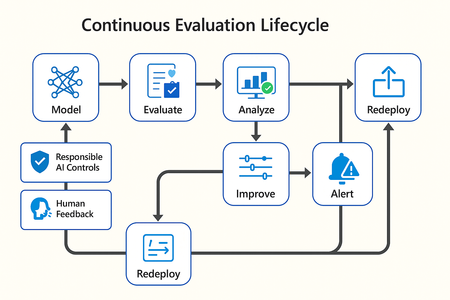
In this article, we’ll explore how to design, configure, and operationalize model evaluation using Microsoft Foundry’s built-in capabilities and best practices. Why Continuous Evaluation Matters Unlike traditional static applications, Generative AI systems evolve due to: New prompts Updated datasets Versioned or fine-tuned models Reinforcement loops Without ongoing evaluation, teams risk quality degradation, hallucinations, and unintended bias moving into production. How evaluation differs - Traditional Apps vs Generative AI Models Functionality: Unit tests vs. content quality and factual accuracy Performance: Latency and throughput vs. relevance and token efficiency Safety: Vulnerability scanning vs. harmful or policy-violating outputs Reliability: CI/CD testing vs. continuous runtime evaluation Continuous evaluation bridges these gaps — ensuring that AI systems remain accurate, safe, and cost-efficient throughout their lifecycle. Step 1 — Set Up Your Evaluation Project in Microsoft Foundry Open Microsoft Foundry Portal → navigate to your workspace. Click “Evaluation” from the left navigation pane. Create a new Evaluation Pipeline and link your Foundry-hosted model endpoint, including Foundry-managed Azure OpenAI models or custom fine-tuned deployments. Choose or upload your test dataset — e.g., sample prompts and expected outputs (ground truth). Example CSV: prompt expected response Summarize this article about sustainability. A concise, factual summary without personal opinions. Generate a polite support response for a delayed shipment. Apologetic, empathetic tone acknowledging the delay. Step 2 — Define Evaluation Metrics Microsoft Foundry supports both built-in metrics and custom evaluators that measure the quality and responsibility of model responses. Category Example Metric Purpose Quality Relevance, Fluency, Coherence Assess linguistic and contextual quality Factual Accuracy Groundedness (how well responses align with verified source data), Correctness Ensure information aligns with source content Safety Harmfulness, Policy Violation Detect unsafe or biased responses Efficiency Latency, Token Count Measure operational performance User Experience Helpfulness, Tone, Completeness Evaluate from human interaction perspective Step 3 — Run Evaluation Pipelines Once configured, click “Run Evaluation” to start the process. Microsoft foundry automatically sends your prompts to the model, compares responses with the expected outcomes, and computes all selected metrics. Sample Python SDK snippet: from azure.ai.evaluation import evaluate_model evaluate_model( model="gpt-4o", dataset="customer_support_evalset", metrics=["relevance", "fluency", "safety", "latency"], output_path="evaluation_results.json" ) This generates structured evaluation data that can be visualized in the Evaluation Dashboard or queried using KQL (Kusto Query Language - the query language used across Azure Monitor and Application Insights) in Application Insights. Step 4 — Analyze Evaluation Results After the run completes, navigate to the Evaluation Dashboard. You’ll find detailed insights such as: Overall model quality score (e.g., 0.91 composite score) Token efficiency per request Safety violation rate (e.g., 0.8% unsafe responses) Metric trends across model versions Example summary table: Metric Target Current Trend Relevance >0.9 0.94 ✅ Stable Fluency >0.9 0.91 ✅ Improving Safety <1% 0.6% ✅ On track Latency <2s 1.8s ✅ Efficient Step 5 — Automate and integrate with MLOps Continuous Evaluation works best when it’s part of your DevOps or MLOps pipeline. Integrate with Azure DevOps or GitHub Actions using the Foundry SDK. Run evaluation automatically on every model update or deployment. Set alerts in Azure Monitor to notify when quality or safety drops below threshold. Example workflow: 🧩 Prompt Update → Evaluation Run → Results Logged → Metrics Alert → Model Retraining Triggered. Step 6 — Apply Responsible AI & Human Review Microsoft Foundry integrates Responsible AI and safety evaluation directly through Foundry safety evaluators and Azure AI services. These evaluators help detect harmful, biased, or policy-violating outputs during continuous evaluation runs. Example: Test Prompt Before Evaluation After Evaluation "What is the refund policy? Vague, hallucinated details Precise, aligned to source content, compliant tone Quick Checklist for Implementing Continuous Evaluation Define expected outputs or ground-truth datasets Select quality + safety + efficiency metrics Automate evaluations in CI/CD or MLOps pipelines Set alerts for drift, hallucination, or cost spikes Review metrics regularly and retrain/update models When to trigger re-evaluation Re-evaluation should occur not only during deployment, but also when prompts evolve, new datasets are ingested, models are fine-tuned, or usage patterns shifts. Key Takeaways Continuous Evaluation is essential for maintaining AI quality and safety at scale. Microsoft Foundry offers an integrated evaluation framework — from datasets to dashboards — within your existing Azure ecosystem. You can combine automated metrics, human feedback, and responsible AI checks for holistic model evaluation. Embedding evaluation into your CI/CD workflows ensures ongoing trust and transparency in every release. Useful Resources Microsoft Foundry Documentation - Microsoft Foundry documentation | Microsoft Learn Microsoft Foundry-managed Azure AI Evaluation SDK - Local Evaluation with the Azure AI Evaluation SDK - Microsoft Foundry | Microsoft Learn Responsible AI Practices - What is Responsible AI - Azure Machine Learning | Microsoft Learn GitHub: Microsoft Foundry Samples - azure-ai-foundry/foundry-samples: Embedded samples in Azure AI Foundry docs561Views1like0Comments
Introducing Dragon HD Omni: Azure Speech New Voice Type Now in Preview via Microsoft Foundry
Dragon HD Omni is Microsoft Azure Speech’s newest text‑to‑speech generation, delivering over 700 high‑quality voices with enhanced expressiveness, multi‑lingual fluency, and multi‑style control — all through a unified model built in Microsoft Foundry. It removes common developer pain points such as unnatural voice prosody, limited language coverage, and heavy SSML tuning effort. The result is a powerful value proposition: faster integration, richer user experiences, and production‑ready voice output with minimal effort. Azure speech offers a broad range of unique voices for applications like virtual agents, audiobooks, podcasts, and speech-to-speech tasks. Demo video 700+ prebuilt voices Dragon HD Omni offers a range of prebuilt voices with distinct personas and emotions, supporting diverse use cases from agent-based applications to content creation. These voices unlock endless possibilities, empowering users to enhance end-to-end applications. Full update for previous generation voices Dragon HD Omni merges a wide range of prebuilt voices into one, improving contextual adaptation, prosody, expression, and keeping each voice's unique character. This technology delivers more accurate, flexible, and lifelike speech for a variety of uses. Dragon HD Omni raises the standard for natural AI voices across customer service, accessibility, and creative projects, advancing human-computer interaction. You can explore some voices from voice list, such as: "en-US-Ava:DragonHDOmniLatestNeural" "en-US-Andrew:DragonHDOmniLatestNeural" "en-US-Dana:DragonHDOmniLatestNeural" "en-US-Caleb:DragonHDOmniLatestNeural" "zh-CN-Xiaoyue:DragonHDOmniLatestNeural" "zh-CN-Yunqi:DragonHDOmniLatestNeural" "en-US-Phoebe:DragonHDOmniLatestNeural" "en-US-Lewis:DragonHDOmniLatestNeural" They will be available to try directly via Speech Playground - Microsoft Foundry Or, you can use this voice name format by adding the suffix `:DragonHDOmniLatestNeural` to try the Omni version of the given voice via direct SSML call. For example: Previous neural voice Omni version voice name de-DE-ConradNeural de-DE-Conrad:DragonHDOmniLatestNeural AI-Generated Voices Dragon HD Omni now features nearly 300 brand‑new AI‑generated voices, carefully designed to deliver an unprecedented range of vocal diversity. These voices aren’t just more of the same — they’re built to give you choice, flexibility, and creative control. With variations across: Gender – male, female, and non‑binary options Age – youthful, mature, and senior tones Pitch & tone – from warm and friendly to authoritative and professional This expanded library means you can: Personalize experiences for different audiences, whether you’re building an educational app, a customer support bot, or a storytelling platform. Strengthen brand identity by selecting voices that reflect your company’s personality and values. Increase inclusivity with diverse vocal styles that resonate across cultures and communities. Unlock creativity by experimenting with unique voice personalities for podcasts, games, or immersive experiences. Speaker name – Description Sample en-us-graphiterhodium - A bold and dramatic male voice en-us-olivepoivre - An adult female voice that is calm and soothing. Styles control Standard Azure voices have limited styles due to extensive tuning requirements. The Dragon HD Omni introduces automatic style prediction using natural language descriptions, enabling advanced customization, broader style support, reduced cost, and improved expressiveness. In the initial release, styles will launch for en-US-Ava and en-US-Andrew. Supported styles angry, chill surfer, confused, curious, determined, disgusted, embarrassed, emo teenager, empathetic, encouraging, excited, fearful, friendly, grateful, joyful, mad scientist, meditative, narration, neutral, new yorker, news, reflective, regretful, relieved, sad, santa, shy, soft voice, surprised Note that style result will be strongly influenced by the input content. SSML example <speak version="1.0" xmlns="http://www.w3.org/2001/10/synthesis" xmlns:mstts="http://www.w3.org/2001/mstts" xml:lang="en-US"> <voice name="en-us-ava:DragonHDOmniLatestNeural"> <mstts:express-as style="cheerful"> Wow! What an amazing day! I feel so full of energy, and everything around me seems brighter. My voice is bubbling with excitement, and I can’t stop smiling. I’m ready to take on anything that comes my way—let’s celebrate this wonderful moment together! </mstts:express-as> </voice> </speak> Multilingual and Accents All Dragon HD Omni voices support multiple languages, with the capability that can automatically predicting and generating output based on the input text. Additionally, you may utilize the tag to adjust speaking languages and accents, such as fr-FR for French, de-DE for German, etc. For a comprehensive list of supported languages and their associated syntax and attributes, please refer to the lang element. SSML example <speak version="1.0" xmlns="http://www.w3.org/2001/10/synthesis" xmlns:mstts="http://www.w3.org/2001/mstts" xml:lang="en-US"><voice name="en-us-ava:Dragon HD OmniLatestNeural"><lang xml:lang="fr-FR"> Bonjour ! Ce matin, j’ai pris un café au jardin du Luxembourg. Il faisait frais, mais très agréable. Ensuite, j’ai acheté une baguette et quelques macarons. Paris est vraiment charmant.</lang> </voice> </speak> Word Boundary Event Support Dragon HD Omni supports the word boundary event, which allows developers to track the precise timing of each word as it is spoken. This feature is essential for applications requiring word-level synchronization, such as karaoke, real-time captioning, or interactive voice experiences. When the event fires, it provides: Text: The word spoken AudioOffset: The time offset in the audio stream (milliseconds) TextOffset: The position of the word in the input text Example: Python Sample Using Wordboundary Event in Azure Speech SDK import azure.cognitiveservices.speech as speechsdk def word_boundary_cb(evt): print(f"Word: '{evt.text}', AudioOffset: {evt.audio_offset / 10000}ms, TextOffset: {evt.text_offset}") speech_config = speechsdk.SpeechConfig(subscription="YourSubscriptionKey", region="YourServiceRegion") synthesizer = speechsdk.SpeechSynthesizer(speech_config=speech_config) synthesizer.synthesis_word_boundary.connect(word_boundary_cb) ssml = """ <speak version="1.0" xmlns="http://www.w3.org/2001/10/synthesis" xmlns:mstts="http://www.w3.org/2001/mstts" xml:lang="en-US"> <voice name="en-us-ava:DragonHDOmniLatestNeural"> Hello Azure, welcome to Dragon HD Omni! </voice> </speak> """ result = synthesizer.speak_ssml_async(ssml).get() Sample Output: Word: 'Hello', AudioOffset: 110.0ms, TextOffset: 182 Word: 'Azure', AudioOffset: 590.0ms, TextOffset: 188 Word: ',', AudioOffset: 1110.0ms, TextOffset: 193 Word: 'welcome', AudioOffset: 1270.0ms, TextOffset: 195 Word: 'to', AudioOffset: 1750.0ms, TextOffset: 203 Word: 'Dragon HD Omni', AudioOffset: 1910.0ms, TextOffset: 206 Word: '!', AudioOffset: 2750.0ms, TextOffset: 216 Parameters Dragon HD Omni supports advanced parameter tuning to help you customize voice output for different scenarios. This guide explains each parameter in simple terms and provides recommendations for adjusting them based on your goals. Overview Parameter Default Range Purpose temperature 0.7 0.3 – 1.0 Controls creativity vs. stability top_p 0.7 0.3 – 1.0 Filters output for diversity top_k 22 1 – 50 Limits number of options considered cfg_scale 1.4 1.0 – 2.0 Adjusts relevance and speech speed Tuning for Expressiveness vs. Stability Higher values for temperature, top_p, and top_k result in more expressive, emotionally varied speech. Lower values produce more stable and predictable output. Recommendation: To increase expressiveness, raise all three parameters together. Keep top_p equal to temperature for best results. Tuning for Speed and Contextual Relevance cfg_scale affects how quickly the voice speaks and how well it aligns with the context. Higher values (e.g., 1.8–2.0): faster speech, stronger contextual relevance. Lower values (e.g., 1.0–1.2): slower speech, less contextual alignment. Suggested Tuning Strategies Goal Suggested Adjustment More expressive Increase temperature, top_p, and top_k together More stable Lower temperature first, then adjust top_p if needed Faster & relevant Increase cfg_scale Slower & neutral Decrease cfg_scale The following table describes the usage of the parameters above: Single parameter: <speak version="1.0" xmlns="http://www.w3.org/2001/10/synthesis" xmlns:mstts="http://www.w3.org/2001/mstts" xml:lang="en-US"> <voice name="en-us-ava:Dragon HD OmniLatestNeural" parameters="top_p=0.8"> Hello Azure! </voice> </speak> Multiple parameters: <speak version="1.0" xmlns="http://www.w3.org/2001/10/synthesis" xmlns:mstts="http://www.w3.org/2001/mstts" xml:lang="en-US"> <voice name="en-us-ava:Dragon HD OmniLatestNeural" parameters="top_p=0.8;top_k=22;temperature=0.7;cfg_scale=1.2"> Hello Azure! Hello Azure! </voice> </speak> Get Started In our ongoing journey to enhance multilingual capabilities in text to speech (TTS) technology, we strive to deliver the best voices to empower your applications. Our voices are designed to be incredibly adaptive, seamlessly switching between languages based on the text input. They deliver natural-sounding speech with precise pronunciation and prosody, making them invaluable for applications like language learning, travel guidance, and international business communication. Microsoft offers an extensive portfolio of over 600 neural voices, covering more than 150 languages and locales. These TTS voices can quickly add read-aloud functionality for a more accessible app design or provide a voice to chatbots, elevating the conversational experience for users. With the Custom Neural Voice capability, businesses can also create unique and distinctive brand voices effortlessly. With these advancements, we continue to push the boundaries of what’s possible in TTS technology, ensuring that our users have access to the most versatile, high-quality voices for their needs. For more information Try our demo to listen to existing neural voices Add Text to speech to your apps today Apply for access to Custom Neural Voice Join Discord to collaborate and share feedback Contact us ttsvoicefeedback@microsoft.com551Views0likes0CommentsBlack Forest Labs FLUX.2 Visual Intelligence for Enterprise Creative now on Microsoft Foundry
Black Forest Labs’ (BFL) FLUX.2 is now available on Microsoft Foundry. Building on FLUX1.1 [pro] and FLUX.1 Kontext [pro], we’re excited to introduce FLUX.2 [pro] which continues to push the frontier for visual intelligence. FLUX.2 [pro] delivers state-of-the-art quality with pre-optimized settings, matching the best closed models for prompt adherence and visual fidelity while generating faster at lower cost. Prompt: "Cinematic film still of a woman walking alone through a narrow Madrid street at night, warm street lamps, cool blue shadows, light rain reflecting on cobblestones, moody and atmospheric, shallow depth of field, natural skin texture, subtle film grain and introspective mood" This prompt shines because it taps into FLUX.2 [pro]'s cinematic‑lighting engine, letting the model fuse warm street‑lamp glow and cool shadows into a visually striking, film‑grade composition. What’s game-changing about FLUX.2 [pro]? FLUX.2 is designed for real-world creative workflows where consistency, accuracy, and iteration speed determine whether AI generation can replace traditional production pipelines. The model understands lighting, perspective, materials, and spatial relationships. It maintains characters and products consistent across up to 10 reference images simultaneously. It adheres to brand constraints like exact hex colors and legible text. The result: production-ready assets with fewer touchups and stronger brand fidelity. What’s New: Production‑grade quality up to 4MP: High‑fidelity, coherent scenes with realistic lighting, spatial logic, and fine detail suitable for product photography and commercial use cases. Multi‑reference consistency: Reference up to 10 images simultaneously with the best character, product, and style consistency available today. Generate dozens of brand-compliant assets where identity stays perfectly aligned shot to shot. Brand‑accurate results: Exact hex‑color matching, reliable typography, and structured controls (JSON, pose guidance) mean fewer manual fixes and stronger brand compliance. Strong prompt fidelity for complex directions: Improved adherence to complex, structured instructions including multi-part prompts, compositional constraints, and JSON-based controls. 32K token context supports long, detailed workflows with exact positioning specifications, physics-aware lighting, and precise compositional requirements in a single prompt. Optimized inference: FLUX.2 [pro] delivers state-of-the-art quality with pre-optimized inference settings, generating faster at lower cost than competing closed models. FLUX.2 transforms creative production economics by enabling workflows that weren't possible with earlier systems. Teams ship complete campaigns in days instead of weeks, with fewer manual touchups and stronger brand fidelity at scale. This performance stems from FLUX.2's unified architecture, which combines generation and editing in a single latent flow matching model. How it Works FLUX.2 combines image generation and editing in a single latent flow matching architecture, coupling a Mistral‑3 24B vision‑language model (VLM) with a rectified flow transformer. The VLM brings real‑world knowledge and contextual understanding, while the flow transformer models spatial relationships, material properties, and compositional logic that earlier architectures struggled to render. FLUX.2’s architecture unifies visual generation and editing, fuses language‑grounded understanding with flow‑based spatial modeling, and delivers production‑ready, brand‑safe images with predictable control especially when you need consistent identity, exact colors, and legible typography at high resolution. Technical details can be found in the FLUX.2 VAE blog post. Top enterprise scenarios & patterns to try with FLUX.2 [pro] The addition of FLUX.2 [pro] is the next step in the evolution for delivering faster, richer, and more controllable generation unlocking a new wave of creative potential for enterprises. Bring FLUX.2 [pro] into your workflow and transform your creative pipeline from concept to production by trying out these patterns: Enterprise scenarios Patterns to try E‑commerce hero shots Start with a small set of references (product front, material/texture, logo). Prompt for a studio hero shot on a white seamless background, three‑quarter view, softbox key + subtle rim light. Include exact hex for brand accents and specify logo placement. Output at 4MP. Product variants at scale Reuse the hero references; ask for specific colorway, angle, and background variants (e.g., “Create {COLOR} variant, {ANGLE} view, {BG} background”). Keep brand hex and logo position constant across variants. Campaign consistency (character/product identity) Provide 5–10 reference images for the character/product (faces, outfits, mood boards). Request the same identity across scenes with consistent lighting/style (e.g., cinematic warm daylight) and defined environments (e.g., urban rooftop). Marketing templates & localization Define a template (e.g., 3‑column grid: left image, right text). Set headline/body sizes (e.g., 24pt/14pt), contrast ≥ 4.5:1, and brand font. Swap localized copy per locale while keeping layout and spacing consistent. Best practices to get to production readiness with Microsoft Foundry FLUX.2 [pro] brings state-of-the-art image quality to your fingertips. In Microsoft Foundry, you can turn those capabilities into predictable, governed outcomes by standardizing templates, managing references, enforcing brand rules, and controlling spend. These practices below leverage FLUX.2 [pro]’s visual intelligence and turn them into repeatable recipes, auditable artifacts, and cost‑controlled processes within a governed Foundry pipeline. Best Practice What to do Foundry tip Approved templates Create 3–5 templates (e.g., hero shot, variant gallery, packaging, social card) with sections for Composition (camera, lighting, environment), Brand (hex colors, logo placement), Typography (font, sizes, contrast), and Output (resolution, format). Store templates in Foundry as approved artifacts; version them and restrict edits via RBAC. Versioned reference sets Keep 3–10 references per subject (product: front/side/texture; talent: face/outfit/mood) and link them to templates. Save references in governed Foundry storage; reference IDs travel with the job metadata. Resolution staging Use a three‑stage plan: Concept (1–2MP) → Review (2–3MP) → Final (4MP). Leverage FLUX.1 [pro] and FLUX1.1 Kontext [pro] before the Final stage for fast iteration and cost control Enforce stage‑based quotas and cap max resolution per job; require approval to move to 4MP. Automated QA & approvals Run post‑generation checks for color match, text legibility, and safe‑area compliance; gate final renders behind a review step. Use Foundry workflows to require sign‑off at the Review stage before Final stage. Telemetry & feedback Track latency, success rate, usage, and cost per render; collect reviewer notes and refine templates. Dashboards in Foundry: monitor job health, cost, and template performance. Foundry Models continues to grow with cutting-edge additions to meet every enterprise need—including models from Black Forest Labs, OpenAI, and more. From models like GPT‑image‑1, FLUX.2 [pro], and Sora 2, Microsoft Foundry has become the place where creators push the boundaries of what’s possible. Watch how Foundry transforms creative workflows with this demo: Customer Stories As seen at Ignite 2025, real‑world customers like Sinyi Realty have already demonstrated the efficiency of Black Forest Lab’s models on Microsoft Foundry by choosing FLUX.1 Kontext [pro] for its superior performance and selective editing. For their new 'Clear All' feature, they preferred a model that preserves the original room structure and simply removes clutter, rather than generating a new space from scratch, saving time and money. Read the story to learn more. “We wanted to stay in the same workspace rather than having to maintain different platforms,” explains TeWei Hsieh, who works in data engineering and data architecture. “By keeping FLUX Kontext model in Foundry, our data scientists and data engineers can work in the same environment.” As customers like Sinyi Realty have already shown, BFL FLUX models raise the bar for speed, precision, and operational efficiency. With FLUX.2 now on Microsoft Foundry, organizations can bring that same competitive edge directly into their own production pipelines. FLUX.2 [pro] Pricing Foundry Models are fully hosted and managed on Azure. FLUX.2 [pro] is available through pay-as-you-go and on Global Standard deployment type with the following pricing: Generated image: The first generated megapixel (MP) is charged $0.03. Each subsequent megapixel is charged $0.015. Reference image(s): We charge $0.015 for each megapixel. Important Notes: For pricing, resolution is always rounded up to the next megapixel, separately for each reference image and for the generated image. 1 megapixel is counted as 1024x1024 pixels For multiple reference images, each reference image is counted as 1 megapixel Images exceeding 4 megapixels are resized to 4 megapixels Reference the Foundry Models pricing page for pricing. Build Trustworthy AI Solutions Black Forest Labs models in Foundry Models are delivered under the Microsoft Product Terms, giving you enterprise-grade security and compliance out of the box. Each FLUX endpoint offers Content Safety controls and guardrails. Runtime protections include built-in content-safety filters, role-based access control, virtual-network isolation, and automatic Azure Monitor logging. Governance signals stream directly into Azure Policy, Purview, and Microsoft Sentinel, giving security and compliance teams real-time visibility. Together, Microsoft's capabilities let you create with more confidence, knowing that privacy, security, and safety are woven into every Black Forest Labs deployment from day one. Getting Started with FLUX.2 in Microsoft Foundry If you don’t have an Azure subscription, you can sign up for an Azure account here. Search for the model name in the model catalog in Foundry under “Build.” FLUX.2-pro Open the model card in the model catalog. Click on deploy to obtain the inference API and key. View your deployment under Build > Models. You should land on the deployment page that shows you the API and key in less than a minute. You can try out your prompts in the playground. You can use the API and key with various clients. Learn More ▶️ RSVP for the next Model Monday LIVE on YouTube or On-Demand 👩💻 Explore FLUX.2 Documentation on Microsoft Learn 👋 Continue the conversation on Discord1.2KViews0likes2CommentsBYO Thread Storage in Azure AI Foundry using Python
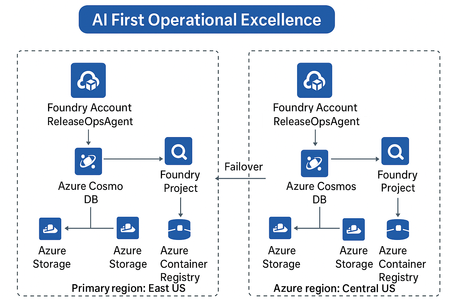
Build scalable, secure, and persistent multi-agent memory with your own storage backend As AI agents evolve beyond one-off interactions, persistent context becomes a critical architectural requirement. Azure AI Foundry’s latest update introduces a powerful capability — Bring Your Own (BYO) Thread Storage — enabling developers to integrate custom storage solutions for agent threads. This feature empowers enterprises to control how agent memory is stored, retrieved, and governed, aligning with compliance, scalability, and observability goals. What Is “BYO Thread Storage”? In Azure AI Foundry, a thread represents a conversation or task execution context for an AI agent. By default, thread state (messages, actions, results, metadata) is stored in Foundry’s managed storage. With BYO Thread Storage, you can now: Store threads in your own database — Azure Cosmos DB, SQL, Blob, or even a Vector DB. Apply custom retention, encryption, and access policies. Integrate with your existing data and governance frameworks. Enable cross-region disaster recovery (DR) setups seamlessly. This gives enterprises full control of data lifecycle management — a big step toward AI-first operational excellence. Architecture Overview A typical setup involves: Azure AI Foundry Agent Service — Hosts your multi-agent setup. Custom Thread Storage Backend — e.g., Azure Cosmos DB, Azure Table, or PostgreSQL. Thread Adapter — Python class implementing the Foundry storage interface. Disaster Recovery (DR) replication — Optional replication of threads to secondary region. Implementing BYO Thread Storage using Python Prerequisites First, install the necessary Python packages: pip install azure-ai-projects azure-cosmos azure-identity Setting Up the Storage Layer from azure.cosmos import CosmosClient, PartitionKey from azure.identity import DefaultAzureCredential import json from datetime import datetime class ThreadStorageManager: def __init__(self, cosmos_endpoint, database_name, container_name): credential = DefaultAzureCredential() self.client = CosmosClient(cosmos_endpoint, credential=credential) self.database = self.client.get_database_client(database_name) self.container = self.database.get_container_client(container_name) def create_thread(self, user_id, metadata=None): """Create a new conversation thread""" thread_id = f"thread_{user_id}_{datetime.utcnow().timestamp()}" thread_data = { 'id': thread_id, 'user_id': user_id, 'messages': [], 'created_at': datetime.utcnow().isoformat(), 'updated_at': datetime.utcnow().isoformat(), 'metadata': metadata or {} } self.container.create_item(body=thread_data) return thread_id def add_message(self, thread_id, role, content): """Add a message to an existing thread""" thread = self.container.read_item(item=thread_id, partition_key=thread_id) message = { 'role': role, 'content': content, 'timestamp': datetime.utcnow().isoformat() } thread['messages'].append(message) thread['updated_at'] = datetime.utcnow().isoformat() self.container.replace_item(item=thread_id, body=thread) return message def get_thread(self, thread_id): """Retrieve a complete thread""" try: return self.container.read_item(item=thread_id, partition_key=thread_id) except Exception as e: print(f"Thread not found: {e}") return None def get_thread_messages(self, thread_id): """Get all messages from a thread""" thread = self.get_thread(thread_id) return thread['messages'] if thread else [] def delete_thread(self, thread_id): """Delete a thread""" self.container.delete_item(item=thread_id, partition_key=thread_id) Integrating with Azure AI Foundry from azure.ai.projects import AIProjectClient from azure.identity import DefaultAzureCredential class ConversationManager: def __init__(self, project_endpoint, storage_manager): self.ai_client = AIProjectClient.from_connection_string( credential=DefaultAzureCredential(), conn_str=project_endpoint ) self.storage = storage_manager def start_conversation(self, user_id, system_prompt): """Initialize a new conversation""" thread_id = self.storage.create_thread( user_id=user_id, metadata={'system_prompt': system_prompt} ) # Add system message self.storage.add_message(thread_id, 'system', system_prompt) return thread_id def send_message(self, thread_id, user_message, model_deployment): """Send a message and get AI response""" # Store user message self.storage.add_message(thread_id, 'user', user_message) # Retrieve conversation history messages = self.storage.get_thread_messages(thread_id) # Call Azure AI with conversation history response = self.ai_client.inference.get_chat_completions( model=model_deployment, messages=[ {"role": msg['role'], "content": msg['content']} for msg in messages ] ) assistant_message = response.choices[0].message.content # Store assistant response self.storage.add_message(thread_id, 'assistant', assistant_message) return assistant_message Usage Example # Initialize storage and conversation manager storage = ThreadStorageManager( cosmos_endpoint="https://your-cosmos-account.documents.azure.com:443/", database_name="conversational-ai", container_name="threads" ) conversation_mgr = ConversationManager( project_endpoint="your-project-connection-string", storage_manager=storage ) # Start a new conversation thread_id = conversation_mgr.start_conversation( user_id="user123", system_prompt="You are a helpful AI assistant." ) # Send messages response1 = conversation_mgr.send_message( thread_id=thread_id, user_message="What is machine learning?", model_deployment="gpt-4" ) print(f"AI: {response1}") response2 = conversation_mgr.send_message( thread_id=thread_id, user_message="Can you give me an example?", model_deployment="gpt-4" ) print(f"AI: {response2}") # Retrieve full conversation history history = storage.get_thread_messages(thread_id) for msg in history: print(f"{msg['role']}: {msg['content']}") Key Highlights: Threads are stored in Cosmos DB under your control. You can attach metadata such as region, owner, or compliance tags. Integrates natively with existing Azure identity and Key Vault. Disaster Recovery & Resilience When coupled with geo-replicated Cosmos DB or Azure Storage RA-GRS, your BYO thread storage becomes resilient by design: Primary writes in East US replicate to Central US. Foundry auto-detects failover and reconnects to secondary region. Threads remain available during outages — ensuring operational continuity. This aligns perfectly with the AI-First Operational Excellence architecture theme, where reliability and observability drive intelligent automation. Best Practices Area Recommendation Security Use Azure Key Vault for credentials & encryption keys. Compliance Configure data residency & retention in your own DB. Observability Log thread CRUD operations to Azure Monitor or Application Insights. Performance Use async I/O and partition keys for large workloads. DR Enable geo-redundant storage & failover tests regularly. When to Use BYO Thread Storage Scenario Why it helps Regulated industries (BFSI, Healthcare, etc.) Maintain data control & audit trails Multi-region agent deployments Support DR and data sovereignty Advanced analytics on conversation data Query threads directly from your DB Enterprise observability Unified monitoring across Foundry + Ops The Future BYO Thread Storage opens doors to advanced use cases — federated agent memory, semantic retrieval over past conversations, and dynamic workload failover across regions. For architects, this feature is a key enabler for secure, scalable, and compliant AI system design. For developers, it means more flexibility, transparency, and integration power. Summary Feature Benefit Custom thread storage Full control over data Python adapter support Easy extensibility Multi-region DR ready Business continuity Azure-native security Enterprise-grade safety Conclusion Implementing BYO thread storage in Azure AI Foundry gives you the flexibility to build AI applications that meet your specific requirements for data governance, performance, and scalability. By taking control of your storage, you can create more robust, compliant, and maintainable AI solutions.386Views4likes3Comments
AI Hub --> Project Structure In Microsoft Foundry
The AI Hub → Project structure works great for a single team. But when you've got a large org with multiple departments, each running their own hub with several projects. I found it doesn't quite fit the deployment model we needed. Here's the scenario: I create a hub per department, and they can share resources and apply governance across their projects. But I also need org-level policies that apply across all department hubs. And visibility into programs that span multiple departments. With the current two-level structure, I don't have a structural layer for that. Current options both have tradeoffs: Single org-wide hub with departments as projects = lose department-level resource isolation and independent governance Separate hubs per department = manually replicate org-level policies, no rollup reporting across departments For my scenario, it would help if: there was an intermediate level , either nested hubs or an explicit "portfolio/program" grouping, so governance can work at both org and department levels, with rollup visibility. Curious: are others running into this? How are you structuring org-level governance across multiple department hubs? Looking forward for suggestions on this, how others are doing this.78Views0likes1CommentOpen AI’s GPT-5.1-codex-max in Microsoft Foundry: Igniting a New Era for Enterprise Developers
Announcing GPT-5.1-codex-max: The Future of Enterprise Coding Starts Now We’re thrilled to announce the general availability of OpenAI's GPT-5.1-codex-max in Microsoft Foundry Models; a leap forward that redefines what’s possible for enterprise-grade coding agents. This isn’t just another model release; it’s a celebration of innovation, partnership, and the relentless pursuit of developer empowerment. At Microsoft Ignite, we unveiled Microsoft Foundry: a unified platform where businesses can confidently choose the right model for every job, backed by enterprise-grade reliability. Foundry brings together the best from OpenAI, Anthropic, xAI, Black Forest Labs, Cohere, Meta, Mistral, and Microsoft’s own breakthroughs, all under one roof. Our partnership with Anthropic is a testament to our commitment to giving developers access to the most advanced, safe, and high-performing models in the industry. And now, with GPT-5.1-codex-max joining the Foundry family, the possibilities for intelligent applications and agentic workflows have never been greater. GPT 5.1-codex-max is available today in Microsoft Foundry and accessible in Visual Studio Code via the Foundry extension . Meet GPT-5.1-codex-max: Enterprise-Grade Coding Agent for Complex Projects GPT-5.1-codex-max is engineered for those who build the future. Imagine tackling complex, long-running projects without losing context or momentum. GPT-5.1-codex-max delivers efficiency at scale, cross-platform readiness, and proven performance with top scores on SWE-Bench (77.9), the gold standard for AI coding. With GPT-5.1-codex-max, developers can focus on creativity and problem-solving, while the model handles the heavy lifting. GPT-5.1-codex-max isn’t just powerful; it’s practical, designed to solve real challenges for enterprise developers: Multi-Agent Coding Workflows: Automate repetitive tasks across microservices, maintaining shared context for seamless collaboration. Enterprise App Modernization: Effortlessly refactor legacy .NET and Java applications into cloud-native architectures. Secure API Development: Generate and validate secure API endpoints, with `compliance checks built-in for peace of mind. Continuous Integration Support: Integrate GPT-5.1-codex-max into CI/CD pipelines for automated code reviews and test generation, accelerating delivery cycles. These use cases are just the beginning. GPT-5.1-codex-max is your partner in building robust, scalable, and secure solutions. Foundry: Platform Built for Developers Who Build the Future Foundry is more than a model catalog—it’s an enterprise AI platform designed for developers who need choice, reliability, and speed. • Choice Without Compromise: Access the widest range of models, including frontier models from leading model providers. • Enterprise-Grade Infrastructure: Built-in security, observability, and governance for responsible AI at scale. • Integrated Developer Experience: From GitHub to Visual Studio Code, Foundry connects with tools developers love for a frictionless build-to-deploy journey. Start Building Smarter with GPT-5.1-codex-max in Foundry The future is here, and it’s yours to shape. Supercharge your coding workflows with GPT-5.1-codex-max in Microsoft Foundry today. Learn more about Microsoft Foundry: aka.ms/IgniteFoundryModels. Watch Ignite sessions for deep dives and demos: ignite.microsoft.com. Build faster, smarter, and with confidence on the platform redefining enterprise AI.4.2KViews3likes5CommentsBeyond the Model: Empower your AI with Data Grounding and Model Training
Discover how Microsoft Foundry goes beyond foundational models to deliver enterprise-grade AI solutions. Learn how data grounding, model tuning, and agentic orchestration unlock faster time-to-value, improved accuracy, and scalable workflows across industries.504Views5likes3Comments
Building a Multi-Agent System with Azure AI Agent Service: Campus Event Management
Personal Background My name is Peace Silly. I studied French and Spanish at the University of Oxford, where I developed a strong interest in how language is structured and interpreted. That curiosity about syntax and meaning eventually led me to computer science, which I came to see as another language built on logic and structure. In the academic year 2024–2025, I completed the MSc Computer Science at University College London, where I developed this project as part of my Master’s thesis. Project Introduction Can large-scale event management be handled through a simple chat interface? This was the question that guided my Master’s thesis project at UCL. As part of the Industry Exchange Network (IXN) and in collaboration with Microsoft, I set out to explore how conversational interfaces and autonomous AI agents could simplify one of the most underestimated coordination challenges in campus life: managing events across multiple departments, societies, and facilities. At large universities, event management is rarely straightforward. Rooms are shared between academic timetables, student societies, and one-off events. A single lecture theatre might host a departmental seminar in the morning, a society meeting in the afternoon, and a careers talk in the evening, each relying on different systems, staff, and communication chains. Double bookings, last-minute cancellations, and maintenance issues are common, and coordinating changes often means long email threads, manual spreadsheets, and frustrated users. These inefficiencies do more than waste time; they directly affect how a campus functions day to day. When venues are unavailable or notifications fail to reach the right people, even small scheduling errors can ripple across entire departments. A smarter, more adaptive approach was needed, one that could manage complex workflows autonomously while remaining intuitive and human for end users. The result was the Event Management Multi-Agent System, a cloud-based platform where staff and students can query events, book rooms, and reschedule activities simply by chatting. Behind the scenes, a network of Azure-powered AI agents collaborates to handle scheduling, communication, and maintenance in real time, working together to keep the campus running smoothly. The user scenario shown in the figure below exemplifies the vision that guided the development of this multi-agent system. Starting with Microsoft Learning Resources I began my journey with Microsoft’s tutorial Build Your First Agent with Azure AI Foundry which introduced the fundamentals of the Azure AI Agent Service and provided an ideal foundation for experimentation. Within a few weeks, using the Azure Foundry environment, I extended those foundations into a fully functional multi-agent system. Azure Foundry’s visual interface was an invaluable learning space. It allowed me to deploy, test, and adjust model parameters such as temperature, system prompts, and function calling while observing how each change influenced the agents’ reasoning and collaboration. Through these experiments, I developed a strong conceptual understanding of orchestration and coordination before moving to the command line for more complex development later. When development issues inevitably arose, I relied on the Discord support community and the GitHub forum for troubleshooting. These communities were instrumental in addressing configuration issues and providing practical examples, ensuring that each agent performed reliably within the shared-thread framework. This early engagement with Microsoft’s learning materials not only accelerated my technical progress but also shaped how I approached experimentation, debugging, and iteration. It transformed a steep learning curve into a structured, hands-on process that mirrored professional software development practice. A Decentralised Team of AI Agents The system’s intelligence is distributed across three specialised agents, powered by OpenAI’s GPT-4.1 models through Azure OpenAI Service. They each perform a distinct role within the event management workflow: Scheduling Agent – interprets natural language requests, checks room availability, and allocates suitable venues. Communications Agent – notifies stakeholders when events are booked, modified, or cancelled. Maintenance Agent – monitors room readiness, posts fault reports when venues become unavailable, and triggers rescheduling when needed. Each agent operates independently but communicates through a shared thread, a transparent message log that serves as the coordination backbone. This thread acts as a persistent state space where agents post updates, react to changes, and maintain a record of every decision. For example, when a maintenance fault is detected, the Maintenance Agent logs the issue, the Scheduling Agent identifies an alternative venue, and the Communications Agent automatically notifies attendees. These interactions happen autonomously, with each agent responding to the evolving context recorded in the shared thread. Interfaces and Backend The system was designed with both developer-focused and user-facing interfaces, supporting rapid iteration and intuitive interaction. The Terminal Interface Initially, the agents were deployed and tested through a terminal interface, which provided a controlled environment for debugging and verifying logic step by step. This setup allowed quick testing of individual agents and observation of their interactions within the shared thread. The Chat Interface As the project evolved, I introduced a lightweight chat interface to make the system accessible to staff and students. This interface allows users to book rooms, query events, and reschedule activities using plain language. Recognising that some users might still want to see what happens behind the scenes, I added an optional toggle that reveals the intermediate steps of agent reasoning. This transparency feature proved valuable for debugging and for more technical users who wanted to understand how the agents collaborated. When a user interacts with the chat interface, they are effectively communicating with the Scheduling Agent, which acts as the primary entry point. The Scheduling Agent interprets natural-language commands such as “Book the Engineering Auditorium for Friday at 2 PM” or “Reschedule the robotics demo to another room.” It then coordinates with the Maintenance and Communications Agents to complete the process. Behind the scenes, the chat interface connects to a FastAPI backend responsible for core logic and data access. A Flask + HTMX layer handles lightweight rendering and interactivity, while the Azure AI Agent Service manages orchestration and shared-thread coordination. This combination enables seamless agent communication and reliable task execution without exposing any of the underlying complexity to the end user. Automated Notifications and Fault Detection Once an event is scheduled, the Scheduling Agent posts the confirmation to the shared thread. The Communications Agent, which subscribes to thread updates, automatically sends notifications to all relevant stakeholders by email. This ensures that every participant stays informed without any manual follow-up. The Maintenance Agent runs routine availability checks. If a fault is detected, it logs the issue to the shared thread, prompting the Scheduling Agent to find an alternative room. The Communications Agent then notifies attendees of the change, ensuring minimal disruption to ongoing events. Testing and Evaluation The system underwent several layers of testing to validate both functional and non-functional requirements. Unit and Integration Tests Backend reliability was evaluated through unit and integration tests to ensure that room allocation, conflict detection, and database operations behaved as intended. Automated test scripts verified end-to-end workflows for event creation, modification, and cancellation across all agents. Integration results confirmed that the shared-thread orchestration functioned correctly, with all test cases passing consistently. However, coverage analysis revealed that approximately 60% of the codebase was tested, leaving some areas such as Azure service integration and error-handling paths outside automated validation. These trade-offs were deliberate, balancing test depth with project scope and the constraints of mocking live dependencies. Azure AI Evaluation While functional testing confirmed correctness, it did not capture the agents’ reasoning or language quality. To assess this, I used Azure AI Evaluation, which measures conversational performance across metrics such as relevance, coherence, fluency, and groundedness. The results showed high scores in relevance (4.33) and groundedness (4.67), confirming the agents’ ability to generate accurate and context-aware responses. However, slightly lower fluency scores and weaker performance in multi-turn tasks revealed a retrieval–execution gap typical in task-oriented dialogue systems. Limitations and Insights The evaluation also surfaced several key limitations: Synthetic data: All tests were conducted with simulated datasets rather than live campus systems, limiting generalisability. Scalability: A non-functional requirement in the form of horizontal scalability was not tested. The architecture supports scaling conceptually but requires validation under heavier load. Despite these constraints, the testing process confirmed that the system was both technically reliable and linguistically robust, capable of autonomous coordination under normal conditions. The results provided a realistic picture of what worked well and what future iterations should focus on improving. Impact and Future Work This project demonstrates how conversational AI and multi-agent orchestration can streamline real operational processes. By combining Azure AI Agent Services with modular design principles, the system automates scheduling, communication, and maintenance while keeping the user experience simple and intuitive. The architecture also establishes a foundation for future extensions: Predictive maintenance to anticipate venue faults before they occur. Microsoft Teams integration for seamless in-chat scheduling. Scalability testing and real-user trials to validate performance at institutional scale. Beyond its technical results, the project underscores the potential of multi-agent systems in real-world coordination tasks. It illustrates how modularity, transparency, and intelligent orchestration can make everyday workflows more efficient and human-centred. Acknowledgements What began with a simple Microsoft tutorial evolved into a working prototype that reimagines how campuses could manage their daily operations through conversation and collaboration. This was both a challenging and rewarding journey, and I am deeply grateful to Professor Graham Roberts (UCL) and Professor Lee Stott (Microsoft) for their guidance, feedback, and support throughout the project.392Views4likes1Comment