ASP .NET
48 TopicsDevelop Custom Engine Agent to Microsoft 365 Copilot Chat with pro-code
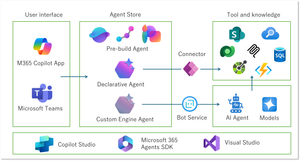
There are some great articles that explain how to integrate an MCP server built on Azure with a declarative agent created using Microsoft Copilot Studio. These approaches aim to extend the agent’s capabilities by supplying it with tools, rather than defining a fixed role. Here were some of the challenges w encountered: The agent's behavior can only be tested through the Copilot Studio web interface, which isn't ideal for iterative development. You don’t have control over which LLM is used as the orchestrator—for example, there's no way to specify GPT-4o. The agent's responses don’t always behave the same as they would if you were prompting the LLM directly. These limitations got me thinking: why not build the entire agent myself? At the same time, I still wanted to take advantage of the familiar Microsoft 365 Copilot interface on the frontend. As I explored further, I discovered that the Microsoft 365 Copilot SDK makes it possible to bring in your own custom-built agent.2.1KViews12likes1CommentChecklist for Migrating Web Apps to App Service
App Service continues to invest in migration tooling to allow customers to easily migrate their web apps to App Service. The current set of tools enable discovery, assessment, and migration of web apps across various scenarios and scopes viz. standalone web app, single IIS server and even a datacenter.15KViews8likes1CommentAzure App Service Logging: How to Monitor Your Web Apps in Real-Time
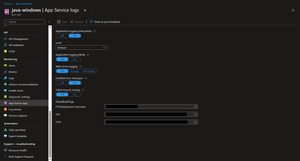
As a developer, having visibility into the behavior of your applications is crucial to maintaining the reliability and performance of your software. Luckily, Azure App Service provides two powerful logging features to help you monitor your web apps in real-time: App Service Logs and Log Stream. In this blog post, we'll explore how to configure these features for both Windows and Linux Web Apps in Azure App Service.94KViews8likes9Comments
Azure App Service Limit (2) - Temp File Usage (Windows)
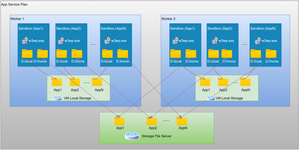
This is the 2nd blog of a series on Azure App Service Limits illustrations: 1) Azure App Service Limit (1) - Remote Storage (Windows) - Microsoft Community Hub 2) Azure App Service Limit (2) - Temp File Usage (Windows) - Microsoft Community Hub 3) Azure App Service Limit (3) - Connection Limit (TCP Connection, SNAT and TLS Version) - Microsoft Community Hub 4) Azure App Service Limit (4) - CPU (Windows) - Microsoft Community Hub 5) Azure App Service Limit (5) - Memory (Windows) - Microsoft Community Hub In the first blog of the app service limits series, we know the web app contents are typically saved in the attached remote storage associated with the App Service plan. For temporary files, they are stored in the temporary directory specific to the running instance of the app. And there is a quota limit for those temporary files as well. If you suspect that the app service's performance issue is related to the storage space issue, it's essential to check both the App Service plan's storage and the amount of temporary file's usage. To better understand the Azure App Service File System please refer to below diagram: In this blog, we will focus on the temporary file usage of the Azure App Service by clarifying the most commonly asked questions below: 1. What is the threshold for temporary file storage space? The size limits vary based on the pricing tier and type of the plan. Here are some general guidelines: SKU Family B1/S1/etc. B2/S2/etc. B3/S3/etc. Basic, Standard, Premium 11 GB 15 GB 58 GB PremiumV2, Isolated 21 GB 61 GB 140 GB 2. Where do I check to see if my site has hit a threshold? Navigate to Diagnose and solve problems blade, and type "Temp" and select Temp File Usage On Workers: From this detector, we can gather information about two things: (1) The temp file usage for each machine; (2) The threshold limit for all the machines in this plan. Kindly note: Considering that calculating the file size can take up system resources and impact response time, the file size is continuously monitored and updated once per hour. 3. Can I set up an alert for temporary storage usage? Currently, it is not supported to set up an alert specifically for the usage of temporary files. However, we can manually monitor and check the usage through the methods mentioned in question 2 above. 4. Where can I view these temporary files? By default, the main site and the kudu site do not share the temp files, so you are not able to see the main site's temp files from the kudu console. By adding the app setting (WEBSITE_DISABLE_SCM_SEPARATION = true) to disable the separation, we will be able to check the file usage details from the kudu site. Please notes, adding this app setting will cause the site to restart, resulting in the cleanup of temporary files. As a result, it is advised to wait for several hours before checking the usage again. A number of common Windows locations are using temporary storage on the local machine. For instance, %APPDATA% maps to %SYSTEMDRIVE%\local\AppData. %ProgramData% maps to %SYSTEMDRIVE%\local\ProgramData. %TMP% maps to %SYSTEMDRIVE%\local\Temp. %SYSTEMDRIVE%\local\DynamicCache for Dynamic Cache feature. 5. What should I do if the threshold has already been reached or will be reached soon? If these temporary files have been checked and backed up, we can do one of the following operations: (1) Restart the site Restarting the website will clear all temporary files, but since many cases are caused by the website storing some cache files, this is only a temporary operation. Also note that a cold start (like killing the IIS process by force or restarting the instance from the advance tool), will not affect temporary files. (2) Scale up the plan If you already know that your site needs more temporary space, switching to a larger machine will give you more temporary space. (3) Update the application code Find the source code that creates the temporary file and modify it at the code level.8.3KViews6likes0CommentsBuilding Static Web Apps with database connections: Best Practices
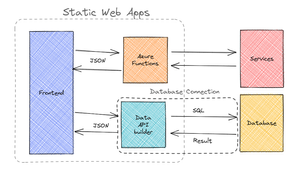
With the announcement of Static Web Apps' database connections feature, when should you use database connections versus building your own backend APIs? What is Data API builder and how does it relate to Static Web Apps' database connections feature? We cover these topics and more in this blog post.11KViews6likes6CommentsAzure App Service Limit (5) - Memory (Windows)
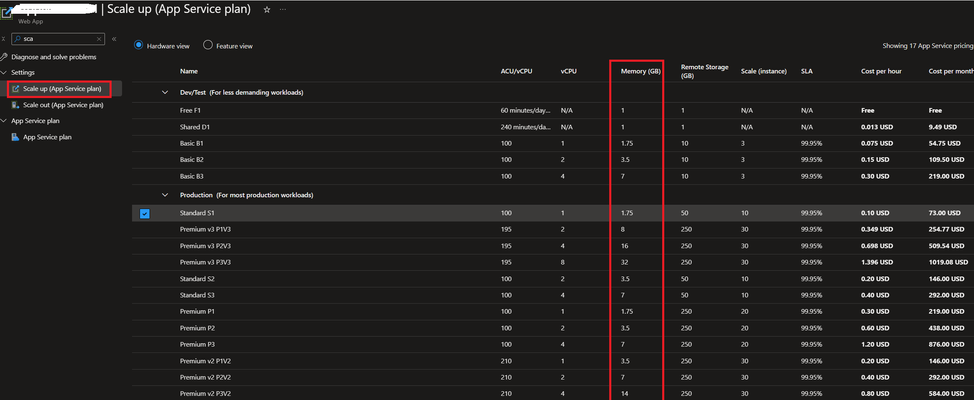
The RAM size is indeed a machine-level resource, and high memory usage can be another common cause for performance issues in an application, similar to high CPU usage. The blog will provide insights into how to check for high memory usage within Azure App Services, enabling you to identify any potential memory-related bottlenecks.12KViews5likes2CommentsAzure App Service Limit (1) - Remote Storage (Windows)
As we all know, each product has its own unique limitations, and Azure App Service is no exception. Limits for Azure App service can be found here. When your website encounters performance problems, we usually think of checking whether the threshold of that limit has been touched in the first place. I will write a series blog regarding some common App Service limits which impact the performance of the site. This blog will introduce the remote storage limit of the Azure App Service.6.4KViews5likes0CommentsHow to store app secrets for your ASP .NET Core project
This article is for you that is either completely new to ASP .NET Core or is currently storing your secrets in config files that you may or may not check in by mistake. Keep secrets separate, store them using the Secret management tool in dev mode, and look into services like Azure KeyVault for production.43KViews5likes5CommentsStart Your Cloud Journey with Azure App Service
Moving a line-of-business application that’s been designed to run on-prem, or even on a virtual machine, to the cloud can be intimidating. Let's take a look at Azure App Service and what it offers .NET applications and developers on their cloud journey.38KViews4likes0Comments