api management
208 Topics
Azure API Center portal is now generally available
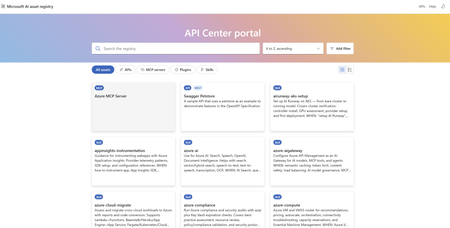
What Is the API Center Portal? The API Center portal is a hosted, provisioned and managed by Azure, where developers across your organization can discover, explore, and consume APIs. The API Center portal provides a multi-gateway, organization-wide view of every API and AI asset (e.g. plugins, MCP servers, skills etc) Key Capabilities Search and filter your full API inventory. Developers can find APIs and AI assets by name or use AI-assisted semantic search (available on the Standard plan) to query by intent. Natural language queries like “Enable cloud migration” surfaces relevant Azure cloud migrate skill and associated MCP server even when exact words don’t appear in AI asset name and description Rich API details at a glance. Users can view endpoints, methods, parameters, and response formats; download API definitions; or open them directly in Visual Studio Code — all from within the portal. Discovering and testing MCP servers: The API Center portal supports discovery of MCP (Model Context Protocol) servers, making it a single destination for both traditional APIs and the AI-native integrations powering modern copilots and agents. Developers and other stakeholders can browse and filter MCP servers in the inventory, view details such as the URL endpoint and tool schemas, and install MCP servers directly into their Visual Studio Code environment — all from within the portal. A built-in test console lets users test MCP server tools and view responses without leaving the portal: simply navigate to the Documentation tab of an MCP server details page, select a tool, and click Run tool to get started. Discovering Skills and assessment results: The API Center portal also serves as a central hub for discovering skills registered in your organization's API inventory. Developers and stakeholders can browse and filter skills alongside APIs and MCP servers and view detailed information about each skill directly in the portal. Skill assessment results are surfaced on the skill details page, giving teams immediate visibility into the quality and readiness of each skill — no additional tooling required. Together with API and MCP server discovery, skills support in the API Center portal reinforces its role as a unified catalog for all the building blocks of modern AI-powered applications. Flexible access control. The portal integrates with Microsoft Entra ID for authenticated access, or you can enable anonymous access for broader internal discoverability. Role-based access control makes it straightforward to grant access to specific users and groups. Customizable visibility rules. Admins can filter which APIs surface in the portal — by asset type (REST, GraphQL, MCP, Agent, Skill etc.), lifecycle stage, specification format, or custom metadata — so the right APIs and AI assets reach the right audiences. Setting It Up Getting started takes just a few steps in the Azure portal: Navigate to your API center and select API Center portal > Settings. Configure access — either Microsoft Entra ID authentication (recommended) or anonymous access. Hit Save + publish, and your portal is live at https://<service-name>.portal.<location>.azure-apicenter.ms. For teams with deeper customization needs, the portal can also be self-hosted and integrates with the Visual Studio Code extension for API Center. Learn more The Azure API Center portal is available today. Visit the setup documentation to configure your portal, and check out the overview of Azure API Center to learn more about managing your organization’s full API and AI asset inventory. To learn more click hereLogic Apps Newsletter - May 2026
In this issue: Ace Aviator of the Month News from our product group News from our community Ace Aviator of the Month May 2026's Ace Aviator: Yahya Ajwad What's your role and title? What are your responsibilities? I work as Chief Architect and AI Lead at Epical. My role is centered around technical leadership, architecture, and advisory mostly within cloud adoption and transformation programs. I help customers design and implement integration platforms. I also support customers in navigating the AI landscape, with a focus on how integration platforms impact AI readiness and how AI can be used to create value in the platforms we build. Internally at Epical, I lead our Microsoft and Azure cloud integration offering, as well as our CoreAI team and AI initiatives. Can you give us some insights into your day-to-day activities? One moment it is about how we can utilize AI to deliver things cheaper and faster without compromising security, governance and quality. Next, a customer contacts us with an undocumented BizTalk environment asking us what to do next (that's where the fun begins). Usually followed up by the question about how much does their future integration platform in Azure will cost down to the last cent (good luck answering that 😜 hint: the right answer is always: "less than BizTalk"). And hey, public cloud might not be good enough for their security, so thank God for private connectivity. I also spend time helping customers identify the best cloud integration strategies and patterns and for their business needs, choosing the right platforms and components for specific use cases, and ensuring that the platforms we design are as secure, scalable, maintainable, and cost-efficient as possible. Increasingly, this also includes sprinkling AI so bosses are happy (joking I'm a true AI believer myself). Internally, I support Epical with technical business development and help ensure that we stay relevant. What motivates and inspires you to be an active member of the Aviators/Microsoft community? I honestly believe that IT in general would never have been the same without communities and the willingness to share knowledge and support one another. The Logic Apps and Azure Integration community is especially unique because it is both practical and open. People share real experiences which makes it incredibly valuable when trying to solve real-world challenges. What motivates me is the opportunity to learn by sharing, receive feedback, and be part of a community where everyone contributes to each other’s growth. Between us, I'm here for the stickers ;) Looking back, what advice do you wish you had been given earlier? Be kind, stay curious and be helpful. Share what you know, even if it feels small or irrelevant. Those small insights often help others more than you think and that will definitely help you grow. Also, focus on learning the fundamentals. Tools and platforms change quickly, and what is popular today might not matter in a few weeks. Strong basics will always stay relevant. Keep learning and try new things all the time. What has helped you grow professionally? Being around kind, skilled, and generous people both in the community and at work who are willing to teach, challenge my thinking, and share their knowledge. Also, finding mentors who are open to mentor me, listen to all my questions even the silly ones, and who are willing to guide me and correct me when I’m hallucinating. If you had a magic wand that could create a feature in Logic Apps, what would it be? I don’t need to wish for one, you guys (Shout-out to Harold, Dyvia and the team) have already created it: Logic Apps Migration Assistant Agents. That stuff is definitely magic. News from our product group Network Connectivity Check APIs for Logic App Standard This post introduces built-in network troubleshooting APIs for Logic App Standard when integrated with a virtual network. Three endpoints—connectivityCheck, dnsCheck, and tcpPingCheck—let you validate end‑to‑end connectivity to services such as Azure SQL, Key Vault, Storage, Service Bus, and Event Hubs, perform DNS resolution, and test TCP reachability from the actual worker hosting your workflows. It covers supported provider types, credential options including Managed Identity and app settings, example payloads, and known limitations (e.g., SMB port 445 cannot be tested). Step-by-step guidance shows how to call the APIs via Azure API Playground or CLI to quickly isolate network issues. Service Bus SBMP Retirement: What BizTalk Server 2020 Customers Need to Know Azure Service Bus will retire the Service Bus Messaging Protocol (SBMP) on September 30, 2026, impacting BizTalk Server 2020 customers using the SB‑Messaging adapter. Microsoft has released a hotfix that adds Advanced Message Queuing Protocol (AMQP) support to the adapter for CU6 and CU7. With the hotfix, AMQP becomes the default transport while SBMP remains an opt‑in fallback; an updated hotfix based on the new Service Bus SDK is expected in June. Guidance includes migrating configurations to AMQP, installing and validating the hotfix in non‑production, and testing large message/file scenarios. The hotfix can be requested via support (KB5091375). Migrate Data Ingestion from Data Collector to Log Ingestion With the HTTP Data Collector API for Log Analytics deprecated and heading out of support in September 2026, this guide shows Logic Apps users how to move to the Log Ingestion API. It explains impacts—such as 403 errors for new Data Collector connections and missing data in newly created custom log tables—and provides a migration path using the HTTP action. Steps include creating a Data Collection Endpoint (DCE) and Data Collection Rule (DCR), deriving the full ingestion URL, mapping sample data to define schema, assigning the Monitoring Metrics Publisher role to the Logic App’s managed identity, and verifying success (HTTP 204). Introducing AI Skill Assessment in Azure API Center Azure API Center now includes automated AI skill assessment, providing governance and quality scoring for skills at scale using an “LLM‑as‑a‑judge” approach. The system evaluates outputs against defined criteria and ships with four default dimensions—Documentation Clarity, Help Completeness, Discoverability, and Safe Usage—each scored 1–5 with configurable thresholds. Developers get detailed reports showing pass/fail, per‑dimension scores, structural checks, and schema validation, helping them decide which skills are production‑ready. Platform administrators can extend or customize criteria to match organizational standards. The feature centralizes oversight and reduces manual review effort, improving confidence when adopting AI skills across integration solutions. Introducing the plugin marketplace for Azure API Center Azure API Center adds a plugin marketplace endpoint (public preview) that exposes a version‑controlled catalog of organizational AI plugins—such as MCP servers and skills—directly from your API Center data plane. Developers can discover and install plugins from familiar tools like Claude Code and GitHub Copilot CLI using simple marketplace commands. The endpoint inherits the API Center portal’s authentication model, ensuring governance and security while platform teams control publication. The article explains the problem it addresses, the marketplace.git URL format, quick start commands, and documentation to enable the feature—streamlining how teams curate, manage, and consume AI plugins in enterprise environments. News from our community Control the Initial State of Logic Apps Standard Workflows Post by Sandro Pereira This tip explains how to prevent Logic Apps Standard workflows from auto-starting after deployment, a risky default in production. Unlike Consumption, Standard doesn’t expose a state property in ARM. Instead, each workflow’s initial state is controlled via App Service application settings using the pattern “Workflows.<WorkflowName>.FlowState=Disabled.” The post shows how to define these keys in local.settings.json (or pipelines/Bicep), deploy with workflows disabled, and enable them when ready. It also notes acceptable values (Disabled/disabled) and clarifies that omitting the keys leaves workflows enabled by default—reducing unwanted executions and noisy alerts. 10 Azure Function App Limitations for Enterprise Integration Post by Tarun Garg The post outlines ten reasons Azure Function Apps may be a poor fit for enterprise integration workloads. Issues include cold-start latency, limited orchestration and state management, operational complexity at scale, and the need to hand-roll observability. It also highlights security and network isolation challenges, cost variability under heavy throughput, strong dependence on custom code, risks around versioning and breaking changes, and insufficient governance controls for integration use cases. The takeaway: Function Apps excel at granular compute, but integration programs often benefit from managed orchestration layers and patterns better aligned to enterprise requirements. Logic Apps Standard: how accidentally blocking access from Edge results in CORS errors Post by Şahin Özdemir Şahin Özdemir explains a troubleshooting case where Logic Apps Standard action inputs/outputs stopped loading in the Azure portal, appearing like a CORS issue. The root cause was a blocked “Local Network Access” permission in Microsoft Edge, not misconfigured CORS. The article advises checking Edge’s site permissions and re-enabling local network access before diving into CORS diagnostics. By validating browser settings first, engineers can avoid unnecessary changes to integration apps and resolve portal rendering failures quickly—saving time and reducing confusion when workflow views suddenly fail to load. Logic apps – Handling AND OR conditions Post by Anitha Eswaran Anitha Eswaran explains how to correctly implement combined AND/OR logic in Azure Logic Apps when the designer view becomes confusing. Using a real example—validating item numbers—she shows how to check for empty values or specific suffixes (W/WN) and when to terminate processing. The article demonstrates building expressions to explicitly control evaluation order and outcomes, avoiding unintended behavior from default AND logic. Practical screenshots and expression snippets help readers structure conditions, handle arrays from trigger data, and create maintainable workflows that reflect real business rules. Why Enterprises Are Migrating from Logic Apps (Consumption) to Logic Apps (Standard): Practical Insights from the Field Post by Kunal Saha Kunal Saha outlines why organizations reach an inflection point where Logic Apps Standard becomes a better fit than Consumption. Drawing from field experience, he highlights drivers like consolidated app-level management, richer local development workflows, environment isolation, and cost predictability for sustained workloads. The piece discusses when per-execution billing ceases to be efficient, how Standard’s hosting model supports enterprise governance, and migration considerations around triggers, connectors, and stateful patterns. The article encourages teams to evaluate workload characteristics and operational needs to determine the right time to modernize to Standard. Event Debouncing with Logic Apps and Azure Table Storage Post by Daniel Jonathan This article presents an event debouncing pattern for webhook-heavy systems using three Logic Apps and a single Azure Table Storage table. Incoming events are buffered by upserting rows keyed by entity ID, ensuring only the latest state is retained. A timer-driven workflow processes pending rows after a cooldown window, fetches fresh state from the source, and calls downstream APIs, deleting entries on success or resetting on failure. Benefits include implicit deduplication, reduced downstream load, and operational transparency in Storage Explorer. The pattern suits moderate scale without Service Bus, with caveats for strict ordering or very high throughput scenarios. XML to JSON in Logic Apps: Fixing the “Object vs Array” Trap Post by Prashant Singh Prashant Singh explains a common pitfall when converting XML to JSON in Logic Apps: json(xml(...)) yields an array when multiple nodes exist, but a single object when only one node is present—breaking For each loops. He outlines three remedies: debatch directly with xpath() to always return a node set; wrap the target node with array() to normalize object/array differences; or use coalesce() with array() to safely handle missing nodes. With clear examples and expressions, the post helps engineers avoid brittle assumptions and build resilient workflows that handle single, multiple, or absent records cleanly. DevUP Talks 02 - 2026 Q1 Reflections with Ahmed Bayoumy, Sebastian Meyer and Andrew Wilson Video by Mattias Lögdberg This 12‑minute panel discussion surveys how AI and automation are changing day‑to‑day engineering work. Mattias Lögdberg hosts Ahmed Bayoumy, Sebastian Meyer, and Andrew Wilson to share early field perspectives: the shift from experimentation to production, emerging testing responsibilities around AI‑assisted code, and how integration teams are adapting operating models and skills. The conversation favors practical observations over hype, offering a snapshot of what practitioners are seeing at the start of 2026. It’s a compact watch for leaders tracking real impacts rather than theoretical roadmaps. How low can you code? From ‘drag-and-drop’ dreams to try–catch reality Post by Sonny Gillissen Sonny Gillissen argues that early low‑code promised simplicity but often obscured complexity with visual designers and limited tooling. He suggests AI can shift low‑code from diagramming boxes to describing intent—letting teams express business behavior in natural terms, with systems generating implementations. The piece calls for focusing on domain clarity, robust data/APIs, and guardrails over chasing more drag‑and‑drop. For integration engineers, it frames a path where Logic Apps and related platforms become orchestration shells around AI‑assisted specifications, improving maintainability without hiding the hard parts. Legacy Integration to Azure: 40% Cost Savings and Faster Delivery Post by Adaptiv (post by Simon Clendon) This piece outlines lessons from migrating legacy integration platforms to Microsoft Azure. It details the discovery work needed to untangle historical integrations, the diplomacy required with stakeholders, and the engineering patterns that de-risk cutovers. Highlights include modernizing HR workflows, establishing clear migration decision trees, and treating AI as a force multiplier rather than a silver bullet. The article emphasizes measurable outcomes—around 40% cost savings and faster delivery—while cautioning against underestimating analysis, testing, and organizational change, and recommending experienced partners to accelerate the journey. Using the Right Tool Is Not Over‑Engineering Post by Marcelo Gomes Marcelo Gomes argues that many integration failures stem from tool misalignment rather than flawed logic. Using a market‑stall analogy, he outlines when to rely on API Management for exposure and control, where Logic Apps should orchestrate rather than absorb all work, and why Azure Storage underpins durable, production‑ready designs. The piece encourages architects to map responsibilities explicitly—governance at the edge, orchestration in workflows, compute where it belongs—so systems scale cleanly without masking complexity under a single service. Choosing fit‑for‑purpose components, he suggests, is discipline—not over‑engineering. Using Event Grid to detect deleted files and trigger Logic App Post by Sandro Pereira (author: Luis Rigueira) This walkthrough shows how to capture Azure Storage blob deletion events with Event Grid and invoke a Logic App for downstream actions like audit, recovery, or notifications. It explains why native Blob triggers don’t fire on delete, then sets up a System Topic on the storage account, configures a Logic App with the “When a resource event occurs” trigger for Microsoft.Storage.BlobDeleted, and parses the event payload for container, file name, content‑type, and timestamp. The post provides expressions and screenshots to build the flow end‑to‑end, enabling reliable reactions to file deletions without custom functions.Introducing AI Skill Assessment in Azure API Center
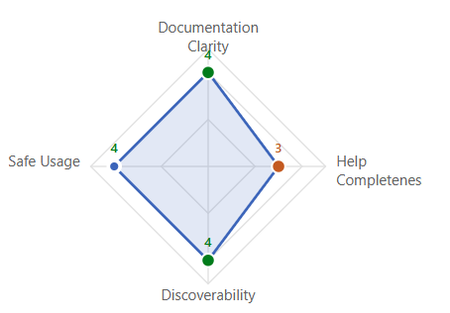
As AI skills become central to enterprise automation and intelligent workflows, ensuring their quality, safety, and discoverability at scale is a growing challenge. Today, we're excited to announce skills assessment in Azure API Center — a built-in, automated quality scoring system powered by the LLM-as-a-judge technique. This capability enables organizations to continuously evaluate AI skills against defined quality standards, giving platform administrators governance controls and giving developers the confidence to adopt skills that are ready for production. What is LLM-as-a-Judge? AI skill assessments using the LLM-as-a-judge technique leverage a large language model to evaluate AI outputs against defined quality criteria — scoring responses across dimensions like accuracy, coherence, and helpfulness. The judge model can be prompted with rubrics, reference answers, or pairwise comparisons, enabling scalable feedback at a fraction of the cost of human annotation. By embedding this technique directly into Azure API Center, teams can now benefit from continuous, automated quality evaluation — without manual review overhead. Default Assessment Criteria: Four Dimensions of Quality API Center comes with default skill assessment criteria out of the box, evaluating skills across four key dimensions — each scored on a 1–5 scale with a default threshold of 3: Documentation Clarity — Evaluates how clearly a skill's purpose and behavior are communicated. Help Completeness — Assesses whether the output serves as a comprehensive standalone reference. Discoverability — Measures how easily functionality can be navigated and found. Safe Usage — Evaluates whether sufficient guidance is provided for safe operation. Enterprise platform administrators can further extend these defaults by defining custom assessment criteria tailored to their organization's specific standards, compliance requirements, and governance policies. Figure 1: Platform administrators configure skill assessment criteria and thresholds in the Azure API Center portal Detailed Quality Reports for Developers Once skills assessment is enabled, developers can view a detailed AI Quality Score report for each skill directly within the API Center portal. This report provides an at-a-glance Pass or Fail status along with per-dimension scores and actionable feedback. Alongside the LLM-based scores, the report includes: Structural Checks — Verifying foundational elements like valid frontmatter, skill name, and body content. Schema Validation — Flags missing sections such as examples or error handling Figure 2: Developers see per-dimension quality scores, structural checks, and schema validation results for each skill in the API Center portal. What This Means for Developers As a developer, this means you can quickly understand the quality and reliability of a skill before adopting it — making informed decisions about which skills are ready to use and which may need further refinement. No more guessing whether a skill is production ready. With skills assessment, every skill in your catalog comes with a transparent quality score, clear actionable feedback, and the confidence that comes from automated, consistent evaluation. Get Started Skills assessment is available now in Azure API Center. Platform administrators can enable assessment, configure criteria, and start evaluating skills from the API Center portal today. To learn more, visit the skills assessment in Azure API Center documentation or try it out in the Azure Portal.Introducing native Service Bus message publishing from Azure API Management (Preview)
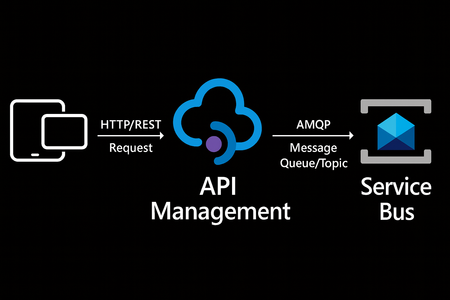
We’re excited to announce a preview capability in Azure API Management (APIM) — you can now send messages directly to Azure Service Bus from your APIs using a built-in policy. This enhancement, currently in public preview, simplifies how you connect your API layer with event-driven and asynchronous systems, helping you build more scalable, resilient, and loosely coupled architectures across your enterprise. Why this matters? Modern applications increasingly rely on asynchronous communication and event-driven designs. With this new integration: Any API hosted in API Management can publish to Service Bus — no SDKs, custom code, or middleware required. Partners, clients, and IoT devices can send data through standard HTTP calls, even if they don’t support AMQP natively. You stay in full control with authentication, throttling, and logging managed centrally in API Management. Your systems scale more smoothly by decoupling front-end requests from backend processing. How it works The new send-service-bus-message policy allows API Management to forward payloads from API calls directly into Service Bus queues or topics. High-level flow A client sends a standard HTTP request to your API endpoint in API Management. The policy executes and sends the payload as a message to Service Bus. Downstream consumers such as Logic Apps, Azure Functions, or microservices process those messages asynchronously. All configurations happen in API Management — no code changes or new infrastructure are required. Getting started You can try it out in minutes: Set up a Service Bus namespace and create a queue or topic. Enable a managed identity (system-assigned or user-assigned) on your API Management instance. Grant the identity the “Service Bus data sender” role in Azure RBAC, scoped to your queue/ topic. Add the policy to your API operation: <send-service-bus-message queue-name="orders"> <payload>@(context.Request.Body.As<string>())</payload> </send-service-bus-message> Once saved, each API call publishes its payload to the Service Bus queue or topic. 📖 Learn more. Common use cases This capability makes it easy to integrate your APIs into event-driven workflows: Order processing – Queue incoming orders for fulfillment or billing. Event notifications – Trigger internal workflows across multiple applications. Telemetry ingestion – Forward IoT or mobile app data to Service Bus for analytics. Partner integrations – Offer REST-based endpoints for external systems while maintaining policy-based control. Each of these scenarios benefits from simplified integration, centralized governance, and improved reliability. Secure and governed by design The integration uses managed identities for secure communication between API Management and Service Bus — no secrets required. You can further apply enterprise-grade controls: Enforce rate limits, quotas, and authorization through APIM policies. Gain API-level logging and tracing for each message sent. Use Service Bus metrics to monitor downstream processing. Together, these tools help you maintain a consistent security posture across your APIs and messaging layer. Build modern, event-driven architectures With this feature, API Management can serve as a bridge to your event-driven backbone. Start small by queuing a single API’s workload, or extend to enterprise-wide event distribution using topics and subscriptions. You’ll reduce architectural complexity while enabling more flexible, scalable, and decoupled application patterns. Learn more: Get the full walkthrough and examples in the documentation 👉 here4.6KViews4likes7CommentsIntroducing the plugin marketplace for Azure API Center
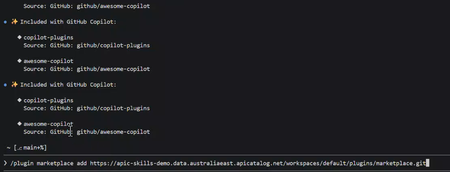
Today, we're excited to announce the public preview of the plugin marketplace endpoint for Azure API Center. This new capability makes it easier than ever for developers to discover and install AI plugins — including MCP servers and skills — directly from the tools they already use, like Claude Code and GitHub Copilot CLI. The problem we're solving As AI plugins and MCP servers become core parts of the developer workflow, teams have struggled with a fundamental challenge: there's no central, governed place to find and manage them. Developers hunt through documentation, Teams messages, and wikis — and platform teams have no reliable way to ensure the right plugins are being used. Azure API Center has built the plugin marketplace to fix this issue What's new When you register plugins in your API Center inventory and enable the API Center portal, we now automatically provision a marketplace.git endpoint at your data plane URL: Your marketplace endpoint is https://<service>.data.<region>.azure-apicenter.ms/workspaces/default/plugins/marketplace.git This endpoint serves as a live, version-controlled catalog of every plugin in your API Center — with metadata, configuration, and install instructions ready for developer tools to consume. Get up and running in seconds We've designed the experience to be as frictionless as possible. Developers can add your organization's marketplace and start installing plugins with just two commands: In Claude Code /plugin marketplace add <url> /plugin install plugin-name@myapicenter In GitHub Copilot CLI /plugin marketplace add <url> /plugin marketplace browse myapicenter Enterprise-ready from day one The plugin marketplace isn't just convenient — it's governed. Access to the marketplace endpoint inherits the same authentication model you configured for your API Center portal, so your security and compliance posture stays intact. Platform teams remain in full control of what gets published; developers get a seamless, trusted source of truth. Documentation To learn more click hereIntroducing Skills in Azure API Center
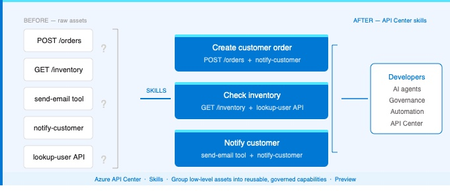
The problem Modern applications depend on more than APIs. A single AI workflow might call an LLM, invoke an MCP tool, integrate a third-party service, and reference a business capability spanning dozens of endpoints. Without a central inventory, these assets become impossible to discover, easy to duplicate, and painful to govern. Azure API Center — part of the Azure API Management platform — already catalogs models, agents, and MCP servers alongside traditional APIs. Skills extend that foundation to cover reusable AI capabilities. What is a Skill? As AI agents become more capable, organizations need a way to define and govern what those agents can actually do. Skills are the answer. A Skill in Azure API Center is a reusable, registered capability that AI agents can discover and consume to extend their functionality. Each skill is backed by source code — typically hosted in a Git repository — and describes what it does, what APIs or MCP servers it can access, and who owns it. Think of skills as the building blocks of AI agent behavior, promoted into a governed inventory alongside your APIs, MCP servers, models, and agents. Example: A "Code Review Skill" performs automated code reviews using static analysis. It is registered in API Center with a Source URL pointing to its GitHub repo, allowed to access your code analysis API, and discoverable by any AI agent in your organization. How Skills work in API Center Skills can be added to your inventory in two ways: registered manually through the Azure portal, or synchronized automatically from a connected Git repository. Both approaches end up in the same governed catalog, discoverable through the API Center portal. Option 1: Register a Skill manually Use the Azure portal to register a skill directly. Navigate to Inventory > Assets in your API center, select + Register an asset > Skill, and fill in the registration form. Figure 2: Register a skill form in the Azure portal. The form captures everything needed to make a skill discoverable and governable: Field Description Title Display name for the skill (e.g. Code Review Skill). Identification Auto-generated URL slug based on the title. Editable. Summary One-line description of what the skill does. Description Full detail on capabilities, use cases, and expected behavior. Lifecycle stage Current state: Design, Preview, Production, or Deprecated. Source URL Git repository URL for the skill source code. Allowed tools The APIs or MCP servers from your inventory this skill is permitted to access. Enforces governance at the capability level. License Licensing terms: MIT, Apache 2.0, Proprietary, etc. Contact information Owner or support contact for the skill. Governance note: The Allowed tools field is key for AI governance. It explicitly defines which APIs and MCP servers a skill can invoke — preventing uncontrolled access and making security review straightforward. Option 2: Sync Skills from a Git repository For teams managing skills in source control, API Center can integrate directly with a Git repository and synchronize skill information automatically. This is the recommended approach for teams practicing GitOps or managing many skills at scale. Figure 3: Integrating a Git repository to sync skills automatically into API Center. When you configure a Git integration, API Center: Creates an Environment representing the repository as a source of skills Scans for files matching the configured pattern (default: **/skill.md) Syncs matching skills into your inventory and keeps them current as the repo changes For private repositories, a Personal Access Token (PAT) stored in Azure Key Vault is used for authentication. API Center's managed identity retrieves the PAT securely — no credentials are stored in the service itself. Tip: Use the Automatically configure managed identity and assign permissions option when setting up the integration if you haven't pre-configured a managed identity. API Center handles the Key Vault permissions automatically. Discovering Skills in your catalog Once registered — manually or via Git — skills appear in the Inventory > Assets page alongside all other asset types. Linked skills (synced from Git) are visually identified with a link icon, so teams can see at a glance which skills are source-controlled. From the API Center portal, developers and other stakeholders can browse the full skill catalog, filter by lifecycle stage or type, and view detailed information about each skill — including its source URL, allowed tools, and contact information. Figure 4: Skills catalog in API Center portal, showing registered skills and the details related to the skill. Developer experience: The API Center portal gives teams a self-service way to discover approved skills without needing to ask around or search GitHub. The catalog becomes the authoritative source of what's available and what's allowed. Why this matters for AI development teams Skills close a critical gap in AI governance. As organizations deploy AI agents, they need to know — and control — what those agents can do. Without a governed skill registry, capability discovery is ad hoc, reuse is low, and security review is difficult. By bringing skills into Azure API Center alongside APIs, MCP servers, models, and agents, teams get: A single inventory for all the assets AI agents depend on Explicit governance over which resources each skill can access via Allowed tools Automated, source-controlled skill registration via Git integration Discoverability for developers and AI systems through the API Center portal Consistent lifecycle management — Design through Production to Deprecated API Center, as part of the Azure API Management platform and the broader AI Gateway vision, is evolving into the system of record for AI-ready development. Skills are the latest step in that direction. Available now Skills are available today in Azure API Center (preview). To register your first skill: Sign in to the Azure portal and navigate to your API Center instance In the sidebar, select Inventory > Assets Select + Register an asset > Skill Fill in the registration form and select Create → Register and discover skills in Azure API Center (docs) → Set up your API Center portal → Explore the Azure API Management platform2.1KViews0likes2CommentsUpdate To API Management Workspaces Breaking Changes: Built-in Gateway & Tiers Support
What’s changing? If your API Management service uses preview workspaces on the built-in gateway and meets the tier-based limits below, those workspaces will continue to function as-is and will automatically transition to general availability once built-in gateway support is fully announced. API Management tier Limit of workspaces on built-in gateway Premium and Premium v2 Up to 30 workspaces Standard and Standard v2 Up to 5 workspaces Basic and Basic v2 Up to 1 workspace Developer Up to 1 workspace Why this change? We introduced the requirement for workspace gateways to improve reliability and scalability in large, federated API environments. While we continue to recommend workspace gateways, especially for scenarios that require greater scalability, isolation, and long-term flexibility, we understand that many customers have established workflows using the preview workspaces model or need workspaces support in non-Premium tiers. What’s not changing? Other aspects of the workspace-related breaking changes remain in effect. For example, service-level managed identities are not available within workspaces. In addition to workspaces support on the built-in gateway described in the section above, Premium and Premium v2 services will continue to support deploying workspaces with workspace gateways. Resources Workspaces in Azure API Management Original breaking changes announcements Reduced tier availability Requirement for workspace gatewaysNew Azure API management service limits
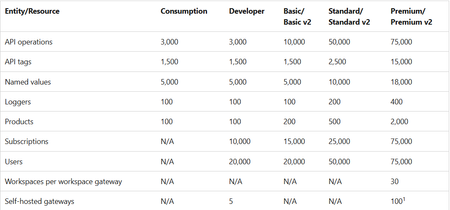
Azure API Management operates on finite physical infrastructure. To ensure reliable performance for all customers, the service enforces limits calibrated based on: Azure platform capacity and performance characteristics Service tier capabilities Typical customer usage patterns Resource limits are interrelated and tuned to prevent any single aspect from disrupting overall service performance. Changes to service limits - 2026 update Starting March 2026 and over the following several months, Azure API Management is introducing updated resource limits for instances across all tiers. The limits are shown in the following table. Entity/Resource Consumption Developer Basic/ Basic v2 Standard/ Standard v2 Premium/ Premium v2 API operations 3,000 3,000 10,000 50,000 75,000 API tags 1,500 1,500 1,500 2,500 15,000 Named values 5,000 5,000 5,000 10,000 18,000 Loggers 100 100 100 200 400 Products 100 100 200 500 2,000 Subscriptions N/A 10,000 15,000 25,000 75,000 Users N/A 20,000 20,000 50,000 75,000 Workspaces per workspace gateway N/A N/A N/A N/A 30 Self-hosted gateways N/A 5 N/A N/A 100 1 1 Applies to Premium tier only. What's changing Limits in the classic tiers now align with those set in the v2 tiers. Limits are enforced for a smaller set of resource types that are directly related to service capacity and performance, such as API operations, tags, products, and subscriptions. Rollout process New limits roll out in a phased approach by tier as follows: Tier Expected rollout date Consumption Developer Basic Basic v2 March 15, 2026 Standard Standard v2 April 15, 2026 Premium Premium v2 May 15, 2026 Limits policy for existing classic tier customers After the new limits take effect, you can continue using your preexisting API Management resources without interruption. Existing classic tier services, where current usage exceeds the new limits, are "grandfathered" when the new limits are introduced. (Instances in the v2 tiers are already subject to the new limits.) Limits in grandfathered services will be set 10% higher than the customer's observed usage at the time new limits take effect. Grandfathering applies per service and service tier. Other existing services and new services are subject to the new limits when they take effect. Guidelines for limit increases In some cases, you might want to increase a service limit. Before requesting a limit increase, note the following guidelines: Explore strategies to address the issue proactively before requesting a limit increase. See the article here Manage resources within limits. Consider potential impacts of the limit increase on overall service performance and stability. Increasing a limit might affect your service's capacity or increase latency in some service operations. Requesting a limit increase The product team considers requests for limit increases only for customers using services in the following tiers that are designed for medium to large production workloads: Standard and Standard v2 Premium and Premium v2 Requests for limit increases are evaluated on a case-by-case basis and aren't guaranteed. The product team prioritizes Premium and Premium v2 tier customers for limit increases. To request a limit increase, create a support request from the Azure portal. For more information, see Azure support plans. Documentation For more information, please see documentation hereLogic Apps Aviators Newsletter - March 2026
In this issue: Ace Aviator of the Month News from our product group News from our community Ace Aviator of the Month March 2026's Ace Aviator: Lilan Sameera What's your role and title? What are your responsibilities? I’m a Senior Consultant at Adaptiv, where I design, build, and support integration solutions across cloud and enterprise systems, translating business requirements into reliable, scalable, and maintainable solutions. I work with Azure Logic Apps, Azure Functions, Azure Service Bus, Azure API Management, Azure Storage, Azure Key Vault, and Azure SQL. Can you give us some insights into your day-to-day activities? Most of my work focuses on designing and delivering reliable, maintainable integration solutions. I spend my time shaping workflows in Logic Apps, deciding how systems should connect, handling errors, and making sure solutions are safe and effective. On a typical day, I might be: - Designing or reviewing integration workflows and message flows - Investigating tricky issues - Working with teams to simplify complex processes - Making decisions about patterns, performance, and long-term maintainability A big part of what I do is thinking ahead, anticipating where things could go wrong, and building solutions that are easy to support and extend. The culture at Adaptiv encourages this approach and makes knowledge sharing across teams easy. What motivates and inspires you to be an active member of the Aviators/Microsoft community? The Microsoft and Logic Apps communities are incredibly generous with knowledge. I’ve learned so much from blogs, GitHub repos, and forum posts. Being part of the Aviators community is my way of giving back, sharing real-world experiences, lessons learned, and practical solutions. Adaptiv encourages people to engage with the community, which makes it easier to contribute and stay involved. Looking back, what advice do you wish you had been given earlier? Don’t wait until you feel like you “know everything” to start building or sharing. You learn the most by doing, breaking things, fixing them, and asking questions. Focus on understanding concepts, not simply tools. Technologies change, fundamentals don’t. Communication matters as well. Being able to explain why something works is just as important as making it work. What has helped you grow professionally? Working on real-world, high-impact projects has been key. Being exposed to different systems, integration patterns, and production challenges has taught me more than any textbook. Supportive teammates, constructive feedback, and a culture that encourages learning and ownership have also been key in my growth. If you had a magic wand that could create a feature in Logic Apps, what would it be? I would love a first-class, visual way to version and diff Logic Apps workflows, like how code changes are tracked in Git. It would make reviews, troubleshooting, and collaboration much easier, notably in complex enterprise integrations, and help teams work more confidently. News from our product group New Azure API management service limits Azure API Management announced updated service limits across classic and v2 tiers to ensure predictable performance on shared infrastructure. The post details new limits for key resources such as API operations, tags, products, subscriptions, and users, along with a rollout schedule: Consumption/Developer/Basic (including v2) from March 15, Standard/Standard v2 from April 15, and Premium/Premium v2 from May 15, 2026. Existing classic services are grandfathered at 10% above observed usage at the time limits take effect. Guidance is provided on managing within limits, evaluating impact, and requesting increases (priority for Standard/Standard v2 and Premium/Premium v2). How to Access a Shared OneDrive Folder in Azure Logic Apps Logic Apps can work with files in a OneDrive folder shared by a colleague, but the OneDrive for Business “List files in folder” action doesn’t show shared folders because it enumerates only the signed‑in user’s drive. The article explains two supported approaches: (1) call Microsoft Graph using HTTP with Microsoft Entra ID (delegated permissions), or (2) use Graph Explorer to discover the shared folder’s driveId and folderId, then manually configure the action with {driveId}:{folderId}. A troubleshooting section shows how to extract these identifiers from browser network traces when Graph Explorer results are incomplete. Stop Writing Plumbing! Use the New Logic Apps MCP Server Wizard A new configuration experience in Logic Apps Standard (Preview) turns an existing logic app into an MCP server with a guided, in‑portal workflow. The wizard centralizes setup for authentication, API keys, server creation, and tool exposure, letting teams convert connectors and workflows into discoverable MCP tools that agents can call. You can generate tools from new connectors or register existing HTTP‑based workflows, choose API key or OAuth (EasyAuth) authentication, and test from agent platforms such as VS Code, Copilot Studio, and Foundry. The post also notes prerequisites and a known OAuth issue mitigated by reapplying EasyAuth settings. Logic Apps Agentic Workflows with SAP - Part 2: AI Agents Part 2 focuses on the AI portion of an SAP–Logic Apps integration. A Logic Apps validation agent retrieves business rules from SharePoint and produces structured outputs—an HTML summary, a CSV of invalid order IDs, and an “invalid rows” CSV—that directly drive downstream actions: email notifications, optional persistence of failed rows as custom IDocs, and filtering before a separate analysis step returns results to SAP. The post explains the agent loop design, tool boundaries (“Get validation rules,” “Get CSV payload,” “Summarize review”), and a two‑model pattern (validation vs. analysis) to keep AI outputs deterministic and workflow‑friendly. Logic Apps Agentic Workflows with SAP - Part 1: Infrastructure Part 1 establishes the infrastructure and contracts for a Logic Apps + SAP pattern that keeps integrations deterministic. A source workflow sends CSV data to SAP, while destination workflows handle validation and downstream processing. The post covers SAP connectivity (RFC/IDoc), the SAP‑side wrapper function, and the core contract elements—IT_CSV for input lines, ANALYSIS for results, EXCEPTIONMSG for human‑readable status, and RETURN (BAPIRET2) for structured success/error. It also details data shaping, error propagation, and email notification paths, with code snippets and diagrams to clarify gateway settings, namespace‑robust XPath extraction, and end‑to‑end flow control. Azure API Management - Unified AI Gateway Design Pattern This customer‑implemented pattern from Uniper uses Azure API Management as a unified AI gateway to normalize requests, enforce authentication and governance, and dynamically route traffic across multiple AI providers and models. Key elements include a single wildcard API, unified auth (API keys/JWT plus managed identity to backends), policy‑based path construction and model‑aware routing, circuit breakers with regional load balancing, token limits and metrics, and centralized logging. Reported outcomes include an 85% reduction in API definitions, faster feature availability, and 99.99% service availability. A GitHub sample shows how to implement the policy‑driven pipeline with modular policy fragments. A BizTalk Migration Tool: From Orchestrations to Logic Apps Workflows The BizTalk Migration Starter is an open‑source toolkit for modernizing BizTalk Server solutions to Azure Logic Apps. It includes tools to convert BizTalk maps (.btm) to Logic Apps Mapping Language (.lml), transform orchestrations (.odx) into Logic Apps workflow JSON, map pipelines to Logic Apps processing patterns, and expose migration tools via an MCP server for AI‑assisted workflows. The post outlines capabilities, core components, and command‑line usage, plus caveats (e.g., scripting functoids may require redesign). A demo video and GitHub repo links are provided for getting started, testing, and extending connector mappings and migration reports. Azure Arc Jumpstart Template for Hybrid Logic Apps Deployment A new Azure Arc Jumpstart “drop” provisions a complete hybrid environment for Logic Apps Standard on an Arc‑enabled AKS cluster with a single command. The deployment script sets up AKS, Arc for Kubernetes, the ACA extension, a custom location and Connected Environment, Azure SQL for runtime storage, an Azure Storage account for SMB artifacts, and a hybrid Logic Apps resource. After deployment, test commands verify each stage. The post links to prerequisites, quick‑start steps, a demo video, and references on hybrid deployment requirements. It invites community feedback and contributions via the associated GitHub repository. News from our community Pro-Code Enterprise AI-Agents using MCP for Low-Code Integration Video by Sebastian Meyer This video demonstrates how Model Context Protocol (MCP) can bridge pro-code and low-code integration by combining Microsoft Agent Framework with Azure Logic Apps. It shows how an autonomous AI agent can be wired into enterprise workflows, using MCP as the glue to connect to systems and trigger actions through Logic Apps. Viewers see how this approach reduces friction between traditional development and low-code automation while enabling consistent orchestration across services. The result is a practical pattern for extending enterprise automation with agent capabilities, improving flexibility without sacrificing control. Logic Apps: Autonomous agent loops - a practical solution for application registration secrets expiration (part 1) Post by Şahin Özdemir Şahin Özdemir describes how a single expired client secret disrupted an integration platform and how Logic Apps autonomous agent loops can prevent recurrence. The solution uses an AI-backed agent loop to call Microsoft Graph, list app registrations, detect secrets expiring within three weeks, and notify stakeholders via email using the Office 365 connector. Prerequisites include a Logic App with a managed identity and an AI model (e.g., via Microsoft Foundry). Clear agent instructions and tool context are emphasized to ensure consistent behavior. The result is a low-effort operational guardrail that replaces complex control-flow logic. From Low-Code to Full Power: When Power Platform Needs Azure with Sofia Platas Video by Ahmed Bayoumy & Robin Wilde Robin Wilde hosts Sofia Platas to explore when Power Platform solutions should extend into Azure. The conversation focuses on adopting an engineering mindset beyond low-code constraints—recognizing when workloads need Azure capabilities for scale, integration, or specialized services. It highlights moving from CRM and Power Platform into Azure and AI, and how pushing boundaries accelerates growth. The episode emphasizes practical decision-making over rigid labels, encouraging builders to reach for Azure when required while retaining the speed of low-code. It’s an insightful discussion about balancing agility with the robustness of cloud-native architecture. Cut Logic Apps Standard Costs by 70% in Dev & POC Azure Environments Post by Daniel Jonathan This article explains a practical cost-saving pattern for Logic Apps Standard in non‑production environments. Because Standard runs on an App Service Plan billed continuously, the author recommends deploying compute only during working hours and tearing it down afterward while retaining the Storage Account. Run history persists in storage, so redeployments reconnect seamlessly. Scripts automate deploy/teardown, with guidance on caveats: avoid removing compute during active runs, recurrence triggers won’t “catch up,” and production should stay always‑on. The post compares Standard versus Consumption and shows how this approach typically yields around 70% savings. Friday Fact: You can reference App Settings inside your Logic Apps Workflows Post by Sandro Pereira Sandro Pereira highlights a simple technique to externalize configuration in Logic Apps Standard by using the appsetting('Key') expression directly in workflow actions. The approach allows storing connection details, flags, and endpoints in App Settings or local.settings.json rather than hardcoding values, improving maintainability and environment portability. He notes the expression may not appear in the editor’s suggestion list but still works when added manually. The post includes a concise “one‑minute brief” and reminders to ensure the keys exist in the chosen configuration source, plus a short video for those who prefer a quick walkthrough. LogicAppWorkbook: Azure Monitor Workbook for Logic Apps Standard (App Insights v1) Post by sujith reddy komma This open-source Azure Monitor workbook provides a focused dashboard for Logic Apps Standard using Application Insights v1 telemetry. It organizes monitoring into Overview and Failures tabs, surfacing KPIs, status distribution, execution trends, and detailed failure grids. The repository includes KQL queries (Queries.md), screenshots, and clear import steps for Azure Workbooks. Notably, it targets the v1 telemetry schema (traces table, FlowRunLastJob) and isn’t compatible with newer v2 telemetry without query adjustments. It’s a useful starting point for teams wanting quick visibility into run health and trends without building dashboards from scratch. Azure Logic Apps - Choosing Between Consumption and Standard Models Post by Manish K. This post shares a primer that compares Logic Apps Consumption and Standard models to help teams choose the right hosting approach. It outlines Standard’s single‑tenant isolation, VNET integration, and better fit for long‑running or high‑throughput workloads, versus Consumption’s multi‑tenant, pay‑per‑action model ideal for short, variable workloads. It highlights migration considerations, limitations, and when each model is cost‑effective. The takeaway: align architecture, networking, and workload patterns to the model’s strengths to avoid surprises in performance, security, and pricing as solutions scale. Logic Apps standard monitoring dashboard – Fix ‘Runs’ tab Post by Integration.team Integration.team describes a fix for Logic Apps Standard where the Application Insights “Runs” tab shows a misconfiguration error and no history. The solution has two parts: ensure host.json sets ApplicationInsights telemetry to v2, and add a hidden tag on the Logic App that links it to the App Insights resource. They provide Bicep snippets for automated deployments and a portal-based alternative during initial creation. After applying both steps, run history populates correctly, restoring visibility in the monitoring dashboard and making troubleshooting more reliable. Using MCP Servers with Azure Logic App Agent Loops Post by Stephen W Thomas Stephen W Thomas explains how exposing Logic Apps as MCP servers simplifies agent loop designs. By moving inline tool logic out of the agent and into MCP-exposed endpoints, tools become reusable, easier to debug, and scoped to only what an agent needs. He discusses limiting accessible tools to control cost and execution time, and outlines a structure for organizing Logic Apps as discrete capabilities. The approach reduces agent complexity while improving maintainability and governance for AI-enabled workflows on Azure. Logic App Best Practices, Tips, and Tricks: #49 The Hidden 32-Character Naming Trap in Logic Apps Standard Post by Sandro Pereira Sandro Pereira explains a subtle but impactful pitfall in Logic Apps Standard tied to the Azure Functions runtime: the host ID is derived from only the first 32 characters of the Logic App name. When multiple Logic App Standard instances share a storage account and have identical leading characters, collisions can cause intermittent deployment and runtime failures. He recommends ensuring uniqueness within the first 32 characters or, in advanced cases, explicitly setting the host ID via AzureFunctionsWebHost__hostid. The article includes naming patterns and practical guidance to avoid hours of troubleshooting.687Views0likes0CommentsAnnouncing the General Availability (GA) of the Premium v2 tier of Azure API Management
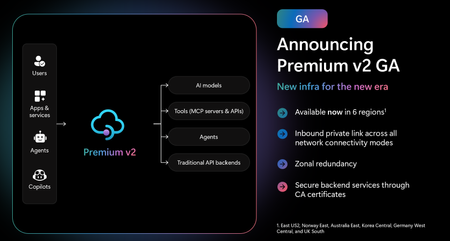
Superior capacity, highest entity limits, unlimited included calls, and the most comprehensive set of features set the Premium v2 tier apart from other API Management tiers. Customers rely on the Premium v2 tier for running enterprise-wide API programs at scale, with high availability, and performance. The Premium v2 tier has a new architecture that eliminates management traffic from the customer VNet, making private networking much more secure and easier to setup. During the creation of a Premium v2 instance, you can choose between VNet injection or VNet integration (introduced in the Standard v2 tier) options. In addition, today we are also adding three new features to Premium v2: Inbound Private Link: You can now enable private endpoint connectivity to restrict inbound access to your Premium v2 instance. It can be enabled along with VNet injection or VNet integration or without a VNet. Availability zone support: Premium v2 now supports availability zones (zone redundancy) to enhance the reliability and resilience of your API gateway. Custom CA certificates: Azure API management v2 gateway can now validate TLS connections with the backend service using custom CA certificates. New and improved VNet injection Using VNet injection in Premium v2 no longer requires configuring routes or service endpoints. Customers can secure their API workloads without impacting API Management dependencies, while Microsoft can secure the infrastructure without interfering with customer API workloads. In short, the new VNet injection implementation enables both parties to manage network security and configuration settings independently and without affecting each other. You can now configure your APIs with complete networking flexibility: force tunnel all outbound traffic to on-premises, send all outbound traffic through an NVA, or add a WAF device to monitor all inbound traffic to your API Management Premium v2—all without constraints. Inbound Private Link Customers can now configure an inbound private endpoint for their API Management Premium v2 instance to allow your API consumers securely access the API Management gateway over Azure Private Link. The private endpoint uses an IP address from an Azure virtual network in which it's hosted. Network traffic between a client on your private network and API Management traverses over the virtual network and a Private Link on the Microsoft backbone network, eliminating exposure from the public internet. Further, you can configure custom DNS settings or an Azure DNS private zone to map the API Management hostname to the endpoint's private IP address. With a private endpoint and Private Link, you can: Create multiple Private Link connections to an API Management instance. Use the private endpoint to send inbound traffic on a secure connection. Apply different API Management policies based on whether traffic comes from the private endpoint. Limit incoming traffic only to private endpoints, preventing data exfiltration. Combine with inbound virtual network injection or outbound virtual network integration to provide end-to-end network isolation of your API Management clients and backend services. More details can be found here Today, only the API Management instance’s Gateway endpoint supports inbound private link connections. Each API management instance can support at most 100 Private Link connections. Availability zones Azure API Management Premium v2 now supports Availability Zones (AZ) redundancy to enhance the reliability and resilience of your API gateway. When deploying an API Management instance in an AZ-enabled region, users can choose to enable zone redundancy. This distributes the service's units, including Gateway, management plane, and developer portal, across multiple, physically separate AZs within that region. Learn how to enable AZs here. CA certificates If the API Management Gateway needs to connect to the backends secured with TLS certificates issued by private certificate authorities (CA), you need to configure custom CA certificates in the API Management instance. Custom CA certificates can be added and managed as Authorization Credentials in the Backend entities. The Backend entity has been extended with new properties allowing customers to specify a list of certificate thumbprints or subject name + issuer thumbprint pairs that Gateway should trust when establishing TLS connection with associated backend endpoint. More details can be found here. Region availability The Premium v2 tier is now generally available in six public regions (Australia East, East US2, Germany West Central, Korea Central, Norway East and UK South) with additional regions coming soon. For pricing information and regional availability, please visit the API Management pricing page. Learn more API Management v2 tiers FAQ API Management v2 tiers documentation API Management overview documentation