ai
1166 TopicsMicrosoft 365 & Power Platform product updates call
💡Microsoft 365 & Power Platform product updates call concentrates on the different use cases and features within the Microsoft 365 and in Power Platform. Call includes topics like Microsoft 365 Copilot, Copilot Studio, Microsoft Teams, Power Platform, Microsoft Graph, Microsoft Viva, Microsoft Search, Microsoft Lists, SharePoint, Power Automate, Power Apps and more. 👏 Weekly Tuesday call is for all community members to see Microsoft PMs, engineering and Cloud Advocates showcasing the art of possible with Microsoft 365 and Power Platform. 📅 On the 7th of April we'll have following agenda: News and updates from Microsoft Together mode group photo Sébastien Levert – Connecting agents in Copilot Chat - Composing an agent ecosystem Zach Rosenfield – Introduction to custom AI Skills in SharePoint Paolo Pialorsi – Connected Declarative Agents for Microsoft 365 Copilot 📞 & 📺 Join the Microsoft Teams meeting live at https://aka.ms/community/ms-speakers-call-join 🗓️ Download recurrent invite for this weekly call from https://aka.ms/community/ms-speakers-call-invite 👋 See you in the call! 💡 Building something cool for Microsoft 365 or Power Platform (Copilot, SharePoint, Power Apps, etc)? We are always looking for presenters - Volunteer for a community call demo at https://aka.ms/community/request/demo 📖 Resources: Previous community call recordings and demos from the Microsoft Community Learning YouTube channel at https://aka.ms/community/youtube Microsoft 365 & Power Platform samples from Microsoft and community - https://aka.ms/community/samples Microsoft 365 & Power Platform community details - https://aka.ms/community/home 🧡 Sharing is caring!16Views0likes0CommentsBuild a Fully Offline AI App with Foundry Local and CAG
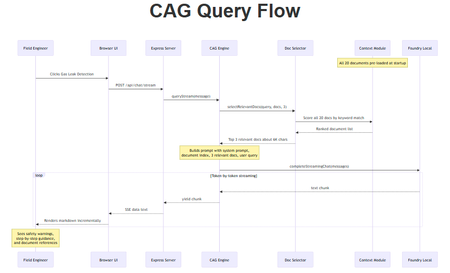
A hands-on guide to building an on-device AI support agent using Context-Augmented Generation, JavaScript, and Foundry Local. You have probably heard the AI pitch: "just call our API." But what happens when your application needs to work without an internet connection? Perhaps your users are field engineers standing next to a pipeline in the middle of nowhere, or your organisation has strict data privacy requirements, or you simply want to build something that works without a cloud bill. This post walks you through how to build a fully offline, on-device AI application using Foundry Local and a pattern called Context-Augmented Generation (CAG). By the end, you will have a clear understanding of what CAG is, how it compares to RAG, and the practical steps to build your own solution. The finished application: a browser-based AI support agent that runs entirely on your machine. What Is Context-Augmented Generation? Context-Augmented Generation (CAG) is a pattern for making AI models useful with your own domain-specific content. Instead of hoping the model "knows" the answer from its training data, you pre-load your entire knowledge base into the model's context window at startup. Every query the model handles has access to all of your documents, all of the time. The flow is straightforward: Load your documents into memory when the application starts. Inject the most relevant documents into the prompt alongside the user's question. Generate a response grounded in your content. There is no retrieval pipeline, no vector database, and no embedding model. Your documents are read from disc, held in memory, and selected per query using simple keyword scoring. The model generates answers grounded in your content rather than relying on what it learnt during training. CAG vs RAG: Understanding the Trade-offs If you have explored AI application patterns before, you have likely encountered Retrieval-Augmented Generation (RAG). Both CAG and RAG solve the same core problem: grounding an AI model's answers in your own content. They take different approaches, and each has genuine strengths and limitations. CAG (Context-Augmented Generation) How it works: All documents are loaded at startup. The most relevant ones are selected per query using keyword scoring and injected into the prompt. Strengths: Drastically simpler architecture with no vector database, no embeddings, and no retrieval pipeline Works fully offline with no external services Minimal dependencies (just two npm packages in this sample) Near-instant document selection with no embedding latency Easy to set up, debug, and reason about Limitations: Constrained by the model's context window size Best suited to small, curated document sets (tens of documents, not thousands) Keyword scoring is less precise than semantic similarity for ambiguous queries Adding documents requires an application restart RAG (Retrieval-Augmented Generation) How it works: Documents are chunked, embedded into vectors, and stored in a database. At query time, the most semantically similar chunks are retrieved and injected into the prompt. Strengths: Scales to thousands or millions of documents Semantic search finds relevant content even when the user's wording differs from the source material Documents can be added or updated dynamically without restarting Fine-grained retrieval (chunk-level) can be more token-efficient for large collections Limitations: More complex architecture: requires an embedding model, a vector database, and a chunking strategy Retrieval quality depends heavily on chunking, embedding model choice, and tuning Additional latency from the embedding and search steps More dependencies and infrastructure to manage Want to compare these patterns hands-on? There is a RAG-based implementation of the same gas field scenario using vector search and embeddings. Clone both repositories, run them side by side, and see how the architectures differ in practice. When Should You Choose Which? Consideration Choose CAG Choose RAG Document count Tens of documents Hundreds or thousands Offline requirement Essential Optional (can run locally too) Setup complexity Minimal Moderate to high Document updates Infrequent (restart to reload) Frequent or dynamic Query precision Good for keyword-matchable content Better for semantically diverse queries Infrastructure None beyond the runtime Vector database, embedding model For the sample application in this post (20 gas engineering procedure documents on a local machine), CAG is the clear winner. If your use case grows to hundreds of documents or requires real-time ingestion, RAG becomes the better choice. Both patterns can run offline using Foundry Local. Foundry Local: Your On-Device AI Runtime Foundry Local is a lightweight runtime from Microsoft that downloads, manages, and serves language models entirely on your device. No cloud account, no API keys, no outbound network calls (after the initial model download). In this sample, your application is responsible for deciding which model to use, and it does that through the foundry-local-sdk . The app creates a FoundryLocalManager , asks the SDK for the local model catalogue, and then runs a small selection policy from src/modelSelector.js . That policy looks at the machine's available RAM, filters out models that are too large, ranks the remaining chat models by preference, and then returns the best fit for that device. Why does it work this way? Because shipping one fixed model would either exclude lower-spec machines or underuse more capable ones. A 14B model may be perfectly reasonable on a 32 GB workstation, but the same choice would be slow or unusable on an 8 GB laptop. By selecting at runtime, the same codebase can run across a wider range of developer machines without manual tuning. What makes it particularly useful for developers: No GPU required — runs on CPU or NPU, making it accessible on standard laptops and desktops Native SDK bindings — in-process inference via the foundry-local-sdk npm package, with no HTTP round-trips to a local server Automatic model management — downloads, caches, and loads models automatically Dynamic model selection — the SDK can evaluate your device's available RAM and pick the best model from the catalogue Real-time progress callbacks — ideal for building loading UIs that show download and initialisation progress The integration code is refreshingly minimal. Here is the core pattern: import { FoundryLocalManager } from "foundry-local-sdk"; // Create a manager and get the model catalogue const manager = FoundryLocalManager.create({ appName: "my-app" }); // Auto-select the best model for this device based on available RAM const models = await manager.catalog.getModels(); const model = selectBestModel(models); // Download if not cached, then load into memory if (!model.isCached) { await model.download((progress) => { console.log(`Download: ${progress.toFixed(0)}%`); }); } await model.load(); // Create a chat client for direct in-process inference const chatClient = model.createChatClient(); const response = await chatClient.completeChat([ { role: "system", content: "You are a helpful assistant." }, { role: "user", content: "How do I detect a gas leak?" } ]); That is it. No server configuration, no authentication tokens, no cloud provisioning. The model runs in the same process as your application. The download step matters for a simple reason: offline inference only works once the model files exist locally. The SDK checks whether the chosen model is already cached on the machine. If it is not, the application asks Foundry Local to download it once, store it locally, and then load it into memory. After that first run, the cached model can be reused, which is why subsequent launches are much faster and can operate without any network dependency. Put another way, there are two cooperating pieces here. Your application chooses which model is appropriate for the device and the scenario. Foundry Local and its SDK handle the mechanics of making that model available locally, caching it, loading it, and exposing a chat client for inference. That separation keeps the application logic clear whilst letting the runtime handle the heavy lifting. The Technology Stack The sample application is deliberately simple. No frameworks, no build steps, no Docker: Layer Technology Purpose AI Model Foundry Local + auto-selected model Runs locally via native SDK bindings; best model chosen for your device Back end Node.js + Express Lightweight HTTP server, everyone knows it Context Markdown files pre-loaded at startup No vector database, no embeddings, no retrieval step Front end Single HTML file with inline CSS No build step, mobile-responsive, field-ready The total dependency footprint is two npm packages: express and foundry-local-sdk . Architecture Overview The four-layer architecture, all running on a single machine. The system has four layers, all running in a single process on your device: Client layer: a single HTML file served by Express, with quick-action buttons and a responsive chat interface Server layer: Express.js starts immediately and serves the UI plus an SSE status endpoint; API routes handle chat (streaming and non-streaming), context listing, and health checks CAG engine: loads all domain documents at startup, selects the most relevant ones per query using keyword scoring, and injects them into the prompt AI layer: Foundry Local runs the auto-selected model on CPU/NPU via native SDK bindings (in-process inference, no HTTP round-trips) Building the Solution Step by Step Prerequisites You need two things installed on your machine: Node.js 20 or later: download from nodejs.org Foundry Local: Microsoft's on-device AI runtime: winget install Microsoft.FoundryLocal Foundry Local will automatically select and download the best model for your device the first time you run the application. You can override this by setting the FOUNDRY_MODEL environment variable to a specific model alias. Getting the Code Running # Clone the repository git clone https://github.com/leestott/local-cag.git cd local-cag # Install dependencies npm install # Start the server npm start Open http://127.0.0.1:3000 in your browser. You will see a loading overlay with a progress bar whilst the model downloads (first run only) and loads into memory. Once the model is ready, the overlay fades away and you can start chatting. Desktop view Mobile view How the CAG Pipeline Works Let us trace what happens when a user asks: "How do I detect a gas leak?" The query flow from browser to model and back. 1 Server starts and loads documents When you run npm start , the Express server starts on port 3000. All .md files in the docs/ folder are read, parsed (with optional YAML front-matter for title, category, and ID), and grouped by category. A document index is built listing all available topics. 2 Model is selected and loaded The model selector evaluates your system's available RAM and picks the best model from the Foundry Local catalogue. If the model is not already cached, it downloads it (with progress streamed to the browser via SSE). The model is then loaded into memory for in-process inference. 3 User sends a question The question arrives at the Express server. The chat engine selects the top 3 most relevant documents using keyword scoring. 4 Prompt is constructed The engine builds a messages array containing: the system prompt (with safety-first instructions), the document index (so the model knows all available topics), the 3 selected documents (approximately 6,000 characters), the conversation history, and the user's question. 5 Model generates a grounded response The prompt is sent to the locally loaded model via the Foundry Local SDK's native bindings. The response streams back token by token through Server-Sent Events to the browser. A response with safety warnings and step-by-step guidance The sources panel shows which documents were used Key Code Walkthrough Loading Documents (the Context Module) The context module reads all markdown files from the docs/ folder at startup. Each document can have optional YAML front-matter for metadata: // src/context.js export function loadDocuments() { const files = fs.readdirSync(config.docsDir) .filter(f => f.endsWith(".md")) .sort(); const docs = []; for (const file of files) { const raw = fs.readFileSync(path.join(config.docsDir, file), "utf-8"); const { meta, body } = parseFrontMatter(raw); docs.push({ id: meta.id || path.basename(file, ".md"), title: meta.title || file, category: meta.category || "General", content: body.trim(), }); } return docs; } There is no chunking, no vector computation, and no database. The documents are held in memory as plain text. Dynamic Model Selection Rather than hard-coding a model, the application evaluates your system at runtime: // src/modelSelector.js const totalRamMb = os.totalmem() / (1024 * 1024); const budgetMb = totalRamMb * 0.6; // Use up to 60% of system RAM // Filter to models that fit, rank by quality, boost cached models const candidates = allModels.filter(m => m.task === "chat-completion" && m.fileSizeMb <= budgetMb ); // Returns the best model: e.g. phi-4 on a 32 GB machine, // or phi-3.5-mini on a laptop with 8 GB RAM This means the same application runs on a powerful workstation (selecting a 14B parameter model) or a constrained laptop (selecting a 3.8B model), with no code changes required. This is worth calling out because it is one of the most practical parts of the sample. Developers do not have to decide up front which single model every user should run. The application makes that decision at startup based on the hardware budget you set, then asks Foundry Local to fetch the model if it is missing. The result is a smoother first-run experience and fewer support headaches when the same app is used on mixed hardware. The System Prompt For safety-critical domains, the system prompt is engineered to prioritise safety, prevent hallucination, and enforce structured responses: // src/prompts.js export const SYSTEM_PROMPT = `You are a local, offline support agent for gas field inspection and maintenance engineers. Behaviour Rules: - Always prioritise safety. If a procedure involves risk, explicitly call it out. - Do not hallucinate procedures, measurements, or tolerances. - If the answer is not in the provided context, say: "This information is not available in the local knowledge base." Response Format: - Summary (1-2 lines) - Safety Warnings (if applicable) - Step-by-step Guidance - Reference (document name + section)`; This pattern is transferable to any safety-critical domain: medical devices, electrical work, aviation maintenance, or chemical handling. Adapting This for Your Own Domain The sample project is designed to be forked and adapted. Here is how to make it yours in three steps: 1. Replace the documents Delete the gas engineering documents in docs/ and add your own markdown files. The context module handles any markdown content with optional YAML front-matter: --- title: Troubleshooting Widget Errors category: Support id: KB-001 --- # Troubleshooting Widget Errors ...your content here... 2. Edit the system prompt Open src/prompts.js and rewrite the system prompt for your domain. Keep the structure (summary, safety, steps, reference) and update the language to match your users' expectations. 3. Override the model (optional) By default the application auto-selects the best model. To force a specific model: # See available models foundry model list # Force a smaller, faster model FOUNDRY_MODEL=phi-3.5-mini npm start # Or a larger, higher-quality model FOUNDRY_MODEL=phi-4 npm start Smaller models give faster responses on constrained devices. Larger models give better quality. The auto-selector picks the largest model that fits within 60% of your system RAM. Building a Field-Ready UI The front end is a single HTML file with inline CSS. No React, no build tooling, no bundler. This keeps the project accessible to beginners and easy to deploy. Design decisions that matter for field use: Dark, high-contrast theme with 18px base font size for readability in bright sunlight Large touch targets (minimum 48px) for operation with gloves or PPE Quick-action buttons for common questions, so engineers do not need to type on a phone Responsive layout that works from 320px to 1920px+ screen widths Streaming responses via SSE, so the user sees tokens arriving in real time The mobile chat experience, optimised for field use. Visual Startup Progress with SSE A standout feature of this application is the loading experience. When the user opens the browser, they see a progress overlay showing exactly what the application is doing: Loading domain documents Initialising the Foundry Local SDK Selecting the best model for the device Downloading the model (with a percentage progress bar, first run only) Loading the model into memory This works because the Express server starts before the model finishes loading. The browser connects immediately and receives real-time status updates via Server-Sent Events. Chat endpoints return 503 whilst the model is loading, so the UI cannot send queries prematurely. // Server-side: broadcast status to all connected browsers function broadcastStatus(state) { initState = state; const payload = `data: ${JSON.stringify(state)}\n\n`; for (const client of statusClients) { client.write(payload); } } // During initialisation: broadcastStatus({ stage: "downloading", message: "Downloading phi-4...", progress: 42 }); This pattern is worth adopting in any application where model loading takes more than a few seconds. Users should never stare at a blank screen wondering whether something is broken. Testing The project includes unit tests using the built-in Node.js test runner, with no extra test framework needed: # Run all tests npm test Tests cover configuration, server endpoints, and document loading. Use them as a starting point when you adapt the project for your own domain. Ideas for Extending the Project Once you have the basics running, there are plenty of directions to explore: Conversation memory: persist chat history across sessions using local storage or a lightweight database Hybrid CAG + RAG: add a vector retrieval step for larger document collections that exceed the context window Multi-modal support: add image-based queries (photographing a fault code, for example) PWA packaging: make it installable as a standalone offline application on mobile devices Custom model fine-tuning: fine-tune a model on your domain data for even better answers Ready to Build Your Own? Clone the CAG sample, swap in your own documents, and have an offline AI agent running in minutes. Or compare it with the RAG approach to see which pattern suits your use case best. Get the CAG Sample Get the RAG Sample Summary Building a local AI application does not require a PhD in machine learning or a cloud budget. With Foundry Local, Node.js, and a set of domain documents, you can create a fully offline, mobile-responsive AI agent that answers questions grounded in your own content. The key takeaways: CAG is ideal for small, curated document sets where simplicity and offline capability matter most. No vector database, no embeddings, no retrieval pipeline. RAG scales further when you have hundreds or thousands of documents, or need semantic search for ambiguous queries. See the local-rag sample to compare. Foundry Local makes on-device AI accessible: native SDK bindings, in-process inference, automatic model selection, and no GPU required. The architecture is transferable. Replace the gas engineering documents with your own content, update the system prompt, and you have a domain-specific AI agent for any field. Start simple, iterate outwards. Begin with CAG and a handful of documents. If your needs outgrow the context window, graduate to RAG. Both patterns can run entirely offline. Clone the repository, swap in your own documents, and start building. The best way to learn is to get your hands on the code. This project is open source under the MIT licence. It is a scenario sample for learning and experimentation, not production medical or safety advice. local-cag on GitHub · local-rag on GitHub · Foundry LocalBuilding a Smart Building HVAC Digital Twin with AI Copilot Using Foundry Local
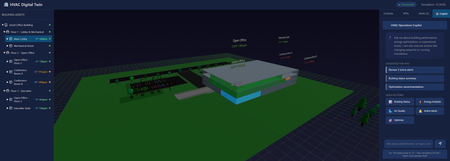
Introduction Building operations teams face a constant challenge: optimizing HVAC systems for energy efficiency while maintaining occupant comfort and air quality. Traditional building management systems display raw sensor data, temperatures, pressures, CO₂ levels—but translating this into actionable insights requires deep HVAC expertise. What if operators could simply ask "Why is the third floor so warm?" and get an intelligent answer grounded in real building state? This article demonstrates building a sample smart building digital twin with an AI-powered operations copilot, implemented using DigitalTwin, React, Three.js, and Microsoft Foundry Local. You'll learn how to architect physics-based simulators that model thermal dynamics, implement 3D visualizations of building systems, integrate natural language AI control, and design fault injection systems for testing and training. Whether you're building IoT platforms for commercial real estate, designing energy management systems, or implementing predictive maintenance for building automation, this sample provides proven patterns for intelligent facility operations. Why Digital Twins Matter for Building Operations Physical buildings generate enormous operational data but lack intelligent interpretation layers. A 50,000 square foot office building might have 500+ sensors streaming metrics every minute, zone temperatures, humidity levels, equipment runtimes, energy consumption. Traditional BMS (Building Management Systems) visualize this data as charts and gauges, but operators must manually correlate patterns, diagnose issues, and predict failures. Digital twins solve this through physics-based simulation coupled with AI interpretation. Instead of just displaying current temperature readings, a digital twin models thermal dynamics, heat transfer rates, HVAC response characteristics, occupancy impacts. When conditions deviate from expectations, the twin compares observed versus predicted states, identifying root causes. Layer AI on top, and operators get natural language explanations: "The conference room is 3 degrees too warm because the VAV damper is stuck at 40% open, reducing airflow by 60%." This application focuses on HVAC, the largest building energy consumer, typically 40-50% of total usage. Optimizing HVAC by just 10% through better controls can save thousands of dollars monthly while improving occupant satisfaction. The digital twin enables "what-if" scenarios before making changes: "What happens to energy consumption and comfort if we raise the cooling setpoint by 2 degrees during peak demand response events?" Architecture: Three-Tier Digital Twin System The application implements a clean three-tier architecture separating visualization, simulation, and state management: The frontend uses React with Three.js for 3D visualization. Users see an interactive 3D model of the three-floor building with color-coded zones indicating temperature and CO₂ levels. Click any equipment, AHUs, VAVs, chillers, to see detailed telemetry. The control panel enables adjusting setpoints, running simulation steps, and activating demand response scenarios. Real-time charts display KPIs: energy consumption, comfort compliance, air quality levels. The backend Node.js/Express server orchestrates simulation and state management. It maintains the digital twin state as JSON, the single source of truth for all equipment, zones, and telemetry. REST API endpoints handle control requests, simulation steps, and AI copilot queries. WebSocket connections push real-time updates to the frontend for live monitoring. The HVAC simulator implements physics-based models: 1R1C thermal models for zones, affinity laws for fan power, chiller COP calculations, CO₂ mass balance equations. Foundry Local provides AI copilot capabilities. The backend uses foundry-local-sdk to query locally running models. Natural language queries ("How's the lobby temperature?") get answered with building state context. The copilot can explain anomalies, suggest optimizations, and even execute commands when explicitly requested. Implementing Physics-Based HVAC Simulation Accurate simulation requires modeling actual HVAC physics. The simulator implements several established building energy models: // backend/src/simulator/thermal-model.js class ZoneThermalModel { // 1R1C (one resistance, one capacitance) thermal model static calculateTemperatureChange(zone, delta_t_seconds) { const C_thermal = zone.volume * 1.2 * 1000; // Heat capacity (J/K) const R_thermal = zone.r_value * zone.envelope_area; // Thermal resistance // Internal heat gains (occupancy, equipment, lighting) const Q_internal = zone.occupancy * 100 + // 100W per person zone.equipment_load + zone.lighting_load; // Cooling/heating from HVAC const airflow_kg_s = zone.vav.airflow_cfm * 0.0004719; // CFM to kg/s const c_p_air = 1006; // Specific heat of air (J/kg·K) const Q_hvac = airflow_kg_s * c_p_air * (zone.vav.supply_temp - zone.temperature); // Envelope losses const Q_envelope = (zone.outdoor_temp - zone.temperature) / R_thermal; // Net energy balance const Q_net = Q_internal + Q_hvac + Q_envelope; // Temperature change: Q = C * dT/dt const dT = (Q_net / C_thermal) * delta_t_seconds; return zone.temperature + dT; } } This model captures essential thermal dynamics while remaining computationally fast enough for real-time simulation. It accounts for internal heat generation from occupants and equipment, HVAC cooling/heating contributions, and heat loss through the building envelope. The CO₂ model uses mass balance equations: class AirQualityModel { static calculateCO2Change(zone, delta_t_seconds) { // CO₂ generation from occupants const G_co2 = zone.occupancy * 0.0052; // L/s per person at rest // Outdoor air ventilation rate const V_oa = zone.vav.outdoor_air_cfm * 0.000471947; // CFM to m³/s // CO₂ concentration difference (indoor - outdoor) const delta_CO2 = zone.co2_ppm - 400; // Outdoor ~400ppm // Mass balance: dC/dt = (G - V*ΔC) / Volume const dCO2_dt = (G_co2 - V_oa * delta_CO2) / zone.volume; return zone.co2_ppm + (dCO2_dt * delta_t_seconds); } } These models execute every simulation step, updating the entire building state: async function simulateStep(twin, timestep_minutes) { const delta_t = timestep_minutes * 60; // Convert to seconds // Update each zone for (const zone of twin.zones) { zone.temperature = ZoneThermalModel.calculateTemperatureChange(zone, delta_t); zone.co2_ppm = AirQualityModel.calculateCO2Change(zone, delta_t); } // Update equipment based on zone demands for (const vav of twin.vavs) { updateVAVOperation(vav, twin.zones); } for (const ahu of twin.ahus) { updateAHUOperation(ahu, twin.vavs); } updateChillerOperation(twin.chiller, twin.ahus); updateBoilerOperation(twin.boiler, twin.ahus); // Calculate system KPIs twin.kpis = calculateSystemKPIs(twin); // Detect alerts twin.alerts = detectAnomalies(twin); // Persist updated state await saveTwinState(twin); return twin; } 3D Visualization with React and Three.js The frontend renders an interactive 3D building view that updates in real-time as conditions change. Using React Three Fiber simplifies Three.js integration with React's component model: // frontend/src/components/BuildingView3D.jsx import { Canvas } from '@react-three/fiber'; import { OrbitControls } from '@react-three/drei'; export function BuildingView3D({ twinState }) { return ( {/* Render building floors */} {twinState.zones.map(zone => ( selectZone(zone.id)} /> ))} {/* Render equipment */} {twinState.ahus.map(ahu => ( ))} ); } function ZoneMesh({ zone, onClick }) { const color = getTemperatureColor(zone.temperature, zone.setpoint); return ( ); } function getTemperatureColor(current, setpoint) { const deviation = current - setpoint; if (Math.abs(deviation) < 1) return '#00ff00'; // Green: comfortable if (Math.abs(deviation) < 3) return '#ffff00'; // Yellow: acceptable return '#ff0000'; // Red: uncomfortable } This visualization immediately shows building state at a glance, operators see "hot spots" in red, comfortable zones in green, and can click any area for detailed metrics. Integrating AI Copilot for Natural Language Control The AI copilot transforms building data into conversational insights. Instead of navigating multiple screens, operators simply ask questions: // backend/src/routes/copilot.js import { FoundryLocalClient } from 'foundry-local-sdk'; const foundry = new FoundryLocalClient({ endpoint: process.env.FOUNDRY_LOCAL_ENDPOINT }); router.post('/api/copilot/chat', async (req, res) => { const { message } = req.body; // Load current building state const twin = await loadTwinState(); // Build context for AI const context = buildBuildingContext(twin); const completion = await foundry.chat.completions.create({ model: 'phi-4', messages: [ { role: 'system', content: `You are an HVAC operations assistant for a 3-floor office building. Current Building State: ${context} Answer questions about equipment status, comfort conditions, and energy usage. Provide specific, actionable information based on the current data. Do not speculate beyond provided information.` }, { role: 'user', content: message } ], temperature: 0.3, max_tokens: 300 }); res.json({ response: completion.choices[0].message.content, model: 'phi-4', timestamp: new Date().toISOString() }); }); function buildBuildingContext(twin) { const alerts = twin.alerts.filter(a => a.active); const zoneStatus = twin.zones.map(z => `${z.name}: ${z.temperature.toFixed(1)}°F (setpoint: ${z.setpoint}°F), CO₂: ${z.co2_ppm}ppm, ${z.occupancy} people` ); return ` Zones: ${zoneStatus.join('\n')} Active Alerts: ${alerts.length} ${alerts.map(a => `- ${a.severity}: ${a.message}`).join('\n')} Energy: ${twin.kpis.total_power_kw.toFixed(1)} kW Chiller: ${twin.chiller.percent_load}% load, ${twin.chiller.cop.toFixed(2)} COP `.trim(); } Example interactions: User: "Why is the third floor conference room warm?" AI: "The Executive Suite on Floor 3 is currently 75.2°F, 3 degrees above the 72°F setpoint. This is due to high occupancy (8 people) and VAV-F3-EXEC operating at reduced airflow (285 CFM vs 450 CFM capacity). AHU-2 is supplying adequate cool air at 55°F. Recommend checking VAV damper position—it may be partially stuck." User: "What's our current energy usage?" AI: "Total building power consumption is 47.3 kW. Breakdown: Chiller (24.1 kW, 51%), AHU fans (12.8 kW, 27%), Pumps (7.2 kW, 15%), Other (3.2 kW, 7%). Chiller is operating at 62% load with a COP of 4.8, which is efficient for current conditions." User: "Activate demand response level 2" AI: "I cannot directly control building systems for safety reasons. To activate DR Level 2, use the Control Panel and click 'Demand Response' → 'Level 2'. This will raise cooling setpoints by 3°F and reduce auxiliary loads, targeting 15% energy reduction." The AI provides grounded, specific answers citing actual equipment IDs and metrics. It refuses to directly execute control commands, instead guiding operators to explicit control interfaces, a critical safety pattern for building systems. Fault Injection for Testing and Training Real building operations experience equipment failures, stuck dampers, sensor drift, communication losses. The digital twin includes comprehensive fault injection capabilities to train operators and test control logic: // backend/src/simulator/fault-injector.js const FAULT_CATALOG = { chillerFailure: { description: 'Chiller compressor failure', apply: (twin) => { twin.chiller.status = 'FAULT'; twin.chiller.cooling_output = 0; twin.alerts.push({ id: 'chiller-fault', severity: 'CRITICAL', message: 'Chiller compressor failure - no cooling available', equipment: 'CHILLER-01' }); } }, stuckVAVDamper: { description: 'VAV damper stuck at current position', apply: (twin, vavId) => { const vav = twin.vavs.find(v => v.id === vavId); vav.damper_stuck = true; vav.damper_position_fixed = vav.damper_position; twin.alerts.push({ id: `vav-stuck-${vavId}`, severity: 'HIGH', message: `VAV ${vavId} damper stuck at ${vav.damper_position}%`, equipment: vavId }); } }, sensorDrift: { description: 'Temperature sensor reading 5°F high', apply: (twin, zoneId) => { const zone = twin.zones.find(z => z.id === zoneId); zone.sensor_drift = 5.0; zone.temperature_measured = zone.temperature_actual + 5.0; } }, communicationLoss: { description: 'Equipment communication timeout', apply: (twin, equipmentId) => { const equipment = findEquipmentById(twin, equipmentId); equipment.comm_status = 'OFFLINE'; equipment.stale_data = true; twin.alerts.push({ id: `comm-loss-${equipmentId}`, severity: 'MEDIUM', message: `Lost communication with ${equipmentId}`, equipment: equipmentId }); } } }; router.post('/api/twin/fault', async (req, res) => { const { faultType, targetEquipment } = req.body; const twin = await loadTwinState(); const fault = FAULT_CATALOG[faultType]; if (!fault) { return res.status(400).json({ error: 'Unknown fault type' }); } fault.apply(twin, targetEquipment); await saveTwinState(twin); res.json({ message: `Applied fault: ${fault.description}`, affectedEquipment: targetEquipment, timestamp: new Date().toISOString() }); }); Operators can inject faults to practice diagnosis and response. Training scenarios might include: "The chiller just failed during a heat wave, how do you maintain comfort?" or "Multiple VAV dampers are stuck, which zones need immediate attention?" Key Takeaways and Production Deployment Building a physics-based digital twin with AI capabilities requires balancing simulation accuracy with computational performance, providing intuitive visualization while maintaining technical depth, and enabling AI assistance without compromising safety. Key architectural lessons: Physics models enable prediction: Comparing predicted vs observed behavior identifies anomalies that simple thresholds miss 3D visualization improves spatial understanding: Operators immediately see which floors or zones need attention AI copilots accelerate diagnosis: Natural language queries get answers in seconds vs. minutes of manual data examination Fault injection validates readiness: Testing failure scenarios prepares operators for real incidents JSON state enables integration: Simple file-based state makes connecting to real BMS systems straightforward For production deployment, connect the twin to actual building systems via BACnet, Modbus, or MQTT integrations. Replace simulated telemetry with real sensor streams. Calibrate model parameters against historical building performance. Implement continuous learning where the twin's predictions improve as it observes actual building behavior. The complete implementation with simulation engine, 3D visualization, AI copilot, and fault injection system is available at github.com/leestott/DigitalTwin. Clone the repository and run the startup scripts to explore the digital twin, no building hardware required. Resources and Further Reading Smart Building HVAC Digital Twin Repository - Complete source code and simulation engine Setup and Quick Start Guide - Installation instructions and usage examples Microsoft Foundry Local Documentation - AI integration reference HVAC Simulation Documentation - Physics model details and calibration Three.js Documentation - 3D visualization framework ASHRAE Standards - Building energy modeling standards
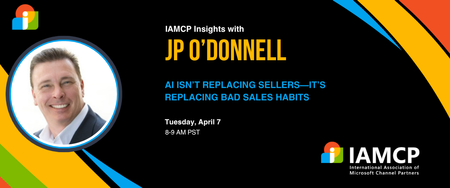
Improving Sales Communication with AI – Turning Execution into Clearer, Stronger Conversations
Execution creates momentum — refinement creates results. In this session, we focus on improving communication quality using AI. Learn how to refine messaging, tighten positioning, and adjust outreach based on real feedback. This session moves beyond activity into clarity, tone, and impact. WHAT YOU’LL LEARN How to use AI to refine outreach messaging Improving tone, clarity, and brevity Turning replies into communication insight Avoiding over-automation in conversations How to iterate messaging without losing authenticity WHY ATTEND? Strengthen real-world sales conversations Improve response quality, not just volume Learn practical refinement workflows Build communication confidence Designed for sales leaders, advisors, consultants, and IAMCP members — as well as non-members looking to improve practical AI-supported sales communication. Register for the event here42Views0likes0Comments
Register now for the Microsoft AI Skills Fest!
*Updated as of March 28, 2025. And we’re live! The registration for the Microsoft AI Skills Fest is now open to everyone! Join us on April 8, 2025, as we kick off this global skilling event to bring learners of all levels, ages, and geographies together and attempt to earn a GUINNESS WORLD RECORDS™ title for most users to take an online multi-level artificial intelligence lesson in 24 hours. We understand that the best way to learn something new is by taking it one step at a time, and learning AI is no exception. This is why we’re so excited to bring you the AI Skills Fest to help you gain valuable AI skills and to be part of a historic worldwide event. You can explore a diverse range of learning activities designed to help you build and enhance your business and technical AI proficiency—one skill at a time. After the kickoff on April 8, 2025, you can continue building your expertise with 50 days of AI discovery and learning, through May 28, 2025. Join us on April 8, 2025, to earn a GUINNESS WORLD RECORDS TM title! We’ll kick things off in Australia at 9 AM Australian Eastern Standard Time on April 8, 2025, and finish at 4 PM Pacific Daylight Time on April 8, 2025, with engaging AI learning experiences scheduled around the globe. While we know learning new things is a treat in itself, we thought it’d be extra fun for everyone participating on April 8 to be included in the attempt to earn a GUINNESS WORLD RECORDS™ title—a little “learn and earn” reward. Follow three simple steps to count your participation: Register for the Microsoft AI Skills Fest. On April 8, 2025, participate in one of the learning experiences that we’ve prepared for you. The details will be available on the event page shortly. Confirm your participation before 4 PM Pacific Daylight Time on April 8, 2025. Instructions will be provided during the various learning experiences. Check out all the learning experiences we've prepared for this day. Unlock the future! Build the skills to stay ahead After the Kickoff Celebration, the AI Skills Fest will continue for a total of 50 exciting days—through May 28, 2025—offering a wealth of training opportunities for learners of all skill levels and roles. Whether you're a business leader, tech professional, business professional, student or general AI enthusiast, the AI Skills Fest offers curated learning experiences for you. Engage in deep dives, experiential content, hackathons, challenges, and practical sessions. By the end of your 50-day skill-building adventure, you’ll have all the confidence you need to level up your AI skills that can unleash your creativity and increase your efficiency. I mean, who doesn’t want a few extra free hours in your day, right? Join us in making history and be part of the Microsoft AI Skills Fest, where you can build the skills you need to put AI to work for you. See you on April 8, 2025!114KViews17likes44CommentsNew Certification for machine learning operations (MLOps) engineers
Do your co-workers rely on you to deploy, operationalize, and maintain machine learning and generative AI solutions in production? Are you working at the intersection of data science, DevOps, and generative AI? If so, the Microsoft Certified: Machine Learning Operations (MLOps) Engineer Associate Certification is designed for you. This Certification validates your ability to operationalize not only traditional machine learning but also generative AI solutions on Azure, reflecting how AI roles have evolved from model experimentation to enterprise-scale AI operations. To earn this Certification, you need to pass Exam AI-300: Operationalizing Machine Learning and Generative AI solutions, currently in beta. Key skills validated by this Certification To earn the MLOps engineer Certification, you must demonstrate your ability to: Design and implement secure, scalable MLOps infrastructure. Automate resource provisioning and deployments by using GitHub Actions, Bicep, and Azure CLI. Orchestrate training, manage model registration and versioning, and monitor production models. Deploy and operationalize generative AI solutions by using Microsoft Foundry. Implement quality assurance, observability, and safety evaluations for generative AI systems. Optimize retrieval-augmented generation (RAG) pipelines and fine-tuned models for performance, accuracy, and cost efficiency. This Certification replaces the Microsoft Certified: Azure Data Scientist Associate Certification (Exam DP-100), which is retiring on June 1, 2026, and reflects the evolution of AI in the enterprise. Exam DP-100 focused on validating your ability to design and implement data science solutions, including data exploration, model training, evaluation, and deployment. Exam AI-300 expands the scope significantly. It retains training and evaluation but places much stronger emphasis on validating your knowledge and experience in automation, infrastructure as code (IaC), continuous integration and continuous deployment (CI/CD), lifecycle governance, observability, drift detection, cost control, and the operationalization of generative AI systems. For more details on the retirement of Exam DP-100, and the latest cloud and AI Certification updates, read our recent blog post, The AI job boom is here. Are you ready to showcase your skills? Skill area Exam AI-300 (new) Exam DP-100 (old) MLOps infrastructure Full CI/CD, IaC (Bicep, Azure CLI), GitHub Actions Basic workspace and compute setup Model lifecycle management Core focus, including registration, versioning, rollout/rollback, monitoring Full lifecycle from training to deployment GenAIOps infrastructure End-to-end lifecycle, including security, automation, and model management with Foundry Basic generative AI setup and experimentation QA and observability Generative AI evaluation, tracing, safety metrics, drift detection, cost monitoring Model evaluation and responsible AI principles Generative AI performance optimization RAG optimization, embedding model selection and tuning, advanced fine-tuning, synthetic data management Basic prompt engineering and fine-tuning Ready to prove your skills? Take advantage of the discounted beta exam offer. The first 300 people who take Exam AI-300 (beta) on or before April 2, 2026, can get 80% off market price. To receive the discount, when you register for the exam and are prompted for payment, use code AI300Meridian. This is not a private access code. The seats are offered on a first-come, first-served basis. As noted, you must take the exam on or before April 2, 2026. Please note that this discount is not available in Turkey, Pakistan, India, or China. Get ready to take Exam AI-300 (beta): Review the Exam AI-300 (beta) exam page for details. The Exam AI-300 study guide explores key topics covered in the exam. Want even more in-depth instructor-led training? We’re creating new instructor-led training that will be released in late March 2026. Connect with Microsoft Training Services Partners in your area for in-person offerings. Need other preparation ideas? Check out Just How Does One Prepare for Beta Exams? You can take certification exams online, from home or the office. Learn what to expect in Online proctored exams: What to expect and how to prepare. The rescore process starts on the day an exam goes live, and final scores for beta exams are released approximately 10 days after that. For details on the timing of beta exam rescoring and results, check out Creating high-quality exams: The path from beta to live. Ready to get started? Remember, only the first 300 candidates can get 80% off Exam AI-300 (beta) with code AI300Meridian on or before April 2, 2026. Stay tuned for general availability of this Certification in May 2026. Learn more about Microsoft Credentials. Related announcements We recently migrated our subject matter expert (SME) database to LinkedIn. To be notified of beta exam availability or opportunities to help with the development of exam, assessment, or learning content, sign up today for the Microsoft Worldwide Learning SME Group for Credentials.17KViews3likes26CommentsAgents League: Meet the Winners
Agents League brought together developers from around the world to build AI agents using Microsoft's developer tools. With 100+ submissions across three tracks, choosing winners was genuinely difficult. Today, we're proud to announce the category champions. 🎨 Creative Apps Winner: CodeSonify View project CodeSonify turns source code into music. As a genuinely thoughtful system, its functions become ascending melodies, loops create rhythmic patterns, conditionals trigger chord changes, and bugs produce dissonant sounds. It supports 7 programming languages and 5 musical styles, with each language mapped to its own key signature and code complexity directly driving the tempo. What makes CodeSonify stand out is the depth of execution. CodeSonify team delivered three integrated experiences: a web app with real-time visualization and one-click MIDI export, an MCP server exposing 5 tools inside GitHub Copilot in VS Code Agent Mode, and a diff sonification engine that lets you hear a code review. A clean refactor sounds harmonious. A messy one sounds chaotic. The team even built the MIDI generator from scratch in pure TypeScript with zero external dependencies. Built entirely with GitHub Copilot assistance, this is one of those projects that makes you think about code differently. 🧠 Reasoning Agents Winner: CertPrep Multi-Agent System View project CertPrep Multi-Agent System team built a production-grade 8-agent system for personalized Microsoft certification exam preparation, supporting 9 exam families including AI-102, AZ-204, AZ-305, and more. Each agent has a distinct responsibility: profiling the learner, generating a week-by-week study schedule, curating learning paths, tracking readiness, running mock assessments, and issuing a GO / CONDITIONAL GO / NOT YET booking recommendation. The engineering behind the scene here is impressive. A 3-tier LLM fallback chain ensures the system runs reliably even without Azure credentials, with the full pipeline completing in under 1 second in mock mode. A 17-rule guardrail pipeline validates every agent boundary. Study time allocation uses the Largest Remainder algorithm to guarantee no domain is silently zeroed out. 342 automated tests back it all up. This is what thoughtful multi-agent architecture looks like in practice. 💼 Enterprise Agents Winner: Whatever AI Assistant (WAIA) View project WAIA is a production-ready multi-agent system for Microsoft 365 Copilot Chat and Microsoft Teams. A workflow agent routes queries to specialized HR, IT, or Fallback agents, transparently to the user, handling both RAG-pattern Q&A and action automation — including IT ticket submission via a SharePoint list. Technically, it's a showcase of what serious enterprise agent development looks like: a custom MCP server secured with OAuth Identity Passthrough, streaming responses via the OpenAI Responses API, Adaptive Cards for human-in-the-loop approval flows, a debug mode accessible directly from Teams or Copilot, and full OpenTelemetry integration visible in the Foundry portal. Franck also shipped end-to-end automated Bicep deployment so the solution can land in any Azure environment. It's polished, thoroughly documented, and built to be replicated. Thank you To every developer who submitted and shipped projects during Agents League: thank you 💜 Your creativity and innovation brought Agents League to life! 👉 Browse all submissions on GitHubLow code solutions at the Microsoft 365 Community Conference
With backlogs getting longer each day and teams that can’t wait for solutions, it’s never been more important to build—fast. AI provides low-code solutions that put innovation in anyone’s hands. If you’ve ever been interested in creating applications using visual building blocks like drag-and-drop interfaces, you’ll want to see what’s possible at Microsoft 365 Community Conference. Don’t miss the Day 1 keynote! Ryan Cunningham, Corporate Vice President of Microsoft Power Platform, will take the M365 Community Conference audience inside how work is being reimagined in the age of AI. His keynote, Business Apps and Agents, explores how Microsoft 365 Copilot, Copilot Studio, Power Apps, and agent experiences come together to help makers build powerful solutions while enabling IT teams to deploy and govern them at scale. Through real‑world demos and scenarios, Ryan will show how organizations can connect data, workflows, and systems into intelligent agents that don’t just respond, but take action, ushering in a new model for how people, processes, and technology work together to move work forward. Build your next app or AI agent with Power Platform and Copilot Studio Power Platform and Copilot Studio provide an intuitive and engaging way to build apps and agents that create a real business impact. You’re able to describe your business needs using plain language, and the services will generate an app and data model for you—no coding required. This capability can be groundbreaking for an organization. Learn more about Copilot in Power Platform. Agent orchestration and governance As technology allows you to start moving faster and faster, safety becomes even more important. Modern governance allows you to work quickly while staying secure. By connecting agents with orchestration tools, you can apply different privileges, knowledge, and governance or audit controls. That’s one of the great things about the Microsoft 365 Community Conference, you’ll be able to meet with Microsoft leaders and Product experts who can help you connect your agents or any other dots you might have. 16 low-code sessions Experience low-code solutions for yourself at the Microsoft 365 Community Conference. This conference is a great opportunity to connect with hundreds of Microsoft executives, subject matter experts, product makers, and colleagues to learn how to unlock solutions that will accelerate your AI transformation. Throughout the conference there will be plenty of opportunities to learn about Copilot Studio, Power Platform, and using AI to help you build faster. Session topics include: Dataverse: Everything, Everywhere, Here and There with Charles Lakes Advanced List Formatting with Chris Kent Battle of the Forms: Microsoft Forms vs. Power Apps vs. SharePoint Forms with Laura Rogers Copilot "Employee Agents" with Kyle Von Haden From Reactive to Proactive: Automating Work with Copilot and Workflows Agent with Heather Orta-Olmo Get Started with Adaptive Cards for Microsoft Teams Using Microsoft Lists and Power Automate with Norm Young Powerful Things: Defeating the Demogorgon of Power Apps Inconsistency with David Warner Prompt Builder Playbook with April Dunnam and Daniel Laskewitz From Chaos to Clarity: Hyperautomation That Actually Works with Danielle Moon The Power Apps Builder’s Guide for Choosing the Right Path with April Dunnam Supercharge Your Agents with Computer Use in Copilot Studio with Sravani Seethi and Phi-Lay Nguyen How Microsoft Actually Builds Copilot Agents with Kristina Marko and Clint Williams Seeking Your Approval: Mastering Approvals in Microsoft 365 with Lindsay Shelton Top Wins - Copilot and Agents for Non Profit with Karuana Gatimu Top Wins - Copilot and Agents for Retail with Karuana Gatimu and Danielle Moon MCP or not to MCP - that is THE question with April Dunnam and Daniel Laskewitz Explore all the low-code sessions in our session catalog. Register today! We hope to see you at the Microsoft 365 Community Conference!115Views0likes0CommentsPartner Case study | TD SYNNEX
As a global Microsoft distributor, TD SYNNEX equips Cloud Solution Provider (CSP) partners and resellers with the tools, programs, and expertise they need to deliver solutions to market. TD SYNNEX has found that the shift to AI has sharpened customers' need not for another point product, but a practical path to adoption that’s secure, cost-aware, and repeatable. In a channel where devices, cloud, and security are often sold in silos, TD SYNNEX focuses on the connective tissue—helping partners position Microsoft as an ecosystem. The organization works across hardware and cloud motions, using Microsoft AI Cloud Partner Program offerings and partner resources to turn guidance into action through training environments, packaged enablement, and hands-on experiences that partners can take directly to their customers. That matters because many CSP resellers aren’t starting from scratch. They’re facing a Windows refresh cycle, juggling budgets, and trying to understand what “AI-ready” actually means for their environment—from endpoint capabilities to identity and security controls. TD SYNNEX helps partners translate that complexity into an offer that makes sense: modernize endpoints, secure the foundation, and adopt Microsoft AI with confidence. Partners face fragmented adoption—devices, cloud, and security aren’t connected For many CSP resellers, the challenge starts upstream when customers express strong interest in AI before they’re truly ready to adopt it. Hardware refreshes happen without a clear understanding of cloud or security implications, while cloud services are purchased without accounting for endpoint requirements, leaving partners to reconcile disconnected decisions into a workable, secure AI foundation. Continue reading here Explore all case studies or submit your own Subscribe to case studies tag to follow all new case study posts. Don't forget to follow this blog to receive email notifications of new stories!42Views0likes0Comments