aad
42 TopicsRetain the same email address value across two objects in Azure AD (Guest and Local)
Howdy Techies! This might sound stupid but thought to throw it here anyway to see if anyone managed to work around this in any possible alternative ways. I have a very specific need to retain the same email address across two Azure AD accounts. One is a guest and the other is a local account in the same tenancy. The purpose is to allow one of the SaaS app to use the local account while the other Guest Account will be used to access Teams channel. I have tried to create a separate accounts and some other workarounds but failed due to conflicts. Why not a single account for both purposes!, you may ask. Its a very specific scenario and could not afford to use a single account due to multiple business reasons. Really appreciate any thoughts/ideas !! Thank you! Manoj K608Views0likes1Comment
Error creating Azure BOT: Failed to store new BOT
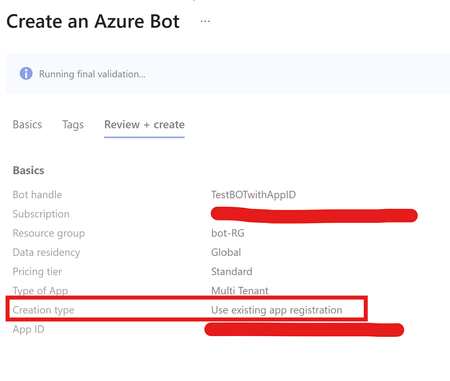
SCENARIO You are trying to create Azure BOT where you are already provided with an existing App registration. After adding relevant details, validation is passed however, the BOT fails to create with Internal Server error. CAUSE This error usually comes up if we are using the same APP ID which is already registered with another Azure BOT resource. { "status": "Failed", "error": { "code": "UnknownError", "message": "Failed to store new bot." } } RESOLUTION Azure BOT requires one to one mapping with the app registration. You can only have one BOT mapped to one App ID. Hence recommendation is to use single app registration for every BOT resource we create.622Views1like1CommentPrinciple 'XYZ' could not be found or this principal type is not supported - Azure SQL DB and MI
In this blog article, we will be discussing the possible scenarios to get the error "Principle 'XYZ' could not be found or this principal type is not supported" while adding an AAD user or group to your Azure SQL database or Azure SQL managed instance.81KViews4likes8Comments
How can I monitor Entra Connect Health Sync?
Hello, How can I monitor Entra Connect Health Sync events and get alerts on failures? I have set up to be alearted to events in the Entra portal but I only get a summary email, and not instant notifications. I wish to informed if there is a loss of sync between OP and Entra, or with SSPR? Is this possible other than what MS give us in the Portal. Thanks2.2KViews0likes5CommentsLesson Learned #396: Fixing 'Invalid value for key 'authentication' using System.Data.SqlClient
Our customer is getting the following error message: Application Error System.ArgumentException: Invalid value for key 'authentication'. at System.Data.Common.DbConnectionStringBuilderUtil.ConvertToAuthenticationType(String keyword, Object value) at System.Data.SqlClient.SqlConnectionString.ConvertValueToAuthenticationType() at System.Data.SqlClient.SqlConnectionString..ctor(String connectionString) at System.Data.SqlClient.SqlConnectionFactory.CreateConnectionOptions(String connectionString, DbConnectionOptions previous) at System.Data.ProviderBase.DbConnectionFactory.GetConnectionPoolGroup(DbConnectionPoolKey key, DbConnectionPoolGroupOptions poolOptions, DbConnectionOptions& userConnectionOptions) at System.Data.SqlClient.SqlConnection.ConnectionString_Set(DbConnectionPoolKey key) using in the authentication keyword in the connection string the value Active Directory Managed Identity.Allow Tenant-Guests to connect to a Universal Printer of my Company to Print there to
I would like to have the option to add a Guest Account to a specific Printer from my Printer list and let them Print. Maybe we can add another option to only allow Guest Printing from a specific Network, or a possible option to use Guest Printing with Conditional Access Policy, that a Guest can not Print for Fun in our Tenant.7.2KViews92likes10Comments
BitLocker recovery key not being uploaded into Intune when using BackupToAAD-BitLockerKeyProtector
Hello, We are having an issue with the BackupToAAD-BitLockerKeyProtector PowerShell cmdlet to upload the BitLocker recovery key of our devices into AAD/Intune. We currently use Sophos Device Encryption to encrypt our devices but want to migrate the recovery keys into Intune as we transition to Intune BitLocker policies. We created a script that attempts to upload the BitLocker recovery key into Intune but it appears the BackupToAAD-BitLockerKeyProtector cmdlet only works on devices where the user logs in with a domain account, and not a local Windows account. Is this standard behaviour? I would have assumed that since the device is enrolled into Intune it would use the Management Extension to communicate with Intune for this task - and have no reliance on the logged in user. Looking at the BitLocker PowerShell module itself, a method named " BackupRecoveryInformationToCloudDomain" is called when this cmdlet is executed. I haven't been able to find much online about what happens beyond here. It would be good to know a bit more about this cmdlet as documentation is limited online. CheersSolved39KViews0likes7Comments
Repeated requests to approve 3rd party app consent
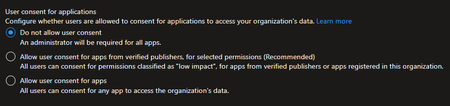
Hello - I am coming across an issue in an environment where Azure Cloud App Admins / Global Admins are receiving repeated email approval requests to approve permissions for 3rd party apps when admin access on behalf of the tenant has been previously approved and granted. Does anyone know why this happens or a way to stop it? The tenant is configured with this: This issue occurs for multiple apps. When the second or third request from an end user comes in for the same app, I have already gone into the Enterprise App in Azure AD and confirmed that the permissions the end user and app is requesting have already been granted by an admin. Example: Thank you!1.6KViews0likes2CommentsLesson Learned #380:Unable to load adalsql.dll (Authentication=XYZ).Error code:0x2
Analyzing a support case that our customer got the following error faced: "Unable to load adalsql.dll (Authentication=ActiveDirectoryPassword). Error code: 0x2" using an older application to the Azure SQL database. Following I would like to share my lessons learned about it.