365 defender
3 Topics
Problem loading Settings - Endpoints page in Microsoft Defender for Endpoint admin console
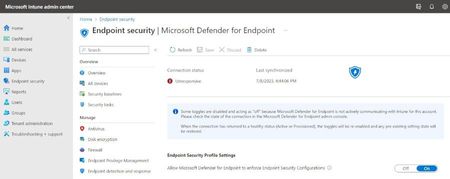
I cannot load the page Settings - Endpoints Microsoft Defender for Endpoint. I get an error message saying "Something went wrong, We have encountered an error loading this page, please try again later: false" I tried to access this page since My Microsoft Intune admin center tells me that there is a connection status problem with Microsoft Defender for Endpoint. I get the message "Some toggles are disabled and acting as "off" because Microsoft Defender for Endpoint is not actively communicating with Intune for this account. Please check the state of the connection in the Microsoft Defender for Endpoint admin console. When the connection has returned to a healthy status (Active or Provisioned), the toggles will be re-enabled and any pre-existing setting state will be restored." See the pictures on the two messages:Solved4.7KViews0likes3Comments
Defender Advanced Hunting with PowerShell
I am trying to write a PS script that runs a query in Defender Adavanced Hunting to get details from the EmailAttachmentInfo schema. I have registered an App, assigned the permission WindowsdefenderATP AdavancedQuery.Read.All and am able to generate a token and authenticate. When I run this simple query 'EmailAttachmentInfo | limit 10' I get a 400 Error. Changing the the query to 'DeviceRegistryEvents | limit 10' returns data. Are there additional permissions I need to assign the App in AAD to see the EmailAttachmentInfo schema? Oddly when I log in to Defender 365 console I can see and query the EmailAttachmentInfo schema but cant see DeviceRegistryEvents. Code below $tenantId = 'redacted' # Paste your own tenant ID here $appId = 'redacted' # Paste your own app ID here $appSecret = 'redacted' # Paste your own app secret here $resourceAppIdUri = 'https://api.securitycenter.microsoft.com' $oAuthUri = "https://login.microsoftonline.com/$TenantId/oauth2/token" $body = [Ordered] @{ resource = "$resourceAppIdUri" client_id = "$appId" client_secret = "$appSecret" grant_type = 'client_credentials' } $response = Invoke-RestMethod -Method Post -Uri $oAuthUri -Body $body -ErrorAction Stop $aadToken = $response.access_token $query = 'EmailAttachmentInfo | limit 10' # Paste your own query here $url = "https://api.securitycenter.microsoft.com/api/advancedqueries/run" $headers = @{ 'Content-Type' = 'application/json' Authorization = "Bearer $aadToken" } $body = ConvertTo-Json -InputObject @{ 'Query' = $query } $webResponse = Invoke-WebRequest -Method Post -Uri $url -Headers $headers -Body $body -ErrorAction Stop $response = $webResponse | ConvertFrom-Json $results = $response.Results $schema = $response.SchemaSolved1.1KViews0likes1CommentClassic Exchange Admin Center loses Spam Filter Control
Apparently yesterday MS removed the "Protection" center from the Exchange admin center. This was moved to the Microsoft 365 Defender page. Under the original section you could add multiple email addresses and domains at once, either separated by a semi-colon or having them on their own lines. In the new spam filter section you cannot add multiple at a time. You have to add everything 1 at a time. This is very annoying because I regularly have to add 10-15 at a time. This is causing me a major time burden and I have to do each 1 individually for email address and then again for domain. It would we great if this could be fixed to either allow comma, semi-colon, or line separated additions at once. I think this should be a very easy fix, or if its complicated, allow the Protection tab to be access from the Exchange admin console until a fix is in place. Cheers, Tim938Views1like1Comment