2016
759 Topics
Exchange 2016 Mail Flow is Not Working
We had issues with updating to a latest Cumulative Update and messed up our EMS and some Web Config. It seems our Exchange Server is totally bricked. So, we decided to boot our Exchange Server from backup. The backup was dated September 2025. Unfortunately, after booting up the September 2025 backup, we noticed that the internal and external mail flow is not working (our Exchange 2016 is Exchange hybrid configured). The outgoing emails are stuck in Draft folder. The following troubleshooting steps have been done to no avail: -Checked if the port 25 is open -> This port is opened -Check the network settings if the Preferred DNS Address points to the correct DNS Server --> It points to the correct DNS Server -Modified the DNS lookup under Exchange Admin Center > Servers > DNS Lookups > Internal DNS Lookups --> Added the IP Address of the DNS Server -Modified the hosts file under System32 > drivers > etc --> Pointed the IP Address of the Exchange Server to the FQDN of the Exchange Server Currently, are not sure of the next steps to do in order to fix the issue. Any advice?102Views0likes3CommentsExchange database dismounted due to NTFS file extent limit reached – unexpected outage
Hi everyone, We experienced a serious outage on our Exchange 2016 server recently, and I wanted to share what we found during the root cause analysis – in case it helps someone else avoid the same scenario. Summary: After digging deep, we discovered that the issue was caused by the NTFS file system hitting its internal file extent limit on the .edb file. Once this threshold was reached, the database could no longer grow, and the system dismounted the database unexpectedly. No prior warning, just service interruption. Details: The .edb was around 1.2 TB in size. This isn’t a limit on database size itself — it’s about how fragmented the file is on disk. Once NTFS couldn’t track any more extents, the database stopped working. Microsoft doesn’t publish a clear fix for this; only scattered references to similar behavior in past cases. What we did: Created a fresh, clean database. Manually moved user mailboxes into the new DB. The old database couldn't be mounted anymore, so we brought the system live without historical mail – just to maintain continuity. We're now working on extracting data from the unmounted .edb using third-party tools. Looking for thoughts: Has anyone else hit the NTFS extent wall with Exchange? How do you monitor extent growth proactively? Did switching to ReFS solve this for you long-term? Open to any input or similar experiences – appreciate it in advance. Thanks!90Views1like3Comments
Help please! Exchange report questions
Hello! I’m hoping someone can help clarify a few things about a deletion report I received. The report shows hard and soft deletes, but it seems to be missing information about moves and restores. I’m trying to understand the following: 1. **Hard Deletes:** * When something is hard deleted, does it go to the Purge folder, and is it still recoverable from there? * Is a “hard delete” simply what happens when someone empties their Deleted Items folder? * Can hard deletes happen accidentally? 2. **Limitations of the Report:** * Are there other reports that can show moves, restores, or whether an item is *currently* deleted? * My understanding is that this delete report only indicates that an item was deleted at some point, not its current status. Is that correct? 3. **Missing Message IDs:** * About half the entries in the report don’t include a message ID. Am I correct in assuming those items aren’t emails? If anyone is willing to chat or walk through this with me, I’d really appreciate it — I’m hoping to understand this report better. Any guidance or links to solid documentation would be truly appreciated. Thank you!Solved69Views0likes3Comments
Update Dynamic Distribution List
we are a hybrid environment, running exchange 2019 and have a few DDLs which have been around from previous exchange versions. One of the DDLs i need to modify is the below. Its hard to read and i am trying to work out where i add the extra fields i want to include. I am looking to add another custom attribute and possibly include members of a security group. Is there anyway to make this easier to read so i know where to add things? Any other tips? ((((((((((((((((((((((((((Company -eq 'Contoso') -and (CustomAttribute4 -eq 'City'))) -and (((((CustomAttribute7 -eq 'Group') -or (CustomAttribute7 -eq 'Contractor'))) -or (CustomAttribute7 -eq 'Permanent'))))) -and (((RecipientType -eq 'UserMailbox') -or (((RecipientType -eq 'MailUser') -and (CustomAttribute12 -ne 'Excluded'))))))) -and (-not(Name -like 'SystemMailbox{*')))) -and (-not(Name -like 'CAS_{*')))) -and (-not(RecipientTypeDetailsValue -eq 'MailboxPlan')))) -and (-not(RecipientTypeDetailsValue -eq 'DiscoveryMailbox')))) -and (-not(RecipientTypeDetailsValue -eq 'PublicFolderMailbox')))) -and (-not(RecipientTypeDetailsValue -eq 'ArbitrationMailbox')))) -and (-not(RecipientTypeDetailsValue -eq 'AuditLogMailbox')))) -and (-not(RecipientTypeDetailsValue -eq 'AuxAuditLogMailbox')))) -and (-not(RecipientTypeDetailsValue -eq 'SupervisoryReviewPolicyMailbox')))) -and (-not(Name -like 'SystemMailbox{*')) -and (-not(Name -like 'CAS_{*')) -and (-not(RecipientTypeDetailsValue -eq 'MailboxPlan')) -and (-not(RecipientTypeDetailsValue -eq 'DiscoveryMailbox')) -and (-not(RecipientTypeDetailsValue -eq 'PublicFolderMailbox')) -and (-not(RecipientTypeDetailsValue -eq 'ArbitrationMailbox')) -and (-not(RecipientTypeDetailsValue -eq 'AuditLogMailbox')) -and (-not(RecipientTypeDetailsValue -eq 'AuxAuditLogMailbox')) -and (-not(RecipientTypeDetailsValue -eq 'SupervisoryReviewPolicyMailbox')))141Views0likes2CommentsFederation Trust Gateway broken - OrgCertificate cannot be uploaded
Hey guys, last week we have done Windows Server updates and this broke some stuff. Some certificates have been unbound and so on. Until then the full classic hybrid worked quite good in our Exchange Server 2016 CU23 environment. We are just in the process of upgrading/migrating. But after this point of time the On-Premises users stopped being able to see the calendars of the cloud users, other way around still worked. So we started trying to fix the hybrid deployment with several runs of the HCW (which is always fine) and rebuilding the organizational relationship and the trust federation gateway. This was quite exhausting, as we updated a bunch of domains in global DNS several times. Currently, neither direction is functioning. Now it looks like the Federation Trust Gateway is in an inconsistent state. When I try... Set-FederationTrust -Identity "Microsoft Federation Gateway" -PublishFederationCertificate then I get the message, that the rollover certificate (OrgNextPrivCertificate) is not set and that I only can publish, when this is done. When I try to define a rollover certificate, then I get the message, that the rollover certificate cannot be set until the OrgCertificate has been published. So, we have a chicken-and-egg situation here. Thanks for any help.70Views0likes0Comments
AuthServer in Exchange Online
The result of Get-AuthServer is different between on-prem and EXO. The list of objects from EXO get-authserver includes some "IssuerIdentifiers" that include a "{tenantid}" pattern. Was this supposed to be expanded by a script, or by HCW? (HCW has never run to completion without exceptions.) There seems to be no documentation about this: no list of default entries, no documentation on the expected form, few mentions of the use of Set-AuthServer/New-AuthServer, and the options don't match the properties.Solved148Views0likes2CommentsExchange 2016 with Hybrid Configuration
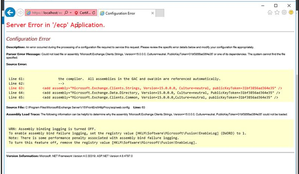
We have Exchange Server 2016 configured in a hybrid environment. We encountered an error when one of our administrators attempted to install a cumulative update that was the same version as the one already installed. After that, we were unable to access OWA, ECP, or the Exchange Management Shell. Exchange Server 2016 CU23 (2022H1) 15.1.2507.6160Views0likes2CommentsExchange synch/profile issue
Dear community, I need help to solve a problem. 1.) I'm using Outlook classic 2016 2.) I need two mail accounts in outlook a.) my gmail account - all good with that one b.) my AWS Workmail account 3.) all used to work fine till I had another problem with teams integration into my calendar which I tried to fix without success. After a while I thought, that when I setup outlook from scratch that this could solve the problem - but it got worse. 4.) when I started the newly installed outlook, I can load my gmail account, and when I add my AWS Workmail account, I get the message that the account was successfully added and need to restart Outlook. 5.) After the restart I get the two messages: - The name cannot be matched to a name in the address list. - Cannot start Microsoft Outlook. Cannot open the Outlook window. The set of folders cannot be opened. An unexpected error has occurred. 6.) so the AWS Workmail is not loaded. I also tried to add the account manually in all different ways but without success. The integration of the AWS mail account on my Android Outlook works perfectly fine. I dont know where the problem is and tried to get answers from AI and Microsoft Support without success. Anyone has an idea? Many thanks, Rob103Views0likes1CommentResolved: Hybrid Exchange Duplicate (Ghost) Mailbox Created After Assigning Exchange Online License
Summary During a hybrid Exchange migration, a user’s mailbox failed to migrate and mail flow broke due to a duplicate (ghost) mailbox automatically created in Exchange Online. Root Cause An Exchange Online Plan 2 license was mistakenly assigned to the user before migration. Azure AD sync then provisioned a cloud mailbox, even though the user already had an on-prem mailbox. This caused a hybrid mismatch — the user appeared in both environments, and migration failed with mailbox lookup errors. Resolution Steps Removed the Exchange Online Plan 2 license from the user account. Forced a DirSync (AAD Connect) synchronization. Verified that the mailbox existed only on-prem via PowerShell Get-Mailbox -Identity email address removed for privacy reasons | fl Name,RecipientTypeDetails,ExchangeGuid Confirmed the ghost mailbox was removed from Exchange Online. Re-ran migration batch successfully to Exchange Online. Verification Get-MailboxStatistics -Identity email address removed for privacy reasons | fl TotalItemSize,ItemCount,LastLogonTime Ensure only one mailbox object exists and mail flow routes correctly. Prevention Tips Don’t assign Exchange Online licenses to hybrid mailboxes before migration. Always verify mailbox location prior to assigning any license. Use PowerShell or EAC to check where the mailbox resides (on-prem vs. cloud). Environment Hybrid Exchange Deployment Exchange 2016 On-Premises Exchange Online (M365) Azure AD Connect This issue is not caused by connectors or mail flow settings, but by improper licensing before migration. Removing the license and resyncing resolves the ghost mailbox problem.75Views0likes0Comments