Forum Discussion

Cooper Beutel
Oct 04, 2018Copper Contributor
Start menu layout cannot be changed
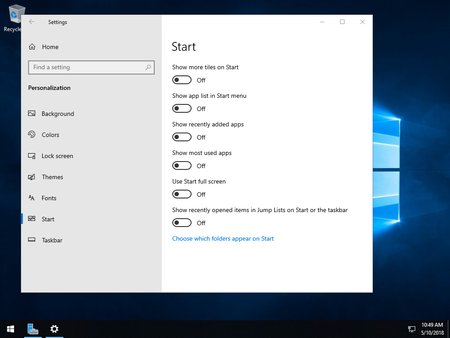
Having just installed an evaluation copy of Windows Server 2019, I cannot make any changes to the start menu layout. For example; unchecking "Show app list in Start menu" from the Start menu settings...
- Apr 02, 2019
https://support.microsoft.com/help/4490481 - the KB doesn't specifically mention this bug, but the fix is included in this update. You can download from here: Microsoft Catalog


robb-flx
Mar 11, 2019Copper Contributor
Ty this one:
>> Use the group policy setting "Do not log users on with temporary profiles", to be found in >> Computer Configuration -> Policies -> Administrative Templates-> System -> User Profiles.
>> Use the group policy setting "Do not log users on with temporary profiles", to be found in >> Computer Configuration -> Policies -> Administrative Templates-> System -> User Profiles.

Anonymous
Mar 11, 2019I've made the change and will see if it works later, because in my case any change is not instantly lost. If I log-in, make a change, log off then immediately log back on the change remains. I can do this a few times within a short space of time and the change is still there. It's only later in the day when I log on that the change is finally reset.
robb-flx wrote:
Ty this one:
>> Use the group policy setting "Do not log users on with temporary profiles", to be found in >> Computer Configuration -> Policies -> Administrative Templates-> System -> User Profiles.