Forum Discussion

Limit Windows Defender CPU Usage
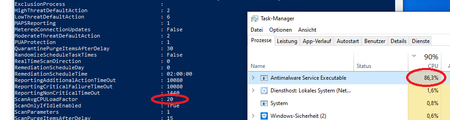

Changing the following setting to NO doesn't make any difference for us - "Start a scheduled scan only when the computer is idle” / "“ScanOnlyIfIdle” doesn't make any difference for us.
I tried setting "AvgCPULoadFactor"n in the registry to 1% and it would still hit up to 68%.

Hey,
based on the docs article for Set-MpPreference, its not a hard limit, see text below.
https://docs.microsoft.com/en-us/powershell/module/defender/set-mppreference?view=windowsserver2019-ps&viewFallbackFrom=win10-ps
Specifies the maximum percentage CPU usage for a scan. The acceptable values for this parameter are: integers from 5 through 100, and the value 0, which disables CPU throttling. Windows Defender does not exceed the percentage of CPU usage that you specify. The default value is 50.
Note: This is not a hard limit but rather a guidance for the scanning engine to not exceed this maximum on average.