Forum Discussion

denversmith8
Mar 09, 2019Copper Contributor
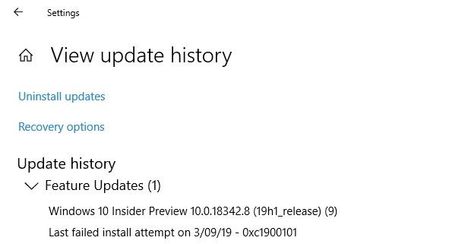
Windows 10.0.18342.8 (19H1 release) NOT INSTALLING
Microsoft Surface Book (original) 512GB HD with external GPU. Windows Insider Slow Ring. I have seen a number of the other posts from the Insider Blog as well as in the forums that mention a fail...

AvinashAus
Mar 09, 2019Copper Contributor
Hey which version you are using as base to update to 19H1 is it public build or insider build. If windows upgrade not working as expected why can't you try USB boot of the 19H1 by downloading it from insider Web page/server.
 denversmith8Mar 09, 2019Copper Contributor
I'm on 17763.316, Windows Insider from Slow Ring. I use my machine for work, but are you saying that I need to wipe and install a clean version of the build? I'm not familiar with what "USB Boot" means?
- AvinashAusMar 09, 2019Copper ContributorClean installation is not needed when we are upgrading to a next version rather than downgrade. Coming to USB booting that way had 3 options
1. Using ISO file and running setup.exe application inside the ISO (be sure to download exact bit version for avoiding issues for surface x64 bit is right one). As you are already using/aware of insider builds I assume by this time you are aware of how to get those iso.
2. Doing the same thing instead of using SSD storage we use USB/Pendrive in this process rest is same.
3. If both of the above options failed you have to make a bootable usb/pendrive and do booting from USB stick instead of Hard drive. This can be in found in bing / google search.
Hope you got an idea of USB booting 3rd option should be used as resuce thing or when upgrading is needed at any cost.- denversmith8Mar 11, 2019Copper Contributor
After the first try, using SSD space to excecute the ISO file, I received this error: