Forum Discussion

Maxgamer223
Sep 04, 2023Copper Contributor
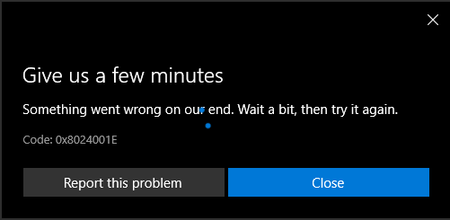
2 issues, I can not use the windows update, and I can not use Microsoft Store
I am using windows 10 and I can not use windows properly, One because I cant use Microsoft store, two because there is an issue with the Windows update, the

Anonymous
Sep 11, 2023So, did you run the KB file?

Maxgamer223
Sep 12, 2023Copper Contributor
an error popped up when I tried to run the application, the number is 0x8024001e
- AnonymousSep 12, 2023aka.ms/w11
- AnonymousSep 12, 2023Hi Max!
Yes, upgrading to Windows 11 may fix the issue except something is seriously wrong with Windows on thy computer.
If thee choose "upgrade" and "keep files & Apps", it will not remove anything!
Hope that help as I am running out of options to provide!
Shawn - Maxgamer223Sep 12, 2023Copper Contributorwhat about upgrading to windows 11, would my application be deleted or only the files stay
- AnonymousSep 12, 2023I see, very strange, not sure how else to help thee except to ask thee to fresh install Windows.
- Maxgamer223Sep 12, 2023Copper ContributorI did that, nothing changed.
Max. - AnonymousSep 12, 2023I see, according to Bing Ai that is a error when there is corrupted files on the computer that is preventing updates.
Kindly run the Media Tool, press keep files!
https://www.microsoft.com/en-us/software-download/windows10
Shawn - AnonymousSep 12, 2023
Now I have this idea:
https://learn.microsoft.com/en-us/microsoft-365/security/intelligence/safety-scanner-download?view=o365-worldwide
- Maxgamer223Sep 12, 2023Copper ContributorI have done literally everything in this article, still have the same issue.
- AnonymousSep 12, 2023
Check out this article.
https://windowsreport.com/fix-error-0x8024001e/
whether you have ever downloaded the Windows installation assistant - it is worth doing it first.