User Profile

Mamatha-MSFT
Former Employee
Joined Feb 17, 2021


User Widgets
Recent Discussions
Re: allow language selection for markdown code block
Hi carlinq - Microsoft will always focus on customer’s feedback and experience, some new features would be added to the services based on customers' feedback in the future, we also recommend you give your new idea in Teams UserVoice here if this needs to be consider as a future request.3.2KViews0likes0CommentsRe: Difference between teams app tab and website tab inside team channel
Hi cmbalderrama - The "website" app in a tab channel is a third party app which allows to add websites as a tab to a channel. Where as personal tab is a custom app which allows only Iframable webpages to as a tab.10KViews0likes5CommentsRe: Difference between teams app tab and website tab inside team channel
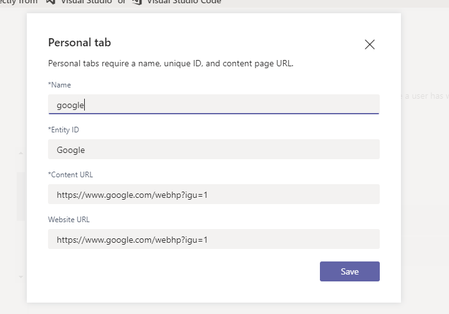
Hi cmbalderrama - Tabs in teams display a web content which are IFramable. But Google will send an "X-Frame-Options: SAMEORIGIN" response header. To open Google as a tab in teams use content url as shown below. https://www.google.com/webhp?igu=1 Let me know if the issue resolved.10KViews0likes7CommentsRe: Difference between teams app tab and website tab inside team channel
Hi cmbalderrama, You can add websites in teams channel as a tab using "website" app without authentication in teams. But when you add website in a personal tab you need to add authentication for that website. Please go through this documentation to add authentication.10KViews0likes9CommentsRe: Custom app not available in meeting configuration
Hi maba91, You need to mention "meetingSurfaces" object in your manifest as shown in below "configurableTabs": [ { "configurationUrl": "URL", "canUpdateConfiguration": true, "scopes": [ "groupchat", "team" ], "meetingSurfaces": [ "sidePanel" ], "context": [ "meetingSidePanel", "channelTab", "privateChatTab", "meetingChatTab", "meetingDetailsTab", "meetingSidePanel" ] } ]1.8KViews1like0CommentsRe: Teams channel Link in a custom Teams App
Hi Ben_64 , It's not possible to display channel chat as a tab. But you can redirect to channel chat when you open a tab using channel link. Create a custom tab and use below code in tab file to redirect to channel to when you open a tab. @page "/deeplink" @{Layout = "~/Pages/Shared/_Layout.cshtml";} <script> microsoftTeams.initialize(); microsoftTeams.executeDeepLink("Channel link"); </script>1KViews1like0CommentsRe: Is there any event for bot that I can use every time it is added?
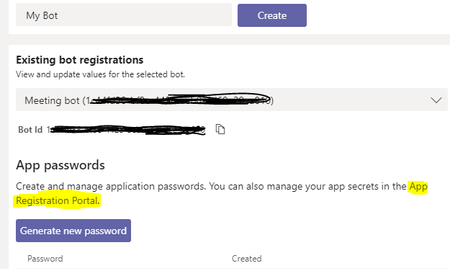
Hi firstteam, It's not possible to delete or uninstall a bot in teams. If you want you have to delete the app from azure portal. Go to Bot Management --> Existing bot registration --> Select the bot which you want to delete and click on App registration portal hyper link as shown in the below highlighted text in image and delete the bot from azure portal.2.2KViews0likes1Comment
Recent Blog Articles
No content to show