User Profile

ChuckLeung
Copper Contributor
Joined Dec 10, 2020


User Widgets
Recent Discussions
Re: SharePoint 2019 Suitebar is disappear and unable to correct it back
ganeshsanap Thank you for your response. I am not sure where did I edit the CSS/JS to hide the suite bar. But I had use a default CSS file replace the environment CSS and I copy a default a master page to my environment. All this approaches are not able to bring the suite bar back. Do you have any idea which JS file should be changed?3.9KViews0likes0CommentsSharePoint 2019 Suitebar is disappear and unable to correct it back
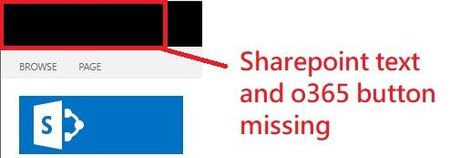
Hi Everyone, We are just setup a SharePoint Server 2019 and created several site collections. We first remove the top left element of the suite bar in .css or .js. I am not sure where did I remove the suite bar. However, we would like to bring it back to all site collections. I tried to edit the SuiteNav.CSS COREV15.CSS and the master page css file, but no luck to bring it back. I use f12 to check the class and found this part is totally missing from my site collection. <div class="o365cs-nav-topItem o365cs-nav-o365Branding o365cs-rsp-tn-hideIfAffordanceOn"><a class="o365button o365cs-nav-appTitle o365cs-topnavText" role="heading" href="https://<spsite>/_layouts/15/sharepoint.aspx" id="Sites_BrandBar" aria-label="SharePoint"><span class="o365cs-nav-brandingText">SharePoint</span></a></div> Can someone let me know how to fix it or how to reset the suite bar setting/config file to default. Thanks a lot~4KViews0likes2Comments
Recent Blog Articles
No content to show