User Profile

ATWVD
Copper Contributor
Joined Oct 07, 2020


User Widgets
Recent Discussions
Re: VM Connection very often gets disconnected
Update from our case. We had only ONE set of random session host disconnects every morning at 08:06 or 08:33 where the users could reconnect straight away after. In the end this was fixed after a technician did some cleanup of private dns zones in the vnet. The zones where not related to AVD traffic at all. Our theory is that updating/saving config in the vnet refreshed the config and fixed some backend error. We did not see any disconnects after this was done.7.8KViews0likes1CommentRe: Consistent Thin Client Disconnection from WVD Pool
Update from our case. We had only ONE set of random session host disconnects every morning at 08:06 or 08:33 where the users could reconnect straight away after. In the end this was fixed after a technician did some cleanup of private dns zones in the vnet. The zones where not related to AVD traffic at all. Our theory is that updating/saving config in the vnet refreshed the config and fixed some backend error. We did not see any disconnects after this was done.1.2KViews0likes0CommentsRe: AVD remote desktop app showing on screen but not responding to clicks until you minimize/maximize
We are seeing same issues with two different host pools. Windows 10 Enterprise multi-session latest updates Windows 10 PCs with Remote Desktop Client 1.2.4337.0 Applications affected: Office (Word) Power BI Desktop Last 2 months7.1KViews0likes0CommentsRe: Consistent Thin Client Disconnection from WVD Pool
We are located in Norway. Our users are spread all across home-office and office locations in Norway. No location specific disconnects. Session hosts and AVD service is in West Europe Azure region. We have verified that UDP is being used, there is some fallback to TCP sometimes. I can verify this some more. Would be useful to know if it happens ONLY with TCP and not UDP connected sessions.3.1KViews0likes1CommentRe: Consistent Thin Client Disconnection from WVD Pool
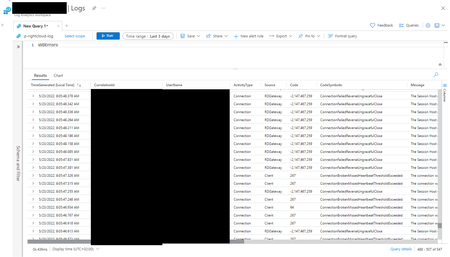
We are still seeing disconnects at every morning at 08:06 CET time for Azure Virtual Desktop. - 1,5 years after first reported. - Multiple RDAgent + RD Client updates, none has fixed it - Troubleshooted all Intune clients and AVD Session hosts - Troubleshooted firewall and URL check, no specific denies - Tried new images, clean marketplace images - Tried clean OUs with GPO inheritance disabled - RDP Shortpath enabled - Accelerated Networking enabled - Works fine throughout the day except these static disconnects in morning, so shouldn't be firewall. - The whole nature of the disconnects is very "scheduled task"-ish. We just cannot find any tasks at these times. Either that or network packets are dropped at this time for some reason. I really wish there was more documentation explaining the EventViewer logs for Azure Virtual Desktop session hosts. Around 4 MS Support cases. Currently we are awaiting MS support saying network is analyzing traces etc. This is the log we see in event viewer when it happens: https://i.imgur.com/vnz98G5.png Our AVD is behind a Azure Firewall https://learn.microsoft.com/en-us/azure/firewall/protect-azure-virtual-desktop?tabs=azure Best Regards AT3KViews0likes5CommentsRe: Version 1.2.3575 of the Windows Desktop client for AVD has been released to all users!
Kathryn_Jakubek Do you have any more information on this fix: "Fixed an issue that caused unexpected disconnects in certain RemoteApp scenarios." Which scenarios? What is the root cause? We are still struggling with disconnects for a bulk set of users after almost 2 years and multiple support cases from Microsoft.1.4KViews0likes1CommentRe: Consistent Thin Client Disconnection from WVD Pool
We have been having consistent disconnects from AVD for over one year. Where MS support is not able to figure out the problem. We have had support cases (multiple) for a year. They have thrown their support case from AVD team to Network team to AVD team to Network team etc. and never seem to want to dig into the technical side of things on their MS-hosted AVD broker service or their backend network. Every day at 08:05 or 12:07 (sometimes 08:27) a bulk of users disconnect. Around 15-20 users. Totally random set of users. Not location specific, notend client specific, newest updated Remote Desktop Client so that "update issue" should not apply. Very hard to replicate with test users and testing. There almost seems to be something going on with the RD Agent at that time aswell, maybe a user session refresh or a heartbeat check or something. We have queried MS support if this could be a bug with refreshing of sessions where duplicate ID's create some sort of overwriting of the same session. Our experience with MS support on AVD service has been really bad on this issue. We are losing hope and looking at alternatives.4.7KViews0likes9CommentsRe: Updating to Windows 10 Multi user 21H2 - MSSENSE.EXE constantly using 25% cpu on new session hosts
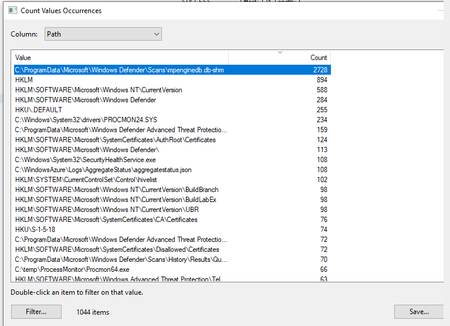
RinoPROITS We have an ongoing Azure Support case on this. Latest reply: "I´m still reviewing the situation with the Defender. I´m not completely sure but I´m suspecting that the Defender Database may have something to do since the Procmon is populated with checking’s on this path: However they all show up as a SUCCESS so it seems that is not an error: It is something that I have to consult since I´ve found some similar issues on third party sites googling this path although nothing from Microsoft end from the time being: https://eur01.safelinks.protection.outlook.com/?url=https%3A%2F%2Fforum.restic.net%2Ft%2Fwindows-defender-causes-10x-slowdown%2F925&data=05%7C01%7Casbjorn.thom%40soprasteria.com%7C291b88e794e44468001008da214509bb%7C8b87af7d86474dc78df45f69a2011bb5%7C0%7C0%7C637858877684460465%7CUnknown%7CTWFpbGZsb3d8eyJWIjoiMC4wLjAwMDAiLCJQIjoiV2luMzIiLCJBTiI6Ik1haWwiLCJXVCI6Mn0%3D%7C3000%7C%7C%7C&sdata=QgzYFjcbuY6XIVZG38PgxBJPg5I96mMjitKNasTMwRg%3D&reserved=0 I´ve found some sites saying that you could delete this entries but I´m not confident on doing that since compromising how defender works. I will take a look into it and confirming once I have some deeper insights on this."6KViews0likes0CommentsUpdating to Windows 10 Multi user 21H2 - MSSENSE.EXE constantly using 25% cpu on new session hosts
We have updated golden image VM to Windows 10 Multi User version 21H2 with latest KB updates and latest FsLogix version. When creating new machines the mssense.exe process (some new EDR sensor process with defender?) is using 25% cpu. We have Defender exclusions for VDI and FsLogix in the environment and also best practice VDI defender GPO applied. Disabling windows defender does not help aswell. Still mssense.exe is using 25% cpu. What is this process and what can we do to disable or remedy this cpu usage on it? Or figure out WHAT is is spending time doing? Best Regards ATSolved6.8KViews0likes6CommentsRe: Automated way to Stop and Start Scaling Scripts
We use automation runbooks for this, one runbook for disable and one for enable. Use a schedule to run disable on the day before patching and then run the runbook for enable the day after. Set-AzLogicApp -ResourceGroupName "your logic app resource group" -Name "logic app name" -State "Enabled" -Force1.5KViews0likes0CommentsRe: Windows Virtual Desktop "Remote Server Disconnected"
We have had the same issues. On March 8 and somewhat on March 9. When checking log analytics with this query: WVDErrors | where ServiceError =="true" and CodeSymbolic contains "connectionfailed" We had 250 errors on Monday, 21 errors on tuesday, and about 17 errors since tuesday until today. We have not opened a MS Support case for it yet, but we will have to if it starts to go up again since it's a service error.1KViews1like0CommentsWVD Log Analytics (classic) How to find out if someone deleted a wvd server from host pool
Hi, We've lost one server from the host pool randomly and I'm trying to look up log analytics data to find out _if_ an admin has misclicked delete in the management portal: I've tried different queries: WVDActivityV1_CL | where Type_s == "Management" and ObjectsDeleted_s != 0 Also method_s == "delete" or "remove" also route_s == "delete" or "remove" What would be the log information generated with a server delete from pool (in the classic wvd management portal)? I cannot find any documentation on the classic wvd log analytics syntax. Best Regards A TSolved850Views0likes1Comment
Recent Blog Articles
No content to show