User Profile

FooTek
Copper Contributor
Joined Sep 04, 2020


User Widgets
Recent Discussions
Re: Windows 10 version 1903 intentionally stopped my Sound Blaster Audigy FX sound card from functioning
I agree with the statement " ditched Creative years ago for lack of proper driver support". Superb hardware with crappy drivers that eventually will not work with your OS of choice because, well, creative needs to sell you another device - even if the one you've bought is perfectly fine. More recently they've made their superb headphones cushions far less superior than they should be, the black colouring layer flakes off and sticks to your head and causes a right mess after approx. 5 years of use (in my case). Nothing at all wrong with the headset - it still sounds way better than most other headsets on the market with 7.1 sound (coupled with the SB H7 software this headset is amazing-even today). The creative website lists the replacement cushions for sale and have listed them as coming soon for about 4 years now. They are NOT coming soon. I purchased another headset and went with Steel Series and never looked back. I will never won a Sound Blaster product again because of this. I have also had perfectly good sound cards over the years not work after an OS update and or upgrade because creative did not release updated drivers and it pissed me off so bad that enough is enough.2.5KViews0likes0CommentsI have an open ticket with Intel-I've posted it here-extremely frustrated Windows 10 user
Dear Intel people, I am also going to post this directly into the Microsoft Community Forums - just so you know. I have been using/configuring/maintaining and troubleshooting Winblows, Linux and Unix Operating Systems since Windows 95 was but a baby. I have NEVER in my 37 years of IT seen something as crude, unstable and NOT ready for public release as the "feature update" to Windows 10 2004. It is, without a doubt the MOST pathetic, beta release of any Operating System, software or driver that's been release in all that time. Since the release of Winblows 10 I have implemented no less than 4 backup locations, one of which is offline, simply because MS can no longer be trusted to delivery a clock software much less a whole Operating System. I set my feature updates to 365 days for a reason. This time I figured - it's been four months, surely MS has worked out all the beta bugs of their "Public Release" by now. I was TOTALLY wrong and will not do this again. I don't really blame MS for this, I know they're mostly incompetent when it comes to feature updates, I blame myself for breaking the golden 365 day rule. I am beginning to hate Microsoft with a passion normally reserved for love making!! ============================= OK - With the above frustration out of the way, lets move back to a more professional attitude. I am using Intel Memory and Storage Tool ver. 1.2.79 (most recent as of today). I cannot optimize my 665p NvME drive, all other functions SEEM to be working as expected I have installed Windows 2004 Build - 19041.508 When I check the driver in use on the NvME it states: Provider: Microsoft Driver Date: 2006-06-21 (a 14 year old driver - ffs MS has gone absolutely crazy) Driver Version: 10.0.19041.1 Digital Signer: Microsoft Windows This is obviously NOT ideal and I am trying to install the actual Intel driver for my NvME found here: https://downloadcenter.intel.com/download/29172/Client-NVMe-Microsoft-Windows-Drivers-for-Intel-SSDs?product=83424 I have tried a manual install via: Client-64bit_f6flpy.zip - which resulted in Winblows telling the BEST driver is already installed. I have tried installing via: Setup_NVME.exe - which resulted in your install program telling no supported devices were found I have searched using Windows Update and no new drivers found because apparently that driver from 2006 is the BEST one to be used. Dear Intel tech support, please help me get the proer driver for your wi=onderful peice of hardware installed into this piece of crapola Operating System I like to loving refer to as Winblows 10. Thank You. Microsoft, I would like to inform you that Intel has a driver release for their lovely piece of hardware dated June-2020 so your driver, which I am being FORCED to use by your Winblows Operating System is NOT the best driver available and is in fact, at 14 years old, most likely the absolutely worst driver available. I just thought someone should let you know because apparently you beleive you are correct in all matters on Winblows and this is clearly NOT the case.1.3KViews0likes1CommentRe: Name of Microsoft tools used to collect logs from Computer
You could also try a safe boot and/or safe mode boot just to see if the issue persists in a clean boot scenario or safe mode. Right click task bar and select task manager, in task manager select the startup tab and disable all items in here. Then click file menu "Run new task". Type in msconfig and click OK. In msconfig click the services tab, select the checkbox to hide all Microsoft services and then click the disable all button. Reboot your PC timing the boot time and if you like wait until the machine sleeps/hibernates and then wake it up to time the wake up time. If the machine seems MUCH better, then re-enable one 3rd party service, starting with any security related programs you have installed such as 3rd party antivirus or firewalls. Then reboot and test with that 1 service enabled. If you enable ALL the 3rd party services you had enabled before and the machine is STILL responsive and quick with no sign of the slowness you now experience then start re-enabling the startup programs from task manager in the same manner. Enable one startup program, reboot and test. All good? = Yes, enable another, reboot test, all good? enable another and so on. If after your first reboot with all services and start programs disabled then do the following: In msconfig click the boot tab, select safe boot check box and put the dot into network. Restart. See how fast the PC boots. Is it still slow? Yes=look into possible virus/spyware/adware by scanning the machine with your choice of free antivirus and/or malware tools. If you scan you machine and it si free of bad guys, then you're most likely experiencing a hardware related problem. Either defective hardware or incompatible BIOS/Firmware or in that area. You can try reinstalling Windows to a clean NvME/SDD/HDD by removing all the partitions during the windows 10 setup and letting Windows recreate the partitions it needs for the install. After that test again. If the same thing persists I'd look at a hardware problem.3.3KViews0likes0CommentsRe: Can't update to win 2004
charleyrich Hey Charlie, Just a shot in the dark here. This exact thing happened to me 3-4 times over the years. Short answer: check for BIOS/Firmware updates from the laptop manufacturer and check for updated drivers from first the laptop manufacturer and if none available then the components in your laptop (IE- go to NVIDIA/AMD/Intel support sites, whichever your device is for graphics drivers and also for audio and communication device drivers. In rare cases you may need controller drivers especially on older machines. My desktop, MSI Infinite X, needed to be wiped (all my data/programs are backed up weekly just for this reason) completely and a new Windows 10 2004 install was done because it absolutely would not upgrade to version 2004 for me. The new install went without a hitch running from a USB stick. Long drawn out detailed story about what I said above. For example. Once it was because I had secure boot set and the BIOS was not letting the drive be altered in any way shape or form. That was about 6 years ago. I had to first disable secure boot, then re-enable it once more after the windows 10 install was completed. - probably not your issue, but worth looking into. The other times ALL involved either outdated BIOS/Firmware OR outdated drivers. For example, my wife's five year old MSI Apache Pro GE72 Leopard laptop would not install without the bios being updated. Luckily Windows TOLD us the laptop needed to be updated first. SO I looked into it and did the bios UPDATE and THEN upgraded the laptop to Windows10 2004 with no troubles after the BIOS update. MY laptop however, is 6 years old and is an MSI GE60 Apache Pro. I did the windows update and it failed with an error code. Forget what it was but I could find no trace of that error code anywhere on the internet. I decided to use the Windows Upgrade Assistant tool. The Windows update assistant tool did everything including reboot and install right up to 99% completed, I was 1% away from logging in, sigh, then it hung fer a bit, then it said something went wrong and rebooted. When I logged back in I had the original Windows 1909 that I had before I tried to do the update. I am pig headed so I tried that, performing various troubleshooting tasks in between each failure for about 5-6 attempts or so. I was at it for a few hours before deciding it was ridiculous and I had better look into something else. I went to the MSI support site to see if there where updates for my laptop, not expecting to find anything newer than 2016. However, there were indeed 3 updates available for my laptop. 1 BIOS update, 1 Firmware update and 1 touch pad firmware update. BIOS from, 2018, the other 2 from 2020 I believe..... Since my EC (whatever that is) and my touch-pad were both working fine I figured BIOS update it is and I honestly felt that was all I would need. I tried the update using the Windows update assistant tool once more and once more if failed at 99% doing the reboot into my old windows version. So, I updated my EC firmware, tried the update, reboot into old windows version at 99% complete. Finally, I tried with no anticipation of it working the touch pad firmware update. By this time I had resigned myself to running Windows 1909 until security updates stopped and then who knows? I mean the laptop is still working great for what I use it for-why spend another $500-$1000 right? After the touch-pad firmware update the laptop update itself to Windows 2004. What I mean by that is, as soon as the firmware update was done a reboot was required. During that reboot Windows Setup opened and completed my 99% install to %100 percent. Weirdest thing I ever seen happen and it was, seemingly, because of a touch-pad firmware/driver conflict. J793Views0likes1CommentRe: Windows 10 ABOUT settings sheet does not show version, just build number
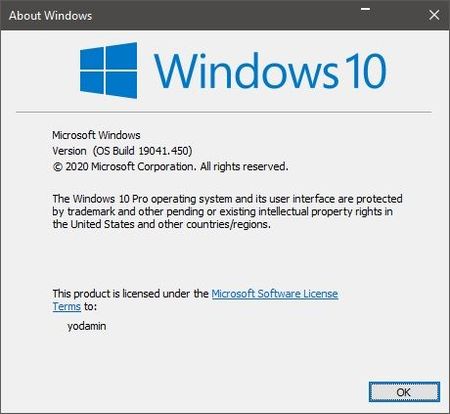
@Kapil Arya arthursobased Thanks for the responses guys. The issue was present directly after the final reboot of a new installation. I hadn't installed anything or change anything on the system at the point I noticed it. I new I had version 2004 because when I right clicked the "This PC" icon on desktop and selected properties the Metro based system settings tab appeared focused on the "About" information sheet/tab whatever you call it. I did not edit the registry. It also displays the same behavior when using ver or winver on the command line. As follows: ver - C:\Users\yodamin>ver Microsoft Windows [Version 10.0.19041.450] Winver - Systeminfo - C:\Users\yodamin>systeminfo Host Name: THREADRIPPER OS Name: Microsoft Windows 10 Pro OS Version: 10.0.19041 N/A Build 19041 OS Manufacturer: Microsoft Corporation OS Configuration: Standalone Workstation OS Build Type: Multiprocessor Free It really isn't that big of a deal to me, but if there is a solution I'd implement it.2.4KViews0likes1CommentRe: Resetting my laptop
Barbara_1943 Hi Barbara, yes it is fine. Kapil Arya is completely correct. If you use the Windows 10 reset option and choose to remove your files and data, then Windows ten re-installs itself onto the laptop while deleting all your personal data and any applications you had installed. What you have no is, essentially a laptop with a brand new install of Windows 10 on it that has never been logged into. A determined individual may still be able to recover data using data recovery tools, however, this is time consuming, not dependable as far as full data recovery goes and expensive if you pay to have someone else do it. I believe it is totally is safe to give it away, donate it or whatever you like. If you are yet completely sure, you can use a partition tool to remove the partitions an don't install anything on it, or you can use a tool to secure wipe the hard drive before installing an Operating System on it. Glad you got some help.1.5KViews0likes1CommentRe: Windows hangs randomly and touch pad freezes for some seconds
Roopi123 If the system was purchased brand new, I wouldn't mess around with suggestions that may or may not work, from here. This issue could be anything from faulty power supply/ram, video card or motherboard component to just to many background program running all at once. Even if you boot into safe mode and it all works fine it may still be a hardwrae issue as safe mode uses generic drivers that have no functionality to use more complicated functions of hardware - especially in the case of graphics cards, plus the power requirements in safe mode are reduce because of what I just said about drivers. If it were me (over 20 years experience as a PC technician for private individuals and corporations) I would immediately pick up the phone and call Dell support. That's what they are their for. Backup all you documents and data before calling them.2.3KViews0likes0CommentsRe: Windows 10 version 1903 intentionally stopped my Sound Blaster Audigy FX sound card from functioning
pArthiva Hi, You might try to completely uninstall the drivers and software for the Audigy. The reinstall as follows. right click install executable and select "troubleshoot compatibility" let troubleshooter do it's thing and hopefully it will end with a suggestion to try installing with "these settings', if it does give it a go. If it doesn't, try creatives website for updated drivers. MOST of the driver issues are on the hardware manufacture not Microsoft. They way I understand it Microsoft will work with any hardware manufacturer to get their drivers updated to work with new Windows 10 releases. If Creative has chosen to NOT do that it is NOT Microsoft's fault and your only options at that point is to either downgrade to a Windows 10 version which has driver support for your hardware or upgrade your hardware. I personally ditched Creative back in the late 90's/early 2000's just for their apparent lack of driver support for older hardware models. Superb hardware with lacking driver support does not make a good hardware purchase IMHO. For example a quick search of the Creative website revealed the latest driver release for your sound card was 2015. https://support.creative.com/Products/ProductDetails.aspx?prodID=21690&prodName=Sound%20Blaster%20Audigy%20Fx&_ga=1.227962141.1626450272.149148071412KViews0likes0CommentsRe: Audio not working after driver update
7JKaushal Hi, You may have more luck with the drivers available for download here. https://www.realtek.com/en/component/zoo/category/pc-audio-codecs-high-definition-audio-codecs-software Also, if you right click the driver executable and select "Troubleshoot compatibility" Windows 10 may find compatibility settings for the driver that should work, you can then select install using suggesting settings and give it a go. As with ALL installs of this type and considering Windows 10 issues are MOSTLY driver related, I would backup data and do restore point before trying anything. This has worked for me installing a Realtek Bison,NB Pro web cam driver on my wife's old laptop, which came loaded with Windows 8.1. I did this last night and used the laptop for a teams meeting today which worked flawlessly. Buyer beware rules apply, but Good Luck.4KViews0likes0CommentsRe: After applying the 2004 update Internet Explorer crashes
JasPacePZOO Hi, I assume some things here. Apologies if my assumptions are incorrect. The apps that reply on IE are intranet APPs. They rely on compatibility view settings. GPedit->computer Config->Admin Template->Windows Components->Internet Explorer_> enable "Turn on Internet Explorer Standards Mode for local Intranet" I have no way to test this, but there are other settings you could try quick to see if a resolution is to be found in the compatibility view settings. Good Luck. J2KViews0likes0CommentsRe: Resetting my laptop
Barbara_1943 If you are restoring fromm a factory image it will reload whatever OS is contained within that factory image. Which I believe you said was windows 7. I am not sure if Windows 7 will then auto download the Windows 10 upgrade files and ask you to upgrade. If it does not, you can then go to the windows download tool and upgrade it once more. I followed this article a few months ago and it worked flawlessly. https://www.onmsft.com/how-to/how-to-still-get-a-free-windows-10-upgrade-in-2020 Excerpt from above web site: Begin by downloading the Windows 10 Media Creation Tool from Microsoft’s “Download Windows 10” webpage. This gives you everything you need to perform the upgrade. Run the program once it has downloaded. Link to Windows 10 download page: https://www.microsoft.com/en-ca/software-download/windows10 Link to download tool: https://go.microsoft.com/fwlink/?LinkId=6912091.6KViews0likes1CommentRe: Fix dialog boxes into one place
Reza_Ameri-Archived No - I just tested on my newly installed windows 10 2004 system and poster is correct. Ctrl+P opens the Windows print dialogue box in the upper left hand corner of my monitor. I move it to the center of the monitor and click "X" to close the print dialogue window. I then use ctrl+p to open it again and it opens in the top left hand corner fo the monitor screen. The window is NOT remembering it's last open position. It is also a thing that has been ongoing since Windows 95. I have heard, as a PC technician many, many, many people complain about this over the past 25 years. I bevel it is time for MS to address it also. It just drives people nuts. One more thing - Linux does not exhibit this behavior. Linux remembers the last known open position for all it's windows in my experience and AFAIK. Sorry for the interruption in this post.6.7KViews2likes2CommentsWindows 10 ABOUT settings sheet does not show version, just build number
Hi, I had some issues upgrading to Windows 10 2004 from from 1909. After a few hours of troubleshooting the upgrade and knowing I have regular backups of everything, I blew away the partitions for Windows 10 1909 and reinstalled Windows 2004 using USB install media. Everything seems fine. Everything is working as expected. Today I went to the about page of settings and look at the Windows Specifications. It reads as follows: Edition: Windows 10 Pro Version: Installed on: 2020-8-31 OS build: 19041.450 Experience: Windows Feature Experience Pack 120.2212.31.0 I have attached a screenshot of the About settings page. I wonder why that is and if it is something that went wrong for my installation or just another bug to be fixed at a later date? My PC specifications are: Operating System Windows 10 Pro 2004 64-bit CPU Intel Core i7 @ 3.70GHz RAM Gskill 3200mHz - 32.0GB Dual-Channel DDR4 @ 1600MHz Motherboard MSI Z370M GAMING PRO AC BIOS Brand American Megatrends Inc. Version 9.40 Date 2017-12-27 (latest) Graphics 4095MB NVIDIA GeForce GTX 1070 (MSI) ASUS MG279 (2560x1440@119Hz) - Windows / nVidia does not allow me to choose 144Hz after this upgrade? BenQ V2420H (1920x1080@59Hz) SA300/SA350 (1920x1080@59Hz) Storage Intel 665p 1907GB NVMe INTEL SSDPEKNW02 (RAID (SSD)) - boot disk 1863GB Seagate ST2000DM006-2DM164 (SATA ) 40 °C 238GB Samsung SSD 840 PRO Series (SATA (SSD)) 33 °C 5589GB Seagate Expansion Desk SCSI Disk Device (USB (SATA) Optical Drives HL-DT-ST DVDRAM GUD0N Audio Sound BlasterX H72.8KViews0likes4Comments
Recent Blog Articles
No content to show