User Profile

Homith
Copper Contributor
Joined Aug 04, 2020


User Widgets
Recent Discussions
Re: Windows 11 Display Settings Not Launching Problem
G'day Shawn, I performed the clean boot as described within the guide you had posted. The Windows Display settings would still not launch. After reverting back I launched again in Safe mode and the settings worked, launching again logged on in a normal boot it stopped working. I guess I am at now step 9B in the guide right now. Any more suggestions would be most welcome. Cheers12KViews0likes1CommentRe: Windows 11 Display Settings Not Launching Problem
G'day Shawn, Thanks for following up on this - really appreciated. Yes indeed I did the registering of the settings app as well with the following steps; 1. Ensure the Windows Update Service has been started 2. Launched PowerShell in Administrator mode 3. Entered the command 'Get-AppxPackage *windows.immersivecontrolpanel* | Reset-AppxPackage' (without the quotes) 4 Rebooted and retried the Display Settings without success. Cheers, JH12KViews0likes4CommentsRe: Windows 11 Display Settings Not Launching Problem
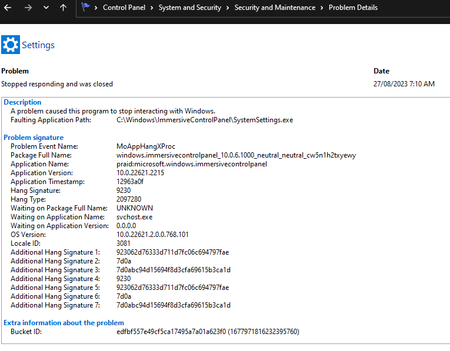
KapilArya Shawn_Brink Good morning Kapil & Shawn, Thank you for taking the time to respond. I tried the re-registering of the Store app as described however this did not work. The issue remains with the Windows 11 Display settings (ms-settings:display) and not launching correctly only showing the cog. I have added some screenshots on what I am experiencing. Cheers, JH11KViews0likes6CommentsWindows 11 Display Settings Not Launching Problem
Good evening Community, Hoping this email finds you well. Just wanted to touch base with a problem I am having with a particular Windows 11 build that is currently running on an ASUS TUF Gaming FX505DV laptop. What seems to have happened is every time I launch the Windows Display Settings all I am presented with is a cog. Now I have tried a lot of different things all bar reinstalling Windows, but the techo in my mind would love to know what is going on here. The strange thing is that the Display settings works well in Safe Mode. I can get to all other settings, it's just the Display settings that seems to be broken. The things I have tried without success are as follows; 1. Run 'DISM.exe /Online /Cleanup-image /Restorehealth' plus 'sfc /scannow' 2. I have reregistered Windows apps using 'Get-AppXPackage|Foreach{Add-AppxPackage -DisableDevelopmentMode -Register "$($_.InstallLocation)\AppXManifest.xml"}' 3. I have tried creating a new user account - However, when booting in Safe mode WIndows Display works.... go figure 🙂 4. I have done a Windows Store reset using 'wsreset.exe' 5. I have made sure all drivers and Windows patches have been applied. Currently at Windows 11 22H2 Windows Feature Experience Pack 1000.22662.1000.0 Kind of running out of ideas and thought I would reach out. Any suggestions that would be really appreciated. Cheers, JH17KViews0likes13CommentsRe: New Microsoft Edge Not Remembering 2 Factor Authentication Verification - Hotmail.com
Good Morning Henno_Keers , No she does not get this when logging on - Only when she navigates to http://www.hotmail.com using IE. As a work around she is using Chrome which remembers the device. Cheers & thanks for the assistance 🙂4.5KViews0likes3CommentsNew Microsoft Edge Not Remembering 2 Factor Authentication Verification - Hotmail.com
Good Evening Forum Members, My wife uses Hotmail.com and has 2 factor authentication enabled on her account to provide her that extra security. Previously on legacy Microsoft Edge she would navigate to Hotmail by typing http://www.hotmail.com into her Edge browser. The first time she had done this she is challenged by requesting a verification code to be sent via email or text message. She enters in her secondary email address or last for digits to her phone number to receive the verification code. The verification code is successfully sent. and the next screen proceeds to the Verification Code input screen. She successfully enters the verification code and underneath the input box there is a checkbox that asks to 'Don't ask me again for this device'. Now she did not have to do this again on this computer. Along rolls the New Microsoft Edge Version 83.0.478.58 and her old legacy 'working' Edge browser is automatically updated. Now, every time she launches Hotmail by following her tried and trusted procedure she is asked to reinput this verification code all the time, even though she ticks the box to 'Don't ask me again for this device'. How does she fix this within the New Microsoft Edge. It is driving her insane. It worked so much better in the previous legacy Edge browser. Any suggestions are more than welcome. Cheers & thanks in advance4.8KViews0likes7CommentsRe: MSN weather metric system settings not saving (Edge Chromium Based)
Deleted Good Morning, I too am having the same problem - this has only started since I have updated to the last version of Edge Version 84.0.522.52 (Official build) (64-bit). Additionally, I am also having a problem where after logging into my 2 Factor Authenticated Hotmail account with Edge and selecting do not ask again for this computer when adding the security code. If I log off it does not remember 'This computer'. I now use Chrome as it works as intended, but would much prefer to use Edge. Cheers3.7KViews0likes3Comments
Recent Blog Articles
No content to show