User Profile

Ken_Hadden
Brass Contributor
Joined May 22, 2020


User Widgets
Recent Discussions
Re: How to enable 'Never Combine taskbar buttons'. Windows 11 ?
I've tried the registry settings. All they did was completely disable the start menu. I believe those scripts were written for a different edition of windows 11 (Home vs. Pro or something). I had to roll back the changes. We need an official setting that works universally.7.1KViews0likes0CommentsRe: How to enable 'Never Combine taskbar buttons'. Windows 11 ?
That microsoft manager must still be trying to find the window that has the Teams chat in it where the devs were asking if they should add a toggle for never combine in the next patch release of 11. Though I doubt that microsoft uses the useless Teams internally. So maybe the chat is in Slack... but the manager still can't find that window because his taskbar is combined.5KViews5likes1CommentRe: How to enable 'Never Combine taskbar buttons'. Windows 11 ?
Tried the registry settings script above. And while it did change the appearance and ungroup icons, it completely disabled the start menu. The icon for it is on the taskbar, but clicking it does nothing. Also explorer.exe crashes as soon as it starts. It seems the "UndockingDisabled" is the culprit. If I set that one key back to 0x0, then the start menu works again but icons are back to being grouped. This is on Win 11 pro for workstations.9.3KViews2likes0CommentsAccent color is not used in title bars, start or task bar.
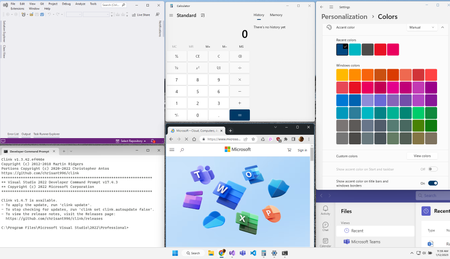
I've turned on "Manual" for "Accent Color" and selected "Dark Blue". Not a single window has a dark blue title bar, nor does start or the task bar. In fact I just opened Visual Studio, Calculator, Settings, Command Prompt, Chrome and Teams, not a single one of those has the same color title bar. Each is either a variation of gray, or in the case of teams is purple (even when not active). Not one window has anything remotely resembling the dark blue color. Which window is the active window in this screen shot. If you guessed Teams, Chrome or Command Prompt you would be wrong!:6.2KViews2likes5CommentsRe: How to enable 'Never Combine taskbar buttons'. Windows 11 ?
THIRD PARTY/COMMERCIAL SOFTWARE IS NOT THE SOLUTION HERE. I'm not going to install yet another thing in my already bloated system. I am not going to install software from an unknown source that may contain spyware. I like the Windows 11 interface enough to keep it. But I just want the option to not combine icons. I can live with the rest of the changes. Just not the one that is the subject of this discussion. Why is Microsoft not taking this 17 page thread seriously? Aleks Lopez, Heather_Poulsen, Hari_Pulapaka9.6KViews8likes2Comments
Recent Blog Articles
No content to show