User Profile

Claire_4
Copper Contributor
Joined Apr 27, 2020


User Widgets
Recent Discussions
Re: How to fully remove domain password policy from on-prem AD
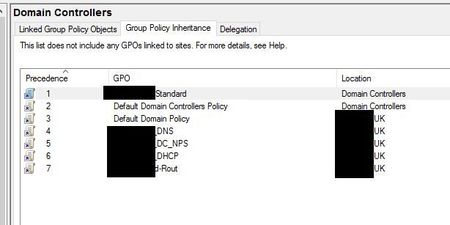
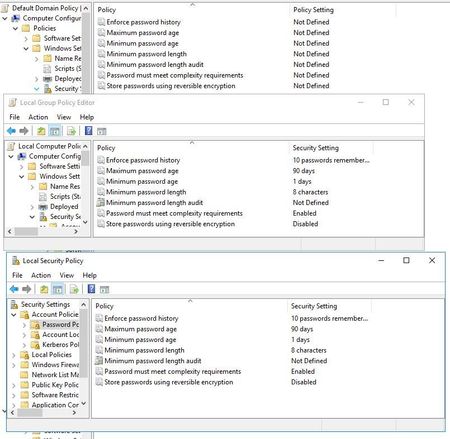
LeonPavesic Thank you for the reply. Yes that's exactly what we've done, all settings under Computer Configuration > Policies > Windows Settings > Security Settings > Account Policies > Password Policy - are set to not defined. Replication across domain controllers is working. I've attached a screenshot showing the group policy at the top with the correct settings, and the local security and group policy for that particular DC showing the incorrect settings. We have ran a GPUpdate on the DC's and rebooted both of them but the settings still remain.17KViews0likes2CommentsHow to fully remove domain password policy from on-prem AD
Hi, We have recently changed our AD password mastering to a 3rd part IDP, the passwords are changed on their system and are pushed to the users profile in AD, all of this is working fine. Users log on to their domain joined laptops with their AD accounts, users and computers are all on the same domain. We have removed the password policy from our default domain policy, the change has replicated across GPO’s on other DC’s and there is no password policy being applied via any other GPO’s. However, when running the query Get-ADDefaultDomainPasswordPolicy it still shows the password policy criteria that were removed from the domain policy. The local security policy and local group policy on the domain controllers shows the same password criteria so I assume that’s where it’s coming from. The local security policy and local group policy on the laptops is just showing what looks like some default settings. Is there another step that needs to be done in order to fully remove the password criteria, i.e do we need to manually adjust the local settings on the domain controllers back to default/something else? If anyone has any input it would be appreciated. Thanks20KViews0likes4CommentsRe: Factory Reset Windows 10 without user intervention
Reza_Ameri-Archived Thanks for your reply. Unfortunately we do not use configuration manager, nor do we have capacity to register devices on InTune currently. We can run exe's/powershell scripts, that sort of thing on the laptops so we're hoping to use something like that to achieve this.220KViews0likes1CommentFactory Reset Windows 10 without user intervention
I've looked for this answer online and have come across the "systemreset -factoryreset" command which works, but it comes up with the prompt asking if I want to keep my files or remove everything, I want to remove everything, but without the prompt. We are not doing this from any pre-exiting images, and our laptops are running the pre-loaded Windows 10 Pro install, we are just using the in-built Windows 10 "reset this PC" feature as we have no MDM configured. We just want the laptops to be totally reset so they don't contain any company information, we're not bothered about completing the OOBE once they are wiped. We are trying to accomplish this remotely as our users are all at home, so I need to automate it and have no user involvement in the process, I just want it to factory reset, and bring the laptop up to the off-the-shelf state configuration. We have the facility to push commands and scripts to the laptops so was hoping to do this via powershell. Does anyone know if this is possible? Thanks250KViews2likes26Comments
Recent Blog Articles
No content to show