User Profile

PaulGMVP
MCT
Joined Mar 02, 2020


User Widgets
Recent Discussions
Re: Azure Virtual Desktop - Black Screens on logins - What we've tried so far
we were testing the behaviour with FSL set to 0 (enable=0) and we did not experience any blackscreens during log in. What is more, we also have Personal hostpools in our org, on which we do not have FSL at all - and everything works there. No blackscreens, so for sure its related. Today we got the following message from MS : "Please note this issue started with KB 5040525: July 23, 2024—KB5040525 (OS Build 19045.4717) Preview so we recommend uninstalling this and one, also KB 5041580: August 13, 2024—KB5041580 (OS Builds 19044.4780 and 19045.4780) and KB 5043064: September 10, 2024—KB5043064 (OS Builds 19044.4894 and 19045.4894) The fix will be included on the KB5045594, which will be released 3rd week of October. " So it looks that we are all getting different answers in regards to potential fix.... its crazy.4.2KViews0likes26CommentsRe: Azure Virtual Desktop - Black Screens on logins - What we've tried so far
HelenaKohler we recieved this fix (KIR) today from MS. The only doubt i have is how to set the state of this GPO. MS guy wrote to set it to ENABLE, but based on what you guys write here it should be set to DISABLED.... so what is the correct value ?6.5KViews0likes9CommentsRe: Azure Virtual Desktop - Black Screens on logins - What we've tried so far
hello, you dont know how "happy" i am to find this post.... We are experiencing exactly same issue. Black screen during login to AVD session hosts. Problem started this week - Monday. Some technicalities : - We have 25 hostpools. 24 are located in West Europe. One is located in India Central - and both regions affected by this. - Vms are different sizes. We have mostly D4 but also D8, B4, B8 - problem with black screen exist on all of them - We have FsLogix configured for multisession hostpools, and all of them are randomly experiencing this black screen. Looks like problem is not happening on Personal hostpools without FSL. What about your pools ? Where are they located etc ? Maybe there is some pattern here, or maybe MS is just hiding some service malfunction that happened recently... We can also confirm that creating a brand new session host is stopping black screens for some time, like 24hr or something. We Suspect that it may have something to do with Defender for endpoint. As soon as Defender engine will update to newest version - 1.1.24080.9 - some of the rules (ASR) are reporting OFF status. So far we did not find any permanent solution for this. We have a lot end user incidents related with this black screen on AVD, we are shuffling users one host to another using drain mode.... its crazy....17KViews0likes3CommentsRe: PUBLIC PREVIEW: Announcing public preview of Azure AD joined VMs
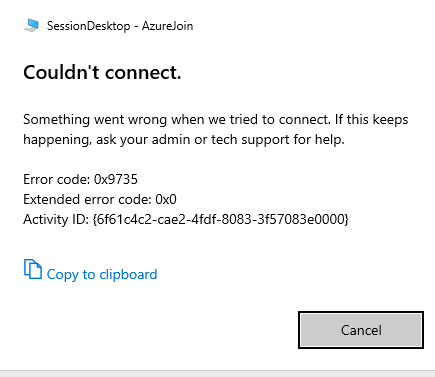
hi guys im experiencing an error when trying to connect to my AADJ VM using Remote Desktop app. Prereqs are all met : - device from which i try the connection is aadjoined to the same tenant. - remote desktop app user is added via IAM with AVD User Login role - targetisaadjoined:i:1 added to rdp advanced properties - validation env checked what else can be missing ? i can only access my VM from the web client , there is no error there and it works from every device. Device State | +----------------------------------------------------------------------+ AzureAdJoined : YES EnterpriseJoined : NO DomainJoined : NO Device Name : VM-AzureAD-0 +----------------------------------------------------------------------+ | Device Details | +----------------------------------------------------------------------+ DeviceId : 2b4f6a7b-02ab-4cb5-a220-1fdde507e7e4 Thumbprint : 4C5F4A2D4D8D55093DDE48F7453621FE8382F2B9 DeviceCertificateValidity : [ 2021-07-19 11:01:49.000 UTC -- 2031-07-19 11:31:49.000 UTC ] KeyContainerId : 21313e88-443a-4391-b4ca-dcdda5e9ee38 KeyProvider : Microsoft Software Key Storage Provider TpmProtected : NO DeviceAuthStatus : SUCCESS +----------------------------------------------------------------------+ | Tenant Details | +----------------------------------------------------------------------+ TenantName : xxxxxx TenantId : xxxxxx Idp : login.windows.net AuthCodeUrl : https://login.microsoftonline.com/xxx AccessTokenUrl : https://login.microsoftonline.com/xxxx/oauth2/token MdmUrl : https://enrollment.manage.microsoft.com/enrollmentserver/discovery.svc MdmTouUrl : https://portal.manage.microsoft.com/TermsofUse.aspx MdmComplianceUrl : https://portal.manage.microsoft.com/?portalAction=Compliance SettingsUrl : JoinSrvVersion : 2.0 JoinSrvUrl : https://enterpriseregistration.windows.net/EnrollmentServer/device/ JoinSrvId : urn:ms-drs:enterpriseregistration.windows.net KeySrvVersion : 1.0 KeySrvUrl : https://enterpriseregistration.windows.net/EnrollmentServer/key/ KeySrvId : urn:ms-drs:enterpriseregistration.windows.net WebAuthNSrvVersion : 1.0 WebAuthNSrvUrl : https://enterpriseregistration.windows.net/webauthn/xxx/ WebAuthNSrvId : urn:ms-drs:enterpriseregistration.windows.net DeviceManagementSrvVer : 1.0 DeviceManagementSrvUrl : https://enterpriseregistration.windows.net/manage/xxx/ DeviceManagementSrvId : urn:ms-drs:enterpriseregistration.windows.net +----------------------------------------------------------------------+ | User State | +----------------------------------------------------------------------+ NgcSet : NO WorkplaceJoined : NO WamDefaultSet : YES WamDefaultAuthority : organizations WamDefaultId : https://login.microsoft.com WamDefaultGUID : {xxxx} (AzureAd) +----------------------------------------------------------------------+ | SSO State | +----------------------------------------------------------------------+ AzureAdPrt : YES AzureAdPrtUpdateTime : 2021-07-19 14:45:18.000 UTC AzureAdPrtExpiryTime : 2021-08-02 14:45:17.000 UTC AzureAdPrtAuthority : https://login.microsoftonline.com/xxx EnterprisePrt : NO EnterprisePrtAuthority : +----------------------------------------------------------------------+ | Diagnostic Data | +----------------------------------------------------------------------+ AadRecoveryEnabled : NO Executing Account Name : xxxxx KeySignTest : PASSED +----------------------------------------------------------------------+ | IE Proxy Config for Current User | +----------------------------------------------------------------------+ Auto Detect Settings : YES Auto-Configuration URL : Proxy Server List : Proxy Bypass List : +----------------------------------------------------------------------+ | WinHttp Default Proxy Config | +----------------------------------------------------------------------+ Access Type : DIRECT +----------------------------------------------------------------------+ | Ngc Prerequisite Check | +----------------------------------------------------------------------+ IsDeviceJoined : YES IsUserAzureAD : YES PolicyEnabled : NO PostLogonEnabled : YES DeviceEligible : NO SessionIsNotRemote : NO CertEnrollment : none PreReqResult : WillNotProvision For more information, please visit https://www.microsoft.com/aadjerrors11KViews0likes2Comments
Recent Blog Articles
No content to show