User Profile

GrahamJockey
Iron Contributor
Joined Sep 26, 2019


User Widgets
Recent Discussions
Re: Provide run / open / save / save as options when downloading files - Discussion
Is there no way to see, when highlighting a link with the mouse, whether or not it will prompt a download? If there is, one fairly easy solution (easy to conceptualise at least) is to right click on such a link and have a menu: 'open', 'save', or 'save and open'. In general, I think that pages downloaded from the same webpage should be treated the same. Perhaps a default could be a prompt as in the old Edge and, if the page isn't explicitly opened, the rest of the downloads are also downloaded but not opened (i.e. treated the same as the first download from that webpage). I think the user should also have the option to change the default, whether "open", "save", "both" or "treat as was the first download from that webpage"3.3KViews1like0CommentsRe: Discussion - Updating our interface with Fluent touches
HotCakeX Ooh, that transparency would be so cool in the entire top bar and in the edge://urls ! Or even imagine the entire browser was somewhat transparent, basically like a transparent dark mode! Heads would turn all over the office, not even joking! Even as crazy as it is, I think it would be fantastic as an option!23KViews0likes1CommentRe: Discussion - Updating our interface with Fluent touches
If consistency with Windows 10 was the main spec, this debate would come to an easy resolution. But I'm currently using edge on a Macbook at work. For the sake of users on other platforms and users who don't really care for Fluent (which are many) please proceed slowly and thoughtfully. Many users, once they get a whiff of the old edge UI, will immediately proceed to download chrome. Maybe try to make it consistent with Office suite at first, since many people are already used to it. UI features (not just design language) and accessibility, gestures etc. are going to be more important in getting users to give Edge a try. Put a pause button on the tab card, like you do with the Win10 taskbar, for example, and people will give the new Edge a second look. Personally, the more I can use Fluent on my Macbook at work, the better -- but I know not everyone agrees.23KViews3likes0CommentsSurface book pro concept
This is just an idea I've been chewing on: Imagine a Surface Pro that you can use with an ordinary type cover or with a keyboard dock similar to the Surface Book. The keyboard dock could include extra I/O, GPU, battery (essential), and speakers maybe, just to be impressive. It could run a little ribbon cable to a flat connector under the kickstand, since it will need PCI lanes. You could even choose between keyboard docks: One of them could include space for a 2.5 inch storage drive, but that's just me. Some could include extra RAM for running VMs. Essentially, it should be able to be a completely portable tablet and also an ultrabook replacement.686Views0likes0CommentsAddress bar blues and why the old edge was better at it
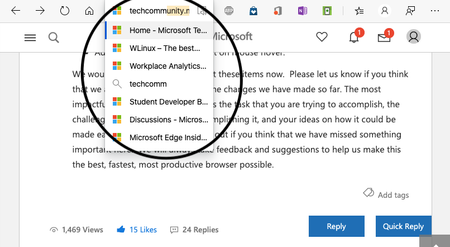
May I just say: This is ridiculous and the old edge handled it perfectly! Why is the address bar so narrow (vertically narrow)? That is the widest it can go when I'm tiling two windows next to each other on a 13 inch screen, and it's impossible to see what is being suggested. The old edge handled this perfectly, no matter how narrow the window was. The only reason I didn't include a screenshot is because I'm on my mac at work.918Views0likes1CommentRe: Discussion - Updating our interface with Fluent touches
Hi again, A summary regarding sizing things: - Have a resizing slider for *all UI elements* (not each one individually, just *all*. These are incredibly useful in my experience and can possibly follow font size. - Option to autohide the browser UI elements when in fullscreen, as in classic edge or Office. (rather than hide them completely as in Chrome--though that should remain an option) - Option to shrink UI elements as the mouse moves away or when scrolling down for touch users. (IDEA: add proximity sensors to the top of the new surface devices, so that when your finger comes close to the top bar, it enlarges. The touchscreen in my midrange car has had this since 2015) - Have different spacing options for touch and for mouse, as in Windows 10 and Office. (literally just a toggle, nothing too complicated for the end user) I think this should make everyone happy when it comes to the size of things (touch users and mouse users are comparing apples to pears in the size debate.) and when it comes to the workspace real-estate debate. That aside, the light effect under the mouse is crucial, I think it's fantastic!44KViews4likes1CommentRe: Discussion - Updating our interface with Fluent touches
If its market share you're after, I don't know how much these changes will help. I liked the old edge UI -- I really did! -- but I think most people (not necessarily the ones that contribute to this forum) just want to feel like they're still in Chrome. In fact, I like that it is basically Chrome plus a few features, and I think other adopters would also like that. (Imagine opening Chrome except that it's more beautiful and has a scrollable tabstrip?!) That said, there are obvious changes that could be done, such as a scrollable tabstrip, scrollable address bar (it's ridiculous that there is no scrollable address bar without first going in to edit the text), ability to make windows narrower, all the things that old Edge did better. I think, for the sake of workspace size, that there should be an *option* to autohide [certain elements of or all of] the top bar, or an *option* to make it smaller until the mouse comes close. Perhaps one could choose how they want their full-screen UI, whether autohide as in old Edge and Firefox; or as it is now -- as it is in Chrome. I also think the size slider for all UI elements is a good idea, or just two or three options as there is in office. Why not make a few animations or UI samples as gifs and ask people to vote?45KViews18likes1CommentRe: Option for a slimmer tab and address bar
I think a big reason for Edge not changing the UI too much from chrome (even where improvement is sorely needed) is that people are used to chrome. Many people, if not most, want to feel like they're still in chrome. It was certainly welcoming for me when I changed to Edge and found everything where I thought it would be. I would still like to see UI improvements though. The old edge was beautiful in many ways, though often at the expense of feeling basic in my opinion. Still, it was more beautiful than Chrome.2.8KViews0likes0CommentsRe: Option for a slimmer tab and address bar
I would love a feature that allows autohide of the top bar, perhaps more like Apple does with its mobile Safari. Another nice feature of mobile chrome is the ability to pull down on the top bar to see all tabs and I can easily see this being useful on a full desktop browser: Imagine going to your tabs and scrolling down to see the entire tab previews (kind of like legacy edge had a way of doing) and then scrolling down again to see all your tab previews, kind of like on Mac Safari.2.8KViews0likes0CommentsSurface buds
I hope others are as excited about this as I am! I don't know to what degree this is the general market's desire, but what I want to see is top call quality and the ability to wear them (or just one) all day without having to take them out for fresh air in my ears or just to talk to people. It might even be a good idea to allow the option of buying just one (business customers might appreciate this). As far as I can tell, these aren't made for music -- If I wanted earbuds for music, I would get ones with a proper rubber seal. For that reason alone, I think it should be marketed for business and all-day use. Mad excited!618Views0likes0CommentsRe: Reading List - Discussion
Elliot Kirk To be honest, I don't think many people care about this feature as it was in the legacy Edge (and, that is, of the minority of people that used legacy Edge). I think there could be an option somewhere to "make this page available offline" or "make pages in this folder available offline", and it would be nice if you had the option to make collections available offline. [Perhaps specifying "for a week/month/indefinitely" would be useful, considering that most people will only need this if they're away from decent signal for an extended period and it's nice to have things deleted after a set period. Come to think of it, it's almost irrelevant since the internet is so accessible and increasingly so.] I can see how a "reading list" could somewhat 'simplify' this feature, but a true "reading list" might be more useful if it saved webpages in reading mode and as epubs perhaps. I can easily see a future where the browser replaces the pdf and ebook reader. Apple Books has different "shelves" for pdfs, including word docs converted to pdf natively in Safari. If a reading list could do something similar ("shelves" for epubs and pdfs, and the ability to convert webpages and docs), it would be extremely useful. Thus, there are three features I may request in place of a reading list: 1. A "Make page/folder available offline for X days" (7 days or 30 days or indefinitely). 2. The ability to convert webpages/docs into pdfs/epubs (print to pdf isn't great). 3. A "bookshelf" or "reading list" with saved pdfs/epubs, and filters to see saved webpages. This would all have to be perfectly integrated and intuitive to effect widespread adoption though, which is the tricky part. I believe in you guys.20KViews3likes1CommentRe: Dev channel update to 80.0.361.5 is live
josh_bodner Suggestion/idea: Have options to set colours or even icons (e.g. briefcase, book, lightbulb) for individual folders, with an additional default option (somewhere in the bookmarks manager). Individualised icons might help for people like me who have about 10 folders in their bookmarks bar (relating to work, studies, interests, hobbies, side projects, reading). That is all I use my favourites bar for, and I'm sure there are others that do the same. Conceptual ideal case: The browser could change icons automatically -- say, if I have a folder called "work" on the favourites bar, it could change the icon to a briefcase. The next time I open my updated browser it would say "Look, we changed the icons on your favourite folders. Would you like to keep them this way?"4.6KViews1like0Comments
Recent Blog Articles
No content to show