User Profile

JeremyWallace
Brass Contributor
Joined Sep 18, 2019


User Widgets
Recent Discussions
New Article - What is Azure Monitor?
Just published a brand-new article titled "What is Azure Monitor?" on LinkedIn. If you're looking to deepen your understanding of this comprehensive tool from Microsoft Azure, give it a read! Link to article: https://www.linkedin.com/pulse/what-azure-monitor-jeremy-wallace-r2qge661Views0likes0CommentsRe: Cloud Migration (Migrating physical infrastructure to the cloud)
So just a single server domain controller, is there file shares on it as well or is it just Active Directory? An approach you can connect your Azure virtual network to your onpremise network (I have a linked in post that provides info on that https://www.linkedin.com/posts/jeremyjwallace_connect-your-network-to-azure-in-4-easy-steps-activity-7104894065686548480--snG?utm_source=share&utm_medium=member_desktop) and then you can spin up an azure virtual machine and join it to your existing domain and promote it to a domain controller. Then all your users and computers and dns in active directory will be replicated to that new azure based domain controller. If you have an file shares on the server you can move those to azure file shares instead of having them on the domain controller. I have a video on how to use Azure File Sync to migrate file share files to Azure Files (https://www.linkedin.com/posts/jeremyjwallace_using-azure-file-sync-to-migrate-from-windows-activity-7128772467141054466-Ehax?utm_source=share&utm_medium=member_desktop). So that would be my initial recommended approach but if you have a lot of other stuff on there then yes I'd probably recommend using Azure Migrate first and foremost as that's going to give you a good analysis of your current setup and help you size your VM correctly in azure and handle the replication.848Views1like0CommentsRe: Retrieve Active Directory Organization Units with Microsoft Graph APi
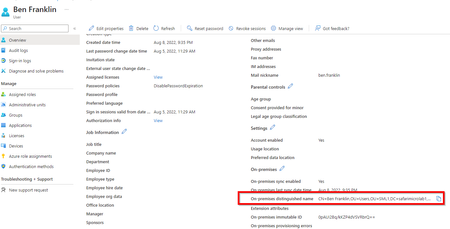
Balanjaneyulu_Kantu Is the desire to simply see what OUs are being synced or do you need to specifically call them via an api? If you just need to see what OUs are synced you can do that from the the Entra/Azure AD Connect sync service that is responsible for synchronizing all of your Active Directory accounts to Entra/Azure/M365. You can do so either through the synchronization service where Entra/Azure AD Connect is installed (https://supertekboy.com/2017/12/31/change-organizational-units-synced-office-365/) or through the actual Entra/Azure AD Connect config. You can also determine the OU from which a specific user is being synced from by looking at their "On-premises distinguished name" in the user properties in Entra ID5.4KViews0likes1CommentRe: Azure authentication
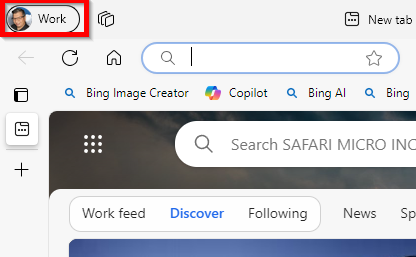
Marius_Roma I would check if on the computer that opens to your azure account right away has Edge signed into your azure account. You can check the upper left hand corner of the Edge window If so you may just need to sign into that same Edge profile on your other computer. The other possibility is that you have your 'work or school' account attached to the other computer. You can try searching for "work or school" on your computer and select "Access work or School" and then select Connect on "Add a work or school account" and connect your azure account to that computer.560Views0likes0CommentsNew Article - What is Azure Stream Analytics?
New article published today for those who aren't familiar with Azure Stream Analytics and want to know more. Check out full article: https://www.linkedin.com/pulse/what-azure-stream-analytics-jeremy-wallace-pn1ce If you've ever wondered how to harness the power of real-time analytics, this piece is for you. :light_bulb: Here are some key takeaways: Azure Stream Analytics is a fully managed real-time analytics service designed to process large volumes of streaming data. It's incredibly accessible and offers high programmer productivity, full management, and low total cost of ownership. It can power real-time dashboards, incorporate insights into applications, and even create dynamic apps and websites. Advanced use-cases include reference data for application customization, machine learning integration, and real-time data warehousing. Monitoring and resilience are crucial aspects, ensuring smooth operation of your Stream Analytics jobs. Give it a read!558Views0likes0CommentsNew Article - What is Azure Private Link?
Been working on providing articles explaining different Azure technologies, here's a recent one on Azure Private Link. Check out the full article: https://www.linkedin.com/pulse/what-azure-private-link-jeremy-wallace-j94rc Azure Private Link is a powerful service from Microsoft Azure that provides private connectivity from a virtual network to Azure platform as a service (PaaS). Here are some key points we'll be covering in the article: What is Azure Private Link and how does it work? Key benefits of Azure Private Link, including private access to Azure services, on-premises and peered networks, protection against data leakage, global reach, and more! How to get started with Azure Private Link, including a step-by-step guide on using it to connect to an Azure SQL Database. Whether you're new to Azure or a seasoned professional, this article provides valuable insights into leveraging Azure Private Link for secure, private connectivity in the cloud. Check out the full article: https://www.linkedin.com/pulse/what-azure-private-link-jeremy-wallace-j94rc873Views0likes0CommentsRe: Azure AD B2C Authentication using an API
The choice between built-in flows and custom policies depends on your specific needs. User flows are easier to implement but offer less flexibility, while custom policies require more setup but offer greater control. API-based authentication can offer even more flexibility, especially for custom front-end scenarios, but it also requires more work to implement and manage. As for MFA, it can be used with both built-in and custom flows. As for using an API for authentication, Azure AD B2C does support this. Token-based authentication ensures that requests to a web API are accompanied by a valid access token. The app authenticates users with Azure AD B2C, acquires an access token with the required permissions (scopes) for the web API endpoint, and passes the access token as a bearer token in the authentication header of the HTTP request2.1.8KViews1like1CommentRe: On-prem connect with S2S VPN to Azure / users on P2S to Azure cannot connect to S2S on-prem resourc
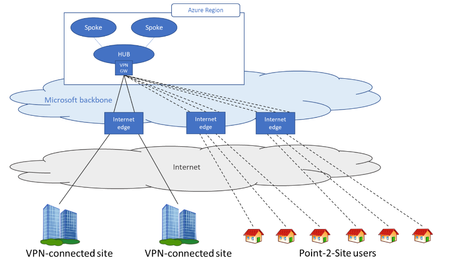
J-La026 That does seem to be the case as BGP being enabled is referenced in multiple Microsoft documents related to the scenario and in this document specifically referencing a 'users need access to resource in Azure and/or on-prem resources' use case: https://learn.microsoft.com/en-us/azure/vpn-gateway/work-remotely-support Also keep in mind whenever you make changes to configurations a new point-to-site vpn profile needs to be downloaded from the azure portal to get the updated configurations.1.4KViews0likes3CommentsRe: AAD DS creation
If you have a Identity dedicated azure subscription landing zone then that s the one I would recommend deploying Entra Domain Services (formerly Azure AD Domain Services) on. Yes you can use an existing domain name space, however there are some caveats to doing so. If you want the Entra Domain Services resources to be able to interact with existing onpremise active directory resources that use the same domain name space you'll have to manually recreate DNS records in the Entra Domain Services DNS for all of your onpremise active directory resources. So instead you could use a subdomain, for instance if your existing domain is contoso.com, you can use ds.contoso.com for your Entra Domain Services environment and then you can setup conditional forwards between your Entra Domain Service environment and your Active Directory environment so that they can resolve eachother's DNS. Even if you use a different domain from your user accounts (such as ds.contoso.com), the users themselves would be able to login with their username as it is currently displayed in Azure (email address removed for privacy reasons). Entra Domain Services can't have endpoints added to additional subscriptions or virtual networks, but you can peer the virtual network that Entra Domain Services is deployed in to other virtual networks on other subscriptions so that they are able to authenticate against Entra Domain Services. For servers/resources to use Entra Domain Services you have to specify it as the DNS for those resources, so only the virtual networks (or individual VMs) that have the Entra Domain Services IPs set as the DNS servers will use it for DNS & authentication.716Views0likes0CommentsRe: Azure MSSP subscription vs Tenant
I would probably opt to do separate tenants as it provides a higher level of isolation with separate identities rather than a single shared Entra ID space, granted it does add more complexity than managing separate subscriptions within the same tenant. So ultimately deciding between the two models depends on the level of isolation you desire between customers and the complexity of management you're willing to take on, as well as any regulatory or compliance requirements that might apply to your situation.378Views1like0CommentsRe: Azure SQL VPN connection
Yes instead of doing public access to the Azure SQL database and opening up via IP you could connect the database to an Azure virtual network via Azure Private Endpoint (https://learn.microsoft.com/en-us/azure/private-link/private-endpoint-overview) and then either setup an azure virtual network gateway for you to VPN to in order to access the database over private network, or you could setup a small Azure Virtual Desktop (AVD) host (https://www.linkedin.com/pulse/what-azure-virtual-desktop-revolutionize-your-business-jeremy-wallace) with SSMS on it that you can publish out to people as a remote app that they can either access via the remote client or in a browser (https://learn.microsoft.com/en-us/azure/virtual-desktop/manage-app-groups) and not have to deal with VPN.746Views0likes0CommentsRe: 502 Bad Gateway error for Azure Application Gateway
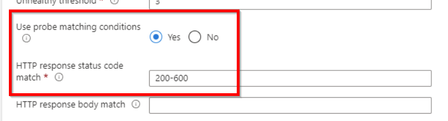
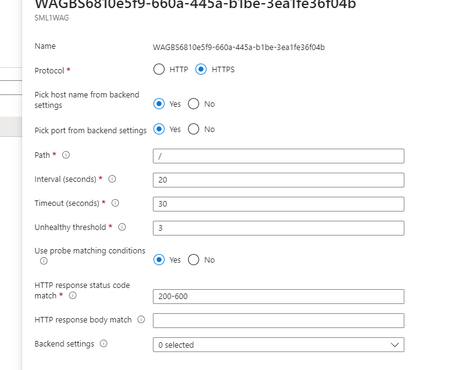
VasuDundi Did you try this part of my previous suggestion to confirm it not being the probe? In addition to upping the timeout, set HTTP response status code match to 200-600. It didn't look like it was set in your screenshot so just wanted to verify. That part is more key than the timeout.13KViews0likes0CommentsRe: What is the difference between Azure SQL server and Azure SQL database?
Well the Azure SQL database is the actual database you interact with, with tables and all. When dealing with Azure SQL Databases, a 'SQL Server' is also known as a logical server - which is like a control center for managing a group of databases. Its not like a windows server based on-site SQL Server instance. Instead, you use it manage things like networking, system/user assigned identities for a group of databases, failover groups for a set of databases, access control to manage a group of databases from the azure portal. Before you can create a database, you need to have a logical server to associate it to. This server can be located anywhere, but all databases it manages must be in the same region as the server itself. When you look at the "SQL Server" you'll see the Azure SQL Database you created associated with it. And in the future when you create additional databases, you can associate it with that same logical server. If you want to know more information about what a Azure SQL Database "SQL Server" (Logical server) is you can read more at the following documentation: https://learn.microsoft.com/en-us/azure/azure-sql/database/logical-servers?view=azuresql&tabs=portal3.8KViews0likes0CommentsRe: Is this phishing?
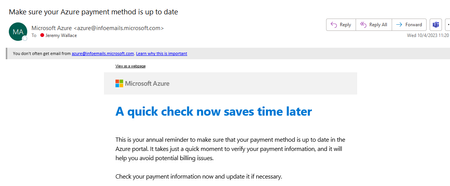
asfdasfa mailto:email address removed for privacy reasons is a legitimately used Microsoft sending address. As for why its sending you an email, likely because you are nearing the end of your initial 30 days on the $200 azure credit (at least thats what I assume your using). The trial azure subscription and $200 credit expires at the end of 30 days, and to continue using it you must upgrade the trial subscription to an actual Azure free account where you'll have continued access to free services for 12 months. You'll only get charged for usage beyond the free services and their allotted quantities. For more information about this you can see the following Microsoft Documentation: https://learn.microsoft.com/en-us/azure/cost-management-billing/manage/avoid-charges-free-account727Views0likes0CommentsRe: 502 Bad Gateway error for Azure Application Gateway
VasuDundi It may not necessarily be an issue of incoming traffic being blocked. Sometimes its just an issue with the health probe being able to get a response in time. If your using a default health probe I think its a 20 second time out so if it doesn't get a response from the backend in time it can result in a 502 for that you can try increasing the timeout on the health probe and open up the HTTP response status code so that pretty much anything returned will be considered 'healthy'. then you could see if its just a health probe issue. If it turns out to be a health probe issue, leaving it opened up with allow the site to still be used but you'll have an inaccurate health probe so you'll want to find a better path and configuration for the probe that will accurately work for your use case. Also if your using end-to-end TLS there could be a possible issue with certificate name not matching the host name in the HTTP backend settings, or the host name on the listener. You'll want to make sure the hostname listed is a SAN name on the certificate or if its a wildcard cert then make sure host name is any valid name covered by the wildcard.13KViews1like2Comments- 2.3KViews0likes0Comments
Re: SAP LEARNING PATH
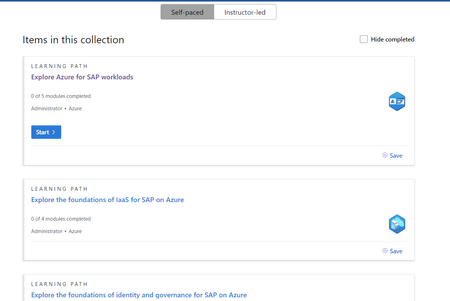
WiryenfeaEric If you go to https://learn.microsoft.com/en-us/credentials/certifications/exams/az-120/ and scroll down to the bottom of the page you'll see self-paced Microsoft Learning paths. Taking each learning path and completing all the models in each one will give you a great understanding of AZ-120 and completion is trackable in Microsoft Learn. and best part - free.946Views0likes1CommentRe: Connect Azure AD to AD on my virtual machine
Hello! So theres three different approaches you could take to connect your VM to an identity service. 1. You could connect the VM to Entra ID (formerly Azure AD), in which case you would be able to log into the VM using your azure account. 2. You could join the Azure VM to your actual Active Directory like you would a VM in your local network. Doing this method enables all the features of Active Directory such as Group Policy and assigning rights to users & groups in your local active directory 3. You could use Entra Domain Services, which is a serverless (no domain controllers) service that gives you most of the benefits of a traditional Active Directory (join services, GPOs, AD integrated DNS), and users and groups would be synced into the Entra Domain Service. Depending on the direction you want to go, below are some links to helpful resources: Option 1: https://learn.microsoft.com/en-us/entra/identity/devices/howto-vm-sign-in-azure-ad-windows Option 2: This option simply requires network connectivity to your local network so that your server can talk to a domain controller. To do this you need to establish a site-to-site VPN between the Azure Virtual Network and your local network: https://www.linkedin.com/posts/jeremyjwallace_connect-your-network-to-azure-in-4-easy-steps-activity-7104894065686548480--snG/?utm_source=share&utm_medium=member_desktop Option 3: Entra Domain Services: https://learn.microsoft.com/en-us/entra/identity/domain-services/join-windows-vm2.3KViews0likes2Comments

Recent Blog Articles
No content to show