User Profile

TheAntony
Iron Contributor
Joined Jul 27, 2019


User Widgets
Recent Discussions
Re: copy data from 1 sheet to another if a condition is met
dank1868 , This may not be the perfect answer, but here's my attempt at solving your problem using Power Query. I had to make a few decisions to fill in the gaps of my understanding of your industry so review carefully.2.3KViews0likes1CommentRe: Help deduct a certain amount on a specific date
Moinjers , there are a couple of interpretations of your question, so I'll add mine. I'm assuming you have a range of dates and want to subtract two values if it's the first of the month. Assuming that the dates are in column B: =IF(DAY(B2)=1,D2-C2,"") Perhaps a more detailed explanation of what you are looking for will help to provide a precise solution.3.6KViews0likes2CommentsRe: copy data from 1 sheet to another if a condition is met
dank1868 , could use a bit more explanation. For example, Here's one employee's details from Sheet1: Employee Number first last Name Status Description Change Type 7 4560 61355 Robert Contreras Contreras, Robert 15 CLOCK IN/PRE-TRIP Manual 2020-07-29 05:53:49 4560 61355 Robert Contreras Contreras, Robert 15 IN SERVICE Manual 2020-07-29 06:02:56 4560 61355 Robert Contreras Contreras, Robert 15 OUT OF SERVICE Manual 2020-07-29 16:02:10 4560 61355 Robert Contreras Contreras, Robert 15 CLOCK OUT Manual 2020-07-29 16:22:10 Here's the same employee's information from Sheet2: Name HomePlt OnDuty PunchIn PunchOut Shift PPD DOT Contreras, Robert 715 YES 2020-7-29 5:50 14.17 36.67 36.67 2020-7-27 0:50 2020-7-27 13:07 12.28 2020-7-28 5:35 2020-7-28 15:48 10.22 2020-7-29 5:50 14.17 How would you want your final data to look like when these 2 are brought together?2.3KViews0likes0Comments- 1.7KViews0likes0Comments
Re: Multiple Drop Down Lists
ahmad ali , I made the helper tables into official Excel Tables (Insert->Table) so that they will expand dynamically and the formulas that reference it will also expand accordingly. They are necessary if your list may grow in the future. Correct. I copied over unique values so I can lookup for the dynamic drop-downs in the Data Validation Formula. I did this because you had mentioned you were using Excel 2016 so you wouldn't have the latest Excel functions like Filter and Unique.1.8KViews0likes2CommentsRe: having trouble with Spill error!
Fariba_150 , looks like your formula is missing a ",": =if([Specialty]="Loans",[Account Values]*.0025,0) Also, this is a Dynamic Array function that will Spill. So it won't work inside Excel Tables if you are trying to write this inside a Table.1.3KViews0likes0Comments- 2KViews0likes5Comments
Re: Import CSV change
Chris_Shackleton , Power Query is incredibly powerful and can pretty much do everything you can throw at it. I was able to import everything based on a made up txt file I created from your original post. If you can share a sample of your file (removing any confidential data), I can provide more assistance.1.9KViews0likes0CommentsRe: Import CSV change
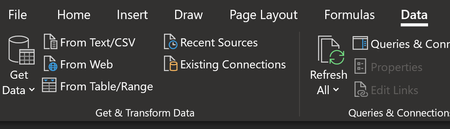
Chris_Shackleton , you can use the "From Text/CSV" option from the Get & Transform section in the Data tab: Then, in the dialog that pops up, select the "Transform Data" Button: This will take you to the Power Query Editor and you can do a lot of transformations from here. In this case you can remove the top 3 rows and perform further data shaping you require: Once you are done with your transformations, click on Home->Close and Load To: You can load to your desired location:1.8KViews0likes7CommentsRe: new to Excel
Jody_McDou , Personally, Excel has been a super useful in my career. It all depends on what you want to do with it. For your second question, I would recommend taking a comprehensive Excel training course. Search YouTube for Excel Tutorials. View a couple of videos from various trainers to find the one that will work for you. Many of them have paid training courses that you can then sign up for. https://techcommunity.microsoft.com/t5/excel/exel/m-p/1504517/highlight/true#M67634749Views0likes0Comments
Recent Blog Articles
No content to show