User Profile

rodfrey
Copper Contributor
Joined May 10, 2019


User Widgets
Recent Discussions
Accessing Project Online through REST api
Hi. I'm having a lot of trouble trying to access Project Online data through the REST interface. (I also posted this to the Sharepoint Dev community, not sure which place is best). I understand Oauth2 and I'm successfully getting an authorization token using a client id and secret that I obtained via the https://terrapinenergy.sharepoint.com/sites/pwa/_layouts/15/appregnew.aspx page. I can use the bearer token to do a GET on https://<<tenant>>.sharepoint.com/sites/pwa/_api/web/lists without a problem. However when I try to access https://<<tenant>>.sharepoint.com/sites/pwa/_api/ProjectData/Projects I get an authorization error, code 20010, "Access Denied". The user I'm logging in with is the company administrator, and has also been added as a site admin for the Project site explicitly by name. Also when I'm logged in as that user, I can navigate to the above link and get the data inside the browser. That's using login cookies I guess, not oauth. It seems obvious that I've not added the correct permissions, but I've given every permission I can find to my user through the admin website, not only to the project site but to the root site. I'm pretty stumped, I'd be grateful for a trailhead. Thanks, Rod23KViews1like4CommentsPermissions for Project Online to access via REST api
Hi. I'm having a lot of trouble trying to access Project Online data through the REST interface. I understand Oauth2 and I'm successfully getting an authorization token using a client id and secret that I obtained via the https://terrapinenergy.sharepoint.com/sites/pwa/_layouts/15/appregnew.aspx page. I can use the bearer token to do a GET on https://<<tenant>>.sharepoint.com/sites/pwa/_api/web/lists without a problem. However when I try to access https://<<tenant>>.sharepoint.com/sites/pwa/_api/ProjectData/Projects I get an authorization error, code 20010, "Access Denied". The user I'm logging in with is the company administrator, and has also been added as a site admin for the Project site explicitly by name. Also when I'm logged in as that user, I can navigate to the above link and get the data inside the browser. That's using login cookies I guess, not oauth. It seems obvious that I've not added the correct permissions, but I've given every permission I can find to my user through the admin website, not only to the project site but to the root site. I'm pretty stumped, I'd be grateful for a trailhead. Thanks, Rod5.9KViews0likes5CommentsOAuth2 authentication
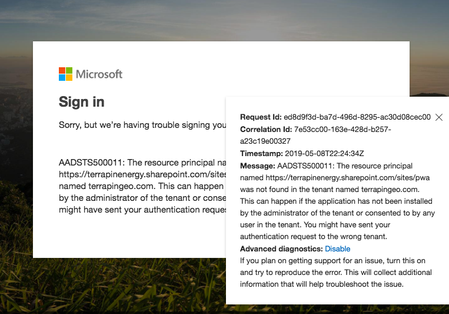
Hi. I'm trying to access information from our Project Online installation from a remote server using the REST interface. I'm having trouble getting anything other than a 403 on api calls. What I've done: - Registered the app using the AppRegNew.aspx page. Successfully got a client id and secret. - Set the permissions using the AppInv.aspx page. Included all the scopes for sharepoint as "FullControl" as well as all the Project specific scopes. - Obtained a token successfully, but the token gave me authorization errors. - Was told that the Project REST resources require user permissions - I added the attribute AllowAppOnlyPolicy="false" to the AppPermisionsRequests element Now, when I try to obtain a token I do indeed need to enter a user id and password. However, when I enter my credentials (which are the same as used to register the app, and as far as I know have maximum permissions on every asset, since I created the account and manage the subscriptions), it gives me an authentication error and won't issue a token. The message on the error is: So I'm pretty stalled... any trailhead to trying something different would be greatly appreciated! Thanks, Rod807Views0likes0Comments
Recent Blog Articles
No content to show