User Profile

M_A_Weiss
Copper Contributor
Joined Dec 22, 2018


User Widgets
Recent Discussions
Prevent Caching of Specific Files in IIS 10--Help with Code in web.config
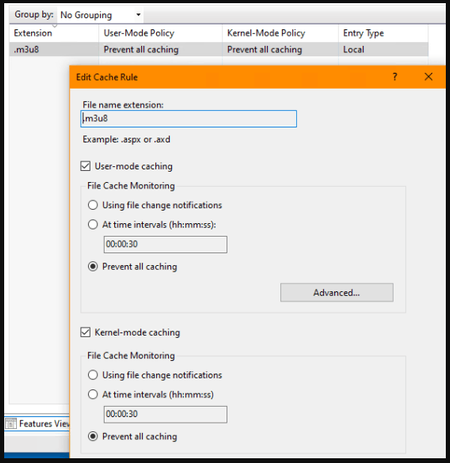
I'm running a streaming server now, using nginx to ingest from OBS studio and write an .m3u8 and .ts files to IIS server directory. I've added MIME type .m3u8 to get it to work. Initially I found that browser caching was preventing the stream from playing anything but the same 8-second segment. I was able to disable all caching with line 6 below from sample file I found online. However, I'd prefer not to disable ALL caching if possible. I tried adding in line 3, 4 and 5 and changed the .jpg to my stream1.m3u8 file that I want to not be cached, but I got a 500 server error when I did that. 1 <configuration> 2 ... 3 <location path="myimage.jpg"> 4 <system.webServer> 5 <staticContent> 6 <clientCache cacheControlMode="DisableCache" /> 7 </staticContent> 8 </system.webServer> 9 </location> 10 </configuration> There is another way supposedly to do this within IIS using the Output Caching menu and adding a rule to not cache specific files, but this does not work. It serves the stale video again. The only method that works so far, is the web.config edit disabling ALL caching (omitting lines 3,4,5). Have I implemented either of these incorrectly? https://filestore.community.support.microsoft.com/api/images/861d86c2-28eb-4c39-856e-9163eb23854f?upload=true&fud_access=wJJIheezUklbAN2ppeDns8cDNpYs3nCYjgitr%2BfFBh2dqlqMuW7np3F6Utp%2FKMltnRRYFtVjOMO5tpbpW9UyRAwvLeec5emAPixgq9ta07Dgnp2aq5eJbnfd%2FU3qhn54VMPsTGXUvw%2FdPCWrGnAbq3bZa1X0sPNOHrg5bBdCXFpzag9i5IIvHBO3t2wT43prsSxwLZ5uvZiWK1y6X63%2BLfbd7VFzTp%2BNUUahU5ZdIgUc6vnPET13TzV7Zhn%2BGWIYfBNSRqjMUoLyovHhjXmVd1EIG7Fz3PAldhhse7R56PVS5KmgmLRG2rrHGFPlbbLDKJuuMFTHyWxTX5eduCgN3QNbSEig7osTw3nS8sDN3fzCCH04qdyOXAlaTeQFdVxlBp1OtWo0IlBbgoHVEi1qgFaYS0WSgmWLMY1Z3XX%2F9bs%3D2KViews0likes1CommentServing RTMP Stream Files on IIS 10
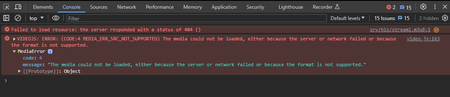
Background: I have been running IIS 10 for HTTPS web services for several years. For live streaming, I am running nginx in parallel with IIS 10. To get it to work, I have to use the nginx server address which is at port 8080. I have a SSL cert for IIS websites and serve HTTPS no problem. However, the SSL I have not been able to get working for nginx. As such, when people click on my live stream, they get a warning from their web browser with a 'back to safety' button. So I'm losing a lot of traffic. Having been unable to make nginx HTTPS, someone suggested I have nginx write the stream files to my IIS directory. I made the necessary configuration change, and the streaming files are going to that folder. I changed the path in the viewer.html to reflect the new location. However, the player just shows a spinner logo and never loads the media. F12 on Chrome/Brave opens this console and I have the following errors. Why can't the player load the files from THIS location, but no problem loading them from the nginx server location? I've checked ownership and permissions and both sets of files have same owner and "full control" permissions. I'm at a loss here as to what to try next. Can anyone with knowledge of streaming tell me what I am missing? Is IIS not listening on some port that is needed for streaming perhaps? If so, how would I enable that? Anything else?1.5KViews0likes1CommentRe: Windows Updated, Now Wacom Tablet Doesn't Work With Many Apps
Ultimately, I was able to rollback not by choosing "Restore from image", but by choosing "System Repair" option, which then took me to the restore image menu. I rolled back to a system image made 3 weeks earlier and all problems solved. I just had to disable Windows Update and Windows Update Medic again while the LAN was unplugged, to ensure that this doesn't keep happening.1.9KViews0likes0CommentsNeed Programmer to Write New Wacom Driver
Looking to hire a software engineer to write a Windows 10 driver for our Wacom Intuos tablets. (original model, from about 20 years ago.) Why am I making this request? Because the Intuos has features and ergonomics that work with our software programs and the nibs last forever. As they say, about the new products, "they don't make them like they used to." The reliability, and just plain "it works and doesn't cause problems" was very good with the Intuos. The new Intuos Pro tablets have a lot of failures, the nibs wear out in mere hours, there is no 4D mouse (which we use a lot for CAD applications) and the power cord comes out the side of the tablet, which gets in the way of other items on the desktop (why did they move it from the rear of the tablet?) We've a bunch of these venerable and great tablets, but Wacom stopped supporting them years ago. Unfortunately, Windows update just made the Wacom driver stop working and we need to solve the problem. So we're looking for someone who can upgrade the existing driver so that we can continue using the best tablet model Wacom ever made.955Views0likes2CommentsRe: Windows Updated, Now Wacom Tablet Doesn't Work With Many Apps
I'm trying to restore to an older system image, but after following the procedure, the system shuts down and doesn't go into restore image bootup. It just sat there for an hour with the monitor sleeping and the power LED on the PC lit. I followed this process: Open the Settings app (you can use the Win+I keyboard shortcut). Click the "Update & Security" tile. In the list of pages on the left, click "Recovery." Click the "Restart now" button under "Advanced start-up." The PC never reboots. I tried a couple of times in the past two days and it's always sitting with the monitor on standby. Short of building a whole new PC, how can I restore my October system image?2KViews0likes1CommentWindows Updated, Now Wacom Tablet Doesn't Work With Many Apps
After a few good years of using Windows 10 without major issues (minor ones I solved myself), the Your Phone app stopped working after rebooting Windows and a message appeared that I needed to update Windows. So I enable Windows Update service and proceed to update Windows. When the system restarted, I found that my Wacom tablet no longer works with several apps, including these major ones: Adobe CS6 Suite Blender VLC Media Player Corel Painter 2019 and several other minor apps. The tablet pointer simply freezes when the app is loaded and won't move. I have to ALT-Tab to another window to regain tablet function or close the offending app. This isn't going to work for me. I need to roll back the system to the state it was in before I rebooted it yesterday, where Your Phone app was working along with all of my other apps. Apparently, Windows had surreptitiously updated SOMETHING causing the Your Phone app to stop working after the most recent restart. I do have a system image from a month ago. But I'm worried that Your Phone app will stop working again shortly after. On the other hand, I can't use a paint program without a tablet. So I'm stuck. Problems like this are the reason why I disabled Windows Update several years ago. PS: I just found that I cannot interact with the Your Phone app. Clicking on the text message tab and then trying to select a conversation does not work. It's not acknowledging clicks.2.1KViews0likes2CommentsRe: Windows 10 v1709 AMA - Why has Creators Update Fall treated creators so badly?
Just want to add myself to the list of Wacom tablet users who are suffering since switching to Windows 10. Symptoms like: Can't drag and drop between windows Can't right-click drag (for instance when you want to move instead of copy file) Sometimes my cursor turns into a gigantic 2-headed arrow when I hover over the edge of a window. Can't select text, neither body text nor browser URL bar text In some field input windows, a handwriting box pops up Right click on the desktop produces a circle/ring that appears briefly I'm sure there are more that I can't recall at this time, but these are the biggies. Didn't have ANY of these issues in Windows 7, once I configured it properly. I'm 94 hours into troubleshooting a week old installation on a new PC build, numerous issues. The stylus issue is minor compared to some major issues, like hardware not working at all, but is a constant (and sometimes dangerous) annoyance that causes me to accidentally move folders or files sometimes due to this quirky behavior.4.1KViews0likes0Comments
Recent Blog Articles
No content to show