User Profile

DhirenMehtaMSFT
 Microsoft
Joined Oct 02, 2018


User Widgets
Recent Discussions
Re: Site collection admin for Team private channel site collection
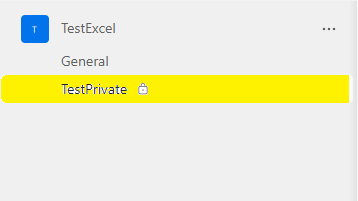
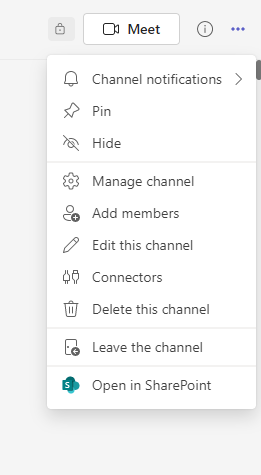
hunk0227 Correct. That's what I was explaining in my response. So for each Private Channel , we create a SharePoint site collection. In order to get to Site collection Administrators page for this Private site collection, you need to Open the Private Channel site in SharePoint. In my case, I created a private channel named "TestPrivate" under the Team "TestExcel" - Now, I go to TestPrivate Channel and then click on 3 Dot icon on the top right to find "Open in SharePoint" option. - The opens up my Private Site collection in browser like this and then I clicked on Home button to go to Home page of this Private Site collection. - Now, I got to Home page of the Private Site collection https://contoso.sharepoint.com/sites/TestExcel-TestPrivate - Now, to go to the site collection administration page of this Private Site Collection, I had to hit the URL https://contoso.sharepoint.com/sites/TestExcel-TestPrivate/_layouts/15/mngsiteadmin.aspx directly to get to this page. I hope this helps. Please let me know if I am understanding this incorrectly.6.1KViews0likes1CommentRe: Site collection admin for Team private channel site collection
hunk0227 There doesn't seem to be straightforward way to get to this page. This is how you can get to it. - In Teams client , go to your private Channel as Channel Owner and Use "Open in SharePoint" option which should open your Private Channel SharePoint site in a different browser window. - Now, when you are in browser -> SharePoint site, it will be the Document Library page. - First you want to go to Home page of the site to get the Site URL. It should be something like https://contoso.sharepoint.com/sites/Test_TestPrivate - Then, You want to go to Site Collection administrators page directly via hitting something like https://contoso.sharepoint.com/sites/Test_TestPrivate/_layouts/15/mngsiteadmin.aspx - where change the highlighted part to match with your Private Channel SharePoint Site URL. -Now, you can change/add Site collection administrators for this Private Channel SharePoint site.6.2KViews1like3CommentsRe: How to populate the TITLE column (via Power Automate?)
jensjakobsen1966 Ok Thanks for the detail. So you are correct in assumption that you can't set Calculated Value based on another column as Default value. See following forum discussion which explains as to why it's not possible to set it this way. https://social.technet.microsoft.com/Forums/en-US/9c32f6fe-9391-4e13-b297-1661dd5d7a03/error-message-the-formula-contains-references-to-fields?forum=sharepointgenerallegacy So if you are planning to use PowerApps, Can you actually create an additional column to fill out the value that you are wanting to have in that column and use it for your business logic? - Second option would be to fire off a Flow (as you have already mentioned) once the item is created and update the Title column to the value you desire.28KViews0likes5CommentsRe: How to populate the TITLE column (via Power Automate?)
jensjakobsen1966 So out of curiosity, Do you really need the Title field to be populated? if not, you can try this and see if that fulfills your requirement. - Go to List Settings -> Columns -> Click on "Title" -> Require that this column contains information -> Choose "No" -> Save - From the Default view and any other view, de-select Title field29KViews1like8CommentsRe: Why have group owners full control in the SharePoint teamsite
Your first assumption is correct and for the second question part, the "MyTest Owners" group gets added to Site collection administrators in SPO site permissions and that's how the owners have Full Control permissions on the site. With M365/O365 group, there are only two modes, Owners and Members and the group membership is maintained via these two modes. With Owners having full control of the group membership and resources (Calendar, SharePoint, Planner, Team etc) and Members having Contribute/Edit rights to all the resources. Since the SPO site gets created as part of O365 group creation process, the Membership from O365 group gets populated to SPO site. Owners -> Site Collection Administrator and Members -> SPO "MyTest Members" group. - Since there is no visitors mode in O365 group, nothing gets added to SPO "MyTest Visitors" group. As to the reason as to why "MyTest Owners" SPO group is empty, it's because O365 "MyTest Owners" group is already added to Site collection administrator so no point in duplicating that same action. You can always add additional users, AD groups to any of these SPO groups , however, they will only have access to SPO site and not to any other resources in the O365 group, so it's always a good idea to manage the group membership via O365 group so that it percolates to all the resources in the O365 group. I hope this information helps. https://docs.microsoft.com/en-us/microsoft-365/admin/create-groups/office-365-groups?view=o365-worldwide2.7KViews1like0CommentsRe: Sharepoint differences in opening Excel files
Interesting. I just tested it and yup it is that. xlsm type files opens up with Viewer in Teams but XLSX files open in the SharePoint page. In my initial testing, I did test Quick links using XLSX and XLS extension types and saw the same results, so didn't think of asking the distinction but glad you caught it.6.3KViews0likes1CommentRe: Sharepoint differences in opening Excel files
Thanks dblemker . Based on your response, I still feel that the First excel document that's opening up is Not Quick Link but without actually looking at it with screenshare, I don't have any other ideas to offer. Only other thing I can think of is you can edit the page in SPO site in browser, Delete the "non-working" quick link and re-add it to see if you are seeing any difference in behavior. Be sure to publish the page after the changes are done. Can you open up a Support ticket with our Teams team so that Microsoft Support team can work on this with you?6.4KViews0likes4CommentsRe: Edit default view for all libraries
There is no Site level settings to change the views as the views are created and stored at the Document library level. You are correct for thinking of using PowerShell to create/update views for Existing Document libraries. - For new Document Library scenario, you can create a Document Library template from existing OOB Document Library that is matching all the sort/filter/ content type set up you want and then ask users to create library from that template instead of choosing Our of the box Document library.4.8KViews0likes1CommentRe: Store files in one Sharepoint site and display in another
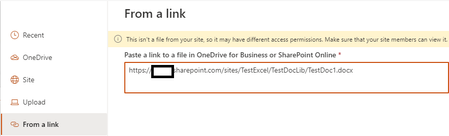
Adamhumbug So I did test out a scenario using File Viewer web part on a Site page and I was able to see the file in File Viewer web part using "From a Link" option. Here is the scenario that worked for me. - Site 1: https://contoso.sharepoint.com/sites/site1 -> Document Library TestDocLib1 -> Word Document TestWordDoc1.docx -> All Company users have Read Permissions on this Document (But no one has been given link to this site so they don't know where this document is coming from) - Site 2: https://contoso.sharepint.com/sites/companypolicies -> Pages Library -> Created a New Site Page -> Added a "File Viewer" web part -> In the pop up to choose the file, I chose "From a Link" option and then provided URL of the document TestWordDoc1.docx from Site1 here. - Look at the warning message above "This isn't a file from your site, so it may have different access permissions. Make sure that your site members can view it." . This is to ensure that the users have permissions to access the file in other site.2.3KViews0likes1CommentRe: Sharepoint differences in opening Excel files
dblemker I did some testing on my lab tenant and I have partially noticed the same behavior that you have described. However, few things to note here. 1. In my case, when I am using QuickLinks web part on the SharePoint page, All the Excel/ Word/PowerPoint files are only showing Catch up button and NOT the Close button. This is because when you use QuickLinks web part, and click on the Link on the page (from the Teams client), it's loading the Link as a whole page in the Teams client. (This is the same behavior you will see when you will click on the Link from the SPO site in the browser directly). Also, you will notice in this scenario that the URL of the Page doesn't change (you can use Fiddler or web version of Teams in the browser to notice this). This means that when you are using QuickLinks web part links in the SharePoint page and when you are opening the SharePoint page from Teams client, Team client is simply opening the link as a new page (like how you would see in the browser). 2. However, When I have Document Library web part on the same SharePoint page and when I tried to open the Excel files form the Library web part in Teams client, I can see the Close button and also, the Excel file taking over entire Teams client real estate (as you have mentioned). This is because when you are opening the file from Document Library web part, Teams client is using DOCX/XLSX Viewer Web/App Part Functionality to display the file and this Web/App part seems to have Close button in it. If you open the teams team in Browser and click on the Excel file from Document Library web part on the SharePoint Page tab, you will see the URL pointing to something like this. https://teams.microsoft.com/_#/xlsx/viewer/teams and also look at the browser tab title changing with something like "XLSX File Viewer | Microsoft Teams" - So from what I am seeing based on my research and testing, the behavior you are seeing is currently by design. However, if you are seeing these two different behaviors using the QuickLinks web part itself, then can you please provide detailed repro steps and some screenshot to better understand the scenario?6.4KViews0likes6CommentsRe: SharePoint library Content type Symbol
So to confirm my understanding, have you just removed this "Type" column from the view? (From the screenshots it seems like it). If it's only removed from the view, then you can go to Library Settings -> Views -> Click on the Library view that you are interested in -> Search for Field "Type (icon linked to document)" and select that Checkbox and Save the view. That should bring it back.1.3KViews1like0CommentsRe: SharePoint Rule for Date Field
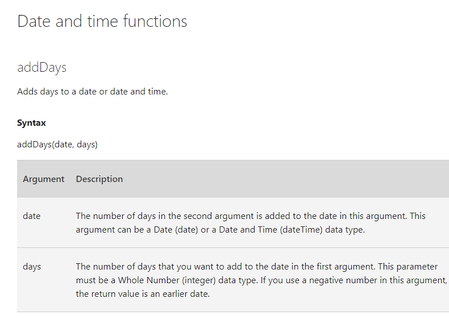
Analyst_NK That's great. I was just reviewing the documentation and found following documentation suggesting in the same direction. I hope this helps as a reference for any future work. https://support.microsoft.com/en-us/office/add-formulas-and-functions-in-infopath-2010-a14c7efd-9884-4e09-9435-7e683666e7e5 https://support.microsoft.com/en-us/office/add-rules-for-performing-other-actions-5322d726-b787-4e5f-8d37-ba6db68b451d#__toc2694514223KViews0likes0CommentsRe: SharePoint Rule for Date Field
Are you trying to use Conditional Formatting to show a warning message? If so, may be this might help. https://docs.microsoft.com/en-us/sharepoint/dev/declarative-customization/column-formatting#formatting-items-based-on-arbitrary-dates-advanced If not, can you please provide more details on what steps are you taking and what use case are you trying to implement? (i.e. When user is creating an item ?) . Also, are you using Infopath form and trying to set up a rule within Infopath form or are you using Power Apps form?3.1KViews0likes1CommentRe: Microsoft 365 Learning SharePoint site's pages keep loading forever
John : I see this same $value 404 error in my working lab tenant site as well. It's pointing to Profile image photo not being found. So it's benign and it's not the cause of the issue you are facing. We might be getting another error while loading the page. I can't say for sure on which resource request it would be without looking at full trace. I think the best way here would be to have our support teams look at it on the case so that we can do deep dive into this issue.4.4KViews0likes2CommentsRe: Microsoft 365 Learning SharePoint site's pages keep loading forever
I do see error reading Custom Learning JS file which can be part of the problem, however, Network tab on the Developer tools would be more helpful to identify the Requests and Response headers of the requests being made between client browser and SPO service. If we are seeing HTTP 500 or 401,403,400 type of HTTP Response code to one or more requests, then we need to dig into those requests and see what's causing those errors.4.5KViews1like4CommentsRe: Microsoft 365 Learning SharePoint site's pages keep loading forever
Ok then without looking at Developer tools trace , it would be difficult to find out what's causing the web part content to not load. I don't see any wide spread issue around O365 learning site or any other sites that match this behavior. So I would recommend to open up a Support case with Microsoft support team so that our teams can investigate this specific issue for you.4.6KViews0likes6CommentsRe: Give sharepoint permissions to user on a specific column on List
Danna450 1. Out of the box, it's not possible to set Read Only columns in SharePoint List so you can't provide permissions to edit only one column. Minimum permissions the user will get is to update the entire List item. You can use PowerApps to create a Custom form and only share the link to the Form with the users so that they can only add items to the List via PowerApps form. That could be one workaround here. Or you can build custom SPFx web part to display all other field information and allow Edit only on one field that you would like users to change. and then from the SPFx web part you can do the POST back to the SharePoint list to update only that one field. (These are the ideas that I can think of based on my research) 2. SharePoint Online all Modern sites do come with Search bar at the top of all Modern pages which should take care of the functionality you are looking for.11KViews0likes1CommentRe: Microsoft 365 Learning SharePoint site's pages keep loading forever
Is this happening only on this O365 learning site or on all Modern sites? How did you create this Learning site? was it via Microsoft 365 Learning Pathways? https://docs.microsoft.com/en-us/office365/customlearning/ - I would try to get Developer tools trace and see if you are seeing any HTTP 500/ 400 or 403 status coming back from SharePoint Online service. - Also, are you able to reproduce this behavior with InPrivate browsing session as well? - What browsers are you using to access these sites? Are all users having this issue?4.6KViews0likes8CommentsRe: SPO document library is missing Automate menu option
I am glad that this issue is resolved for you. I do not have details on what caused the issue. The best way to get more information would be to reach out to the Support professional that is assigned to your case so that they can review your tenant information and provide specific further details.5.7KViews1like1Comment



Recent Blog Articles
No content to show