User Profile

SeanHaggerty
Copper Contributor
Joined Sep 30, 2023


User Widgets
Recent Discussions
Widening the drop down list without changing the cell size?
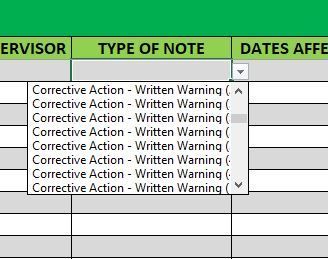
In the dropdown list that I created for my worksheet, I have several items that are wider than the dropdown window allows me to see. Is there a way to adjust the width of the dropdown, without adjusting the size of the cell, so I can see the full line? I don't really want to have to extend the cell to 2-3x the size to be able to read the line, and can't really shorten the names for the tracking purposes that the other sheets are referencing, but blind guessing which item is obviously going to be a pain as well.Solved7.6KViews0likes2CommentsConditional formatting formula using 2 criteria, for 2 different limits
I am trying to create a conditional formatting highlight formula that will highlight the cell if the date in C5 is more than 5 years and P5 has a value of more than 15, or if the date in C5 is less than 5 years and P5 is more than 10. I have gotten to the point of being able to highlight the first part using this formula, but can't figure out how to introduce the second aspect and not get an error. =AND(TODAY()-$C$5>=(5*365),$P$5>15) I have played around with trying to make it work with an OR function, but keep getting an error. =AND(OR(TODAY()-C5>=(5*365), P5>15),(TODAY()-C5<=(5*365), P5>10)) Any help on where I am going wrong is really appreciated!Solved836Views0likes3CommentsRe: Averaging the sum of a specific cell across multiple sheets
HansVogelaar Thanks for the explanation. Makes sense why it is not returning the value I want now. I followed what you laid out, but the AVERAGEIF is presenting a #DIV/0! error. The values for AC23 and AC27 (had to add a couple cells, but its updated across all sheets) are returning correctly, so not sure what error I've made now.2.8KViews0likes3CommentsRe: Averaging the sum of a specific cell across multiple sheets
HansVogelaar I have been trying to play around with this, to see if I can have the formula omit any pages that have a No listed in cell AC23, so that it automatically filters out the disqualified sheets. =AVERAGEIF(AC23,"No",'SHEET NAME 1:SHEET NAME 2'!AC25) Any chance you could explain where I'm going wrong with this one?3.5KViews0likes5CommentsAveraging the sum of a specific cell across multiple sheets
Hello, I am trying to average a specific cell across a range of sheets where they have all been named with text (Not sure it matters?). The fixed cell that I am trying to average does have a formula in it to provide the number that I want to average (Again not sure if this will cause an issue?) The formula that I am using is =AVERAGE('SHEET NAME 1':'SHEET NAME 2'AC25!) but this is clearly the wrong way to go about it, as I keep getting a #NAME? error. I took a look at some of the suggested/previous posts that were similar, but haven't been able to get any of them to work properly.Solved4.3KViews0likes8Comments
Recent Blog Articles
No content to show