User Profile

DBell5130
Copper Contributor
Joined Aug 30, 2023


User Widgets
Recent Discussions
Re: IF AND Help
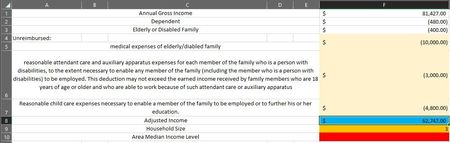
OliverScheurich Thank you for the response! How do I edit the formula to reference specific cells on other tabs? I need the red cell to be where the AMI level (0-30%, etc.) populates based on the info contained in the blue and orange cells above it (these cells are filled with formulas that reference cells in other tabs). The second image is my data tab which contains various lists and the AMI table. Thanks!987Views0likes1CommentIF AND Help
Hello, I need a cell to auto-populate based on a complicated formula which I cannot figure out. I think it's a nested IF/AND formula, but I don't know how to put it together. Using the tables below, the cell filled with question marks needs to show the appropriate AMI level for a household based on its adjusted income and household size. In this example, a household of 3 with income of $62,747 would fall in the 61-80% range. I think the formula should look something like: IF HHSize=1 AND AdjIncome<=18750, THEN AMI="0-30%" BUT IF HHSize=1 AND AdjIncome>18750 and <=31200, THEN AMI="31-50%), etc.... Can anybody help me out? Thanks! AdjIncome $ 62,747.00 HHSize 3 AMI ????? AMI LEVEL Household Size 0-30% 31-50% 51-60% 61-80% 81-100% 101-120% 1 $ 18,750 $ 31,200 $ 37,440 $ 49,950 $ 68,865 $ 82,638 2 $ 21,400 $ 35,650 $ 42,780 $ 57,050 $ 78,654 $ 94,385 3 $ 24,100 $ 40,100 $ 48,120 $ 64,200 $ 88,511 $ 106,214 4 $ 26,750 $ 44,550 $ 53,460 $ 71,300 $ 98,300 $ 117,960 5 $ 28,900 $ 48,150 $ 57,780 $ 77,050 $ 106,227 $ 127,473 6 $ 31,050 $ 51,700 $ 62,040 $ 82,750 $ 114,086 $ 136,903 7 $ 33,200 $ 55,250 $ 66,300 $ 88,450 $ 121,944 $ 146,333 8 $ 35,350 $ 58,850 $ 70,620 $ 94,150 $ 129,803 $ 155,7631.1KViews0likes3Comments
Recent Blog Articles
No content to show