User Profile

Mohammad_Sufiyan_Ansar
Copper Contributor
Joined Jul 31, 2023


User Widgets
Recent Discussions
Re: Sensitivity Button not showing in Office Web Apps
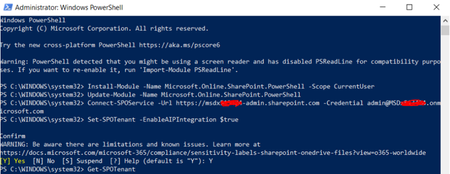
HiPaul_Saldanha , There may be some commands that you try to run but they fail, giving you errors like "term not recognized," "object not found," or "command cannot be executed because running script is disabled." In this case, just use the below command to get around the running script and run the instructions. 1> Verify that the user has the necessary licenses for AIP by checking their licenses. 2> Typically, this occurs when AIP is not connected to SPO (Sharepint Online). In this situation, you must enable AIP and SPO integration. To do this, follow the procedures below: On your computer, launch a Windows PowerShell window. with administrative rights Execute these commands: - Install-Module -Name Microsoft.Online.SharePoint.PowerShell -Scope CurrentUser - Update-Module -Name Microsoft.Online.SharePoint.PowerShell - Connect-SPOService -Url https://msdxXXXXX-admin.sharepoint.com -Credential email address removed for privacy reasons (Here Url: yoursharepointlink-admin.sharepoint.com , Credentials: credential of global admin) ( Eg: Contoso- admin.sharepoint.com , Credential: email address removed for privacy reasons) - Set-SPOTenant -EnableAIPIntegration $true Once this command has been executed, AIP and SPO Integration is enabled. - Get-SPOTenant You can check here to see if EnableAIPIntegration is now true.8.3KViews0likes0Comments
Recent Blog Articles
No content to show