User Profile

adobriyal88
Copper Contributor
Joined Jul 08, 2023


User Widgets
Recent Discussions
Mail Merge Excel to Word
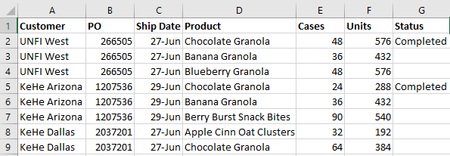
This is the data I want to Mail Merge. I want it to look like this when merged to Word: Priority #1 - UNFI West / PO 266505 Ship Date: June 27 Chocolate Granola: 48 cases - 576 units - Completed Banana Granola: 36 cases - 432 units - Blueberry Granola: 48 cases - 576 units - Priority #2 - KeHe Arizona/ PO 1207536 Ship Date: June 29 Chocolate Granola: 24 cases - 288 units - Completed Banana Granola: 36 cases - 432 units - Berry Burst Snack Bites: 90 cases - 540 units - Priority #3 - KeHeDallas/ PO 2037201 Ship Date: June 27 Apple Cinn Oat Clusters: 32 cases - 192 units - Chocolate Granola: 64 cases - 384 units - I'm not too familiar with using Mail Merge so I created a Merge Field looking like: Priority #1 - «Customer» / PO «PO» Ship Date: «Ship_Date» «Product»: «Cases» cases - «Units» units - «Status» I'm not sure how you have Priority 1,2,3 etc come up for every unique Customer/PO/Ship Date. My problem is when I run it it puts every individual product on another page with Customer, PO and Ship Date whereas I want it too look like what I posted all the products under one unique Customer/PO/Ship Date and each Priority just goes one under another not on separate pages.765Views0likes1Comment
Recent Blog Articles
No content to show