User Profile

vassilis-MSFT
Learn Expert
Joined Sep 16, 2016


User Widgets
Recent Discussions
Re: Expired Certifications
Hi mirahsan21685, Microsoft Learn has always the latest certifications that are currently valid and you can check the current certification on this page Microsoft Certifications | Microsoft Learn by role. As IT roles change or get shifted because of the ever-ending technology lifecycle, certifications get retired, too. You can check the retired certification here. Regarding the update of courses and certification, I can tell you first hand, that this is something that takes considerable time and effort from multitudes of people in different areas, and even feedback from the learners' aid in that. This updates to the courses and relevant information happens 2-3 times per year, sometimes maybe more if there are important and significant changes, and the exam and certification is also updated, but it may take a quarter to hit the exam questions. Microsoft Learn content is very frequently updated, nonetheless. Check also the paths to become certified by visiting this page here. Companies in general trust the certification process that is why we have also introduced a yearly renewal process for all the role-based certifications, not the fundamentals. This renewal process is free and very intuitive, and helps you stay current. Hope this helps! Vassilis1.3KViews0likes1CommentRe: Conditional access legacy Auth
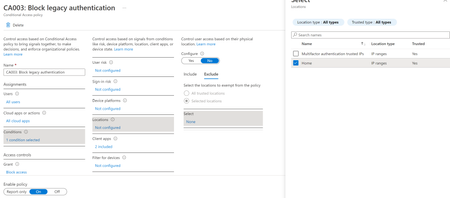
Hey Dan-sec-1992, Conditional Access Policies are a type of nested "if-else" sets in order to control flow of a sign-in and either grant or block access under circumstances. So, coming back to your question, if you set in the "Conditions" section of your CAP the "Location" property to "Exclude" a named location that you have already preset with the range of your IPs then you should be fine. Maybe this screenshot will help: I have checked it and it worked as expected, based on the sign-in logs output, success/failed by adding/removing my home IP. HTH! Vassilis702Views0likes1CommentRe: Why Stored Procedure throws exception during transaction?
Hi _Mmesa1984 I'm not wrong 🙂 The instance you are showing is version 10.50.1600 => SQL Server 2008 R2. I hope it makes sense to you, now. If not check here for a comprehensive list of all SQL Server builds and versions available. Vassilis1.7KViews0likes0CommentsRe: Why Stored Procedure throws exception during transaction?
Hi _Mmesa1984, the answer is in your description: attend to the user input and output only the error description -if you have to- and not the exception details to the end-user. Exceptions should be logged for the developer and not for end-users. Instead, try to inform the user on the wrong input or use proper input controls to validate the user input which has always been the Achilles heel of every application 🙂 Also, don't forget to put your code inside try-catch-finally blocks to eliminate the application exceptions and hanging of your app. HTH, Vassilis1.6KViews0likes0CommentsRe: Planning Maintenance Plans
Hi, TBrown2020! Well, this is definitely an "it depends" answer since you don't specify the environment and the objective of the database but I'm willing to give it a try 🙂 First of all, it all depends on the recovery model of the database. If it's Simple then probably you don't care much about the surviving a database failure since your last good full backup. In that case and only you can do away without a transaction log backup, in reality you can't even take a transaction log backup on that recovery model 🙂 In case your database is either Full or Bulk-logged then you should probably take backup i.e. once a day, to clean up the transactions that have been checkpointed and to keep the log from growing till the next big bang. This also depends on how many transactions the database has per day or to put it simpler how fast the log is filling up. Of course, it all depends if we are talking about a production database of a customer then it comes down to the SLA for RPO. HTH, Vassilis1.2KViews0likes0CommentsRe: 2019 Express Silent Install
Hi rajmuthusamy , this is because this is just an installer, not the actual installation file. You can use the installer to download the actual installation file namely "SQLEXPR_x64_ENU.exe". Then you can run this which extracts the files in a folder you specify. In there you can find the actual SETUP.EXE for the installation of SQL Server 2019 Express. HTH Vassilis20KViews0likes0Comments
Recent Blog Articles
No content to show