User Profile

Christina_B5749
Copper Contributor
Joined Jun 09, 2022


User Widgets
Recent Discussions
How to add social media podcast to existing PowerShell Script to display in HTML for email signature
I am trying to add to an existing PowerShell script to include social media HTML tag for an Apple podcast . When I add the script to the pertinent section, and run the PowerShell script, this is the error I am getting. + ~~~~~~~~~~~~~~~~~~~~~ + CategoryInfo : ResourceExists: (C:\Users\bolden...oft\signatures\:String) [New-Item], IOException + FullyQualifiedErrorId : DirectoryExist,Microsoft.PowerShell.Commands.NewItemCommand Remove-ItemProperty : Cannot find path 'HKCU:\Software\Microsoft\Office\15.0\Outlook\Setup\' because it does not exist. At C:\Users\boldenc\OneDrive - National Endowment for the Arts\Desktop\Working Documents\Email Signature\nea_email_sig_ApplePodcast.ps1:42 char:1 + Remove-ItemProperty -Path HKCU:\Software\Microsoft\Office\15.0\Outloo ... + ~~~~~~~~~~~~~~~~~~~~~~~~~~~~~~~~~~~~~~~~~~~~~~~~~~~~~~~~~~~~~~~~~~~~~ + CategoryInfo : ObjectNotFound: (HKCU:\Software\...\Outlook\Setup\:String) [Remove-ItemProperty], ItemNotFoundException + FullyQualifiedErrorId : PathNotFound,Microsoft.PowerShell.Commands.RemoveItemPropertyCommand New-ItemProperty : Cannot find path 'HKCU:\Software\Microsoft\Office\15.0\Common\MailSettings' because it does not exist. At C:\Users\boldenc\OneDrive - National Endowment for the Arts\Desktop\Working Documents\Email Signature\nea_email_sig_ApplePodcast.ps1:43 char:1 + New-ItemProperty -Path HKCU:\Software\Microsoft\Office\15.0\Common\Ma ... + ~~~~~~~~~~~~~~~~~~~~~~~~~~~~~~~~~~~~~~~~~~~~~~~~~~~~~~~~~~~~~~~~~~~~~ + CategoryInfo : ObjectNotFound: (HKCU:\Software\...on\MailSettings:String) [New-ItemProperty], ItemNotFoundException + FullyQualifiedErrorId : PathNotFound,Microsoft.PowerShell.Commands.NewItemPropertyCommand New-ItemProperty : Cannot find path 'HKCU:\Software\Microsoft\Office\15.0\Common\MailSettings' because it does not exist. At C:\Users\boldenc\OneDrive - National Endowment for the Arts\Desktop\Working Documents\Email Signature\nea_email_sig_ApplePodcast.ps1:44 char:1 + New-ItemProperty -Path HKCU:\Software\Microsoft\Office\15.0\Common\Ma ... + ~~~~~~~~~~~~~~~~~~~~~~~~~~~~~~~~~~~~~~~~~~~~~~~~~~~~~~~~~~~~~~~~~~~~~ + CategoryInfo : ObjectNotFound: (HKCU:\Software\...on\MailSettings:String) [New-ItemProperty], ItemNotFoundException + FullyQualifiedErrorId : PathNotFound,Microsoft.PowerShell.Commands.NewItemPropertyCommand This is what I have added to the existing PowerShell script. Line 68. #$stream.WriteLine("<SPAN style=`"FONT-SIZE: 11pt; COLOR: black; FONT-FAMILY: `'Calibri`'`"><tr><td nowrap=`'nowrap`'>To join the discussion on how art works, visit the NEA at <a href='http://www.arts.gov'>arts.gov</a>, <a href='http://www.facebook.com/nationalendowmentforthearts'>Facebook</a>, <a href='http://www.twitter.com/neaarts'>Twitter</a>, <a href='https://podcasts.apple.com/us/podcast/art-works-podcast/id1058911829'>Art Works Podcast</a>.</SPAN></td></tr>") -------------------------------------- This is the full PowerShell script. ############################################################# #Modified by Ghost in the Machine 10-13-15 #This Powershell Script creates Outlook signatures for Active Direcory users and sets it as their default at logon $strName = $env:username $strFilter = "(&(objectCategory=User)(samAccountName=$strName))" $objSearcher = New-Object System.DirectoryServices.DirectorySearcher $objSearcher.Filter = $strFilter $objPath = $objSearcher.FindOne() $objUser = $objPath.GetDirectoryEntry() $strName = $objUser.DisplayName if ($objUser.Properties.Contains("extensionAttribute2") -and -not [string]::IsNullOrWhiteSpace($objUser.extensionAttribute2[0])) { $strNameWithPronouns = "$($objUser.DisplayName) $($objUser.extensionAttribute2[0])"; } else { $strNameWithPronouns = $objUser.DisplayName; } $strTitle = $objUser.Title $strCompany = $objUser.Company $strDepartment = $objUser.Department $strPhone = $objUser.telephoneNumber $strFax = $objUser.faxnumber $strcellPhone = $objUser.mobile $strEmail = $objUser.emailaddress $strwwwHomePage = "$($user.wWWHomePage)" #above strwwwhomepage used for Assitant line $UserDataPath = $Env:appdata #Signature Folder Location $FolderLocation = $UserDataPath + '\\Microsoft\\signatures\\' #Checks for existing signature #$path = $FolderLocation + $strname + '.htm' # If ((Test-Path -path $path) -eq $true) { break } # Else { mkdir $FolderLocation #Sets Outlook to force signature Remove-ItemProperty -Path HKCU:\Software\Microsoft\Office\15.0\Outlook\Setup\ -name First-Run New-ItemProperty -Path HKCU:\Software\Microsoft\Office\15.0\Common\MailSettings -Name "NewSignature" -Value "$strname" -PropertyType "String" New-ItemProperty -Path HKCU:\Software\Microsoft\Office\15.0\Common\MailSettings -Name "ReplySignature" -Value "$strname" -PropertyType "String" #Creates HTML Signature $stream = [System.IO.StreamWriter] "$FolderLocation\\$strName.htm" $stream.WriteLine("<!DOCTYPE HTML PUBLIC `"-//W3C//DTD HTML 4.0 Transitional//EN`">") $stream.WriteLine("<HTML><HEAD><TITLE>Signature</TITLE>") $stream.WriteLine("<META http-equiv=Content-Type content=`"text/html; charset=windows-1252`">") $stream.WriteLine("<BODY>") #Name of Employee $stream.WriteLine("<Table border =`'0`'><tr><td><B><SPAN style=`"FONT-SIZE: 11pt; COLOR: black; FONT-FAMILY: `'Calibri`'`">" + $strNameWithPronouns + "</B></SPAN></td></tr>") #Title & Company Name $stream.WriteLine("<SPAN style=`"FONT-SIZE: 11pt; COLOR: black; FONT-FAMILY: `'Calibri`'`"><tr><td nowrap=`'nowrap`'>" + $strTitle + $strCompany + " | " + $strDepartment + "</td></tr>") #NEA $stream.WriteLine("<SPAN style=`"FONT-SIZE: 11pt; COLOR: black; FONT-FAMILY: `'Calibri`'`"><tr><td nowrap=`'nowrap`'>National Endowment for the Arts</td></tr>") #Street Address, Room, City $stream.WriteLine("<SPAN style=`"FONT-SIZE: 11pt; COLOR: black; FONT-FAMILY: `'Calibri`'`"><tr><td nowrap=`'nowrap`'>400 7th Street SW | Washington DC 20506</SPAN></td></tr>") #Email & Telephone Numbers $stream.WriteLine("<SPAN style=`"FONT-SIZE: 11pt; COLOR: black; FONT-FAMILY: `'Calibri`'`"><tr><td nowrap=`'nowrap`'>" + $strEmail + " | 202-682-" + $strPhone + " (p) | " + $strFax + "</SPAN></td></tr>") #Second Line for Assistant for Laura Callanan $stream.WriteLine("<SPAN style=`"FONT-SIZE: 11pt; COLOR: black; FONT-FAMILY: `'Calibri`'`"><tr><td nowrap=`'nowrap`'>" + $strwwwhomepage + "</SPAN></td></tr>") #Social Media $stream.WriteLine("<SPAN style=`"FONT-SIZE: 11pt; COLOR: black; FONT-FAMILY: `'Calibri`'`"><tr><td nowrap=`'nowrap`'>Learn more about the arts in your community at <a href='http://www.arts.gov'>arts.gov</a>") #$stream.WriteLine("<SPAN style=`"FONT-SIZE: 11pt; COLOR: black; FONT-FAMILY: `'Calibri`'`"><tr><td nowrap=`'nowrap`'>Celebrating the NEA's 50th Anniversary at <a href='https://www.arts.gov/50th'>arts.gov/50th</a>.</SPAN></td></tr>") #$stream.WriteLine("<SPAN style=`"FONT-SIZE: 11pt; COLOR: black; FONT-FAMILY: `'Calibri`'`"><tr><td nowrap=`'nowrap`'>To join the discussion on how art works, visit the NEA at <a href='http://www.arts.gov'>arts.gov</a>, <a href='http://www.facebook.com/nationalendowmentforthearts'>Facebook</a>, <a href='http://www.twitter.com/neaarts'>Twitter</a>, <a href='https://podcasts.apple.com/us/podcast/art-works-podcast/id1058911829'>Art Works Podcast</a>.</SPAN></td></tr>") $stream.WriteLine("</BODY>") $stream.WriteLine("</HTML>") $stream.WriteLine("</DIV>") $stream.close() #Creates TXT Signature $stream = [System.IO.StreamWriter] "$FolderLocation\\$strName.txt" $stream.WriteLine("$strName") #Title & Company Name $stream.WriteLine("$strTitle $strCompany | $strDepartment ") #NEA $stream.WriteLine("National Endowment for the Arts") #Street Address, Room, City $stream.WriteLine("400 7th Street SW | Washington DC 20506") #Email & Telephone Numbers $stream.WriteLine("$strEmail | 202-682-$strPhone (p) | $strFax") #Social Media #$stream.WriteLine("To join the discussion on how art works, visit the NEA at www.arts.gov, Facebook, Twitter, Apple Art Works Podcast.") #$stream.WriteLine("In celebration of the NEA's 50th, we're gathering stories about the impact of art on people's lives. Click here to share your story!") $stream.WriteLine("Learn more about the arts in your community at https://www.arts.gov") $stream.WriteLine("https://www.arts.gov/sites/default/files/2018-%20Horizontal-Logo-white-on-black-with-url.png") $stream.close() #############################################################1.5KViews0likes2CommentsRe: How to add social media podcast to existing PowerShell Script to display in HTML for email signature
Schnittlauch Thank you! I've attached the full PowerShell script into a word document. Hopefully this is easily legible in this format. I've also highlighted the line that I am currently working on and trying to include in an email signature the Apple Podcast logo with a clickable link to it. I do have the below path on my computer. ############################################################# #Modified by Ghost in the Machine 10-13-15 #This Powershell Script creates Outlook signatures for Active Direcory users and sets it as their default at logon $strName = $env:username $strFilter = "(&(objectCategory=User)(samAccountName=$strName))" $objSearcher = New-Object System.DirectoryServices.DirectorySearcher $objSearcher.Filter = $strFilter $objPath = $objSearcher.FindOne() $objUser = $objPath.GetDirectoryEntry() $strName = $objUser.DisplayName if ($objUser.Properties.Contains("extensionAttribute2") -and -not [string]::IsNullOrWhiteSpace($objUser.extensionAttribute2[0])) { $strNameWithPronouns = "$($objUser.DisplayName) $($objUser.extensionAttribute2[0])"; } else { $strNameWithPronouns = $objUser.DisplayName; } $strTitle = $objUser.Title $strCompany = $objUser.Company $strDepartment = $objUser.Department $strPhone = $objUser.telephoneNumber $strFax = $objUser.faxnumber $strcellPhone = $objUser.mobile $strEmail = $objUser.emailaddress $strwwwHomePage = "$($user.wWWHomePage)" #above strwwwhomepage used for Assitant line $UserDataPath = $Env:appdata #Signature Folder Location $FolderLocation = $UserDataPath + '\\Microsoft\\signatures\\' #Checks for existing signature #$path = $FolderLocation + $strname + '.htm' # If ((Test-Path -path $path) -eq $true) { break } # Else { mkdir $FolderLocation #Sets Outlook to force signature Remove-ItemProperty -Path HKCU:\Software\Microsoft\Office\15.0\Outlook\Setup\ -name First-Run New-ItemProperty -Path HKCU:\Software\Microsoft\Office\15.0\Common\MailSettings -Name "NewSignature" -Value "$strname" -PropertyType "String" New-ItemProperty -Path HKCU:\Software\Microsoft\Office\15.0\Common\MailSettings -Name "ReplySignature" -Value "$strname" -PropertyType "String" #Creates HTML Signature $stream = [System.IO.StreamWriter] "$FolderLocation\\$strName.htm" $stream.WriteLine("<!DOCTYPE HTML PUBLIC `"-//W3C//DTD HTML 4.0 Transitional//EN`">") $stream.WriteLine("<HTML><HEAD><TITLE>Signature</TITLE>") $stream.WriteLine("<META http-equiv=Content-Type content=`"text/html; charset=windows-1252`">") $stream.WriteLine("<BODY>") #Name of Employee $stream.WriteLine("<Table border =`'0`'><tr><td><B><SPAN style=`"FONT-SIZE: 11pt; COLOR: black; FONT-FAMILY: `'Calibri`'`">" + $strNameWithPronouns + "</B></SPAN></td></tr>") #Title & Company Name $stream.WriteLine("<SPAN style=`"FONT-SIZE: 11pt; COLOR: black; FONT-FAMILY: `'Calibri`'`"><tr><td nowrap=`'nowrap`'>" + $strTitle + $strCompany + " | " + $strDepartment + "</td></tr>") #NEA $stream.WriteLine("<SPAN style=`"FONT-SIZE: 11pt; COLOR: black; FONT-FAMILY: `'Calibri`'`"><tr><td nowrap=`'nowrap`'>National Endowment for the Arts</td></tr>") #Street Address, Room, City $stream.WriteLine("<SPAN style=`"FONT-SIZE: 11pt; COLOR: black; FONT-FAMILY: `'Calibri`'`"><tr><td nowrap=`'nowrap`'>400 7th Street SW | Washington DC 20506</SPAN></td></tr>") #Email & Telephone Numbers $stream.WriteLine("<SPAN style=`"FONT-SIZE: 11pt; COLOR: black; FONT-FAMILY: `'Calibri`'`"><tr><td nowrap=`'nowrap`'>" + $strEmail + " | 202-682-" + $strPhone + " (p) | " + $strFax + "</SPAN></td></tr>") #Second Line for Assistant for Laura Callanan $stream.WriteLine("<SPAN style=`"FONT-SIZE: 11pt; COLOR: black; FONT-FAMILY: `'Calibri`'`"><tr><td nowrap=`'nowrap`'>" + $strwwwhomepage + "</SPAN></td></tr>") #Social Media $stream.WriteLine("<SPAN style=`"FONT-SIZE: 11pt; COLOR: black; FONT-FAMILY: `'Calibri`'`"><tr><td nowrap=`'nowrap`'>Learn more about the arts in your community at <a href='http://www.arts.gov'>arts.gov</a>") #$stream.WriteLine("<SPAN style=`"FONT-SIZE: 11pt; COLOR: black; FONT-FAMILY: `'Calibri`'`"><tr><td nowrap=`'nowrap`'>Celebrating the NEA's 50th Anniversary at <a href='https://www.arts.gov/50th'>arts.gov/50th</a>.</SPAN></td></tr>") #$stream.WriteLine("<SPAN style=`"FONT-SIZE: 11pt; COLOR: black; FONT-FAMILY: `'Calibri`'`"><tr><td nowrap=`'nowrap`'>To join the discussion on how art works, visit the NEA at <a href='http://www.arts.gov'>arts.gov</a>, <a href='http://www.facebook.com/nationalendowmentforthearts'>Facebook</a>, <a href='http://www.twitter.com/neaarts'>Twitter</a>, <a href='https://podcasts.apple.com/us/podcast/art-works-podcast/id1058911829'>Art Works Podcast</a>.</SPAN></td></tr>") $stream.WriteLine("</BODY>") $stream.WriteLine("</HTML>") $stream.WriteLine("</DIV>") $stream.close() #Creates TXT Signature $stream = [System.IO.StreamWriter] "$FolderLocation\\$strName.txt" $stream.WriteLine("$strName") #Title & Company Name $stream.WriteLine("$strTitle $strCompany | $strDepartment ") #NEA $stream.WriteLine("National Endowment for the Arts") #Street Address, Room, City $stream.WriteLine("400 7th Street SW | Washington DC 20506") #Email & Telephone Numbers $stream.WriteLine("$strEmail | 202-682-$strPhone (p) | $strFax") #Social Media #$stream.WriteLine("To join the discussion on how art works, visit the NEA at www.arts.gov, Facebook, Twitter, Apple Art Works Podcast.") #$stream.WriteLine("In celebration of the NEA's 50th, we're gathering stories about the impact of art on people's lives. Click here to share your story!") $stream.WriteLine("Learn more about the arts in your community at https://www.arts.gov") $stream.WriteLine("https://www.arts.gov/sites/default/files/2018-%20Horizontal-Logo-white-on-black-with-url.png") $stream.close()1.3KViews0likes0CommentsRe: What is the process to restore network connections for network file shares on Windows 2019 Server
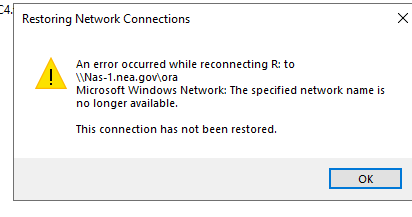
I did disconnect the mapped network drive on the server and restarted the server and no change in restoring the file share. The mapped share is now gone from the list of file shares on the server. the net use commands are not working. C:\WINDOWS\system32>net use R: \\Nas-1.nea.gov\photo R: has a remembered connection to \\Nas-1.nea.gov\ora. Do you want to overwrite the remembered connection? (Y/N) [Y]: Y System error 64 has occurred. The specified network name is no longer available. This is a NAS (IBM EMC) device that houses the file shares in question is using the NETBIOS file sharing protocol.7.3KViews0likes1CommentRe: How to update PowerShell script to include extensionattribute2 to $stream.WriteLine
LainRobertson When I add the if statement to the eighth line of the script, the below errors are returned. mkdir : An item with the specified name C:\Users\boldenc\AppData\Roaming\Microsoft\signatures\ already exists. At C:\Users\boldenc\OneDrive - National Endowment for the Arts\boldenc\Documents\Scripts - email signature_Login\nea_email_sig_with_logo_Pronouns.ps1:33 char:1 + mkdir $FolderLocation + ~~~~~~~~~~~~~~~~~~~~~ + CategoryInfo : ResourceExists: (C:\Users\bolden...oft\signatures\:String) [New-Item], IOException + FullyQualifiedErrorId : DirectoryExist,Microsoft.PowerShell.Commands.NewItemCommand Remove-ItemProperty : Cannot find path 'HKCU:\Software\Microsoft\Office\15.0\Outlook\Setup\' because it does not exist. At C:\Users\boldenc\OneDrive - National Endowment for the Arts\boldenc\Documents\Scripts - email signature_Login\nea_email_sig_with_logo_Pronouns.ps1:37 char:1 + Remove-ItemProperty -Path HKCU:\Software\Microsoft\Office\15.0\Outloo ... + ~~~~~~~~~~~~~~~~~~~~~~~~~~~~~~~~~~~~~~~~~~~~~~~~~~~~~~~~~~~~~~~~~~~~~ + CategoryInfo : ObjectNotFound: (HKCU:\Software\...\Outlook\Setup\:String) [Remove-ItemProperty], ItemNotFoundException + FullyQualifiedErrorId : PathNotFound,Microsoft.PowerShell.Commands.RemoveItemPropertyCommand New-ItemProperty : Cannot find path 'HKCU:\Software\Microsoft\Office\15.0\Common\MailSettings' because it does not exist. At C:\Users\boldenc\OneDrive - National Endowment for the Arts\boldenc\Documents\Scripts - email signature_Login\nea_email_sig_with_logo_Pronouns.ps1:38 char:1 + New-ItemProperty -Path HKCU:\Software\Microsoft\Office\15.0\Common\Ma ... + ~~~~~~~~~~~~~~~~~~~~~~~~~~~~~~~~~~~~~~~~~~~~~~~~~~~~~~~~~~~~~~~~~~~~~ + CategoryInfo : ObjectNotFound: (HKCU:\Software\...on\MailSettings:String) [New-ItemProperty], ItemNotFoundException + FullyQualifiedErrorId : PathNotFound,Microsoft.PowerShell.Commands.NewItemPropertyCommand New-ItemProperty : Cannot find path 'HKCU:\Software\Microsoft\Office\15.0\Common\MailSettings' because it does not exist. At C:\Users\boldenc\OneDrive - National Endowment for the Arts\boldenc\Documents\Scripts - email signature_Login\nea_email_sig_with_logo_Pronouns.ps1:39 char:1 + New-ItemProperty -Path HKCU:\Software\Microsoft\Office\15.0\Common\Ma ... + ~~~~~~~~~~~~~~~~~~~~~~~~~~~~~~~~~~~~~~~~~~~~~~~~~~~~~~~~~~~~~~~~~~~~~ + CategoryInfo : ObjectNotFound: (HKCU:\Software\...on\MailSettings:String) [New-ItemProperty], ItemNotFoundException + FullyQualifiedErrorId : PathNotFound,Microsoft.PowerShell.Commands.NewItemPropertyCommand Cannot convert value "C:\Users\boldenc\AppData\Roaming\\Microsoft\\signatures\\\\Christina Bolden (She/Her/Hers).htm" to type "System.IO.StreamWriter". Error: "Could not find a part of the path 'C:\Users\boldenc\AppData\Roaming\Microsoft\signatures\Christina Bolden (She\Her\Hers).htm'." At C:\Users\boldenc\OneDrive - National Endowment for the Arts\boldenc\Documents\Scripts - email signature_Login\nea_email_sig_with_logo_Pronouns.ps1:43 char:1 + $stream = [System.IO.StreamWriter] "$FolderLocation\\$strName.htm" + ~~~~~~~~~~~~~~~~~~~~~~~~~~~~~~~~~~~~~~~~~~~~~~~~~~~~~~~~~~~~~~~~~~ + CategoryInfo : InvalidArgument: (:) [], RuntimeException + FullyQualifiedErrorId : InvalidCastConstructorException Exception calling "WriteLine" with "1" argument(s): "Cannot write to a closed TextWriter." At C:\Users\boldenc\OneDrive - National Endowment for the Arts\boldenc\Documents\Scripts - email signature_Login\nea_email_sig_with_logo_Pronouns.ps1:44 char:1 + $stream.WriteLine("<!DOCTYPE HTML PUBLIC `"-//W3C//DTD HTML 4.0 Trans ... + ~~~~~~~~~~~~~~~~~~~~~~~~~~~~~~~~~~~~~~~~~~~~~~~~~~~~~~~~~~~~~~~~~~~~~ + CategoryInfo : NotSpecified: (:) [], MethodInvocationException + FullyQualifiedErrorId : ObjectDisposedException Exception calling "WriteLine" with "1" argument(s): "Cannot write to a closed TextWriter." At C:\Users\boldenc\OneDrive - National Endowment for the Arts\boldenc\Documents\Scripts - email signature_Login\nea_email_sig_with_logo_Pronouns.ps1:45 char:1 + $stream.WriteLine("<HTML><HEAD><TITLE>Signature</TITLE>") + ~~~~~~~~~~~~~~~~~~~~~~~~~~~~~~~~~~~~~~~~~~~~~~~~~~~~~~~~~ + CategoryInfo : NotSpecified: (:) [], MethodInvocationException + FullyQualifiedErrorId : ObjectDisposedException Exception calling "WriteLine" with "1" argument(s): "Cannot write to a closed TextWriter." At C:\Users\boldenc\OneDrive - National Endowment for the Arts\boldenc\Documents\Scripts - email signature_Login\nea_email_sig_with_logo_Pronouns.ps1:46 char:1 + $stream.WriteLine("<META http-equiv=Content-Type content=`"text/html; ... + ~~~~~~~~~~~~~~~~~~~~~~~~~~~~~~~~~~~~~~~~~~~~~~~~~~~~~~~~~~~~~~~~~~~~~ + CategoryInfo : NotSpecified: (:) [], MethodInvocationException + FullyQualifiedErrorId : ObjectDisposedException Exception calling "WriteLine" with "1" argument(s): "Cannot write to a closed TextWriter." At C:\Users\boldenc\OneDrive - National Endowment for the Arts\boldenc\Documents\Scripts - email signature_Login\nea_email_sig_with_logo_Pronouns.ps1:47 char:1 + $stream.WriteLine("<BODY>") + ~~~~~~~~~~~~~~~~~~~~~~~~~~~ + CategoryInfo : NotSpecified: (:) [], MethodInvocationException + FullyQualifiedErrorId : ObjectDisposedException Exception calling "WriteLine" with "1" argument(s): "Cannot write to a closed TextWriter." At C:\Users\boldenc\OneDrive - National Endowment for the Arts\boldenc\Documents\Scripts - email signature_Login\nea_email_sig_with_logo_Pronouns.ps1:49 char:1 + $stream.WriteLine("<Table border =`'0`'><tr><td><B><SPAN style=`"FONT ... + ~~~~~~~~~~~~~~~~~~~~~~~~~~~~~~~~~~~~~~~~~~~~~~~~~~~~~~~~~~~~~~~~~~~~~ + CategoryInfo : NotSpecified: (:) [], MethodInvocationException + FullyQualifiedErrorId : ObjectDisposedException Exception calling "WriteLine" with "1" argument(s): "Cannot write to a closed TextWriter." At C:\Users\boldenc\OneDrive - National Endowment for the Arts\boldenc\Documents\Scripts - email signature_Login\nea_email_sig_with_logo_Pronouns.ps1:51 char:1 + $stream.WriteLine("<SPAN style=`"FONT-SIZE: 11pt; COLOR: black; FONT- ... + ~~~~~~~~~~~~~~~~~~~~~~~~~~~~~~~~~~~~~~~~~~~~~~~~~~~~~~~~~~~~~~~~~~~~~ + CategoryInfo : NotSpecified: (:) [], MethodInvocationException + FullyQualifiedErrorId : ObjectDisposedException Exception calling "WriteLine" with "1" argument(s): "Cannot write to a closed TextWriter." At C:\Users\boldenc\OneDrive - National Endowment for the Arts\boldenc\Documents\Scripts - email signature_Login\nea_email_sig_with_logo_Pronouns.ps1:53 char:1 + $stream.WriteLine("<SPAN style=`"FONT-SIZE: 11pt; COLOR: black; FONT- ... + ~~~~~~~~~~~~~~~~~~~~~~~~~~~~~~~~~~~~~~~~~~~~~~~~~~~~~~~~~~~~~~~~~~~~~ + CategoryInfo : NotSpecified: (:) [], MethodInvocationException + FullyQualifiedErrorId : ObjectDisposedException Exception calling "WriteLine" with "1" argument(s): "Cannot write to a closed TextWriter." At C:\Users\boldenc\OneDrive - National Endowment for the Arts\boldenc\Documents\Scripts - email signature_Login\nea_email_sig_with_logo_Pronouns.ps1:55 char:1 + $stream.WriteLine("<SPAN style=`"FONT-SIZE: 11pt; COLOR: black; FONT- ... + ~~~~~~~~~~~~~~~~~~~~~~~~~~~~~~~~~~~~~~~~~~~~~~~~~~~~~~~~~~~~~~~~~~~~~ + CategoryInfo : NotSpecified: (:) [], MethodInvocationException + FullyQualifiedErrorId : ObjectDisposedException Exception calling "WriteLine" with "1" argument(s): "Cannot write to a closed TextWriter." At C:\Users\boldenc\OneDrive - National Endowment for the Arts\boldenc\Documents\Scripts - email signature_Login\nea_email_sig_with_logo_Pronouns.ps1:57 char:1 + $stream.WriteLine("<SPAN style=`"FONT-SIZE: 11pt; COLOR: black; FONT- ... + ~~~~~~~~~~~~~~~~~~~~~~~~~~~~~~~~~~~~~~~~~~~~~~~~~~~~~~~~~~~~~~~~~~~~~ + CategoryInfo : NotSpecified: (:) [], MethodInvocationException + FullyQualifiedErrorId : ObjectDisposedException Exception calling "WriteLine" with "1" argument(s): "Cannot write to a closed TextWriter." At C:\Users\boldenc\OneDrive - National Endowment for the Arts\boldenc\Documents\Scripts - email signature_Login\nea_email_sig_with_logo_Pronouns.ps1:59 char:1 + $stream.WriteLine("<SPAN style=`"FONT-SIZE: 11pt; COLOR: black; FONT- ... + ~~~~~~~~~~~~~~~~~~~~~~~~~~~~~~~~~~~~~~~~~~~~~~~~~~~~~~~~~~~~~~~~~~~~~ + CategoryInfo : NotSpecified: (:) [], MethodInvocationException + FullyQualifiedErrorId : ObjectDisposedException Exception calling "WriteLine" with "1" argument(s): "Cannot write to a closed TextWriter." At C:\Users\boldenc\OneDrive - National Endowment for the Arts\boldenc\Documents\Scripts - email signature_Login\nea_email_sig_with_logo_Pronouns.ps1:61 char:1 + $stream.WriteLine("<SPAN style=`"FONT-SIZE: 11pt; COLOR: black; FONT- ... + ~~~~~~~~~~~~~~~~~~~~~~~~~~~~~~~~~~~~~~~~~~~~~~~~~~~~~~~~~~~~~~~~~~~~~ + CategoryInfo : NotSpecified: (:) [], MethodInvocationException + FullyQualifiedErrorId : ObjectDisposedException Exception calling "WriteLine" with "1" argument(s): "Cannot write to a closed TextWriter." At C:\Users\boldenc\OneDrive - National Endowment for the Arts\boldenc\Documents\Scripts - email signature_Login\nea_email_sig_with_logo_Pronouns.ps1:65 char:1 + $stream.WriteLine("</BODY>") + ~~~~~~~~~~~~~~~~~~~~~~~~~~~~ + CategoryInfo : NotSpecified: (:) [], MethodInvocationException + FullyQualifiedErrorId : ObjectDisposedException Exception calling "WriteLine" with "1" argument(s): "Cannot write to a closed TextWriter." At C:\Users\boldenc\OneDrive - National Endowment for the Arts\boldenc\Documents\Scripts - email signature_Login\nea_email_sig_with_logo_Pronouns.ps1:66 char:1 + $stream.WriteLine("</HTML>") + ~~~~~~~~~~~~~~~~~~~~~~~~~~~~ + CategoryInfo : NotSpecified: (:) [], MethodInvocationException + FullyQualifiedErrorId : ObjectDisposedException Exception calling "WriteLine" with "1" argument(s): "Cannot write to a closed TextWriter." At C:\Users\boldenc\OneDrive - National Endowment for the Arts\boldenc\Documents\Scripts - email signature_Login\nea_email_sig_with_logo_Pronouns.ps1:67 char:1 + $stream.WriteLine("</DIV>") + ~~~~~~~~~~~~~~~~~~~~~~~~~~~ + CategoryInfo : NotSpecified: (:) [], MethodInvocationException + FullyQualifiedErrorId : ObjectDisposedException Cannot convert value "C:\Users\boldenc\AppData\Roaming\\Microsoft\\signatures\\\\Christina Bolden (She/Her/Hers).txt" to type "System.IO.StreamWriter". Error: "Could not find a part of the path 'C:\Users\boldenc\AppData\Roaming\Microsoft\signatures\Christina Bolden (She\Her\Hers).txt'." At C:\Users\boldenc\OneDrive - National Endowment for the Arts\boldenc\Documents\Scripts - email signature_Login\nea_email_sig_with_logo_Pronouns.ps1:71 char:1 + $stream = [System.IO.StreamWriter] "$FolderLocation\\$strName.txt" + ~~~~~~~~~~~~~~~~~~~~~~~~~~~~~~~~~~~~~~~~~~~~~~~~~~~~~~~~~~~~~~~~~~ + CategoryInfo : InvalidArgument: (:) [], RuntimeException + FullyQualifiedErrorId : InvalidCastConstructorException Exception calling "WriteLine" with "1" argument(s): "Cannot write to a closed TextWriter." At C:\Users\boldenc\OneDrive - National Endowment for the Arts\boldenc\Documents\Scripts - email signature_Login\nea_email_sig_with_logo_Pronouns.ps1:72 char:1 + $stream.WriteLine("$strName") + ~~~~~~~~~~~~~~~~~~~~~~~~~~~~~ + CategoryInfo : NotSpecified: (:) [], MethodInvocationException + FullyQualifiedErrorId : ObjectDisposedException Exception calling "WriteLine" with "1" argument(s): "Cannot write to a closed TextWriter." At C:\Users\boldenc\OneDrive - National Endowment for the Arts\boldenc\Documents\Scripts - email signature_Login\nea_email_sig_with_logo_Pronouns.ps1:74 char:1 + $stream.WriteLine("$strTitle $strCompany | $strDepartment ") + ~~~~~~~~~~~~~~~~~~~~~~~~~~~~~~~~~~~~~~~~~~~~~~~~~~~~~~~~~~~~ + CategoryInfo : NotSpecified: (:) [], MethodInvocationException + FullyQualifiedErrorId : ObjectDisposedException Exception calling "WriteLine" with "1" argument(s): "Cannot write to a closed TextWriter." At C:\Users\boldenc\OneDrive - National Endowment for the Arts\boldenc\Documents\Scripts - email signature_Login\nea_email_sig_with_logo_Pronouns.ps1:76 char:1 + $stream.WriteLine("National Endowment for the Arts") + ~~~~~~~~~~~~~~~~~~~~~~~~~~~~~~~~~~~~~~~~~~~~~~~~~~~~ + CategoryInfo : NotSpecified: (:) [], MethodInvocationException + FullyQualifiedErrorId : ObjectDisposedException Exception calling "WriteLine" with "1" argument(s): "Cannot write to a closed TextWriter." At C:\Users\boldenc\OneDrive - National Endowment for the Arts\boldenc\Documents\Scripts - email signature_Login\nea_email_sig_with_logo_Pronouns.ps1:78 char:1 + $stream.WriteLine("400 7th Street SW | Washington DC 20506") + ~~~~~~~~~~~~~~~~~~~~~~~~~~~~~~~~~~~~~~~~~~~~~~~~~~~~~~~~~~~~ + CategoryInfo : NotSpecified: (:) [], MethodInvocationException + FullyQualifiedErrorId : ObjectDisposedException Exception calling "WriteLine" with "1" argument(s): "Cannot write to a closed TextWriter." At C:\Users\boldenc\OneDrive - National Endowment for the Arts\boldenc\Documents\Scripts - email signature_Login\nea_email_sig_with_logo_Pronouns.ps1:80 char:1 + $stream.WriteLine("$strEmail | 202-682-$strPhone (p) | $strFax") + ~~~~~~~~~~~~~~~~~~~~~~~~~~~~~~~~~~~~~~~~~~~~~~~~~~~~~~~~~~~~~~~~ + CategoryInfo : NotSpecified: (:) [], MethodInvocationException + FullyQualifiedErrorId : ObjectDisposedException Exception calling "WriteLine" with "1" argument(s): "Cannot write to a closed TextWriter." At C:\Users\boldenc\OneDrive - National Endowment for the Arts\boldenc\Documents\Scripts - email signature_Login\nea_email_sig_with_logo_Pronouns.ps1:84 char:1 + $stream.WriteLine("Learn more about the arts in your community at ar ... + ~~~~~~~~~~~~~~~~~~~~~~~~~~~~~~~~~~~~~~~~~~~~~~~~~~~~~~~~~~~~~~~~~~~~~ + CategoryInfo : NotSpecified: (:) [], MethodInvocationException + FullyQualifiedErrorId : ObjectDisposedException Exception calling "WriteLine" with "1" argument(s): "Cannot write to a closed TextWriter." At C:\Users\boldenc\OneDrive - National Endowment for the Arts\boldenc\Documents\Scripts - email signature_Login\nea_email_sig_with_logo_Pronouns.ps1:85 char:1 + $stream.WriteLine("https://www.arts.gov/sites/default/files/2018-%20H ... + ~~~~~~~~~~~~~~~~~~~~~~~~~~~~~~~~~~~~~~~~~~~~~~~~~~~~~~~~~~~~~~~~~~~~~ + CategoryInfo : NotSpecified: (:) [], MethodInvocationException + FullyQualifiedErrorId : ObjectDisposedException2.3KViews0likes2CommentsHow to update PowerShell script to include extensionattribute2 to $stream.WriteLine
We use a PowerShell script to manage an agency wide email signature file for all users. We've recently added pronouns (gender) to extensionattribute2 using ADSI Editor. What is the specific code and where do I place the new user extensionattribute2 in the PowerShell script? It will need to display directly following after the DisplayName. ############################################################# #This Powershell Script creates Outlook signatures for Active Directory users and sets it as their default at logon $strName = $env:username $strFilter = "(&(objectCategory=User)(samAccountName=$strName))" $objSearcher = New-Object System.DirectoryServices.DirectorySearcher $objSearcher.Filter = $strFilter $objPath = $objSearcher.FindOne() $objUser = $objPath.GetDirectoryEntry() $strName = $objUser.DisplayName $strTitle = $objUser.Title $strCompany = $objUser.Company $strDepartment = $objUser.Department $strPhone = $objUser.telephoneNumber $strFax = $objUser.faxnumber $strcellPhone = $objUser.mobile $strEmail = $objUser.emailaddress $strwwwHomePage = "$($user.wWWHomePage)" #above strwwwhomepage used for Assitant line $UserDataPath = $Env:appdata #Signature Folder Location $FolderLocation = $UserDataPath + '\\Microsoft\\signatures\\' #Checks for existing signature #$path = $FolderLocation + $strname + '.htm' # If ((Test-Path -path $path) -eq $true) { break } # Else { mkdir $FolderLocation #Sets Outlook to force signature Remove-ItemProperty -Path HKCU:\Software\Microsoft\Office\15.0\Outlook\Setup\ -name First-Run New-ItemProperty -Path HKCU:\Software\Microsoft\Office\15.0\Common\MailSettings -Name "NewSignature" -Value "$strname" -PropertyType "String" New-ItemProperty -Path HKCU:\Software\Microsoft\Office\15.0\Common\MailSettings -Name "ReplySignature" -Value "$strname" -PropertyType "String" #Creates HTML Signature $stream = [System.IO.StreamWriter] "$FolderLocation\\$strName.htm" $stream.WriteLine("<!DOCTYPE HTML PUBLIC `"-//W3C//DTD HTML 4.0 Transitional//EN`">") $stream.WriteLine("<HTML><HEAD><TITLE>Signature</TITLE>") $stream.WriteLine("<META http-equiv=Content-Type content=`"text/html; charset=windows-1252`">") $stream.WriteLine("<BODY>") #Name of Employee $stream.WriteLine("<Table border =`'0`'><tr><td><B><SPAN style=`"FONT-SIZE: 11pt; COLOR: black; FONT-FAMILY: `'Calibri`'`">" + $strName + "</B></SPAN></td></tr>") #Title & Company Name $stream.WriteLine("<SPAN style=`"FONT-SIZE: 11pt; COLOR: black; FONT-FAMILY: `'Calibri`'`"><tr><td nowrap=`'nowrap`'>" + $strTitle + $strCompany + " | " + $strDepartment + "</td></tr>") #NEA $stream.WriteLine("<SPAN style=`"FONT-SIZE: 11pt; COLOR: black; FONT-FAMILY: `'Calibri`'`"><tr><td nowrap=`'nowrap`'>National Endowment for the Arts</td></tr>") #Street Address, Room, City $stream.WriteLine("<SPAN style=`"FONT-SIZE: 11pt; COLOR: black; FONT-FAMILY: `'Calibri`'`"><tr><td nowrap=`'nowrap`'>400 7th Street SW | Washington DC 20506</SPAN></td></tr>") #Email & Telephone Numbers $stream.WriteLine("<SPAN style=`"FONT-SIZE: 11pt; COLOR: black; FONT-FAMILY: `'Calibri`'`"><tr><td nowrap=`'nowrap`'>" + $strEmail + " | 202-682-" + $strPhone + " (p) | " + $strFax + "</SPAN></td></tr>") #Second Line for Assistant for Laura Callanan $stream.WriteLine("<SPAN style=`"FONT-SIZE: 11pt; COLOR: black; FONT-FAMILY: `'Calibri`'`"><tr><td nowrap=`'nowrap`'>" + $strwwwhomepage + "</SPAN></td></tr>") #Social Media $stream.WriteLine("<SPAN style=`"FONT-SIZE: 11pt; COLOR: black; FONT-FAMILY: `'Calibri`'`"><tr><td nowrap=`'nowrap`'>Learn more about the arts in your community at <a href='http://www.arts.gov'>arts.gov</a>") #$stream.WriteLine("<SPAN style=`"FONT-SIZE: 11pt; COLOR: black; FONT-FAMILY: `'Calibri`'`"><tr><td nowrap=`'nowrap`'>Celebrating the NEA's 50th Anniversary at <a href='https://www.arts.gov/50th'>arts.gov/50th</a>.</SPAN></td></tr>") #$stream.WriteLine("<SPAN style=`"FONT-SIZE: 11pt; COLOR: black; FONT-FAMILY: `'Calibri`'`"><tr><td nowrap=`'nowrap`'>To join the discussion on how art works, visit the NEA at <a href='http://www.arts.gov'>arts.gov</a>, <a href='http://www.facebook.com/nationalendowmentforthearts'>Facebook</a>, <a href='http://www.twitter.com/neaarts'>Twitter</a>, <a href='http://www.pinterest.com/artsgov'>Pinterest</a>, <a href='http://www.itunes.com/affiliates/download'>iTunes</a>, and <a href='http://www.youtube.com/user/NEAarts'>YouTube</a>.</SPAN></td></tr>") $stream.WriteLine("</BODY>") $stream.WriteLine("</HTML>") $stream.WriteLine("</DIV>") $stream.close() #Creates TXT Signature $stream = [System.IO.StreamWriter] "$FolderLocation\\$strName.txt" $stream.WriteLine("$strName") #Title & Company Name $stream.WriteLine("$strTitle $strCompany | $strDepartment ") #NEA $stream.WriteLine("National Endowment for the Arts") #Street Address, Room, City $stream.WriteLine("400 7th Street SW | Washington DC 20506") #Email & Telephone Numbers $stream.WriteLine("$strEmail | 202-682-$strPhone (p) | $strFax") #Social Media #$stream.WriteLine("To join the discussion on how art works, visit the NEA at http://www.arts.gov, Facebook, Twitter, Pinterest, iTunes, and YouTube.") #$stream.WriteLine("In celebration of the NEA's 50th, we're gathering stories about the impact of art on people's lives. Click here to share your story!") $stream.WriteLine("Learn more about the arts in your community at arts.gov") $stream.WriteLine("https://www.arts.gov/sites/default/files/2018-%20Horizontal-Logo-white-on-black-with-url.png") $stream.close()Solved2.5KViews0likes4Comments
Recent Blog Articles
No content to show