User Profile

ShawnZ1H
Brass Contributor
Joined May 05, 2022


User Widgets
Recent Discussions
Re: Remote assistance with Quick Assist is changing
here we go again: Quick-Assist effectively unusable: "Software that's required for Quick Assist couldn't be installed, Error 1002" Run-As doesn't work. Of course, we are running as StandardUser, LocalAccount for security and privacy reasons. As helper, I can run Quick-Assist only if I sign-in to Windows as an Administrator, but several users needing help have faced same error and have no remedy running as a Standard User. Even most third party publishers have installers that know enough to recognize non-admin user and request privilege elevation. Why not Microsoft Quick-Assist? We have lots of small business clients completely UNINTERESTED in M$ cloud. Further, best practice and standard operating procedure on every other OS is to run as a Standard-User, so that Admin functions are done deliberately, rather than accidentally. If you run as an Administrator, UAC will sometimes, but not always, warn that you are using elevated privileges. The fact that Edge (a web browser) can and does bypass UAC prompts is reason enough to run as Standard User.490Views0likes0CommentsRe: Remote assistance with Quick Assist is changing
TWO YEARS Later: here we go again: I told my 80+ y.o. father he should finally accept the in-place upgrade from Windows 10 to 11. I frequently support him remotely using Quick-Assist, so obviously it's installed on Windows 10. Post upgrade to Windows 11, he calls me. He clicks the Quick-Assist shortcut pinned to the TaskBar: it throws an error for failing to find the app. So we try Win+CTRL+Q. NOPE! Search the start menu: Because Microsoft default is to return Web results for every search, he gets so many answers as to make it dangerous for him to select one. I tell him to open the Microsoft Store directly: same result: Tons of results he is unable to parse w/o me seeing his screen to help him select. Finally I search the Microsoft Store myself and email him a URL. Walk him through downloading, finding Downloads, running/installing/opening Quick-Assist. LITERALLY TWENTY-ONE Minutes to make a Quick-Assist connection. HOW Damned difficult would it have been for Windows 11 to recognize Quick-Assist was installed and make sure it was still installed after upgrade. ps: so we get to his question: how do I switch users? OMG: Windows 11 improved the start menu by putting the signed-in user front and center (er bottom left, just above Start), with an actual name rather than a cryptic generic avatar ... BUT then they go and HIDE 'sign-out' and 'switch-user' under a 'more' button. WTF. For home users sharing a computer Sign-out / Switch User are FAR more likely to be used than looking at their microsoft account (in our case they are local accounts). If it wasn't for about (2) apps he uses, he would already be on Linux.676Views3likes1CommentRe: Remote assistance with Quick Assist is changing
ShawnZ1H ... and again. 30 minutes on the phone, still cannot establish screen sharing. Regular users will do all sort of things to break this. This is a user we presumed was using a local account. When they launch the store to get the new Quick Assist app, they are prompted to login with their microsoft account. Problem is, it's not their microsoft account. In this case, it's prompting for password for the microsoft account of the users' spouse. Who knows when user, or perhaps their spouse, wanted to do something requiring store access and just entered the credentials they knew (or created a new account) unwittingly, they permanently associated this local user with their account. So we go to Settnigs, Accounts, tell it NOT to automatically login with microsoft, do shutdown, power on, ... and STILL, microsoft store prompts for spouses microsoft account login. I've walked dozens of users through adding new Quick Assist. This is the first time a user has been required to authenticate to the store. As we all are finding there are lots of ways to break this, and fixing remote assist remotely is tedious at best. Remote Assist tools need to 'Just Work'. Why is it called "QUICK-Assist" ? Name no longer fits.5.8KViews4likes0CommentsRe: Remote assistance with Quick Assist is changing
Broken some more: helping a very computer illiterate client. As it happens, this is first time attempting to use remote assist since April, so new App Not Yet installed. I ask her to press Win+CTRL+Q. It complains no network. Walk her through connecting to WiFi. Old QuickAssist just sits there. Well maybe it never noticed net now connected. Okay, kill it and start it again. She does. Progress-wheel spinning... nothing more. Apparently old quick-assist can't even lead us to the store any more. I help her open the store, search, get, install, (enter Admin credentials). We've now been on the phone nearly 20 minutes, just to establish sharing of desktop. Hate MS for doing this. Surely there is some evil business reason. Please share.4.3KViews0likes1CommentRe: Remote assistance with Quick Assist is changing
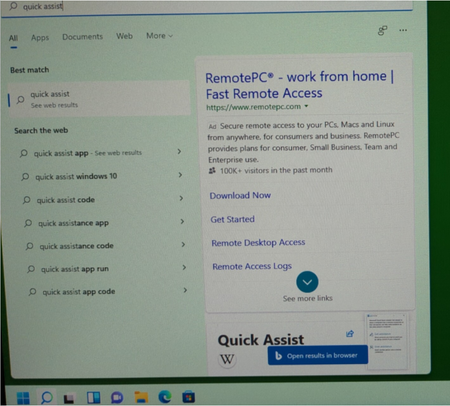
Nathan_Pfeifer re: walking a remote user through installing Quick Assist: (proof, my concern about remote user installing an impostor app, is valid) I just performed a clean install of Windows 11 Pro; Created two Local accounts: an Administrator, and a Standard User. As Admin, searched Quick Assist from Start, opened it, used the prompt in the old version to install the new. All good so far. Next, login as Standard User. Click Start and search for "quick assist": Under 'Best match': nothing, just 'See web results'. Under 'Search the web': Top match is an advertisement for 3rd party software offering persistent remote access. Second match is the Wikipedia page for Microsoft Quick Assist. Third is a Microsoft Support article on how to install Quick Assist, and finally, the fourth listing is for the Quick Assist app from the Microsoft App Store. IF a third party can purchase the top result, when the search is performed from the Microsoft Windows Start Button, AND the search term is an exact match for a Microsoft Product, further, a product that facilitates remote access... there is something seriously wrong.6.2KViews1like1CommentRe: Remote assistance with Quick Assist is changing
Having heard old and new may co-exist, and figuring slim to none likelihood of remedy, or even extension of current Quick-Assist support, I just installed the new, twice. Both initially fail, but ultimately working. Hopefully someone finds this useful: 1) a Windows 10 VM that I frequently use for remote support. Mostly generic Windows10, fully updated, but hardly any other software: Result: Fetch and install okay. On first launch, new Quick Assist app hangs for nearly a minute, then fails with unmet dependency: "requires WebView2 runtime". Am I going to have to walk a user through installing WebView2 runtime as well? Works after installing the dependency. 2: Windows 11 Pro: As I just installed this OS yesterday, is absolutely a default installation with all Windows Updates applied. It has (1) local user account. Fetch and install from App Store okay (good, no MS Account required). On launch, dialog box with plain blue background and progress circle opens, then a few seconds later, is gone, apparently crashed/closed w/o notice. Launch again, same result. Third try: opens with dialog apparently identical to the prior version, so much so, I thought perhaps I had mistakenly launched the older version. Indeed it is the new. I was able to share screen between the two. Re: WebView2: powerful tools, letting Quick-Assist developers make use of all that the WWW has to offer. Seems to me it's likely this change (WebView2) will greatly increase the threat-surface of Quick-Assist. Consistent with the rest of Microsoft Windows philosophy: forcefully include every bleeding toy, widget, app, we didn't ask for, and make it neigh impossible to remove, less you are large enough to buy and manage LTSC. Stated reasons for new version?: none still. (unofficially, I read, now easier to get remote elevation of privileges). We are left to speculate, but probably increased telemetry.14KViews0likes0CommentsRe: Remote assistance with Quick Assist is changing
well, it was good while it lasted: Introduced with Windows 10. Gone before Windows 11 reaches 25% adoption. With Quick-Assist, we could deliver remote help to a near complete stranger. Usually someone just referred to us by an other client. To build trust, I usually begin by explaining that Quick-Assist is a Microsoft product, and in fact, it is part of Windows 10, already installed on your PC. Further, Windows even gave you a HotKey (Win+Ctrl+Q) to launch it. This is far more reassuring to security conscious users than "I need you to install something that lets me remotely control your computer". Microsoft needs to re-think this. Why can't Windows Update continue to maintain this feature? Why does the inbuilt Quick-Assist need to be eliminated so quickly? We only just learned of the change less than a month ago. If Microsoft insists, this will drive many to move back to 3rd party tools. Some will pay for proprietary solutions, making connections proxied through systems hosted by possibly trustworthy organizations (or not). Others will search out free tools, with obvious risks.63KViews25likes2CommentsRe: Remote assistance with Quick Assist is changing
ps_alisto, Thanks for the warning. Echoing what Paul said: Best thing about the existing Quick Assist is that it's guaranteed to be on every Windows 10 computer, which means we don't have to walk someone through an installation over the phone, which always carries the risk that they will install an impostor (malicious) app. When someone is in need a remote assistance, IS NOT the time to be installing new software. What if their problem is a full system volume? Further, if we were involved with the users PC setup, they are almost certainly logged in as a Standard Local Account, and may not be able to install new apps. I came here looking for details about how Quick Assist is changing. Have searched high and low. Found only instructions to fetch new from app store. In App Store reviews, I see several experiencing trouble with new App. Why from App Store? Why not with Windows Updates? So far, I'm convinced we will stay with the old version.63KViews10likes4Comments
Recent Blog Articles
No content to show