User Profile

simcpk
Brass Contributor
Joined Mar 26, 2018


User Widgets
Recent Discussions
Re: ConfigDeviceHealthMonitoringServiceInstance - Error 404 - The system cannot find the file specified.
Rudy_Ooms_MVP, thanks for responding. Windows 10, Version 21H1 (OS Build 19043.1237) The device passes all pertinent device compliance policies and the only "Windows health monitoring" profile we deploy reports that a "Deployment Status" of Succeeded.23KViews0likes10CommentsConfigDeviceHealthMonitoringServiceInstance - Error 404 - The system cannot find the file specified.
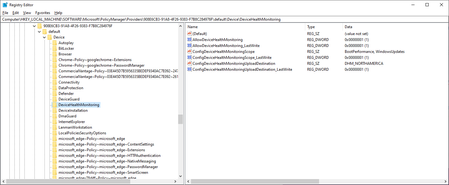
I have a machine (perhaps many, though I haven't searched widely yet) that is throwing the following error in the Microsoft-Windows-DeviceManagement-Enterprise-Diagnostics-Provider/Admin log every time it syncs and reapplies settings from Intune. MDM ConfigurationManager: Command failure status. Configuration Source ID: (908E6CB3-91A8-4F26-9383-F7B8C284976F), Enrollment Name: (MDMDeviceWithAAD), Provider Name: (Policy), Command Type: (Add: from Replace or Add), CSP URI: (./Vendor/MSFT/Policy/Config/DeviceHealthMonitoring/ConfigDeviceHealthMonitoringServiceInstance), Result: (The system cannot find the file specified.). I don't believe I have any configurations setting this value -- in fact, i don't even think this is a setting that can be set intentionally via Intune. I don't know what it does if you do manage to set it. I've dug around in the registry and I've found the Configuration referenced by the Source ID and it appears as follows -- There is no ConfigDeviceHealthMonitoringServiceInstance specified at all. The merged view under the current key shows no alternative source for the setting either. What else can I even look at to get to the bottom of this? Thanks. Phil24KViews0likes12CommentsRe: Custom Exploit Guard Rules Occasionally Ignored
eappelboom I never got any further with this. Fortunately for us, our deadlocks disappeared just as mysteriously as they started so I was able to move on. I am still curious as to why that behavior existed and my only guess is that they may have been filtering the calls to win32k.sys based on the actual functions they were using and knew some to be "safe". As you mentioned, it was when passing the --type=renderer parameter that it was getting blocked which would align with what I think I understand about the filtering mechanism, since it's the GUI threads that are blocked. When passing (what sounds like) a non-GUI thread, the call was allowed. More reading: https://github.com/mtth-bfft/win32k-mitigation https://improsec.com/tech-blog/win32k-system-call-filtering-deep-dive3.8KViews0likes0CommentsRe: Intune Compliance Policy: Device not compliant because of missing machine risk score: deactivated?
Wim Borgers Well, I'm fixed. They ran some sort of back-end sync and and all of my machines are reporting properly. I asked whether or not this fix was applied only to my tenant or whether it was a platform-wide change and I received the following response -- "Actually I was checking from the backend team whether the fix was only for specific to your tenant or there were other tenants on which this fix was deployed . I got a confirmation that they have deployed a fix for the ATP service to get it working again over the weekend 12/7-8 and it was only for your tenant ." So anyone else that is having this issue has two options: Start a support case to beg and plead that they run whatever back-end sync it is that fixes this. Keep in mind this took 2(!) months for me as the passed me back and forth between Intune and ATP support and ruled out all of the things that I may have mucked up. Run the WD ATP detection test script on all affected machines. In fact, I would probably run the detection test script on a machine or two first to make sure that it resolved the problem and that you didn't have an entirely different issue at play. After verifying that this resolves it, you might pursue the support case for a back-end sync.31KViews0likes8CommentsRe: Multi-Identity Support in iOS Apps (Word, Excel, OneDrive, Outlook)
After toying around with it a bit more, I think I've come to an understanding of how this is accomplished. It does work correctly, just not in the way that I first expected it to. I was incorrect in my assertion I had to log out of my corporate identity to save a new Word document to store it in a non-managed location. I was able to start a .docx and then save directly to my iPhone. I was then able to see the device in Files - On My iPhone - Word. As soon as I saved it to a managed location under my corporate identity, I was no longer able to move it to an unmanaged location as expected. Similarly, I got the behavior I expected when I opened a .docx from the Gmail app.2KViews0likes0CommentsMulti-Identity Support in iOS Apps (Word, Excel, OneDrive, Outlook)
I've been experimenting with App Protection Policies I need someone to clarify something for me. Apps can be written in a way that supports multi-identity so as to not interfere with users using apps for personal reasons. This works great in Outlook and OneDrive where they make it very easy to switch between corporate and personal accounts. In Word and Excel (and I assume PowerPoint), it seems that the user is required to log out of corporate identity entirely when using the app because you can't have multiple identities logged in at one time. This means that if a user opens a .docx attachment from Gmail and opens it in Word, it automatically gets sucked into the corporate environment with no way out other than not saving it. Similarly, they can't start a personal Word document without logging out of the corporate identity. Is there really no way to easily switch between two logged-in identities similar to the way Outlook and OneDrive let you do it? If not, what exactly is multi-identity about the iOS Office apps?Solved1.9KViews0likes1CommentRe: Intune Compliance Policy: Device not compliant because of missing machine risk score: deactivated?
A quick update -- After a few false starts and transfers to different teams, we've learned a few things. Firstly, my configuration is correct. I'm being assured that Microsoft is looking at this issue internally and will provide guidance -- the case will remain open until then. We have a workaround that we can apply which simply involves running a test detection for Defender ATP (https://docs.microsoft.com/en-us/windows/security/threat-protection/microsoft-defender-atp/run-detection-test) for any of the machines experiencing this issue. Within about 15 minutes of running this, they shift to a compliant state. I've never had a machine return to the non-compliant, deactivated state after running this test so it seems the workaround is permanent. I'm hoping there is something that Microsoft can do that would obviate the need to run this test detection on every affected machine and I'll try to report back when the case is closed.32KViews1like10CommentsRe: Intune Compliance Policy: Device not compliant because of missing machine risk score: deactivated?
Even though the ATP <--> Intune connector claims to be healthy and working fine, I had a thought to try to recreate it and have gotten some troubling results. When I toggled off the Connect Windows devices version 10.0.15063 and above to Microsoft Defender ATP option in the Intune settings and I received an error stating "An error occurred. Couldn't establish the connector. Try again later." I receive this error whether I'm toggling it On or Off. Toggling on and off the connector from the Defender ATP portal gives me no errors. Is anyone else willing to see if they get a similar error when toggling in the Intune portal?33KViews0likes12CommentsRe: Defender ATP Support
Joe Stern We did, but historically they haven't been able to help us much there without opening a Premier support ticket. The good news is I've heard back from ATP support at this point and they claim to have escalated the issue as of yesterday. Not sure that it actually means much, but hopefully we'll get somewhere.1.2KViews0likes0CommentsDefender ATP Support
I'm disappointed, but not surprised, to find that the support experience for the Defender ATP product has not improved in the last 6 months. I would seriously urge caution to anyone taking a look at this product that expects to operate without a costly "Premier" support contract, which depending on your organization's size may be unattainable no matter how deep your pockets. The "Professional" support is anything but. I currently find myself waiting for the initial callback after a case was opened (as a transfer from the Intune team, who is quite responsive by comparison) on Thursday last week. It was opened as a severity rating C with an expected response time of 8 hours, but it's Monday and I've not heard a thing. The most infuriating part of it all is the total absence of contact info for me to proactively engage with the support team. My only choice is to sit. And wait.1.3KViews0likes2CommentsRe: Intune Compliance Policy: Device not compliant because of missing machine risk score: deactivated?
Wim Borgers Thanks for checking back in. I've been working with support and the Intune team verified that everything is configured correctly on our end. We, too, are dealing with hybrid Azure AD joined devices that have tons of inexplicable, transient issues regarding device compliance. As of yesterday evening, the Intune team agreed to reach out to the Windows Defender ATP team to figure out why the services aren't talking to each other successfully. The WD ATP dashboard shows all of these devices as healthy, but still our devices are marked Deactivated under Device Threat Level in Intune. I'll report back with any useful findings. Until this works, the whole Zero Trust model of secure network design will remain out of reach for us which is a shame.33KViews0likes13CommentsRe: Intune Compliance Policy: Device not compliant because of missing machine risk score: deactivated?
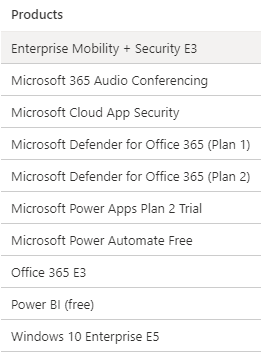
Jerod Powell Mine is somewhat ambiguous and simply states "Windows 10 Enterprise". Similarly, under Settings - Update & Security - Activation it states "Windows 10 Enterprise" and "Windows is activated with a digital license". I assume it's the assigned E5 license, but I don't know for certain.97KViews0likes18CommentsRe: Intune Compliance Policy: Device not compliant because of missing machine risk score: deactivated?
Jerod Powell, do you have an easy way of checking whether or not a machine is properly recognizing the licensing as Windows 10 Enterprise E5? About 80% of our machines are showing this "Deactivated" status and although I'm fairly confident that it's not an OS license issue for us, I'd like to know if there's a simple way to rule it out for sure. I do have a support case open with Microsoft, but it's moving very slowly as those things do. They always seem to call with about 5 min to go in the workday. I've begun to accept that this is actually done with intent on their end.97KViews0likes23CommentsSet 'Remote Desktop security level' to 'TLS' Not Detecting Correctly
Consider the following remediation description -- Set 'Remote Desktop security level' to 'TLS' Option 1 - Set the following registry value: HKLM\SYSTEM\CurrentControlSet\Control\Terminal Server\WinStations\RDP-Tcp\SecurityLayer To the following REG_DWORD value: 2 Option 2 - Set the following Group Policy: Computer Configuration\Administrative Templates\Windows Components\Remote Desktop Services\Remote Desktop Session Host\Security\Require use of specific security layer for remote (RDP) connections To the following value: SSL (TLS 1.0) -------------- I believe my machines should be passing this test, but due to out-of-order validation steps they are still marked as unresolved. I've checked my group policy settings and the corresponding registry key at (HKEY_LOCAL_MACHINE\SOFTWARE\Policies\Microsoft\Windows NT\Terminal Services\SecurityLayer) and it's set to '2'. As far as I understand it, this should take precedence over the value that I have in HKLM\SYSTEM\CurrentControlSet\Control\Terminal Server\WinStations\RDP-Tcp\SecurityLayer which is '1'. I don't bother setting that key/value since I believe the group policy takes precedence. Unfortunately, WDATP is checking Option 1 first and short-circuiting if it's not set to '2'. In my opinion, it should be checking Option 2 first and short-circuiting a pass if the value is set to '2'. Phil18KViews0likes2Comments"Disable Windows Firewall notifications..." detection/remediation steps are incorrect
The following three security detections/recommendations are incorrect -- Disable Windows Firewall notifications when programs are blocked for Domain profile Disable Windows Firewall notifications when programs are blocked for Private profile Disable Windows Firewall notifications when programs are blocked for Public profile The stated (although debatable) goal is to disable the notifications so as not to confuse the user since they wouldn't be able to address it properly anyway. The remediation options indicate that Windows Defender ATP is verifying that the HKLM\SOFTWARE\Policies\Microsoft\WindowsFirewall\DomainProfile\DisableNotifications REG_DWORD value is set to 0. Instead, it should be checking to make sure it is set to 1 since that is what would disable the notifications.6.1KViews0likes0Comments"Block Flash activation in Office documents" Security Recommendation
It seems like the security recommendation for the "Block Flash activation in Office documents" actually does the opposite of what is intended and overrides the disabled-by-default ability to load Flash components in Office documents. The guidance states the following: Remediation options Set the following registry value: HKLM\SOFTWARE\Microsoft\Office\16.0\Common\COM Compatibility\{D27CDB6E-AE6D-11CF-96B8-444553540000}\activationfilteroverride To the following value: 1 According to this Microsoft article https://support.office.com/en-us/article/flash-silverlight-and-shockwave-controls-blocked-in-microsoft-office-55738f12-a01d-420e-a533-7cef1ff6aeb1?ui=en-US&rs=en-US&ad=US, this is exactly what you'd do if you wanted to override the already disabled component.Solved11KViews2likes3CommentsRe: MS Professional support for Defender ATP is nonexistent
TJ Cornish I feel your pain. In the last few months, I've had a few "Professional" MS Support cases open to the tune of $499 a pop and they've all turned out to be a joke. The experience is anything but professional. Fortunately(?), it's not just Defender ATP where this backlog exists, it's "Professional" support across all of their products as far as I can tell. My most recent Defender ATP support case was opened on 4/3 with Severity A (expected response 2 hours) and after multiple followup calls initiated on my end, I finally heard from Microsoft on 4/16. It's also impossible to really chase anyone down since the don't let (or claim not to let) the individuals opening the cases have any direct contact with the teams providing support. It's now 5/6, and this case still had no real movement. They haven't even verified that the issue is reproducible even though it 100% is (e.g. Chrome win32k SysCalls being blocked regardless of any mitigation rule exceptions). You may not know this depending on your organization's size, but there is a level of support above "Professional" which doesn't operate on a pay-per-incident (PPI) basis, but rather bills hourly. This is the only level that Microsoft very clearly takes seriously and it is known as Premier support. However, if you're a smaller organization, you literally cannot access this level of support without going through a third-party that has a contract with Microsoft. Then you get the luxury of paying the third-party their hourly rate to manage the case as well as hourly rates to Microsoft for their work on the case, but at least you will finally be dealing with a responsive individual. Anyway, you're not alone in your support struggles. It's infuriating. If it's any consolation, you can typically get your $499 refunded when these cases go nowhere.3.4KViews1like3CommentsSearching Machine Events Works Poorly
When viewing the details of a specific machine in the Timeline pane, I find the Search events field works so poorly that I have no trust in it at all. Is there a specific search syntax that I should be using to improve my search? For instance, I wanted to see how often the "Anomalous memory allocation" Process event showed up for a machine. Searching for Anomalous returns "No events found".768Views0likes0Comments
Recent Blog Articles
No content to show