User Profile

chundhau
Copper Contributor
Joined Feb 14, 2022


User Widgets
Recent Discussions
Re: Macro keyboard shortcuts not working in new macro template document
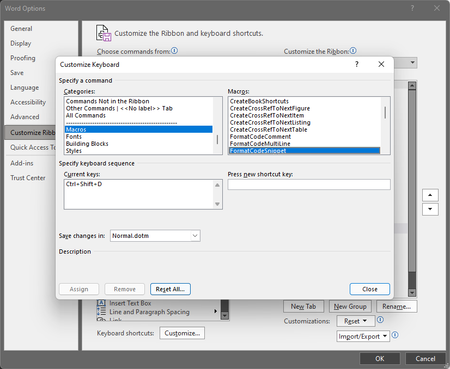
Stefan_Blom Yes, I am saving my macros to the Normal template--at least I think that is the case. I am creating the keyboard shortcuts using a macro like this: 'CreateBookShortcuts 'Assigns convenient shortcut keys to the book macros Sub CreateBookShortcuts() CustomizationContext = NormalTemplate KeyBindings.Add _ KeyCode:=BuildKeyCode(wdKeyControl, wdKeyShift, wdKeyH), _ KeyCategory:=wdKeyCategoryCommand, _ Command:="FormatHTMLTag" KeyBindings.Add _ KeyCode:=BuildKeyCode(wdKeyControl, wdKeyShift, wdKeyP), _ KeyCategory:=wdKeyCategoryCommand, _ Command:="FormatCSSProp" KeyBindings.Add _ KeyCode:=BuildKeyCode(wdKeyControl, wdKeyShift, wdKeyV), _ KeyCategory:=wdKeyCategoryCommand, _ Command:="FormatCSSVal" This macro is part of a module `BookMacros` that lives in the Normal' template's 'Modules' folder. When I inspect keystroke shortcuts through File->Options->Customize Ribbon, I see that the keystroke shortcuts I have defined do indeed show up: However, the keystroke shortcuts do NOT work!! The only way I can get them to run is to manually run them from the Developer->Macros dialog. This is really strange. These shortcuts worked fine previous to my recent transition to Windows 11. Thanks in advance for any help you can provide. Note: I have tried "Reset Macros..." and then re-running the macro to redefine the keystroke shortcuts. However, that didn't work.5.4KViews0likes6CommentsRe: Macro keyboard shortcuts not working in new macro template document
Stefan_Blom Was there ever a resolution to this question? I am experiencing the same issue as Susan. The issue seems to have started with the migration to Windows 11. Keystroke shortcuts for my custom macros (part of the Normal template) show up in File->Options->Customize Ribbon->Customize keyboard shortcuts (button). However, the keyboard shortcuts do NOT work! However, I am able to manually run the macros through the Developer->Macros dialog box. Please help!5.5KViews0likes8Comments
Recent Blog Articles
No content to show