User Profile

gongyan
Copper Contributor
Joined Dec 24, 2021


User Widgets
Recent Discussions
Re: Cannot Use Newer Version of PowerShellGet in PowerShell 5.1.
Ukiman1014 I think you can refer to the about_Command_Precedence description, which describes how PowerShell determines the command to run. You can use the prefix (-Prefix parameter of the Import-Module command) when manually importing the new PowerShellGet module, as follows: Import-Module -Name PowerShellGet -Version "2.2.5" -Prefix now_psg #I am using the 1.0.0.1 version of PowerShellGet for demonstration, and the 2.2.5 version of PowerShellGet is not installed on the Windows system I am using now Get-Module PowerShellGet|fl Name : PowerShellGet Path : C:\Program Files\WindowsPowerShell\Modules\PowerShellGet\1.0.0.1\PSModule.psm1 Description : PowerShell module with commands for discovering, installing, updating and publishing the PowerShell artifacts like Modules, DSC Re sources, Role Capabilities and Scripts. ModuleType : Script Version : 1.0.0.1 NestedModules : {} #Note here, the commands of this module are prefixed with now_psg ↓↓↓↓↓↓↓↓↓↓↓↓↓↓↓↓↓↓↓↓↓↓↓↓↓↓↓↓↓↓↓↓↓↓↓↓↓↓↓↓↓↓↓↓↓↓↓↓↓↓↓↓↓↓↓↓↓↓↓↓↓↓↓↓↓↓↓↓↓↓↓↓ ExportedFunctions : {Find-now_psgCommand, Find-now_psgDscResource, Find-now_psgModule, Find-now_psgRoleCapability...} In this way, you can use the install-now_psgModule command to install the modules you need3.4KViews0likes0CommentsRe: Cannot Use Newer Version of PowerShellGet in PowerShell 5.1.
Ukiman1014 Hello, my answer is to translate Chinese into English through Google translation service, please forgive me, I can't speak English. I tried to run the command you mentioned using PowerShell5.1 on a brand new unconfigured Windows Server 2016, but I did not observe the exception you mentioned. The book "Windows Server 2016 Automation with PowerShell Cookbook Second Edition" mentions that "PowerShellGet, formerly known as OneGet, is a module that provides you with an easy way to discover, install, and update PowerShell modules and scripts. It relies on packagmanagement module, and the packagmanagement module depends on NuGet. It is an open source project at https://github.com/powershell/powershellget." I'm guessing you may not have updated NuGet. Here are the commands I used and some output: PS C:\Users\Administrator> Import-Module powershellget PS C:\Users\Administrator> Get-Module -Name powershellget ModuleType Version Name ExportedCommands ---------- ------- ---- ---------------- Script 1.0.0.1 powershellget {Find-Command, Find-DscResource, Find-Module, Find-RoleCapability...} PS C:\Users\Administrator> Install-PackageProvider -Name NuGet -Force -Verbose PS C:\Users\Administrator>#Here I run exit to reopen the PowerShell command line program PS C:\Users\Administrator> Get-PackageProvider -Name nuget|Select-Object -Property version Version ------- 2.8.5.208 PS C:\Users\Administrator> Install-Module -Name PowerShellGet -Verbose -Force 详细信息: 模块“PowerShellGet”已成功安装到路径“C:\Program Files\WindowsPowerShell\Modules\PowerShellGet\2.2.5”中。 PS C:\Users\Administrator>#Here I run exit to reopen the PowerShell command line program PS C:\Users\Administrator> Import-Module powershellget PS C:\Users\Administrator> Get-Module -Name powershellget |Select-Object -Property version Version ------- 2.2.5 PS C:\Users\Administrator> Get-PSRepository Name InstallationPolicy SourceLocation ---- ------------------ -------------- PSGallery Untrusted https://www.powershellgallery.com/api/v2 PS C:\Users\Administrator> Get-Module powershellget,packageManagement -ListAvailable 目录: C:\Program Files\WindowsPowerShell\Modules ModuleType Version Name ExportedCommands ---------- ------- ---- ---------------- Script 1.4.8.1 PackageManagement {Find-Package, Get-Package, Get-PackageProvider, Get-PackageSource...} Binary 1.0.0.1 PackageManagement {Find-Package, Get-Package, Get-PackageProvider, Get-PackageSource...} Script 2.2.5 PowerShellGet {Find-Command, Find-DSCResource, Find-Module, Find-RoleCapability...} Script 1.0.0.1 PowerShellGet {Install-Module, Find-Module, Save-Module, Update-Module...} PS C:\Users\Administrator> Install-Module microsoft.graph.authentication -AllowPrerelease Untrusted repository You are installing the modules from an untrusted repository. If you trust this repository, change its InstallationPolicy value by running the Set-PSRepository cmdlet. Are you sure you want to install the modules from 'PSGallery'? [Y] 是(Y) [A] 全是(A) [N] 否(N) [L] 全否(L) [S] 暂停(S) [?] 帮助 (默认值为“N”): a PS C:\Users\Administrator> PS C:\Users\Administrator>#Here I run exit to reopen the PowerShell command line program PS C:\Users\Administrator> Import-Module microsoft.graph.authentication PS C:\Users\Administrator> Get-Module microsoft.graph.authentication |fl Name : microsoft.graph.authentication Path : C:\Program Files\WindowsPowerShell\Modules\microsoft.graph.authentication\2.0.0\Microsoft.Graph.Authentication.psm1 Description : Microsoft Graph PowerShell Authentication Module. ModuleType : Script Version : 2.0.0 NestedModules : {Microsoft.Graph.Authentication} ExportedFunctions : {Find-MgGraphCommand, Find-MgGraphPermission} ExportedCmdlets : {Add-MgEnvironment, Connect-MgGraph, Disconnect-MgGraph, Get-MgContext...} ExportedVariables : ExportedAliases : {Connect-Graph, Disconnect-Graph, Invoke-GraphRequest, Invoke-MgRestMethod} PS C:\Users\Administrator> good luck!3KViews0likes0CommentsRe: Sorry, we couldn't find your file. Was it moved, renamed, or deleted?
Jianzhong_Hill 看你的昵称,你好像是中国人?如果是的话,我也是。 你的问题在于这一行代码: $document = $wordObject.Documents.Open($wordPath) $wordPath变量是不能被open函数识别的,你应该这样写: $document = $wordObject.Documents.Open($wordPath.fullname) 我在我自己的电脑上解决了你说的文件不存在的报错,但是随之而来的是新的错误: Exception Caught: System.Runtime.InteropServices.COMException (0x80010001): 被呼叫方拒绝接收呼叫。 (异常来自 HRESULT:0x80010001 (RPC_E_CALL_REJECTED)) 在 System.Runtime.InteropServices.Marshal.ThrowExceptionForHRInternal(Int32 errorCode, IntPtr errorInfo) 在 System.Management.Automation.ComInterop.ComRuntimeHelpers.CheckThrowException(Int32 hresult, ExcepInfo& excepInfo, ComMethodDesc method, Object[] args, UInt32 argErr) 在 CallSite.Target(Closure , CallSite , ComObject , Object , Int32 ) 在 System.Dynamic.UpdateDelegates.UpdateAndExecute3[T0,T1,T2,TRet](CallSite site, T0 arg0, T1 arg1, T2 arg2) 在 System.Dynamic.UpdateDelegates.UpdateAndExecute3[T0,T1,T2,TRet](CallSite site, T0 arg0, T1 arg1, T2 arg2) 在 System.Management.Automation.Interpreter.DynamicInstruction`4.Run(InterpretedFrame frame) 在 System.Management.Automation.Interpreter.EnterTryCatchFinallyInstruction.Run(InterpretedFrame frame) 今天的时间不够了,明天我在尝试解决这个问题。 今天终于解决了这个问题,途中我被我自己的一个误操作困扰了很久,但是最终解决掉了,值得吐槽的是,com真难用,明明是参数1的错误,非要说第二个参数错了。 我的代码: $folderPath = "D:\工作\temp\2023年4月19日" $folderPathOut = "D:\工作\temp\2023年4月19日" $wordFiles = Get-ChildItem -Path $folderPath -Filter "*.docx" try{ Get-Process -Name "*word*" |Stop-Process #避免之前运行失败的word程序影响 $wordObject = new-object -ComObject "Word.Application" } catch { Write-Host "Exception Caught: " $_.Exception -ForegroundColor Red exit } foreach ($file in $wordFiles){ $pdfPath = Join-Path -Path $folderPathOut -ChildPath ($file.BaseName + ".pdf") try{ $document = $wordObject.Documents.Open($file.FullName) } catch { Write-Host "打开word文件: " $_.Exception -ForegroundColor Red continue } try{ $document.SaveAs($pdfPath, 17) } catch { Write-Host "另存为: " $_.Exception -ForegroundColor Red } finally{ $document.Close() } } $wordObject.Quit() Remove-Variable wordObject 我在我的电脑上测试通过:Windows 10 企业版,word 20191.9KViews0likes0CommentsRe: Get-Counter: Could not find any performance counter sets on the 192.168.50.101 computer: error 80000
Yes, exactly as you might expect. It is because port 445 of the firewall on the virtual machine is not released. At the same time, I also encountered the c0000bdb error you mentioned. I was confused at first because the get-counter command doesn't have parameters to pass username and password. Finally, I suddenly realized that I opened Windows Explorer, entered "\\virtual machine IP address" in the address bar, then entered the corresponding account password, and selected "Save Credentials", and then I ran the command again, this time it was successful! Finally, you are so awesome, very professional and enthusiastic, thank you very much, I wish you all the best in your work and life.1.9KViews0likes0CommentsGet-Counter: Could not find any performance counter sets on the 192.168.50.101 computer: error 80000
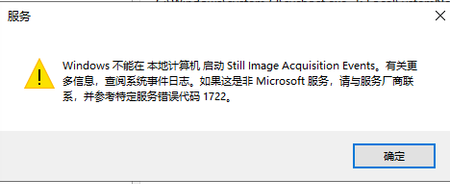
I use hyper-v to virtualize a Windows Server 2016 on my Windows 10. I ensured that the network between the host machine and the virtual machine is unblocked, as follows: PS 2023年5月3日 16:44:41 C:\Users\gyj> $server_ip 192.168.50.101 PS 2023年5月3日 16:54:47 C:\Users\gyj> ping $server_ip 正在 Ping 192.168.50.101 具有 32 字节的数据: 来自 192.168.50.101 的回复: 字节=32 时间<1ms TTL=128 来自 192.168.50.101 的回复: 字节=32 时间<1ms TTL=128 来自 192.168.50.101 的回复: 字节=32 时间<1ms TTL=128 来自 192.168.50.101 的回复: 字节=32 时间<1ms TTL=128 192.168.50.101 的 Ping 统计信息: 数据包: 已发送 = 4,已接收 = 4,丢失 = 0 (0% 丢失), 往返行程的估计时间(以毫秒为单位): 最短 = 0ms,最长 = 0ms,平均 = 0ms PS 2023年5月3日 16:55:01 C:\Users\gyj> But when I use command like below, it returns error: PS 2023年5月3日 16:22:17 C:\Users\gyj> Get-Counter -ListSet * -ComputerName $server_ip Get-Counter: Could not find any performance counter sets on the 192.168.50.101 computer: error 800007d0. Verify that the 192.168.50.101 computer exists, that it is discoverable, and that you have sufficient privileges to view performance counter data on that computer. https://learn.microsoft.com/en-us/powershell/module/microsoft.powershell.diagnostics/get-counter?view=powershell-7.2#parameters According to the introduction, it can be used without configuring remote commands. I don't know why this error occurs, and there are almost no relevant instructions on the Internet. Tried restarting the virtual machine, but that didn't solve the problem. Please take a look, thank you very much. I think, I probably know why, because the WiaRpc service did not start successfully. Found this thanks to this code sample. https://learn.microsoft.com/en-us/windows/win32/perfctrs/writing-performance-data-to-a-log-file But a new problem appeared: I couldn't start the WiaRpc service, I tried many methods. [Windows Server 2016]: PS C:\Users\Administrator\Documents> Get-Service "WiaRpc"|Start-Service Start-Service : 无法启动服务“Still Image Acquisition Events (WiaRpc)”。 + CategoryInfo : OpenError: (System.ServiceProcess.ServiceController:ServiceController) [Start-Service], ServiceCommandException + FullyQualifiedErrorId : StartServiceFailed,Microsoft.PowerShell.Commands.StartServiceCommand [Windows Server 2016]: PS C:\Users\Administrator\Documents> Windows could not start still image Acquisition Events on Local Computer. Consult the system event log for more information. If this is a non-Microsott service, please contact your service vendor and refer to Service Specific Error Code 1722. The Still Image Acquisition Events service terminated due to the following service-specific error: The RPC server is unavailable. But in fact, the rpc service is running. PS C:\Users\Administrator> Get-Service -Name "*rpc*" Status Name DisplayName ------ ---- ----------- Running RpcEptMapper RPC Endpoint Mapper Stopped RpcLocator Remote Procedure Call (RPC) Locator Running RpcSs Remote Procedure Call (RPC) Stopped WiaRpc Still Image Acquisition Events PS C:\Users\Administrator> Now, there's really nothing I can do.Solved2.5KViews0likes2CommentsRe: Regarding the problem of -match not updating the $Matches variable after matching
farismalaeb Thank you for your answer. I discovered later that this is caused by the differences in the implementation of regularization in different programming languages. I use notepad++ software to verify whether the regular expressions can match, but some regular expressions cannot match the expected results correctly in PowerShell. And in the case of PowerShell, using the -match operator to match and the [regex::] class to match, in some cases, it is not possible to get consistent results.4.7KViews0likes0CommentsRe: Regarding the problem of -match not updating the $Matches variable after matching
farismalaeb It is possible to obtain the desired result correctly by matching alone; an example is as follows: $a = '<tr><td align="left"><div class="pages"><a href="javascript:#" class="gray"><</a><a href="javascript:#" class="gray">上一頁</a><a><U>1</U></a><a href="../../../read.php?tid=4651187&page=2">2</a>' $a -match 'a href="\.\./\.\./\.\./.+?(?=">2<)' $Matches out True Name Value ---- ----- 0 a href="../../../read.php?tid=4651187&page=2 So, I guess this may be more related to the scope of the variable, but I cannot change the scope of $Matches. Can the -match operation save the result to other custom variables instead of updating it to the $Matches variable?4.9KViews0likes2CommentsRe: Regarding the problem of -match not updating the $Matches variable after matching
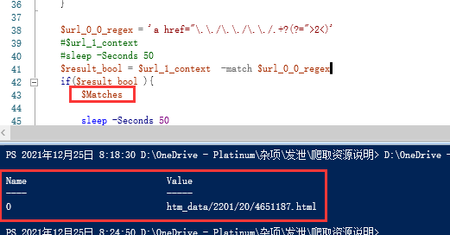
farismalaeb Hello, thank you for your reply! $url_1_context is the html source code of a web page. I use the regular expression $url_0_0_regex to match, and output the value of $Matches by judging the result of -match if($result_bool ), but obviously, the value of $Matches is another- The value after the match operation; it matches another regular expression, but does not match the regular expression represented by $url_0_0_regex. In addition, it should be noted that the code here is in a function (get_content), and this function (get_content) is called by another function (get_url_name), before calling this function (get_content), once- match operation.4.8KViews0likes0CommentsRegarding the problem of -match not updating the $Matches variable after matching
这是我代码的一部分 $Matches = 0 $url_0_0_regex = '(?<=a href="\.\./\.\./\.\./).+?(?=">2<)' #$url_1_context #sleep -Seconds 50 $result_bool = $url_1_context -match $url_0_0_regex if($result_bool ){ $Matches sleep -Seconds 50 After I set $Matches to 0, and after the -match operation succeeded, I output the value of $Matches, but it still showed 0 instead of the result of a successful match. According to the document description of the comparison operator, the value of $Matches will be automatically updated after the -match operation is successful. I don't understand what happened in the middle that caused this situation. I have tried [regex]::, but the result of the Match function of [regex]:: makes me desperate. [regex]:: does not seem to support the use of backward matching in regular expressions. Please help me, thanks a lot!Solved5.4KViews0likes5Comments
Recent Blog Articles
No content to show