User Profile

nidhiachhaa9
Brass Contributor
Joined Aug 02, 2021


User Widgets
Recent Discussions
Re: Need to Lock only certain cells (Excel)
Firstly, unlock all the cells in your worksheet by Pressing Ctrl + 1>>Protection>>Uncheck Locked option. Next press the Control key and select all the cells you want to lock. Press Ctrl+1>>Protection>>Locked(checkmark the box). This will Lock the selected cells. Now you can protect your worksheet from the review tab. This will lock your selected cells only1.1KViews0likes0CommentsRe: Excel Online Conditional Formatting - Unable to Edit Existing Rules
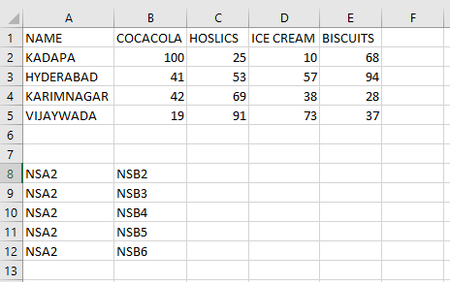
Malleshg0072035 Hi, this involves a bit of work. Just follow the steps below: 1. In cell A8, type NSA2, and in Cell B8 type NSB2 NS is just 2 random alphabets, now you need to use the find and replace option. Find "NS" and replace with "=" You will get your answer as: So basically what we are doing is referring to the cell addresses and getting the answer. This shall be quicker method to use24KViews0likes0CommentsRe: excel date formatting and sorting
Hi, this could be because any field could makes it a text field and so you are only able to sort it with the first 2 digits. (If you look at the filter option, it would show text filters) You need to make sure the format is Date. You can use Custom Number format "dd-mmm-yyyy hh: mm" to display in the format you want. Make sure you have no am or pm displayed after the date and time.934Views0likes0CommentsRe: flash fill not working
Hi, make sure you have the "Show Paste Options button when content is pasted" option ticked. Excel options>>Advanced>>Cut Copy Paste>>Show Paste Options button, when content is pasted. This will ensure the autofill box pops up. Else you can use the formula =A1+1 and drag the formula till the last cell, you want the serial numbers5.2KViews0likes2Comments

Recent Blog Articles
No content to show