User Profile

Ronak_Shah
Copper Contributor
Joined Jul 18, 2021


User Widgets
Recent Discussions
Re: How to access Null fields in Parsers
GaryBushey Hi, Thanks for your response Actually yes, the system that is sending the data have a list of the fields it is sending, But when we pass the data through API to the Azure sentinel, Azure while parsing the data, changes the field names. Like for eg. In our system we sent fields "name" --> then azure checked for the values of those fields --> If the values are null for all the events, then that field is removed --> If the field is not null, then that field is present in azure, with a new name say "name_s" So our concern is, if the fields is removed by azure, how do we know whether that field will come with the name of "name_s" or "something_else"?, so that we can then write column_ifexists('name_s','') or column_ifexists('something_else','')1.8KViews0likes1CommentHow to prevent fields from trimming
We are getting "The following fields' values <Fields> of type <Log_Type> have been trimmed to the max allowed size, 32766 bytes. Please adjust your input accordingly.". However, we want to retain full value and don't want Azure to trim our data automatically. Can someone help us to determine how we can do this?4.9KViews0likes4CommentsRe: How to access Null fields in Parsers
GaryBushey Hi, Thanks for your response Actually, the command column_ifexists(), will be implemented in the parsers, and it will be useful when we actually know the column name. In column_ifexists('column_name',''), it will check if the 'column_name' column is present or not, if not then null value will be added, But this is all possible when we actually know the 'column_name'. And as Azure has removed the column with null field, so it has actually removed our access to the column_name, So how do we know then what to actually type in the 'column_name' name. So is their any method in which, we don't allow azure to remove that column's with null fields.1.8KViews0likes3CommentsRe: Internal fields have multiple values in Parsers
deshantshukla Hi, Thanks for your response Actually in the above method suggested, it will be only possible if we know the length of the list, or we know how many dictionary items are present in the list. If in the example I provided a = [ {b: null, c: "string1"}, {b: "string2", c: "string3"} ..... {b: "string3", c: "null"}] we don't know the length, then how should I implement the logic.1.5KViews0likes1CommentIn Azure Workbooks Bar chart x-axis labels are half-displayed or not displayed
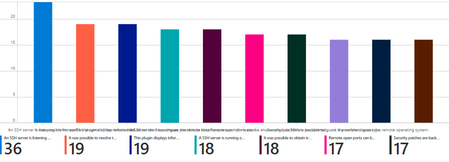
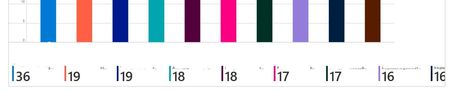
Hi, We are working on creating a custom connector to ingest the data in Azure Sentinel. We are now working on workbooks. But in workbooks, in the graphs, we are facing problem, that x-axis labels are getting half-displayed or are not getting displayed. When we are using Bar chart as the query visualization, then the x-axis labels are getting overlapped, as shown below. And when we are using Bar Chart(Categorical) as the visualization, then few x-axis labels are half-displayed, while few are now getting displayed. Can someone help me, how to show all the x-axis labels completely visible?1.8KViews0likes2CommentsIn Azure Workbooks Bar chart legends are getting hidden
Hi, We are working on creating a custom connector to ingest the data in Azure Sentinel. We are now working on workbooks. But in workbooks, in the graphs, we are facing problem, that few legends are getting hidden. As you can see in the above image, out of 10, only 9 are displayed, and that also not complete, even though the graph panel width is set to 100%. And if we decrease the tab size, or zoom in, then more no. of legends are getting hidden. same applies to zoom out, if we zoom out to 80% approx, then all the 10 legends will be displayed. Can someone help me to solve the this problem, and make all the legends visible irrespective of screen size?986Views1like0CommentsRe: Data Ingestion speed in Azure Sentinel
CliveWatson, We are using Azure Function (Python). We have followed the same link you provided above.However, we cannot identify any best practices to follow to make sure performance is improved in the data collection. Can you please help us with any checklist or best practices to follow to make the data collection intact and optimized?1.6KViews0likes0CommentsHow to access Null fields in Parsers
Hi, We are working on creating a custom connector to ingest the data in Azure Sentinel. We are now working on parsers, and we are trying to replicate the data fields as in Splunk. In Splunk, even though if all the values of a particular field, say name, are null in all the events, then that field will be shown null in all the events. But in Azure if all the events, of a particular field is null, then Azure removes that particular field. So as we want to replicate fields to as that of parsers, we can't access that particular field, say name, as azure removed that field. So In parser's if we create a new field statically, name="", then that field will be present. But if the value comes in any 1 event out of 1000's, then this static representation would cause Data Loss. So, Can someone help me determine how can we import those null fields into our logs, or method can we use to get those null fields, which Azure removed.2KViews0likes5CommentsInternal fields have multiple values in Parsers
Hi, We are working on creating a custom connector to ingest the data in Azure Sentinel. We are now working on parsers, and we are trying to replicate the data fields as in Splunk. In Splunk, the inner fields of a List of Dictionaries can be individually represented. say for eg. a is a list of dictionaries a = [ {b: null, c: "string1"}, {b: "string2", c: "string3"} ] In Splunk we can represent a{}.b = null, a{}.b="string2" But we are trying to do the same in Azure, and we actually are not able to do it, we can give column a{}.b only one value, from the list of values, say a{}.b=null or string2 Can someone please help me determine how to access inner of fields of a multi valued fields, or how to represent the multiple values under one name field, say a{}.b?1.6KViews0likes3CommentsHow to link a Azure workbook to another by name
Hi, We are working on creating a custom connector to ingest the data in Azure Sentinel. We are now working on workbooks, and want to create a option of opening a new workbook, say secondary workbook, after clicking on Main workbook. But when we are trying to link the secondary workbook, on to the main, theirs just option of Entering static template ID of the second, but if we deploy the workbooks, the problem is the template ID of the workbooks is changing. Is their any way to keep the secondary workbooks template id constant, or linking the workbooks by name. Can someone please help me determine how to link one workbook to another by name, or template ID of second, provided by keeping the second workbook's template id constant?730Views0likes0CommentsData Ingestion speed in Azure Sentinel
Hi, We are working on creating a custom connector to ingest the data in Azure Sentinel. We are trying to replicate a product that we made in Splunk. However, the time taken to ingest our data in Azure Sentinel is significantly higher than in Splunk. For ingesting 1.5K-2K data splunk takes a minute while Azure Sentinel takes 10-15 mins. Is there any way to improve ingestion speed in Azure?1.7KViews0likes2CommentsHow many and what resources to keep in the ARM template
Hi, We are working on creating a custom connector to ingest the data in Azure Sentinel. We want to add resources in the azure deploy JSON template file. We are taking reference of SentinelOne data connector for the same. However, we are stuck at one point, wherein we are not getting How many and what resources to keep in the azuredeploy ARM template (https://github.com/Azure/Azure-Sentinel/blob/master/DataConnectors/SentinelOne/azuredeploy_Connector_SentinelOneAPI_AzureFunction.json). Can someone please help me determine how many and what resources to keep in the azuredeploy json file for a custom connector (https://github.com/Azure/Azure-Sentinel/blob/master/DataConnectors/Templates/Connector_REST_API_AzureFunctionApp_template/azuredeploy_DataConnector_API_AzureFunctionApp_template.json)?657Views0likes0CommentsHow to generate the function app link to be provided for Manual deployment
Hi, We are working on creating a custom connector to ingest the data in Azure Sentinel. We want to provide function app code link to customers for function app manual deployment in the connector's configuration page. We are taking reference of SentinelOne data connector for the same. However, we are stuck at one point, wherein we are not getting proper information for generating the link for the Function App that is placed in the SentinelOne_API_FunctionApp.json under the 'Deploy a Function App' (https://github.com/Azure/Azure-Sentinel/blob/master/DataConnectors/SentinelOne/SentinelOne_API_FunctionApp.json#L106). Can someone please help me determine how to generate such a link (https://aka.ms/sentinel-SentinelOneAPI-azuredeploy)) for our custom connector?780Views0likes0CommentsHow to generate the template link for the 'Deploy to Azure' button
Hi, We are working on creating a custom connector to ingest the data in Azure Sentinel. We want to leverage the ARM template of Azure Sentinel to provide an interface to the customers for the connector's configuration. We are taking reference of SentinelOne data connector for the same. However, we are stuck at one point, wherein we are not getting proper information for generating the link for the ARM template that is placed in the SentinelOne_API_FunctionApp.json besides the 'Deploy to Azure' button (https://github.com/Azure/Azure-Sentinel/blob/master/DataConnectors/SentinelOne/SentinelOne_API_FunctionApp.json#L106). Can someone please help me determine how to generate such a link (https://aka.ms/sentinel-SentinelOneAPI-azuredeploy) for our custom connector?714Views0likes0Comments
Recent Blog Articles
No content to show