User Profile

dalonsos
Copper Contributor
Joined Jun 23, 2021


User Widgets
Recent Discussions
Re: Change Published Date for News Post
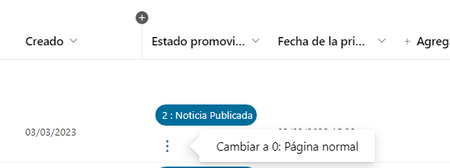
grant_jenkins I found a shortcut using the promoted status column If you change the page to promoted status 0, then change it to 1 (unpublished news) and publish the news again, then the "first publication date" is changed to current date. In order to modify the promoted status column from the web interface I use this json like column format: (change Spanish labels to English) { "$schema": "https://developer.microsoft.com/json-schemas/sp/v2/column-formatting.schema.json", "elmType": "div", "style": { "flex-wrap": "wrap", "display": "flex", "flex-direction": "row" }, "children": [ { "elmType": "div", "txtContent": "=if(@currentField == 0 ,'0 : Página normal' , if(@currentField == 1, '1 : Noticia (SinPublicar)' , if(@currentField == 2 , '2 : Noticia Publicada','') ) )", "style": { "box-sizing": "border-box", "padding": "4px 8px 5px 8px", "display": "flex", "border-radius": "16px", "height": "27px", "align-items": "center", "white-space": "nowrap", "overflow": "hidden", "margin": "4px 4px 4px 4px", "border": "1px solid" }, "attributes": { "class": "=if(@currentField == 0 ,'ms-fontColor-themePrimary ms-borderColor-themePrimary ms-bgColor-white' , if(@currentField == 1, 'ms-fontColor-themePrimary ms-borderColor-themePrimary ms-bgColor-themeLighter' , if(@currentField == 2 , 'ms-fontColor-white ms-borderColor-themePrimary ms-bgColor-themePrimary','') ) )" } }, { "elmType": "div", "style": { "font-size": "18px", "cursor": "pointer", "padding": "10px", "border-radius": "25%", "display": "=if(@currentField == 2 || @currentField == 1 , 'none' ,'')" }, "attributes": { "iconName": "MoreVertical", "class": "ms-fontColor-themePrimary ms-bgColor-themeLighter--hover" }, "customCardProps": { "openOnEvent": "click", "directionalHint": "rightCenter", "isBeakVisible": true, "formatter": { "elmType": "div", "txtContent": "Cambiar a 1: Noticia Sin Publicar", "style": { "padding": "10px 20px 10px 20px", "cursor": "pointer" }, "attributes": { "class": "ms-bgColor-themeLighter--hover" }, "customRowAction": { "action": "setValue", "actionInput": { "PromotedState": "1" } } } } }, { "elmType": "div", "style": { "font-size": "18px", "cursor": "pointer", "padding": "10px", "border-radius": "25%", "display": "=if(@currentField == 0 , 'none' ,'')" }, "attributes": { "iconName": "MoreVertical", "class": "ms-fontColor-themePrimary ms-bgColor-themeLighter--hover" }, "customCardProps": { "openOnEvent": "click", "directionalHint": "rightCenter", "isBeakVisible": true, "formatter": { "elmType": "div", "txtContent": "Cambiar a 0: Página normal", "style": { "padding": "10px 20px 10px 20px", "cursor": "pointer" }, "attributes": { "class": "ms-bgColor-themeLighter--hover" }, "customRowAction": { "action": "setValue", "actionInput": { "PromotedState": "0" } } } } } ] }1.1KViews0likes0CommentsRe: Problems editing hub site navigation
In my case the problem was solved by adding a new link from powershell. Add-PnPNavigationNode -Title $Title -Url $URL -Location "TopNavigationBar" Also in the navigation page settings /_layouts/15/AreaNavigationSettings.aspx disable/enable the cache Initially after running the script the top navigation disappeared but after refreshing a few times the navigation appeared again and this time correctly. That is, it lets me edit, add, and remove links normally.10KViews0likes0Comments
Recent Blog Articles
No content to show