Forum Discussion

RE: CDX Throws “Unauthorized”
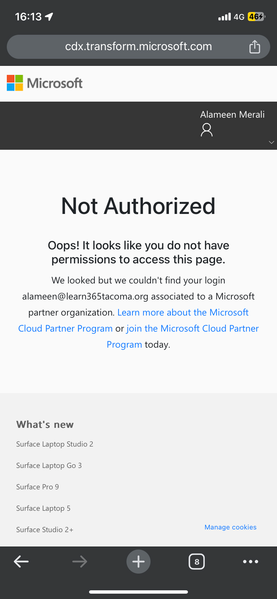

FOB_AlexBaker I will say that I have seen the same -- I waited a few days later and then it worked - my guess there was code work done on the site?? - also this may seem like a step backwards but i have rolled back edge to "before it was a chrome clone" and the rendering of the site was much better... so it could be browser related - just something to try not a solution - good luck let me know if you get your issue resolved -- i still have one user that cannot access this portal...

I was able to fix by the following suggestion from Microsoft
Andrew Posadas (Microsoft Transform Program)
Sep 12, 2024, 08:21 GMT-5
Hello Alex Baker,
You may need to run these Powershell scripts to manually add some required service principals and then attempt to provide consent. If you are an admin in your organization, please complete these steps. Otherwise, contact your admin and inform them of this request:
install-module AzureAD
connect-azuread -tenantid [Your tenant ID]
New-AzureADServicePrincipal -AppId fa3d9a0c-3fb0-42cc-9193-47c7ecd2edbd
New-AzureADServicePrincipal -AppId 4990cffe-04e8-4e8b-808a-1175604b879f
Provide consent - https://login.microsoftonline.com/common/oauth2/authorize?response_type=id_token&prompt=consent&client_id=fe6aa35b-7da8-44fd-a44e-e2d4bafbdab5&redirect_uri=https%3A%2F%2Fcdx.transform.microsoft.com&state=a9985c9c-6c9a-4b65-a444-1e3aa90d27a4&client-request-id=6b3f4e71-ed02-406c-96f2-0a7e3c16ea98&x-client-SKU=Js&x-client-Ver=1.0.17&nonce=09492f5a-fb1a-412c-b24a-ba1704900924
I was able to log in to the tenant and run these through the cloud CLI which fixed my issue.
 SerggSep 17, 2024Iron ContributorI finally found a way to get the CDX portal open on my PC. To make the CDX website work, you need to trigger Microsoft MFA in the same browser before accessing the CDX portal. CDX portal somehow does not like third-party MFA (like DUO) or implied MFA (like trusted Azure joined PC) but not generate an additional MS MFA prommpteither.
The MS MFA can be triggered using some Azure admin features; for example, in the PIM, when one pick and requests the privileged role. Once Azure PIM requests additional authorisation (e.g. MS MFA with Authenticator), I was able to access CDX portal. You mush use the same browser window to open CDP portal; CDX no longer reports authorization errors.
You need to repeat the process each time. Good luck!
P.S. I just found that accessing My Sign-Ins | Security Info | Microsoft.com https://mysignins.microsoft.com/security-info forces MFA and makes CDX connect. anakar9Sep 20, 2024Copper ContributorNew Partner. Tried above. No go.
On another partner tenant - working without any issues.- JillArmourMicrosoftSep 18, 2024
Community Manager
Sergg thank you so much for coming back and posting the solution you found! Much appreciated and I'm sure other partners will feel the same.
Thanks for being part of the community!
