azure database for postgresql
131 TopicsPremium SSD v2 Is Now Generally Available for Azure Database for PostgreSQL
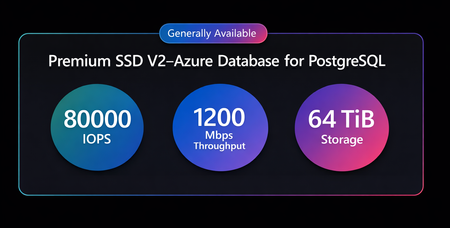
We are excited to announce the General Availability (GA) of Premium SSD v2 for Azure Database for PostgreSQL flexible server. With Premium SSD v2, you can achieve up to 4× higher IOPS, significantly lower latency, and better price-performance for I/O-intensive PostgreSQL workloads. With independent scaling of storage and performance, you can now eliminate overprovisioning and unlock predictable, high-performance PostgreSQL at scale. This release is especially impactful for OLTP, SaaS, and high‑concurrency applications that require consistent performance and reliable scaling under load. In this post, we will cover: Why Premium SSD v2: Core capabilities such as flexible disk sizing, higher performance, and independent scaling of capacity and I/O. Premium SSD v2 vs. Premium SSD: A side‑by‑side overview of what’s new and what’s improved. Pricing: Pricing estimates. Performance: Benchmarking results across two workload scenarios. Migration options: How to move from Premium SSD to Premium SSD v2 using restore and read‑replica approaches. Availability and support: Regional availability, supported features, current limitations, and how to get started. Why Premium SSD v2? Flexible Disk Size - Storage can be provisioned from 32 GiB to 64 TiB in 1 GiB increments, allowing you to pay only for required capacity without scaling disk size for performance. High Performance -Achieve up to 80,000 IOPS and 1,200 MiB/s throughput on a single disk, enabling high-throughput OLTP and mixed workloads. Adapt instantly to workload changes: With Premium SSD v2, performance is no longer tied to disk size. Independently tune IOPS and throughput without downtime, ensuring your database keeps up with real-time demand. Free baseline performance: Premium SSD v2 includes built-in baseline performance at no additional cost. Disks up to 399 GiB automatically include 3,000 IOPS and 125 MiB/s, while disks sized 400 GiB and larger include up to 12,000 IOPS and 500 MiB/s. Premium SSD v2 vs. Premium SSD: What’s new? Pricing Pricing for Premium SSD v2 is similar to Premium SSD, but will vary depending on the storage, IOPS, and bandwidth configuration set for a Premium SSD v2 disk. Pricing information is available on the pricing page or pricing calculator. Performance Premium SSD v2 is designed for IO‑intensive workloads that require sub‑millisecond disk latencies, high IOPS, and high throughput at a lower cost. To demonstrate the performance impact, we ran pgbench on Azure Database for PostgreSQL using the test profile below. Test Setup To minimize external variability and ensure a fair comparison: Client virtual machines and the database server were deployed in the same availability zone in the East US region. Compute, region, and availability zones were kept identical. The only variable changed was the storage tier. TPC-B benchmark using pgbench with a database size of 350 GiB. Test Scenario 1: Breaking the IOPS Ceiling with Premium SSD v2 Premium SSD v2 eliminates the traditional storage bottleneck by scaling linearly up to 80,000 IOPS, while Premium SSD plateaus early due to fixed performance limits. To demonstrate this, we configured each storage tier with its maximum supported IOPS and throughput while keeping all other variables constant. Premium SSD v2 achieves up to 4x higher IOPS at nearly half the cost, without requiring large disk sizes. Note: Premium SSD requires a 32 TiB disk to reach 20K IOPS, while SSD v2 achieves 80K IOPS even on a 160 GiB disk though we used 1 TiB disk in this test for a bigger scaling factor for pgbench test. We ran pgbench across five workload profiles, ranging from 32 to 256 concurrent clients, with each test running for 20 minutes. The results go beyond incremental improvements and highlight a material shift in how applications scale with Premium SSD v2. Throughput Scaling As concurrency increases, Premium SSD quickly reaches its IOPS limits while Premium SSD v2 continues to scale. At 32 clients: Premium SSD v2 achieved 10,562 TPS vs 4,123 TPS on Premium SSD representing a 156% performance improvement. At 256 clients: At higher load, Premium SSD v2 achieved over 43,000 TPS representing a 279% improvement compared to the 11,465 TPS observed on Premium SSD. Latency Stability Throughput is an indication of how much work is done while latency reflects how quickly users experience it. Premium SSD v2 maintains consistently low latency even as workload increases. Reduced Wait Times: 61–74% lower latency across all test phases. Consistency under Load: Premium SSD latency increased to 22.3 ms, while Premium SSD v2 maintained a latency of 5.8 ms, remaining stable even under peak load. IOPS Behavior The table below illustrates the IOPS behavior observed during benchmarking for both storage tiers. Dimension Premium SSD Premium SSD v2 IOPS Lower baseline performance, Hits limits early ~2× higher IOPS at low concurrency, Up to 4× higher IOPS at peak load IOPS Plateau Throughput stalls at ~20k IOPS for 64 clients -256 clients Scales from ~29k IOPS (32 clients) to ~80k IOPS (256 clients) Additional Clients Adding clients does not increase throughput Additional clients continue to drive higher throughput Primary Bottleneck Storage becomes the bottleneck early No single bottleneck observed Scaling Behavior Stops scaling early True linear scaling with workload demand Resource Utilization Disk saturation leaves CPU and memory underutilized Balanced utilization across IOPS, CPU, and memory Key Takeaway Storage limits performance before compute is fully used Unlocks higher throughput and lower latency by fully utilizing compute resources Test Scenario 2: Better Performance at same price At the same price point, Premium SSD v2 delivers higher throughput and lower latency than Premium SSD without requiring any application changes. To demonstrate this, we ran multiple pgbench tests using two workload configurations 8 clients / 8 threads and 32 clients / 32 threads with each run lasting 20 minutes. Results were consistent across all runs, with Premium SSD v2 consistently outperforming Premium SSD. Both configurations cost $578/month, the only difference is storage performance. Results: Moderate concurrency (8 clients) Premium SSD v2 delivered approximately 154% higher throughput (Transactions Per Second) than Premium SSD (1,813 TPS vs. 715 TPS), while average latency decreased by about 60% (from ~11.1 ms to ~4.4 ms). High concurrency (32 clients) The performance gap increases as concurrency grows, Premium SSD v2 delivered about 169% higher throughput than Premium SSD (3,643 TPS vs. ~1,352 TPS) and reduced average latency by around 67% (from ~26.3 ms to ~8.7 ms). IOPS Behavior In the 8‑client, 8‑thread test, Premium SSD reached its IOPS ceiling early, operating at 100% utilization, while Premium SSD v2 retained approximately 30% headroom under the same workload delivering 8,037 IOPS vs 3,761 IOPS with Premium SSD. When the workload increased to 32 clients and 32 threads, both tiers approached their IOPS limits however, Premium SSD v2 sustained a significantly higher performance ceiling, delivering approximately 2.75x higher IOPS (13,620 vs. 4,968) under load. Key Takeaway: With Premium SSD v2, you do not need to choose between cost and performance you get both. At the same price, applications run faster, scale further, and maintain lower latency without any code changes. Migrate from Premium SSD to Premium SSD v2 Migrating is simple and fast. You can migrate from Premium SSD to Premium SSD v2 using the two strategies below with minimal downtime. These methods are generally quicker than logical migration strategies, such as exporting and restoring data using pg_dump and pg_restore. Restore from Premium SSD to Premium SSD v2 Migrate using Read Replicas When migrating from Premium SSD to Premium SSD v2, using a virtual endpoint helps keep downtime to a minimum and allows applications to continue operating without requiring configuration changes after the migration. After the migration completes, you can stop the original server until your backup requirements are met. Once the required backup retention period has elapsed and all new backups are available on the new server, the original server can be safely deleted. Region Availability & Features Supported Premium SSD v2 is available in 48 regions worldwide for Azure Database for PostgreSQL – Flexible Server. For the most up‑to‑date information on regional availability, supported features, and current limitations, refer to the official Premium SSD v2 documentation. Getting Started: To learn more, review the official documentation for storage configuration available with Azure Database for PostgreSQL. Your feedback is important to us, have suggestions, ideas, or questions? We would love to hear from you: https://aka.ms/pgfeedback.349Views2likes0CommentsNo code left behind: How AI streamlines Oracle-to-PostgreSQL migration
Coauthored by Jonathon Frost, Aditya Duvuri and Shriram Muthukrishnan More and more organizations are choosing PostgreSQL over proprietary database platforms such as Oracle, and for good reasons. It’s fully open source and community supported with a steady pace of innovation. It’s also preferred by developers for its extensibility and flexibility, often being used for vector data along with relational data to support modern applications and agents. Still, organizations considering a shift from Oracle to PostgreSQL, may hesitate due to the complexity that often accompanies an enterprise-scale migration project. Challenges such as incompatible data types, language mismatches, and the risk of breaking critical applications are hard to ignore. Recently, the Azure Postgres team released a new, free tool for migrations from Oracle to PostgreSQL that was designed to address these challenges, making the decision to migrate a lot less risky. The new AI-assisted Oracle-to-PostgreSQL migration tool, available in public preview via the PostgreSQL extension for Visual Studio Code, brings automation, validation, and AI-powered migration assistance into a single, user-friendly interface. Meet your new migration assistant The AI-assisted Oracle to PostgreSQL migration tool dramatically simplifies moving off Oracle databases. Accessible through VS Code, the tool uses intelligent automation, powered by GitHub Copilot, to convert Oracle database schemas and PL/SQL code into PostgreSQL-compatible formats. It can analyze Oracle schema, and automatically translate table definitions, data types, and even stored procedures/triggers into PostgreSQL equivalents speeding up migrations that once took months of manual effort. By handling the heavy lifting of schema and code conversion, this tool allows teams to focus on higher-level testing and optimization rather than tedious code rewrites. Users are already reporting that migrations are now faster, safer, and more transparent. The tool is simple, free, and ready for you to use today. Let’s take a look at how it works by covering the following: Creating the migration project Setting up the connections AI-assisted schema migration Reviewing schema migration report AI-assisted application migration Reviewing application migration report Step by step with the AI-assisted Oracle-to-PostgreSQL migration tool Step 1 – Create the project in VS Code Start by installing or updating the PostgreSQL extension for VS Code from the marketplace. Open the PostgreSQL extension panel and click “Create Migration Project.” You’ll name your project, which will create a folder to store all migration artifacts. This folder will house extracted and converted files, organized for version control and collaboration. Step 2 - Connect to your databases and AI model Before beginning the migration, you’ll need to connect to the Oracle databases and select an OpenAI model to leverage during the process. Enter the connection details for your source Oracle database, credentials, and the schema to migrate. Then, select a PostgreSQL scratch database. This temporary environment is used to validate converted DDL in real time. Next, you will be prompted to select an OpenAI model. Step 3 – Begin schema migration Once you’ve set up your connections, click the button to start the schema migration. The tool performs an extraction of all relevant Oracle database objects: tables, views, packages, procedures, and more. The extracted DDL is saved as files in your project folder. This file-based approach functions like a software project, enabling change tracking, collaboration, and source control. Enter - AI assistance This is where the AI takes over. The tool breaks the extracted schema into manageable chunks, and each chunk is processed by a multi-agent orchestration system: The Migration Specialist Agent converts Oracle DDL to PostgreSQL. The Migration Critic Agent validates the conversion by executing it in the PostgreSQL scratch database. The Documentation Agent captures follow up review tasks, metadata, and coding notes for later integration with the application code migration process. Each chunk is converted, validated, and deployed. If validation fails, the agents auto correct and retry. This self-healing loop ensures high conversion accuracy. Essentially, the tool conducts compile-time validation against a live PostgreSQL instance to catch issues early and reduce downstream surprises. Checkpoint - review the schema migration report Some complex objects, like Oracle packages with intricate PL/SQL, may not convert cleanly on the first pass. These are flagged as “review tasks.” You can invoke GitHub Copilot’s agent mode directly from VS Code to assist. The tool constructs a composite prompt with the original Oracle DDL, the partially converted PostgreSQL version, and any validation errors. This context-rich prompt enables Copilot to generate more accurate fixes. With the schema fully converted, you can compare the original Oracle and new PostgreSQL versions side by side. Right-click any object in the project folder and select “Compare File Pair." You can also use the “Visualize Schema” feature to see a graphical representation of the converted schema. This is ideal for verifying tables, relationships, and constraints. Once the schema migration is complete, the tool generates a detailed report that includes: Total number of objects converted Conversion success rate PostgreSQL version and extensions used List of converted objects by type Any flagged review tasks This report serves as both a validation summary and an audit artifact. It helps confirm success and identify any follow-up actions. If you have compliance or change management requirements you need to meet, this documentation is essential. Step 4 – Begin application migration The next phase that the tool supports is updating the application code that interacts with the schema. Migrations often stall when code is overlooked or when traditional tools treat SQL statements as simple strings rather than part of a cohesive system. The AI-assisted Oracle-to-PostgreSQL migration tool’s application conversion feature takes a more holistic, context-aware approach. Before starting, you’ll need to configure GitHub Copilot Agent Mode with a capable AI model. Then, navigate to the ‘application_code’ directory typically found in .github/postgres-migration/<project_name>/application_code, and copy your source code into this directory. Keeping your application and converted schema together provides the AI with the structural context it needs to refactor your code accurately. To start the app migration, this time you’d select the "Migrate Application" button. Then select the folder containing your source code and the converted schema. Enter - AI assistance The AI orchestrator will analyze your application’s database interactions against the new Postgres schema and generate a series of transformation tasks. These tasks address SQL dialect changes, data access modifications, and library updates. This process goes beyond a simple search-and-replace operation. The AI queries your migrated PostgreSQL database to gain grounded context of your converted schema, and ensures that things like function signatures, data types, and ORM models are migrated correctly in the application code. Checkpoint - review the app migration report When the AI finishes converting your application, it produces a detailed summary. The report lists which files were migrated, notes any unresolved tasks, and outlines how the changes map to the database schema. This audit-ready document can help DBAs and developers collaborate effectively on follow-up actions and integration testing. You can use VS Code’s built-in diff viewer to compare each migrated file with its original. Right-click on a migrated file and select "Compare App Migration File Pairs" to open a side-by-side view. This comparison highlights differences in SQL queries, driver imports, and other code changes, allowing you to verify the updates. Wrapping up the migration project During schema migration, the tool created detailed coding notes summarizing data-type mappings, constraints, and package transformations. These notes are essential for understanding why specific changes were made and for guiding the application conversion. Use them as reference points when validating and refining the AI-generated application code. Destination - PostgreSQL on Azure The AI-assisted Oracle-to-PostgreSQL migration tool brings together automation, validation, and AI to make Oracle-to-PostgreSQL migrations faster, safer, and more transparent. With schema extraction, multi-agent orchestration, app conversion, real-time validation, and detailed reporting, it provides a clear, confident path to modernization so you can start taking advantage of the benefits of open-source Postgres. What’s in store On the other side of a successful migration project to PostgreSQL on Azure, you get: First-class support in Azure Significantly lower total cost of ownership from eliminating license fees and reducing vendor lock-in Unmatched extensibility, with support for custom data types, procedural languages and powerful extensions like PostGIS, TimescaleDB, pgvector, Azure AI, and DiskANN Frequent updates and cutting-edge features delivered via a vibrant open-source community Whether you’re migrating a single schema or leading a broader replatforming initiative, the AI-assisted Oracle-to-PostgreSQL migration tool helps you move forward with confidence without sacrificing control or visibility. Learn more about starting your own migration project.Bidirectional Replication with pglogical on Azure Database for PostgreSQL - a VNET guide
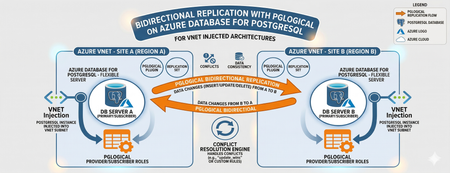
Editor’s Note: This article was written by Raunak Jhawar, a Chief Architect. Paula Berenguel and Guy Bowerman assisted with the final review, formatting and publication. Overview Bidirectional replication is one of the most requested topologies requiring writes in multiple locations, selective sync, geo-distributed active-active, or even accepting eventual consistency. This is a deep technical walkthrough for implementing bidirectional (active‑active) replication on private Azure Database for PostgreSQL Server using pglogical, with a strong emphasis on VNET‑injected architectures. It explains the underlying networking and execution model covering replication worker placement, DNS resolution paths, outbound connectivity, and conflict resolution mechanics to show why true private, server‑to‑server replication is only achievable with VNET injection and not with Private Endpoints. It also analyzes the operational and architectural trade‑offs needed to safely run geo distributed, multi write PostgreSQL workloads in production. This blog post focus on pglogical however, if you are looking for steps to implement it with logical replication or pros and cons of which approach, please refer to my definitive guid to bi-directional replication in Azure Database for PostgreSQL blog post Why this is important? This understanding prevents fundamental architectural mistakes (such as assuming Private Endpoints provide private outbound replication), reduces deployment failures caused by hidden networking constraints, and enables teams to design secure, compliant, low‑RPO active/active or migration architectures that behave predictably under real production conditions. It turns a commonly misunderstood problem into a repeatable, supportable design pattern rather than a trial‑and‑error exercise. Active-Active bidirectional replication between instances Architecture context This scenario targets a multi-region active-active write topology where both nodes are injected into the same Azure VNET (example - peered VNETs on Azure or even peered on-premises), both accept writes. Common use case: Geo distributed OLTP with regional write affinity. Step 1: Azure Infrastructure Prerequisites Both server instances must be deployed with VNET injection. This is a deploy time decision and you cannot migrate a publicly accessible instance (with or without private endpoint) to VNET injection post creation without rebuilding it. Each instance must live in a delegated subnet: Microsoft.DBforPostgreSQL/Servers. The subnet delegation is non-negotiable and prevents you from placing other resource types in the same subnet, so plan your address space accordingly. If nodes are in different VNETs, configure VNET peering before continuing along with private DNS integration. Ensure there are no overlapping address spaces amongst the peered networks. NSG rules must allow port 5432 between the two delegated subnets, both inbound and outbound. You may choose to narrow down the NSG rules to meet your organization requirements and policies to a specific source/target combination allow or deny list. Step 2: Server Parameter Configuration On both nodes, configure the following server parameters via the Azure Portal (Server Parameters blade) or Azure CLI. These cannot be set via ALTER SYSTEM SET commands. wal_level = logical -- This setting enables logical replication, which is required for pglogical to function. max_worker_processes = 16 -- This setting allows for more worker processes, which can help with replication performance. max_replication_slots = 10 -- This setting allows for more replication slots, which are needed for pglogical to manage replication connections. max_wal_senders = 10 -- This setting allows for more WAL sender processes, which are responsible for sending replication data to subscribers. track_commit_timestamp = on -- This setting allows pglogical to track commit timestamps, which can be useful for conflict resolution and monitoring replication lag. shared_preload_libraries = pglogical -- This setting loads the pglogical extension at server startup, which is necessary for it to function properly. azure.extensions = pglogical -- This setting allows the pglogical extension to be used in the Azure Postgres PaaS environment. Both nodes require a restart after shared_preload_libraries and wal_level changes. Note that max_worker_processes is shared across all background workers in the instance. Each pglogical subscription consumes workers. If you are running other extensions, account for their worker consumption here or you will hit startup failures for pglogical workers. Step 3: Extension and Node Initialization Create a dedicated replication user on both nodes. Do not use the admin account for replication. CREATE ROLE replication_user WITH LOGIN REPLICATION PASSWORD 'your_password'; GRANT USAGE ON SCHEMA public TO replication_user; GRANT SELECT ON ALL TABLES IN SCHEMA public TO replication_user; ALTER DEFAULT PRIVILEGES IN SCHEMA public GRANT SELECT ON TABLES TO replication_user; Log into Server A either via a VM in the specified VNET or Azure Bastion Host and run the following which creates the extension, a replication set and policies. CREATE EXTENSION IF NOT EXISTS pglogical; SELECT pglogical.create_node(node_name := 'node_a', dsn := 'host.fqdn-for-server-a port=5432 dbname=preferred-database user=replication_user password=<strong_password>'); -- Define the replication set for Server A, specifying which tables to replicate and the types of operations to include (inserts, updates, deletes). SELECT pglogical.create_replication_set(set_name := 'node_a_set', replicate_insert := true, replicate_update := true, replicate_delete := true, replicate_truncate := false); -- Add sales_aus_central table explicitly SELECT pglogical.replication_set_add_table(set_name := 'node_a_set', relation := 'public.sales_aus_central', synchronize_data := true); -- Add purchase_aus_central table explicitly SELECT pglogical.replication_set_add_table(set_name := 'node_a_set', relation := 'public.purchase_aus_central', synchronize_data := true); -- OR add all tables in the public schema SELECT pglogical.replication_set_add_all_tables('default', ARRAY['public']); -- This command adds all tables in the public schema to the default replication set. -- Now, repeat this on Server B using the same method above i.e. via a VM in the specified VNET or Azure Bastion Host CREATE EXTENSION IF NOT EXISTS pglogical; -- Define the replication set for Server B, specifying which tables to replicate and the types of operations to include (inserts, updates, deletes) SELECT pglogical.create_node(node_name := 'node_b', dsn := 'host-fqdn-for-server-b port=5432 dbname=preferred-database user=replication_user password=<strong_password>'); SELECT pglogical.create_replication_set( set_name := 'node_b_set', replicate_insert := true, replicate_update := true, replicate_delete := true, replicate_truncate := false); -- Add sales_aus_east table explicitly SELECT pglogical.replication_set_add_table( set_name := 'node_b_set', relation := 'public.sales_aus_east', synchronize_data := true); -- Add purchase_aus_east table explicitly SELECT pglogical.replication_set_add_table( set_name := 'node_b_set', relation := 'public.purchase_aus_east', synchronize_data := true); -- OR add all tables in the public schema SELECT pglogical.replication_set_add_all_tables('default', ARRAY['public']); -- This command adds all tables in the public schema to the default replication set. It is recommended that you confirm the DNS resolution on all server’s involved as part of the replication process. For a VNET injected scenarios – you must get back the private IP. As a sanity check, you can run the nslookup on the target server’s FQDN or even use the \conninfo command to see the connection details. One such example is here: Step 4: Configuring the subscribers SELECT pglogical.create_subscription ( -- Create a subscription on Server A to receive changes from Server B subscription_name := 'node_a_to_node_b', replication_sets := array['default'], synchronize_data := true, forward_origins := '{}', provider_dsn := 'host=fqdn-for-server-b port=5432 dbname=preferred-database user=replication_user password=<strong_password>'); -- Run this on Server B to subscribe to changes from Server A SELECT pglogical.create_subscription ( -- Create a subscription on Server B to receive changes from Server A subscription_name := 'node_b_to_node_a', replication_sets := array['default'], synchronize_data := true, forward_origins := '{}', provider_dsn := 'host=fqdn-for-server-a port=5432 dbname=preferred-database user=replication_user password=<strong_password>'); For most OLTP workloads, last_update_wins using the commit timestamp is the most practical choice. It requires track_commit_timestamp = on, which you must set as a server parameter. The FQDN must be used rather than using the direct private IP of the server itself. Bidirectional replication between server instances with private endpoints – does this work and will this make your server security posture weak? Where do pglogical workers run? With VNET injection, the server's network interface lives inside your delegated subnet which is a must do. The PostgreSQL process including all pglogical background workers starts connections from within your VNET (delegated subnet). The routing tables, NSGs, and peering apply to both inbound and outbound traffic from the server. With Private Endpoint, the architecture is fundamentally different: Private endpoint is a one-way private channel for your clients or applications to reach the server securely. It does not give the any of server’s internal processes access to your VNET for outbound connectivity. pglogical subscription workers trying to connect to another server are starting those connections from Microsoft's managed infrastructure and not from your VNET. What works? Scenario A: Client connectivity via private endpoint Here you have application servers or VMs in your VNET connecting to a server configured with a private endpoint, your app VM connects to 10.0.0.15 (the private endpoint NIC), traffic flows over Private Link to the server, and everything stays private. This is not server-to-server replication. Scenario B: Two servers, both with private endpoints Here both servers are in Microsoft's managed network. They can reach each other's public endpoints, but not each other's private endpoints (which are in customer VNETs). The only path for bidirectional replication worker connections is to enable public network access on both servers with firewall rules locked down to Azure service IP. Here you have private endpoints deployed alongside public access. Inside your VNET, SERVER A resolves to the private endpoint IP via the privatelink.postgres.database.azure.com private DNS zone. But the pglogical worker running in Microsoft's network does not have access to your private DNS zone and it resolves via public DNS, which returns the public IP. This means if you are using the public FQDN for replication, the resolution path is consistent from the server's perspective (always public DNS, always public IP using the allow access to Azure services flag as shown above). Your application clients in the VNET will still resolve to the private endpoint. If your requirement is genuinely private replication with no public endpoint exposure, VNET injection is the correct answer, and private endpoint cannot replicate that capability for pglogical. Conclusion The most compelling benefit in the VNET-injected topology is network isolation without sacrificing replication capability. You get the security posture of private connectivity i.e. no public endpoints, NSG controlled traffic, private DNS resolution all while keeping a live bidirectional data pipeline. This satisfies most enterprise compliance requirements around data transit encryption and network boundary control. The hub/spoke migration (specifically, on-premises or external cloud to Azure) scenarios are where this approach shines. The ability to run both systems in production simultaneously, with live bidirectional sync during the cutover window, reduces migration risk when compared to a hard cutover. From a DR perspective, bidirectional pglogical gives you an RPO measured in seconds (replication lag dependent) without the cost of synchronous replication. For workloads that can tolerate eventual consistency and have well-designed conflict avoidance this is a compelling alternative to synchronous streaming replication via read replicas, which are strictly unidirectional.251Views2likes0CommentsGraphRAG and PostgreSQL integration in docker with Cypher query and AI agents (Version 2*)
This is update from previous blog (version 1): GraphRAG and PostgreSQL integration in docker with Cypher query and AI agents | Microsoft Community Hub Review the business needs of this solution from version 1 What's new in version 2? MCP tools for GraphRAG and PostgreSQL with Apache AGE This solution now includes MCP tools for GraphRAG and PostgreSQL. There are five MCP tools exposed: [graphrag_search] Used to run query (local or global) with runtime-tunable API parameters. One important aspect is that query behavior can be tuned at runtime, without changing the underlying index. [age_get_schema_cached] Used for schema inspection and diagnostics. It returns the graph schema (node labels and relationship types) from cache by default; and can optionally refresh the cache by re‑querying the database. This tool is typically used for introspection or debugging, not for answering user questions about data. [age_entity_lookup] Used for quick entity discovery and disambiguation. It performs a simple substring match on entity names or titles and is especially useful for questions like “Who is X?” or as a preliminary step before issuing more complex graph queries. [age_cypher_query] Executes a user‑provided Cypher query directly against the AGE graph. This is intended for advanced users who already know the graph structure and want full control over traversal logic and filters. [age_nl2cypher_query] Bridges natural language and Cypher. This tool converts a natural‑language question into a Cypher query (using only Entity nodes and RELATED_TO edges), executes it, and returns the results. It is most effective for multi‑hop or structurally complex questions where semantic interpretation is needed first, but execution must remain deterministic. Besides that, This solution now uses Microsoft agent framework. It enables clean orchestration over MCP tools, allowing the agent to dynamically select between GraphRAG and graph query capabilities at runtime, with a looser coupling and clearer execution model than traditional Semantic Kernel function plugins. The new Docker image includes graphRAG3.0.5. This version stabilizes the 3.x configuration‑driven, API‑based architecture and improves indexing reliability, making graph construction more predictable and easier to integrate into real workflows. New architecture Updated Step 7 - run query in Jupyter notebook This step runs Jupyter notebook in docker, which is the same as stated in previous blog. > docker compose up query-notebook After clicking the link highlighted in the above screen shot, you can explore all files within the project in the docker, then find the query-notebook.ipynb. https://github.com/Azure-Samples/postgreSQL-graphRAG-docker/blob/main/project_folder/query-notebook.ipynb But in this new version of notebook, the graphRAG3.0.5 uses different library for local Search and global Search. New Step 8 - run agent and MCP tools in Jupyter notebook This step runs Jupyter notebook in docker. > docker compose up mcp-agent Click on the highlighted URL, you can start working on agent-notebook.ipynb. https://github.com/Azure-Samples/postgreSQL-graphRAG-docker/blob/main/project_folder/agent-notebook.... Multiple scenarios of agents with MCP tools are included in the notebook: GraphRAG search: local search and global search examples with direct mcp call. GraphRAG search: local search and global search examples with agent and include mcp tools. Cypher query in direct mcp call. Agent to query in natural language, and mcp tool included to convert NL2Cypher. Agent with unified mcp (all five mcp tools), and based on the question route to the corresponding tool. ['graphrag_search', 'age_get_schema_cached', 'age_cypher_query', 'age_entity_lookup', 'age_nl2cypher_query'] Router agent: selecting the right MCP tool The notebook also includes a router agent that has access to all five MCP tools and decides which one to invoke based on the user’s question. Rather than hard‑coding execution paths, the agent reasons about intent and selects the most appropriate capability at runtime. General routing guidance used in this solution Use [graphrag_search] when the question requires: full dataset understanding, themes, patterns, or trends across documents, exploratory or open‑ended analysis, global understanding or evaluation where we have a corpus of many tokens. In these cases, GraphRAG’s semantic retrieval and aggregation are a better fit than explicit graph traversal. Use AGE‑based tools [age_get_schema_cached, age_entity_lookup, age_cypher_query, age_nl2cypher_query] when the question involves: specific entities or explicit relationships, deterministic graph traversal or filtering, questions that depend on graph structure rather than document semantics, complex graph queries involving multiple entities or multi‑hop paths. Within the AGE toolset: [age_entity_lookup] is typically used for quick entity discovery or disambiguation. [age_cypher_query] is used when a precise Cypher query is already known. [age_nl2cypher_query] is used when the question is expressed in natural language but requires a non‑trivial Cypher query to answer. [age_get_schema_cached] is reserved for schema inspection and diagnostics. The router agent dynamically selects between semantic search and deterministic graph tools based on question intent, keeping retrieval, graph execution, and orchestration clearly separated and extensible. Note: The repository also includes [age_get_schema] and [age_get_schema_details] MCP tools for debugging and development purposes. These are not exposed to agents by default and are superseded by [age_get_schema_cached] for normal use. Key takeaways GraphRAG and postgreSQL AGE querying serve different purposes and each has its advantages. MCP tools provide a uniform interface to both semantic search and deterministic graph operations. Microsoft Agent Framework enables tool‑centric orchestration, where agents select the right capability at runtime instead of hard‑coding logic in prompts. The Jupyter‑based agent workflow makes it easy to experiment with different interaction patterns, from direct tool calls to fully routed agent execution. What's next In this solution, the MCP server and agent runtime are architecturally separated but deployed together in a single Docker container to demonstrate how MCP tools work and to keep local experimentation simple. There are other deployment options, such as running MCP servers remotely, where tools can be hosted and operated independently of the agent runtime. Contributions and enhancements are welcome.253Views1like0CommentsFebruary 2026 Recap: Azure Database for PostgreSQL
Hello Azure Community, We’re excited to share the February 2026 recap for Azure Database for PostgreSQL, featuring a set of updates focused on speed, simplicity, and better visibility. From Terraform support for Elastic Clusters and a refreshed VM SKU selection experience in the Azure portal to built‑in Grafana dashboards, these improvements make it easier to build, operate, and scale PostgreSQL on Azure. This recap also includes practical GIN index tuning guidance, enhancements to the PostgreSQL VS Code extension, and improved connectivity for azure_pg_admin users. Features Terraform support for Elastic Clusters - Generally Available Dashboards with Grafana - Generally Available Easier way to choose VM SKUs on portal – Generally Available What’s New in the PostgreSQL VS Code Extension Priority Connectivity to azure_pg_admin users Guide on 'gin_pending_list_limit' indexes Terraform support for Elastic Clusters Terraform now supports provisioning and managing Azure Database for PostgreSQL Elastic Clusters, enabling customers to define and operate elastic clusters using infrastructure‑as‑code workflows. With this support, it is now easier to create, scale, and manage multi‑node PostgreSQL clusters through Terraform, making it easier to automate deployments, replicate environments, and integrate elastic clusters into CI/CD pipelines. This improves operational consistency and simplifies management for horizontally scalable PostgreSQL workloads. Learn more about building and scaling with Azure Database for PostgreSQL elastic clusters. Dashboards with Grafana — Now Built-In Grafana dashboards are now natively integrated into the Azure Portal for Azure Database for PostgreSQL. This removes the need to deploy or manage a separate Grafana instance. With just a few clicks, you can visualize key metrics and logs side by side, correlate events by timestamp, and gain deep insights into performance, availability, and query behavior all in one place. Whether you're troubleshooting a spike, monitoring trends, or sharing insights with your team, this built-in experience simplifies day-to-day observability with no added cost or complexity. Try it under Azure Portal > Dashboards with Grafana in your PostgreSQL server view. For more details, see the blog post: Dashboards with Grafana — Now in Azure Portal for PostgreSQL. Easier way to choose VM SKUs on portal We’ve improved the VM SKU selection experience in the Azure portal to make it easier to find and compare the right compute options for your PostgreSQL workload. The updated experience organizes SKUs in a clearer, more scannable view, helping you quickly compare key attributes like vCores and memory without extra clicks. This streamlined approach reduces guesswork and makes selecting the right SKU faster and more intuitive. What’s New in the PostgreSQL VS Code Extension The VS Code extension for PostgreSQL helps developers and database administrators work with PostgreSQL directly from VS Code. It provides capabilities for querying, schema exploration, diagnostics, and Azure PostgreSQL management allowing users to stay within their editor while building and troubleshooting. This release focuses on improving developer productivity and diagnostics. It introduces new visualization capabilities, Copilot-powered experiences, enhanced schema navigation, and deeper Azure PostgreSQL management directly from VS Code. New Features & Enhancements Query Plan Visualization: Graphical execution plans can now be viewed directly in the editor, making it easier to diagnose slow queries without leaving VS Code. AGE Graph Rendering: Support is now available for automatically rendering graph visualizations from Cypher queries, improving the experience of working with graph data in PostgreSQL. Object Explorer Search: A new graphical search experience in Object Explorer allows users to quickly find tables, views, functions, and other objects across large schemas, addressing one of the highest-rated user feedback requests. Azure PostgreSQL Backup Management: Users can now manage Azure Database for PostgreSQL backups directly from the Server Dashboard, including listing backups and configuring retention policies. Server Logs Dashboard: A new Server Dashboard view surfaces Azure Database for PostgreSQL server logs and retention settings for faster diagnostics. Logs can be opened directly in VS Code and analyzed using the built-in GitHub Copilot integration. This release also includes several reliability improvements and bug fixes, including resolving connection pool exhaustion issues, fixing Docker container creation failures when no password is provided, and improving stability around connection profiles and schema-related operations. Priority Connectivity to azure_pg_admin Users Members of the azure_pg_admin role can now use connections from the pg_use_reserved_connections pool. This ensures that an admin always has at least one available connection, even if all standard client connections from the server connection pool are in use. By making sure admin users can log in when the client connection pool is full, this change prevents lockout situations and lets admins handle emergencies without competing for available open connection slots. Guide on 'gin_pending_list_limit' indexes Struggling with slow GIN index inserts in PostgreSQL? This post dives into the often-overlooked gin_pending_list_limit parameter and how it directly impacts insert performance. Learn how GIN’s pending list works, why the right limit matters, and practical guidance on tuning it to strike the perfect balance between write performance and index maintenance overhead. For a deeper dive into gin_pending_list_limit and tuning guidance, see the full blog here. Learning Bytes Create Azure Database for PostgreSQL elastic clusters with terraform: Elastic clusters in Azure Database for PostgreSQL let you scale PostgreSQL horizontally using a managed, multi‑node architecture. With Elastic cluster now generally available, you can provision and manage elastic clusters using infrastructure‑as‑code, making it easier to automate deployments, standardize environments, and integrate PostgreSQL into CI/CD workflows. Elastic clusters are a good fit when you need: Horizontal scale for large or fast‑growing PostgreSQL workloads Multi‑tenant applications or sharded data models Repeatable and automated deployments across environments The following example shows a basic Terraform configuration to create an Azure Database for PostgreSQL flexible server configured as an elastic cluster. resource "azurerm_postgresql_flexible_server" "elastic_cluster" { name = "pg-elastic-cluster" resource_group_name = <rg-name> location = <region> administrator_login = var.admin_username administrator_password = var.admin_password version = "17" sku_name = "GP_Standard_D4ds_v5" storage_mb = 131072 cluster { size = 3 } } Conclusion That’s a wrap for the February 2026 Azure Database for PostgreSQL recap. We’re continuing to focus on making PostgreSQL on Azure easier to build, operate, and scale whether that’s through better automation with Terraform, improved observability, or a smoother day‑to‑day developer and admin experience. Your feedback is important to us, have suggestions, ideas, or questions? We’d love to hear from you: https://aka.ms/pgfeedback.382Views2likes1CommentNasdaq builds thoughtfully designed AI for board governance with PostgreSQL on Azure
Authored by: Charles Federssen, Partner Director of Product Management for PostgreSQL at Microsoft and Mohsin Shafqat, Senior Manager, Software Engineering at Nasdaq When people think of Nasdaq, they usually think of markets, trading floors, and financial data moving at extraordinary speed. But behind the scenes, Nasdaq also plays an equally critical role in how boards of directors govern, deliberate, and make decisions. Nasdaq Boardvantage® is the company’s governance platform, used by more than 4,400 organizations worldwide—including nearly half of the Fortune 100. It’s where directors review board books, collaborate in an environment designed with robust security, and prepare for meetings that often involve some of the most sensitive information a company has. In recent years, Nasdaq set out to modernize Nasdaq Boardvantage with AI, without compromising security and reliability. That journey was featured in a Microsoft Ignite session, “Nasdaq Boardvantage: AI-Driven Governance on PostgreSQL and Foundry.” It offers a practical look at how Azure Database for PostgreSQL can support AI-driven applications where precision, isolation, and data control are non-negotiable. Introducing AI where trust is everything Board governance isn’t a typical productivity workload. Board packets can run 400 to 600 pages, meeting minutes are legal records, and any AI-generated insight must be confined to a customer’s own data. “Our customers trust us with some of their most strategic, sensitive data,” said Mohsin Shafqat, Senior Manager of Software Development at Nasdaq. That trust meant tackling several core challenges upfront, including: How do you minimize AI hallucinations in a governance context? How do you guarantee tenant isolation at scale? How do you keep data regional across a global customer base? A cloud foundation built for governance Before adding intelligence, Nasdaq decided to re-architect Nasdaq Boardvantage on Microsoft Azure, using Azure Kubernetes Service (AKS) to run containerized, multi-tenant workloads with strong isolation boundaries. Microsoft Foundry provides the managed foundation for deploying, governing, and operating AI models across this architecture, adding consistency, security, and control as intelligence is introduced. At the data layer, Azure Database for PostgreSQL and Azure Database for MySQL became the backbone for governance data. PostgreSQL, in particular, plays a central role in managing structured governance information alongside vector embeddings that support AI-driven features. Together, these services give Nasdaq the performance, security, and operational control required for a highly regulated, multi-tenant environment, while still moving quickly. Key architectural choices included: Tenant isolation by design, with separate databases and storage Regional deployments to align with data residency requirements High availability and managed operations, so teams could focus on product innovation instead of infrastructure maintenance PostgreSQL and pgvector: Powering context-aware AI With that foundation in place, Nasdaq was ready to carefully introduce AI. One of the first AI capabilities was intelligent document summarization. Board materials that once took hours to review could now be condensed into concise, contextually accurate summaries. Under the hood, this required more than just calling an LLM. Nasdaq uses pgvector, natively supported in Azure Database for PostgreSQL, to store and query embeddings generated from board documents. This allows the platform to perform hybrid searches that combine traditional SQL queries with vector similarity to retrieve the most relevant context before sending anything to a language model. Instead of treating AI as a black box, the team built a pipeline where: Documents are processed with Azure Document Intelligence to preserve structure and meaning Content is chunked and embedded Embeddings are stored in PostgreSQL with pgvector Vector similarity searches retrieve precise context for each AI task Because this runs inside PostgreSQL, the same database benefits from Azure’s built-in high availability, security controls, and operational tooling – delivering tangible results, including a 25% reduction in overall board preparation time and internal testing shows 91–97% accuracy for AI-generated summaries and meeting minutes. From summaries to an AI Board Assistant With summarization working in production, Nasdaq expanded further. The team is now building an AI-powered Board Assistant that will help directors prepare for upcoming meetings by surfacing trends, risks, and insights from prior discussions. This introduces a new level of scale. Years of board data across thousands of customers translate into millions of embeddings. PostgreSQL continues to anchor this architecture, storing vectors for semantic retrieval while MySQL supports complementary non-vector workloads. Across Nasdaq Boardvantage, users are advised to always review AI outputs, and no customer data is shared or used to train external models. “We designed AI for governance, not the other way around,” Shafqat said. More importantly, customers trust the system because security, isolation, and data control were engineered in from day one. Looking ahead Nasdaq’s work shows how Azure Database for PostgreSQL can support AI workloads that demand both intelligence and integrity. With PostgreSQL at the core, Nasdaq has built a governance platform that scales globally, respects regulatory boundaries, and introduces AI in a way that feels dependable and not experimental. What started as a modernization of Nasdaq Boardvantage is now influencing how Nasdaq approaches AI across the enterprise. To dive deeper into the architecture and hear directly from the engineers behind it, watch the Ignite session and check out these resources: Watch the Ignite breakout session for a technical walkthrough of how Nasdaq Boardvantage is built, including PostgreSQL on Azure, pgvector, and Microsoft Foundry in production. Read the case study to see how Nasdaq introduced AI into board governance and what changed for directors, administrators, and decision-making. Watch the Ignite broadcast for a candid discussion on Azure Database for PostgreSQL, Azure HorizonDB, and what it takes to scale AI-driven governance.January 2026 Recap: Azure Database for PostgreSQL
Hello Azure Community, We’re kicking off the year with important updates for Azure Database for PostgreSQL. From Premium SSD v2 features now available in public preview to REST API feature updates across developer tools, this blog highlights what’s new and what’s coming. Terraform Adds Support for PostgreSQL 18 – Generally Available Ansible module update - Generally Available Achieving Zonal Resiliency with Azure CLI - Generally Available SDKs Released : Go, Java, JavaScript, .NET and Python – Generally Available What’s New in Premium SSD v2 - Public Preview Latest PostgreSQL minor versions January 2026 Maintenance Release Notes Terraform Adds Support for PostgreSQL 18 Azure Database for PostgreSQL now provides support for PostgreSQL 18 which allows customers to create new servers with PostgreSQL 18 version and upgrade existing ones using Terraform. This update makes it easier to adopt PostgreSQL 18 on Azure while managing both provisioning and upgrades through consistent Terraform workflows. Learn more about using the new terraform resource Ansible Module Update A new Ansible module is now available with support for the latest GA REST API features, enabling customers to automate provisioning and management of Azure Database for PostgreSQL resources. This includes support for Elastic Clusters provisioning, deployment of PostgreSQL instances with PostgreSQL 18, and broader adoption of newly released Azure Database for PostgreSQL capabilities through Ansible. Learn more about using Ansible module with latest REST API features Achieve zonal resiliency with Azure CLI We have released updates to the Azure CLI that allow users to enable zone‑redundant high availability (HA) by default using a new --zonal-resiliency parameter. This parameter can be set to enabled or disabled. When --zonal-resiliency is enabled, the service provisions a standby server in a different availability zone than the primary, providing protection against zonal failures. If zonal capacity is not available in the selected region, you can use the --allow-same-zone flag to provision the standby in the same zone as the primary. Azure CLI commands: az postgres flexible-server update --resource-group <resource_group> --name <server> --zonal-resiliency enabled --allow-same-zone</server></resource_group> az postgres flexible-server update --resource-group <resource_group> --name <server> --zonal-resiliency Disabled</server></resource_group> az postgres flexible-server create --resource-group <resource_group> --name <server> --zonal-resiliency enabled --allow-same-zone</server></resource_group> Learn more about how to configure high availability on Azure Database for PostgreSQL. SDKs Released : Go, Java, JavaScript, .NET and Python We have released updated SDKs for Go, Java, JavaScript, .NET, and Python, built on the latest GA REST API (2025‑08‑01). These SDKs enable developers to programmatically provision, configure, and manage Azure Database for PostgreSQL resources using stable, production‑ready APIs. It also adds the ability to set a default database name for Elastic Clusters, simplifying cluster provisioning workflows, support for PostgreSQL 18. To improve developer experience and reliability, operation IDs have been renamed for clearer navigation, and HTTP response codes have been corrected so automation scripts and retries behave as expected. Learn More about .NET SDK Learn more about Go SDK Learn more about Java SDK Learn more about Javascript SDK Learn more about Python SDK What’s New in Premium SSD v2: Public Preview Azure Database for PostgreSQL Flexible Server now supports a broader set of resiliency and lifecycle management capabilities on Premium SSD v2, enabling production‑grade PostgreSQL deployments with improved durability, availability, and operational flexibility. In this preview, customers can use High Availability (same‑zone and zone‑redundant), geo‑redundant backups, in‑region and geo read replicas, geo‑disaster recovery (Geo‑DR), and Major Version Upgrades on SSDv2‑backed servers, providing both zonal and regional resiliency options for mission‑critical PostgreSQL workloads. These capabilities help protect data across availability zones and regions, support compliance and disaster‑recovery requirements, and simplify database lifecycle operations. Premium SSD v2 enhances these resiliency workflows with higher and independently scalable IOPS and throughput, predictable low latency, and decoupled scaling of performance and capacity. Customers can provision and adjust storage performance without over‑allocating disk size, enabling more efficient capacity planning while sustaining high‑throughput, low‑latency workloads. When combined with zone‑resilient HA and cross‑region data protection, SSDv2 provides a consistent storage foundation for PostgreSQL upgrades, failover, backup, and recovery scenarios. These capabilities are being expanded incrementally across regions as the service progresses toward general availability For more details, see Premium SSDv2 Latest Postgres minor versions: 18.1, 17.7, 16.11, 15.15, 14.20, 13.23 Azure Database for PostgreSQL now supports the latest PostgreSQL minor versions: 18.1, 17.7, 16.11, 15.15, 14.20, and 13.23. These updates are applied automatically during planned maintenance windows, ensuring your databases stay up to date with critical security fixes and reliability improvements no manual action required. This release includes two security fixes and over 50 bug fixes across indexing, replication, partitioning, memory handling, and more. PostgreSQL 13.23 is the final community release for version 13, which has now reached end-of-life (EOL). Customers still using PostgreSQL 13 on Azure should review their upgrade options and refer to Azure’s Extended Support policy for more details. For details about the minor release, see PostgreSQL community announcement. January 2026 Maintenance Release Notes We’re excited to announce the January 2026 version of Azure Database for PostgreSQL maintenance updates. This new version delivers major engine updates, new extensions, Elastic clusters enhancements, performance improvements, and critical reliability fixes. This release introduces expands migration and Fabric mirroring support, and adds powerful analytics, security, and observability capabilities across the service. Customers also benefit from improved Query Store performance, new WAL metrics, enhanced networking flexibility, and multiple Elastic clusters enhancements. All new servers are automatically onboarded beginning January 20, 2026, with existing servers upgraded during their next scheduled maintenance. For a complete list of features, improvements, and resolved issues, see the full release notes here. Azure Postgres Learning Bytes Managing Replication Lag with Debezium Change Data Capture (CDC) enables real‑time integrations by streaming row‑level changes from OLTP systems like PostgreSQL into event streams, data lakes, caches, and microservices. In a typical CDC pipeline, Debezium captures changes from PostgreSQL and streams them into Kafka with minimal latency. However, during large bulk updates that affect millions of rows, replication lag can spike significantly, impacting replication lag. This learning byte walks through how to detect and mitigate replication lag in Azure Database for PostgreSQL when using Debezium. Detect Replication Lag: Start by identifying where lag is building up in the system. Monitor replication slots and lag: Use the following query to inspect active replication slots and measure how far behind they are relative to the current WAL position: SELECT slot_name, active_pid, confirmed_flush_lsn, restart_lsn, pg_current_wal_lsn(), pg_size_pretty( ( pg_current_wal_lsn() - confirmed_flush_lsn ) ) AS lsn_distance FROM pg_replication_slots; Check WAL sender backend status: Verify whether WAL sender processes are stalled due to decoding or I/O waits: SELECT pid, backend_type, application_name, wait_event FROM pg_stat_activity WHERE backend_type = 'walsender' ORDER BY backend_start; Inspect spill activity : High spill activity indicates memory pressure during logical decoding and may contribute to lag. Large values for spill_bytes or spill_count suggest the need to increase logical_decoding_work_mem, reduce transaction sizes, or tune Debezium connector throughput. SELECT slot_name, spill_txns, spill_count, pg_size_pretty(spill_bytes) AS spill_bytes, total_txns, pg_size_pretty(total_bytes) AS total_bytes, stats_reset FROM pg_stat_replication_slots; Fix Replication Lag: Database and infrastructure tuning Reduce unnecessary overhead and ensure compute, memory, and storage resources are appropriately scaled to handle peak workloads. Connector level tuning Adjust Debezium configuration to keep pace with PostgreSQL WAL generation and Kafka throughput. This includes tuning batch sizes, poll intervals, and throughput settings to balance latency and stability. To learn more about diagnosing and resolving CDC performance issues, read the full blog: Performance Tuning for CDC: Managing Replication Lag in Azure Database for PostgreSQL with Debezium569Views2likes1CommentMicrosoft at PGConf India 2026
I’m genuinely excited about PGConf India 2026. Over the past few editions, the conference has continued to grow year over year—both in size and in impact—and it has firmly established itself as one of the key events on the global PostgreSQL calendar. That momentum was very evident again in the depth, breadth, and overall quality of the program for PGConf India 2026. Microsoft is proud to be a diamond sponsor for the conference again this year. At Microsoft, we continue our contributions to the upstream PostgreSQL open-source project—as well as to serve our customers with our Postgres managed service offerings, both Azure Database for PostgreSQL and our newest Postgres offering, Azure HorizonDB . On the open-source front, Microsoft had 540 commits in PG18, including major features like Asynchronous IO. We’re also excited to grow our Postgres open-source contributors team, and so happy to welcome Noah Misch to our team. Noah is a Postgres committer who has deep expertise in PostgreSQL security and is focused on correctness and reliability in PostgreSQL’s core. Microsoft at PGConf India 2026: Highlights from Our Speakers PGConf India has several tracks, all of which have some great talks I am looking forward to. First, the plug. 😊 Microsoft has some amazing talks this year, and we have 8 different talks spread across all the tracks. Postgres on Azure : Scaling with Azure HorizonDB, AI, and Developer Workflows, by Aditya Duvuri & Divya Bhargov Resizing shared buffer pool in a running PostgreSQL server: important, yet impossible, by Ashutosh Bapat Ten Postgres Hacker Journeys—and what they teach us, by Claire Giordano How Postgres can leverage disk bandwidth for better TPS, by Nikhil Chawla AWSM FSM! Free Space Maps Decoded by Nikhil Sontakke Journey of developing a Performance Optimization Feature in PostgreSQL, by Rahila Syed Build Agentic AI with Semantic Kernel and Graph RAG on PostgreSQL, by Shriram Muthukrishnan & Palak Chaturvedi All things Postgres @ Microsoft (2026 edition) by Sumedh Pathak Claire is an amazing speaker and has done a lot of work over the last several years documenting and understanding PostgreSQL committers and hackers. Her talk will definitely have some key insights and nuggets of information. Rahila’s talk will go in depth on performance optimization features and how best to test and benchmark them, and all the tools and tricks she has used as part of the feature development. This should be a must-see talk for anyone doing performance work. Diving Deep: Case Studies & Technical Tracks One of the tracks I’m really excited about is the Case Study track. I see these as similar to ‘Experience’ papers in academia. An experience paper documents what actually happened when applying a technique or system in the real world, what worked, what didn’t, and why. One of the talks I’m looking forward to is ‘Operating Postgres Logical Replication at Massive Scale’ by Sai Srirampur from Clickhouse. Logical Replication is an extremely useful tool, and I’m curious to learn more about pitfalls and lessons learnt when running this at large scale. Another interesting one I’m curious to hear is ‘Understanding the importance of the commit log through a database corruption’ by Amit Kumar Singh from EDB. The Database Engine Developers track allows us to go deep into the PostgreSQL code base and get a better understanding of how PostgreSQL is built. Even if you are not a database developer, this track is useful to understand how and why PostgreSQL does things, helping you be a better user of the database. With the rise of larger machines and memory available in the Cloud, different and newer memory architectures/tiers and serverless product offerings, there is a lot of deep dive in PostgreSQL’s memory architecture. There are some great talks focused on this area, which should be must-see for anyone interested in this topic: Resizing shared buffer pool in a running PostgreSQL server: important, yet impossible by Ashutosh Bapat from Microsoft From Disk to Data: Exploring PostgreSQL's Buffer Management by Lalit Choudhary from PurnaBIT Beyond shared_buffers: On-Demand Memory in Modern PostgreSQL by Vaibhav Popat from Google Finally, the Database Administration and Application Developer tracks have some really great content as well. They cover a wide range of topics, from PII data, HA/DR, Query Tuning to connection pooling and understanding conflict detection and resolution. PostgreSQL in India: A Community Effort Worth Celebrating Conferences like these are a rich source of information, dramatically increasing my personal understanding of the product and the ecosystem. Separately, they are also a great way to meet other practitioners in the space and connect with people in the industry. For people in Bangalore, another great option is the PostgreSQL Bangalore Meetup, and I’m super happy that Microsoft was able to join the ranks of other companies to host the eighth iteration of this meetup. Finally, I would be remiss in not mentioning the hard work done by the PGConf India organizing team including Pavan Deolasse, Ashish Mehra, Nikhil Sontakke, Hari Kiran, and Rushabh Lathia who are making all of this happen. Also, a big shout out to the PGConf India Program Committee (Amul Sul, Dilip Kumar, Marc Linster, Thomas Munro, Vigneshwaran C) for putting together an amazing set of talks. I look forward to meeting all of you in Bangalore! Be sure to drop by the Microsoft booth to say hello (and to snag a free pair of our famous socks). I’d love to learn more about how you’re using Postgres.294Views3likes0Comments