Forum Discussion

Unable to launch the Surface DUO Emulator with Visual Studio
- Mar 20, 2020
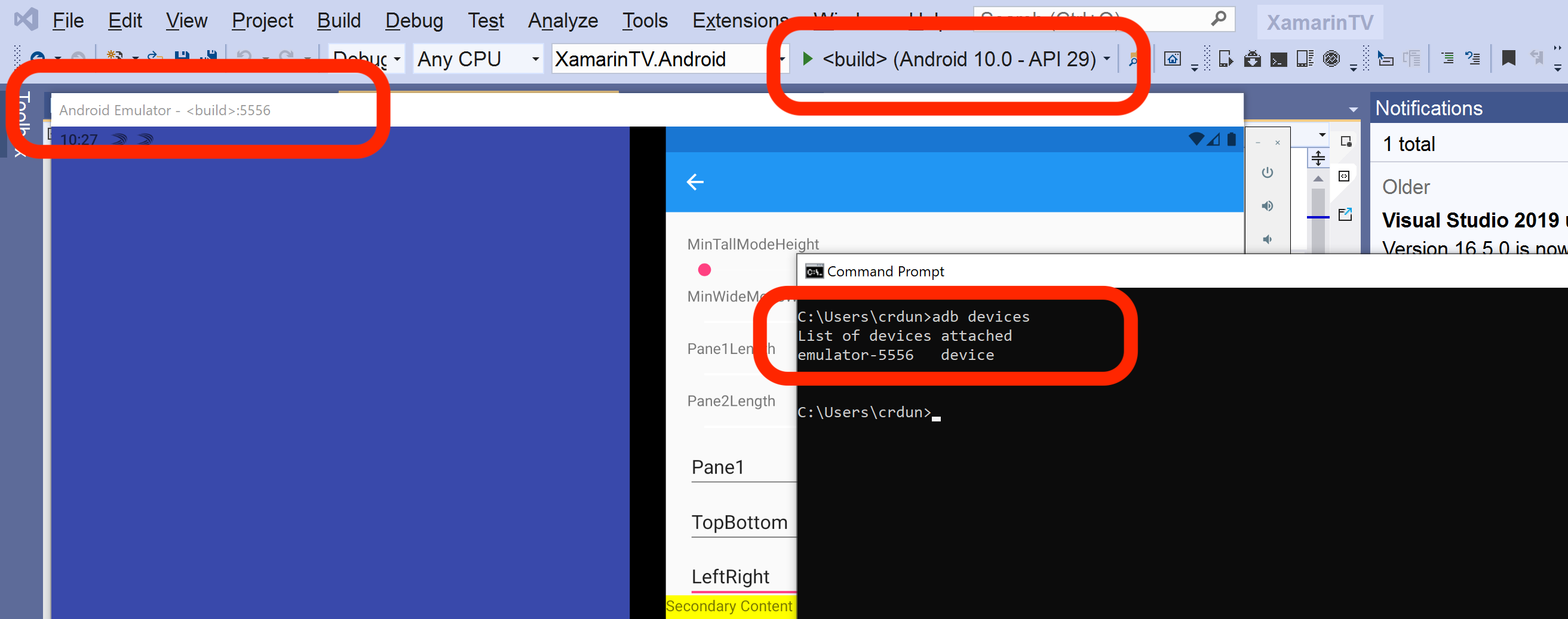
Sivaprasad. G if you see the Surface Duo emulator, check the port showing in the title bar (it will say something like "Android Emulator - <build>:5556").
That should match the post listed by adb devices, even though the rest of the name may not match exactly. I've attached a screenshot of how it looks for me.
I'll add that whenever I use the Visual Studio batch file (run_vs.bat), I get a low-numbered port (like 5554 or 5556). I notice in your list it's 5578. Check that your batch file does not specify the -ports parameter (and also confirm the ANDROID_SDK_LOCATION is the one in C:\Program Files (x86\Android\android-sdk).

Hello Craig_Dunn ,
Thank you for the detail information and support , After changing the script, I can successfully launch the emulator by clicking the run.bat, However when I tried to run the sample app (surface duo Xamarin sample apps) I didn't find the Surface Duo emulator in option, (even I build, the solution )
I also tried following the steps
- removed the -ports 5575,5579 in run.bat ,
- replaced run.bat with the original xamarin script and modified the part ANDROID_PRODUCT_OUT as run_androidstudio.bat, the run.bat not throw any error , its successfully launch the emulator.
The same thing applied to run_vs.bat, and I can directly launch the emulator by clicking run_vs.bat
However still I wasn't able to successfully connect the emulator to Visual studio.

 Microsoft
Sivaprasad. G after you start the emulator with run_vs.bat, can you do adb devices in the command line and confirm that the Surface Duo emulator shows up there? The Surface Duo emulator might not automatically appear in the Visual Studio menu by default, but if it is shown in the adb devices list, then it should also be available in Visual Studio.
- tscholzeMar 21, 2020Iron Contributor
Sivaprasad. G No problem, you are welcome to the Surface Duo developer family. 🙂
- Mar 21, 2020
Craig_Dunn , Thank you so much for your valuable time and support , I successfully connect the emulator to Visual studio. For me, It took around 10 minutes to appear the emulator option in visual studio at first time. Thank you so much tggmbi and tscholze for your valuable suggestion ,
- Craig_DunnMar 20, 2020
Sivaprasad. G if you see the Surface Duo emulator, check the port showing in the title bar (it will say something like "Android Emulator - <build>:5556").
That should match the post listed by adb devices, even though the rest of the name may not match exactly. I've attached a screenshot of how it looks for me.
I'll add that whenever I use the Visual Studio batch file (run_vs.bat), I get a low-numbered port (like 5554 or 5556). I notice in your list it's 5578. Check that your batch file does not specify the -ports parameter (and also confirm the ANDROID_SDK_LOCATION is the one in C:\Program Files (x86\Android\android-sdk).
- Mar 20, 2020
Hi Craig_Dunn,OK, Surface Duo emulator Is Not shown up in the list. please advise . Thanks
C:\Program Files (x86)\Android\android-sdk\platform-tools>adb devices
List of devices attached
47f020a5 device
emulator-5578 device - Craig_DunnMar 20, 2020
Sivaprasad. G you can start a new command window and use adb devices there - you are correct the one that started the emulator will not accept further input.
- Mar 20, 2020
Hi Craig_Dunn ,I am unable to type or paste the "adb devices" on the command line after the emulator start, I tried many times, the run_vs.bat CMD is no more accepting any input once it started. Please advise, Thanks.